Monaco-editor: Curly brackets when typing ""
monaco-editor version: 0.9.0
Browser: Edge
OS: Windows
Steps or JS usage snippet reproducing the issue:
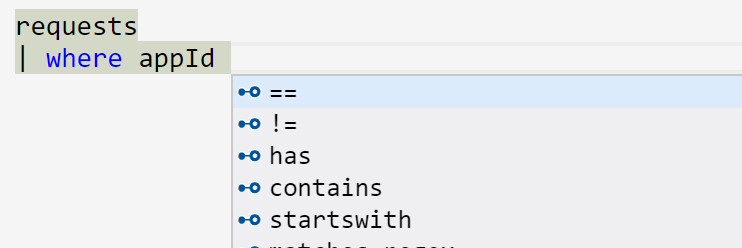
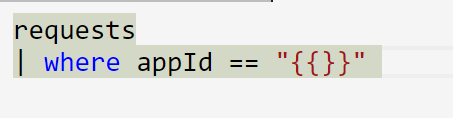
When I press "enter" on suggestion "==" I get == "{{}}"
How to disable these curly brackets?
thanks!
 galyech
All 3 comments
Can you provide some more details about how I can get == suggestions?
 rebornix
on 14 Jul 2017
rebornix
on 14 Jul 2017
Yes.
for example:

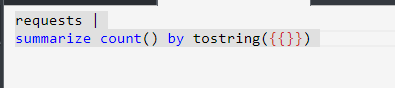
another example:
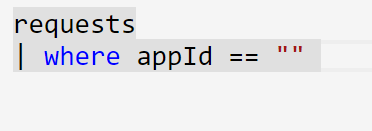
in older version:
in current version:
In older version of the editor, when I press enter to accept the suggestion: "==" I got : " =="" " and the cursor would blinking between the quotation marks.
I debugged that and saw that every suggestion has a "insertText" attribute and for the older version, the insert text for == was =="" and for this version is =="{{}}".
I hope I made it clear this time.
also, I'm using "Kusto" language for the Monaco editor.
How can I change/disable this behavior of those curly brackets?
galyech
on 14 Jul 2017
The latest monaco editor version v0.9.0 discontinued support for the custom built in snippet syntax. (one of which was the {{}} syntax)
Whoever owns the Kusto language service for monaco will need to update their SuggestAdapter to use the TextMate style snippet syntax instead, see:
https://code.visualstudio.com/docs/editor/userdefinedsnippets#_snippet-syntax
 samelhusseini
on 14 Jul 2017
samelhusseini
on 14 Jul 2017
Related issues
 SoftTimur
·
3Comments
SoftTimur
·
3Comments
 robclive
·
3Comments
robclive
·
3Comments
 Kang-Jun-sik
·
3Comments
Kang-Jun-sik
·
3Comments
 akosyakov
·
3Comments
akosyakov
·
3Comments
 chengtie
·
3Comments
chengtie
·
3Comments
Most helpful comment
The latest monaco editor version v0.9.0 discontinued support for the custom built in snippet syntax. (one of which was the {{}} syntax)
Whoever owns the Kusto language service for monaco will need to update their SuggestAdapter to use the TextMate style snippet syntax instead, see:
https://code.visualstudio.com/docs/editor/userdefinedsnippets#_snippet-syntax