Model-viewer: low version google chrome(my version is 73) is not supported,how can I support it
Description
I can use it correct in new version google chrome,but in low version,the glb suffix file can not show,when I upgrade the low version to new version,it can show again,how can I do in the low version google chrome
Browser Affected
- Chrome
OS
- Windows
Versions
 gexingfeiyang
All 6 comments
@gexingfeiyang we actively support the last two versions of every major browser. If there is a reason why you cannot upgrade, please let us know so that we can consider whether or not we should extend support.
To be honest with you, it is unlikely that we will go out of our way to support a Chrome version that old. However, if you explain your use case a little more and also share an example / demo / model that fails in old Chrome, then I would be happy to consider the issue with you and give you a more clear answer as to whether or not you can use old Chrome.
 cdata
on 2 Apr 2020
cdata
on 2 Apr 2020
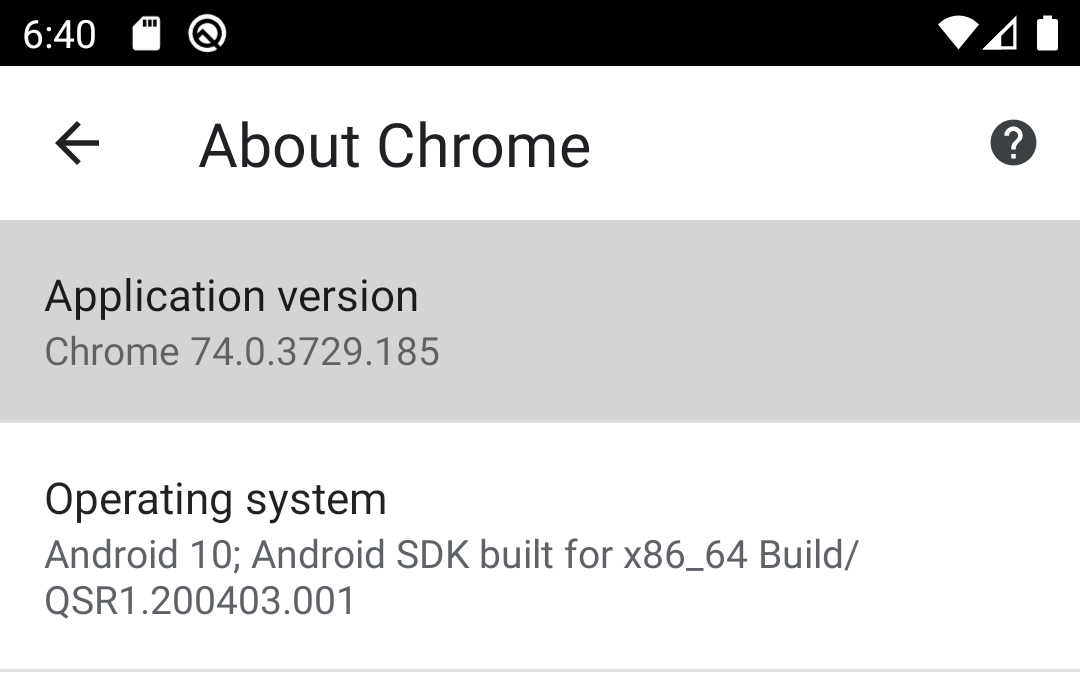
Something to note is that developers working with the Android emulator tend to have old Chrome versions by default. I was trying to get the model viewer working in a WebView on an Android 10 image, but that didn't work out; as it turned out, that image shipped with Chrome 74:
 artob
on 19 May 2020
artob
on 19 May 2020
@cdata Where might one find documented the oldest Chrome version that v1.0.0 supports?
artob
on 12 Jul 2020
@artob We don't document that anywhere because we don't have enough test coverage to be certain. More than likely it won't stop completely, but simply have more and more bugs the further back you go. As stated above, our test coverage is generally for the most recent two versions.
 elalish
on 13 Jul 2020
elalish
on 13 Jul 2020
@elalish The failures I have seen (with the bundled stock Chrome version on Android 10 VMs, as mentioned above) produced just a blank white page with no overt indication of anything wrong other than the content just missing.
Is that the intended failure mode for ancient Chrome versions (Chrome 74 in that case), or might it perhaps be useful to show some failure indication similar to broken image tags?
Also, even if it's not possible to pinpoint the exact version where all this no longer works, would it at least be possible to document a known-good version where it all _certainly_ does work?
artob
on 13 Jul 2020
@artob Indeed, those things would be helpful. I'd be more than happy to accept a PR, and if that's too heavy a lift, if you want to test some chrome versions and put the results here, I can put them into our docs somewhere. The biggest challenge is it will tend to be a moving target.
elalish
on 13 Jul 2020
Related issues
 DarkChris86
·
17Comments
DarkChris86
·
17Comments
 hybridherbst
·
43Comments
hybridherbst
·
43Comments
 pushmatrix
·
34Comments
cdata
·
19Comments
hybridherbst
·
19Comments
pushmatrix
·
34Comments
cdata
·
19Comments
hybridherbst
·
19Comments
Most helpful comment
Something to note is that developers working with the Android emulator tend to have old Chrome versions by default. I was trying to get the model viewer working in a WebView on an Android 10 image, but that didn't work out; as it turned out, that image shipped with Chrome 74: