Model-viewer: WebXR demo with dynamic src change collapse or force the browser to refresh on phone.
Description
Open as much as ( View in 3D ) buttons possible from iPhone.
At the 5th or 6th model it'll force the browser to refresh or collapse it.
Live Demo
Version
- model-viewer: v1.2.1
Browser Affected
- [x] Chrome
- [x] Safari
- [ ] Edge
- [ ] Firefox
- [ ] IE
OS
- [x] iOS
- [x] Android
- [ ] Linux
- [ ] MacOS
- [ ] Windows
 DarkChris86
All 17 comments
I think I'll need more precise repro steps, as I've just opened 6 or 7 of your models on my iphone SE and it all seems to be working fine. There's a chance you're just running out of GPU memory. You could try reducing the ModelCacheSize to see if that helps.
 elalish
on 8 Sep 2020
elalish
on 8 Sep 2020
Hey @elalish,
Thank you for your effort and help!
I thought the same, it should be memory type of problem.
Do you mean like this? ( Just wanted to be sure about how should I implement it )
<script>
jQuery(document).ready(function ($) {

const ModelViewer = $('model-viewer');

    ModelViewer.modelCacheSize = 1;
...
If yes, than unfortunately that isn't work yet.
Collapsed or refreshed like before.
DarkChris86
on 8 Sep 2020
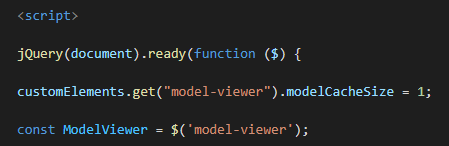
Not quite; it's a static property, so you set it like this: customElements.get("model-viewer").modelCacheSize = 1;
elalish
on 8 Sep 2020
Dear @elalish!
Sorry, I'm still not sure about the implementation. I'm not a native JS expert.
Could you check the following link and help in this special case? ( JS tab on the top right )
https://codepen.io/ChrisDark/pen/RwaQMqj
Thanks in advance!
DarkChris86
on 8 Sep 2020
It doesn't look like you tried putting in the line I gave you. I'm sorry, but I can't write your JS for you; I hope you understand. Advanced functionality like this does require some JS knowledge, so you may want to start by reading up on custom elements.
elalish
on 8 Sep 2020
Sorry, didn't save the Pen.
I put like this, but doesn't seems to solve my problem.
DarkChris86
on 8 Sep 2020
I tested this cache and works as expected, but the memory usage just collapse my iPhone X Safari & Chrome browsers or force them to refresh after 3-4-5 model view.

DarkChris86
on 8 Sep 2020
You may have better results by rearranging your site such that you have a single model-viewer element that you simply switch the src on, along the lines of the webxr example. It could be that we have a memory leak, but I'll need a pretty conclusive repro to establish that. Meanwhile, the most important thing is to compress your models for web delivery: downsample textures, DRACO compression, etc.
elalish
on 8 Sep 2020
I did the same but via jQuery, so I simply switch the src also on a single model-viewer element.
I also tested it via native JS but it was the same results.
Maybe the best what we could do is the model compress at the moment as you mentioned.
I'm going to check that DRACO compression.
DarkChris86
on 8 Sep 2020
I made the compressions via glTF Pipeline and on texture images ( compressed them also via TinyPNG ) and lastly from the compressed .glb files I exported new .usdz files also via SimLab Composer.
This brought the following results:
10 models were about ~150MB and now only 55MB but the problem still exists.
DarkChris86
on 9 Sep 2020
Nice work! As I say, I still haven't reproed your issue; you can be very specific about what devices, OS versions and browser versions you're seeing this on and write some detailed repro steps? Once I can reproduce it, I'll be able to tell you what the problem is and maybe fix it.
elalish
on 9 Sep 2020
Thanks! ; )
This is the test site, I won't touch it, so you could do some tests:
https://webmernok.hu/ar/
Here as you can see you could find 2 type of models.
Custom Models are from a company. ( Try with them ( already compressed ) )
Google Models are from modelviewer.dev source. ( These works better but I reproduced it at 7-8-9th view )
I tried with the following devices and browsers:
iPhone X - Safari / Chrome / OS version 13.7
Huawei P20Pro - Chrome
I could reproduce it with iPhone X - Safari / Chrome at the 3-4-5th models' view.
Maybe andriod takes a little bit more but it's also happen.
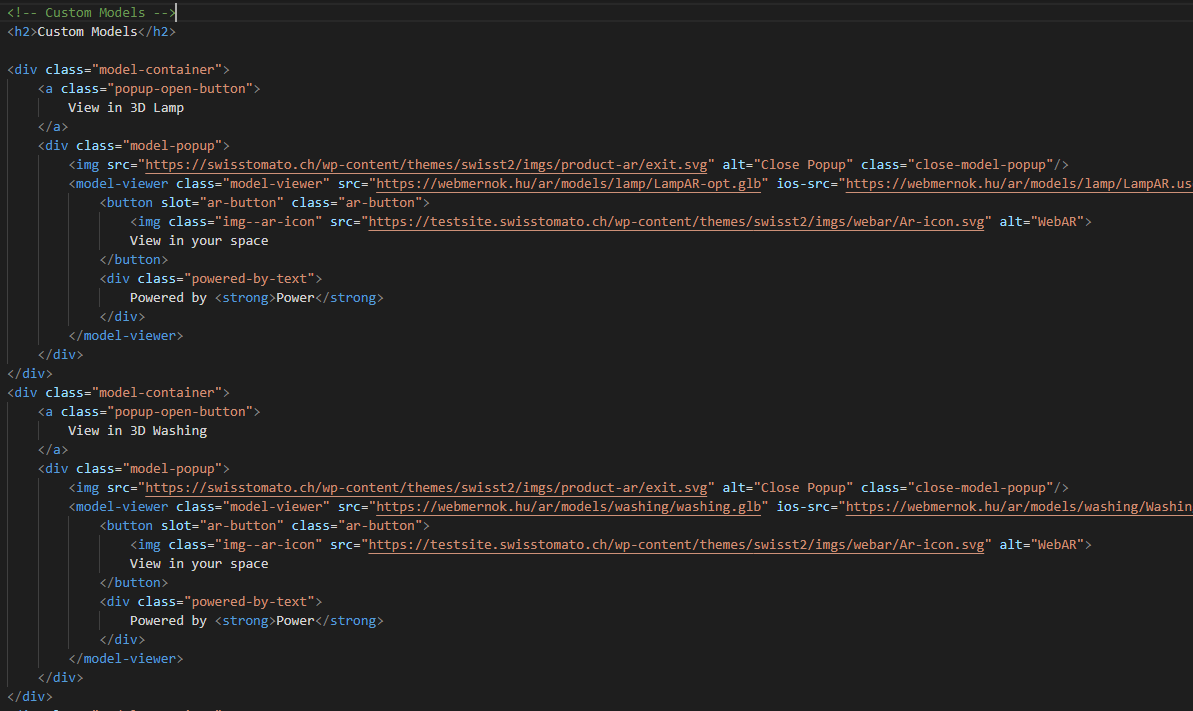
I created a separate version where each button has own model-viewer ( problem still exist ).
https://webmernok.hu/ar/ar.php
DarkChris86
on 9 Sep 2020
Thank you, I have now managed to repro on both my iPhone SE and Pixel 3. Basically it forces a page reload after looking through enough models. It's not very consistent.
One thing I noticed unrelated to this (I think) is that your models show up looking very metallic on my Pixel 3, but nowhere else. I also noticed that your GLBs have externally referenced textures, which I didn't even realize was possible. You'll probably want to pack those inside to simplify the networking. I also noticed for instance that the chair has normal maps that are blank. You'll get better performance if you simply don't include them.
elalish
on 9 Sep 2020
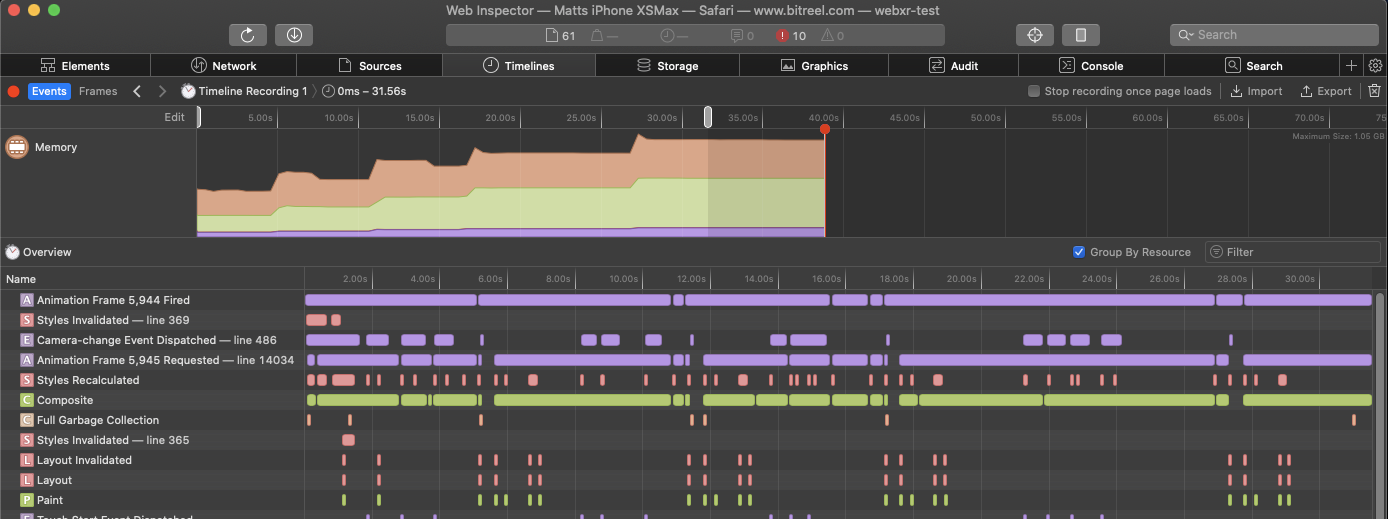
Experiencing this as well, looks like some refs being held on to. Each step in the memory is loading next model by switching src=
 br-matt
on 11 Sep 2020
br-matt
on 11 Sep 2020
@br-matt We do cache 5 models by default, so some of this is expected. Do you see different results using customElements.get("model-viewer").modelCacheSize = 0;?
elalish
on 11 Sep 2020
@br-matt We do cache 5 models by default, so some of this is expected. Do you see different results using
customElements.get("model-viewer").modelCacheSize = 0;?
@elalish Thank you ! I had suggested that to them. Went and double checked just now though. It was being set on the HTMLElement and not that way there.
Working as intended and can tap through many as needed now without memory climbing :)
br-matt
on 11 Sep 2020
@br-matt Are you running the change to the modelCacheSize before or after opening the model? Just curious, because with either one of those I'm getting issues, normally when I open the model my RAM increases about 700 to 800mb and it won't decrease until I reload the page, but I can reopen the model any times that I want to and the RAM won't go any higher, on the other hand, if I call customElements.get("model-viewer").modelCacheSize = 0; the RAM will increase every time that I reopen the model.
I also tried to force garbage collect as @elalish said, but none of solutions seem to be solving the issue.
 tcorreiaubi
on 15 Sep 2020
tcorreiaubi
on 15 Sep 2020
Related issues
 ebrayton
·
37Comments
ebrayton
·
37Comments
 pushmatrix
·
22Comments
pushmatrix
·
22Comments
 methot-ilya-3ds
·
17Comments
methot-ilya-3ds
·
17Comments
 fselcukcan
·
14Comments
fselcukcan
·
14Comments
 hybridherbst
·
19Comments
hybridherbst
·
19Comments