Mkdocs-material: Microsoft Edge: Transparent header in 5.x
Description
Microsoft Edge displays a transparent header in mkdocs-material 5.x. In the previous 4.x releases, Microsoft Edge used to display the background color correctly as defined in theme['palette']['primary'].
I've noticed that if you inspect the corresponding md-header DOM element, it will show you that the CSS attribures color/background-color are set correctly to var(--md-primary-fg-color)/var(--md-primary-bg-color). So my guess is that there is something wrong with the fade-in animation; browser-specific instructions my be needed.
Expected behavior
Edge renders the header background color as defined in theme['palette']['primary']
Actual behavior
Edge renders a transparent header background
Steps to reproduce the bug
- Serve a mkdocs documentation with the mkdocs-material enabled
- Open documentation in Edge
Package versions
- Python: 3.7.3
- MkDocs: 1.1.2
- Material: 5.2.1
Project configuration
theme:
  name: material
  language: en
  features:
    - instant
  palette:
    scheme: default
    primary: grey
    accent: blue
  font:
    text: Roboto
    code: Roboto Mono
  logo: img/logo.png
System information
- OS: Windows 10
- Browser: Edge 44
 lukas-koschmieder
All 8 comments
I can't debug Edge, as I'm not on Windows (using macOS). Also, I've never heard of Edge 44. Could I ask you to try to debug the problem yourself?
 squidfunk
on 25 May 2020
squidfunk
on 25 May 2020
I reproduced this issue too - and the text on the homepage is white (hidden) too:
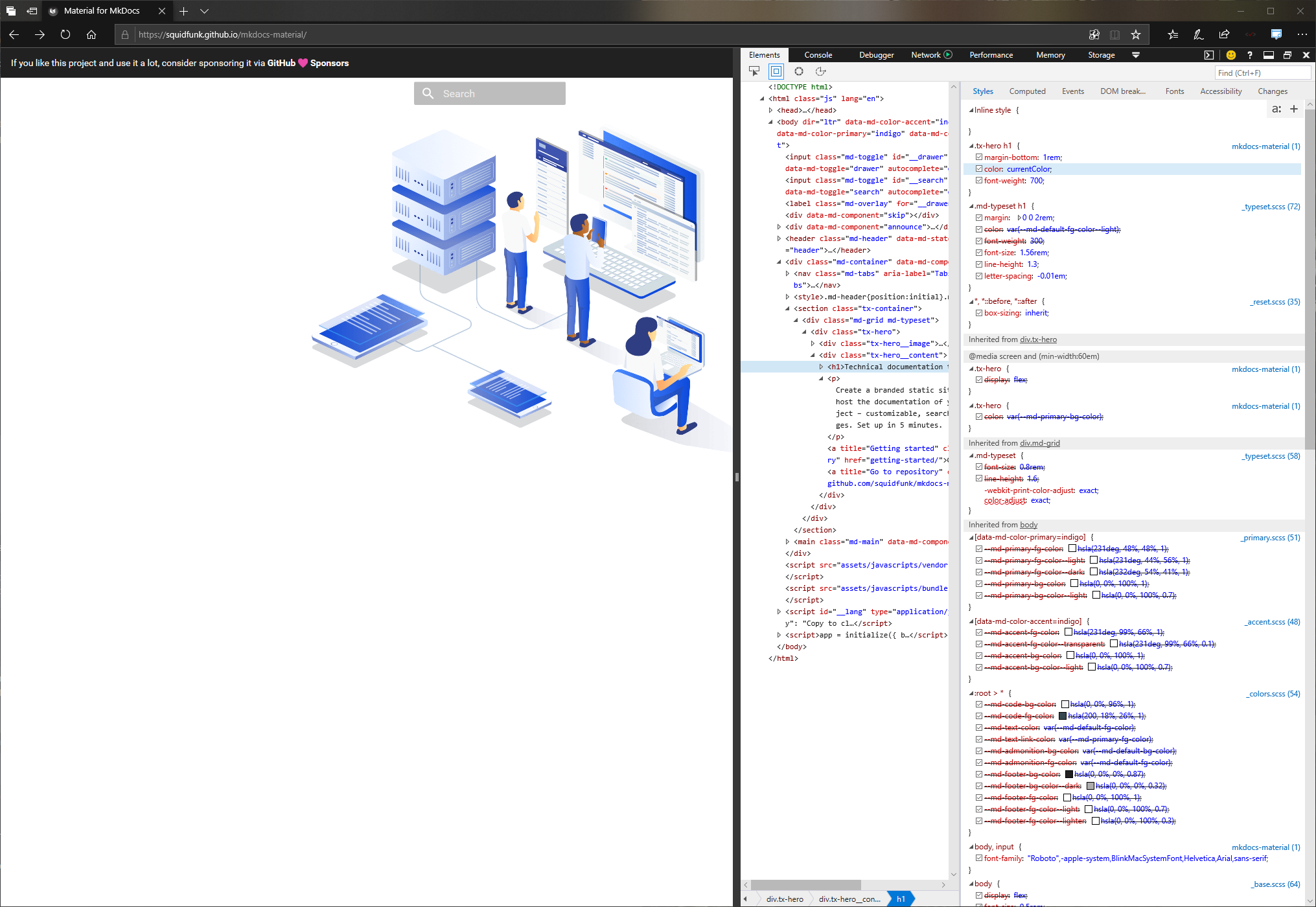
Screenshot from Edge 18 (which shows as Edge 44 in Settings screen but is more widely referred to by the EdgeHTML version - 18)
Should really get this fixed as Edge Legacy has approx 2% global marketshare
 coliff
on 25 May 2020
coliff
on 25 May 2020
As I said, I'm hoping for some help from somebody using Windows. It looks like it's related to CSS variables, which is strange, as caniuse says Edge 16+ supports them.
EDIT: might also be related to color definitions.
squidfunk
on 25 May 2020
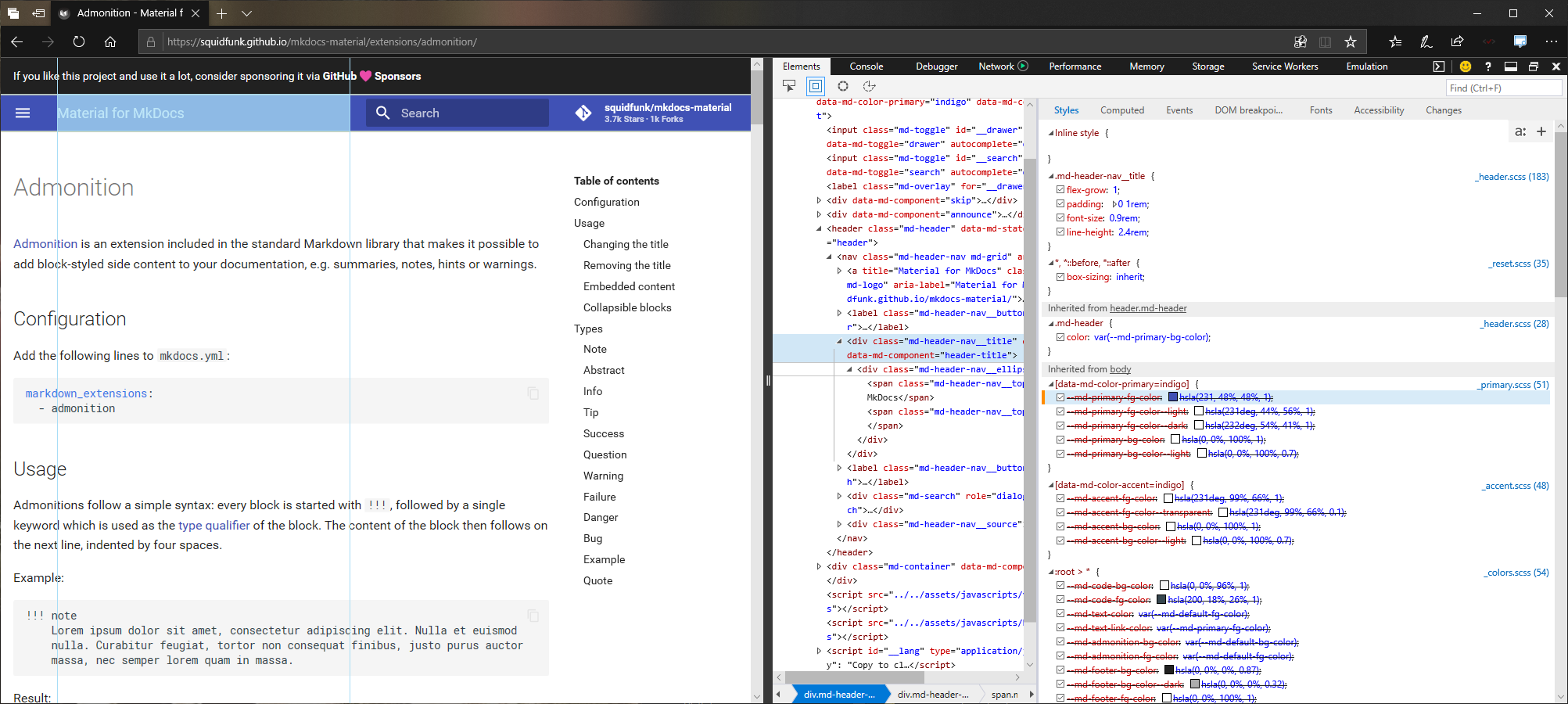
Changing the --md-primary-fg-color variable to hsl(231, 48%, 48%) fixes it.
Or just removing the deg part of the first value works too.. e.g. hsla(231, 48%, 48%, 1)
coliff
on 25 May 2020
Thank you! This deg part seems to be generated by a SASS function hex2hsl in _colors.scss.
Do you have an idea how to fix it?
lukas-koschmieder
on 25 May 2020
That is weird. Edge should support deg, but I guess since the grammar of the first value of hsla() is <angle> | <number>, and <number> is implicitly converted to an <angle> value with the canonical deg unit, we could drop deg from all hsla() functions. It seems, that deg was added in Color Level 4, as Color Level 3 doesn't mention it.
squidfunk
on 25 May 2020
Fixed in 24b185a7.
squidfunk
on 25 May 2020
Released as part of 5.2.2
squidfunk
on 26 May 2020
Related issues
 ghost
·
3Comments
ghost
·
3Comments
 madrus
·
3Comments
madrus
·
3Comments
 yogeshbeniwal
·
4Comments
yogeshbeniwal
·
4Comments
 dbdevtop
·
4Comments
dbdevtop
·
4Comments
 40huo
·
3Comments
40huo
·
3Comments
Most helpful comment
Fixed in 24b185a7.