Mkdocs-material: Collapse table of contents and automatically expand active section
When a single markdown file contains too many headers, like this one, the TOC is too long.
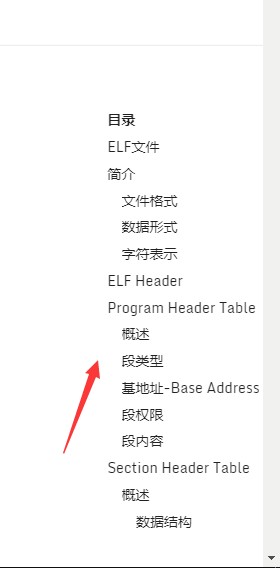
In this case, an auto-expand TOC may be more readable, like auto-expand TOC example, which uses hexo-theme-indigo.
 40huo
40huo
All 3 comments
You can try with this CSS (it doesn't work exactly like your example, but it's close):
:not([data-md-state="blur"]) + nav {
  display: none;
}
 max-ci
on 10 Feb 2018
max-ci
on 10 Feb 2018
This is an enhancement and could be done with the collapsing logic of the navigation. It could be set via flag in the configuration. I may implement it in the future when I find the time.
 squidfunk
on 11 Feb 2018
squidfunk
on 11 Feb 2018
I'm closing this, as this will probably never get implemented. Material's default behavior should work pretty good, but it can also be extended by custom JavaScript. Giving users the option to auto-collapse the TOC is too specific to be useful. I want to allocate my time to stuff that needs to be fixed, not optional "nice" features. I'm sorry and hope you can understand.
squidfunk
on 17 Nov 2018
Related issues
 HerbFargus
·
4Comments
HerbFargus
·
4Comments
 madrus
·
3Comments
madrus
·
3Comments
 ngtrian
·
3Comments
ngtrian
·
3Comments
 tiangolo
·
3Comments
tiangolo
·
3Comments
 atmarx
·
4Comments
atmarx
·
4Comments
Most helpful comment
This is an enhancement and could be done with the collapsing logic of the navigation. It could be set via flag in the configuration. I may implement it in the future when I find the time.