Mixedrealitytoolkit-unity: Better MRTK Standard Shader
Describe the problem
Regarding the use of MRTK Standard shader, multiple problems arise :
1- Build time is getting very long due to the compilation of all shader variants, and final shader is taking a lot of memory space in the final build.
- Example of an app building shader variants for 5mn+ (the bakc and forth displays like this, this is not the gif looping)
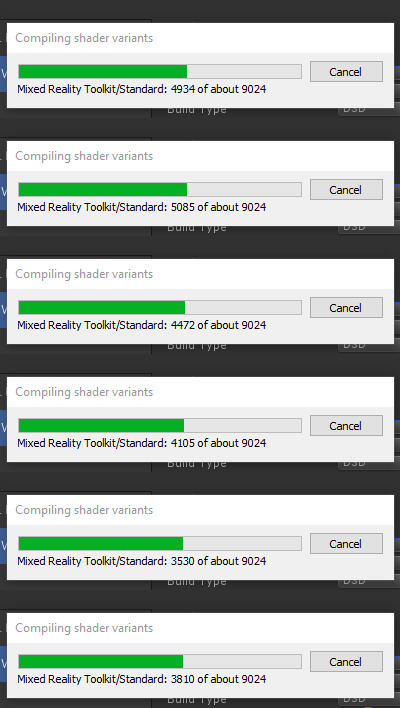
- From build log: standard shader takes 2mn (other shaders takes 1-10 seconds)
Compiled shader 'Mixed Reality Toolkit/Standard' in 126.29s
d3d11 (total internal programs: 18816, unique: 6272)
Compressed shader 'Mixed Reality Toolkit/Standard' on d3d11 from 17.30MB to 1.59MB
- Standard shader is the file that takes most memory in the build :
Used Assets and files from the Resources folder, sorted by uncompressed size:
7.1 mb     8.7% Assets/MixedRealityToolkit/StandardAssets/Shaders/MixedRealityStandard.shader
2- Having a shader "one-fits-all" gets too heavy for some simple use cases
This makes the shader a lot more complicated, with more variants for the same shader, where there could be different shaders limiting those variant growing exponentially.
Plus, it's get ahrder to dive into the shader code if we want to copy it and add some custom options (shadows anyone ;) )
3- There is no service utilities, or even documentation regarding the possible optimization process of all this
some solutions exists, like using shader variants presets (Project settings > Graphics)
Describe the solution you'd like
1- MRTK could have a way to disable unnecessary keywords - like the "Shader Control" plugin offers
2-
a) Split the standard shader to keep it as simple as possible
b) Move tri-planar mapping/clipping or any other specific feature in a separate shader
c) Add a shader for simple ui-specific stuff (not taking lights into the mix)
3- Document how to optimize the shader variant, or try to automatize some part of it?
Additional context
this all started on holodevelopers slack : https://holodevelopers.slack.com/archives/C2H4HT858/p1574070849273600
this is an open discussion, i tried to bring some of the ideas that were exposed in the discussion above. feel free to give your opinion with your own words, experience and proposal !
 gilbdev
All 7 comments
I'm generally of the opinion that keeping the bulk of these features in a single shader is a good thing. I disagree with moving features like tri-planar mapping away - that one is feature anyway, so disabling it will not contribute to compilation time. This is because moving features into different shaders make it more complex to keep a uniform aesthetic with generally useful lighting features, while having specific options alongside them.
Having the 3 clip versions as multi-define keywords however, does increase shader complexity dramatically. While it is nice to be able to toggle clipping modes at run time, we should look into how these are used, and perhaps move them to shader features, and simply swap materials when they need to be toggled.
Right now, a plugin like ShaderControl can easily remove these clip keywords, and thus dramatically cut down on compile time.
In general, shader features only increase compile time if they are used in a material in a built scene. Example scenes will have a lot of variants, and thus bubble up complexity.
 provencher
on 19 Nov 2019
provencher
on 19 Nov 2019
I like option 1 and 3. Not everyone is into writing shaders therefore not everyone is willing to write the accompanying stripping code, especially when you don't know what features you're actually using when just building a scene (tri-planar what?).
What I would think would be really fancy is the toolkit starting with no features enabled at all but detects whenever you're trying to use a new one and informs you about the necessity of enabling another shader keyword.
 Alexees
on 21 Nov 2019
Alexees
on 21 Nov 2019
Plus, it's get ahrder to dive into the shader code if we want to copy it and add some custom options (shadows anyone ;) )
What if we broke out the various MRTK shader bits into cginc files? It might be easier to write stripped-down MRTK-style shaders with a la carte features. Eg:
            #include "UnityCG.cginc"
            #include "MRTKRimLight.cginc"
            #include "MRTKHoverLight.cginc"
            #include "MRTKNearFade.cginc"
            ...

            fixed4 frag(v2f i)
            {
                        float4 color = 1;
                        color = ApplyRimLight(color)
                        color = ApplyHoverLight(color)
                        color = ApplyNearFade(color)
                        return color;
            }
You could use the full-featured standard shader during design / experimentation, then migrate to a custom version once you've settled on a final look.
 Railboy
on 21 Nov 2019
Railboy
on 21 Nov 2019
Thank you @gilbdev and everyone for the raising these issues and potential solutions! I'm now back from paternity leave and may have some spare cycles to help out.
Reducing compilation time is something I would like to tackle soon (since it has slowly crept up as the shader has evolved). As @provencher mentioned I think we could get some nice wins from removing/condensing some of the multi_compile keywords. I know there is one (maybe two we could quickly remove), it would be good to refactor the clipping ones too.
Splitting the shader up vs maintaining an uber shader always has its pros and cons. I believe for programmers splitting up makes a lot of sense, but for non-programmers or programmers unfamiliar with graphics terms (as @Alexees mentions) it can be a usability issue selecting the right shader for the job.
For a long time I was adamantly against breaking the shader into various includes as @Railboy suggests. Simply due to the way Unity reloads includes, it can cripple iteration time. But, I agree it is probably time to do this (we already have with some of the clipping methods) to allow developers to easily create custom shaders (a depth pre-pass variant has been a reoccurring ask, which is sadly impossible to do via keywords alone).
Right now I'm accessing my workload after returning from leave, but I'll be sure to post updates here! And, please keep the ideas coming.
 Cameron-Micka
on 14 Feb 2020
Cameron-Micka
on 14 Feb 2020
@gilbdev for the first issue (Build time is getting very long due to the compilation of all shader variants) I was not able to reproduce this within the MRTK project:
Compiled shader 'Mixed Reality Toolkit/Standard' in 6.47s
d3d11 (total internal programs: 21504, unique: 7168)
But! I opened another teams project and did encounter the issue (building shader variants just kept looping and looping). After doing some poking around I narrowed the issue down to the "Optimize Mesh Data" in the player settings:

If you need this setting, I would recommend disabling it while iterating on your application and only enabling it when you go to make final builds. That settings tries to remove unused vertex attributes within your application. It does this by running over every shader pass in every material that is on every mesh in the build. (You can see why this would take awhile in mid to large size projects.)
As for reducing shader permutations and memory size, I plan to tackle that soon. I hope the above information helps.
Cameron-Micka
on 20 Feb 2020
Thanks a lot,
this speeds up the process a lot!
we'll adapt our CI to check the optimize mesh data only for delivery/official version :)
gilbdev
on 21 Feb 2020
@gilbdev I've also just removed many of the MRTK/Standard shader variants with this PR: https://github.com/microsoft/MixedRealityToolkit-Unity/pull/7531
Please let me know if you run into any issues!
Cameron-Micka
on 13 Mar 2020
Related issues
 dustin2711
·
3Comments
dustin2711
·
3Comments
 DanAndersen
·
3Comments
Alexees
·
3Comments
DanAndersen
·
3Comments
Alexees
·
3Comments
 MatteoFantasy
·
3Comments
MatteoFantasy
·
3Comments
 brean
·
3Comments
brean
·
3Comments
Most helpful comment
I'm generally of the opinion that keeping the bulk of these features in a single shader is a good thing. I disagree with moving features like tri-planar mapping away - that one is feature anyway, so disabling it will not contribute to compilation time. This is because moving features into different shaders make it more complex to keep a uniform aesthetic with generally useful lighting features, while having specific options alongside them.
Having the 3 clip versions as multi-define keywords however, does increase shader complexity dramatically. While it is nice to be able to toggle clipping modes at run time, we should look into how these are used, and perhaps move them to shader features, and simply swap materials when they need to be toggled.
Right now, a plugin like ShaderControl can easily remove these clip keywords, and thus dramatically cut down on compile time.
In general, shader features only increase compile time if they are used in a material in a built scene. Example scenes will have a lot of variants, and thus bubble up complexity.