Mixedrealitytoolkit-unity: Holographic Remoting: Cursor stops working after first air-tap on Hololens (Gen 1) using RC1
Overview
When using RC1 on 1st gen Hololens, air-tapping does not work. Posted about it on Slack as well, and noticed that someone was dealing with the same exact bug 30 minutes beforehand. Writing up the issue on Github as a result.
Expected Behavior
Scene starts, white dot indicating gaze is seen. When air-tapping, the cursor should animate from dot to circle to dot. The object being selected should also recognize that its being selected.
Actual Behavior
After the cursor animates to a circle, the cursor stays as a circle and objects cannot be selected.
Steps to reproduce
Import asset packs RC1 Foundation and Examples. Open any example demo scene. Configure play mode for holographic remoting on Hololens 1. Start play mode. Prep for air-tap to see cursor animate from dot to circle, but stays as a circle even when no longer air-tapping/holding. Unable to click anything as a result. Bug seems to be 100% replicable.
Unity Editor Version
Unity 2018.3.9f1
Mixed Reality Toolkit Release Version
Microsoft Mixed Reality Toolkit v2.0.0 RC1
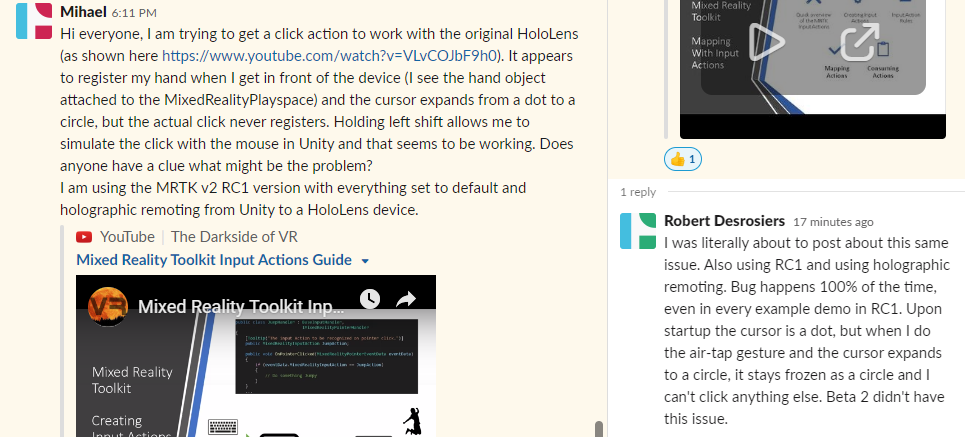
 RobDesrosiers
All 20 comments
I am also experiencing this on:
Tag: RC1, and Branch mrtk_release
Windows 10 Pro: 10.0.18362.0 Build 18363
As stated above, this did not happen on the beta release.
About every 3rd try, I'll get this stack trace:
NullReferenceException: Object reference not set to an instance of an object
Microsoft.MixedReality.Toolkit.Input.GGVPointer.OnPreSceneQuery () (at Assets/MixedRealityToolkit.SDK/Features/UX/Scripts/Pointers/GGVPointer.cs:167)
Microsoft.MixedReality.Toolkit.Input.FocusProvider.UpdatePointer (Microsoft.MixedReality.Toolkit.Input.FocusProvider+PointerData pointer) (at Assets/MixedRealityToolkit.Services/InputSystem/FocusProvider.cs:715)
Microsoft.MixedReality.Toolkit.Input.FocusProvider.UpdatePointers () (at Assets/MixedRealityToolkit.Services/InputSystem/FocusProvider.cs:686)
Microsoft.MixedReality.Toolkit.Input.FocusProvider.Update () (at Assets/MixedRealityToolkit.Services/InputSystem/FocusProvider.cs:443)
Microsoft.MixedReality.Toolkit.MixedRealityToolkit.UpdateAllServices () (at Assets/MixedRealityToolkit/Services/MixedRealityToolkit.cs:994)
Microsoft.MixedReality.Toolkit.MixedRealityToolkit.Update () (at Assets/MixedRealityToolkit/Services/MixedRealityToolkit.cs:777)
 ArtieTwelve
on 11 Apr 2019
ArtieTwelve
on 11 Apr 2019
The same thing happens to me as well, with the examples and with small apps I create. It does it when I remote with unity, and when I deploy the app to the Hololens. I also recreated the same app using the MRTK beta version and it worked fine with that.
 Walker8711
on 12 Apr 2019
Walker8711
on 12 Apr 2019
Same behaviour here with a Hololens v1 and the latest MRTK. Airtap doesn't work, occasionally the above exception appears (not on every run). Issue already happens in Holographic Remoting mode.
Edit: judging from the release notes, this was supposed to be fixed in Beta 2 ((#3496) Fix air-tap in Holographic Remoting (workaround for Unity issue #1033526)) - so this is a regression.
 hybridherbst
on 16 Apr 2019
hybridherbst
on 16 Apr 2019
@wiwei is going to try and get this appropriately assigned to an owner.
 chrisfromwork
on 17 Apr 2019
chrisfromwork
on 17 Apr 2019
Looks like this does not repro in editor unfortunately.
 julenka
on 17 Apr 2019
julenka
on 17 Apr 2019
Hm, I'm not able to repro this on HoloLens 1 in the latest mrtk_development branch as of commit 7b275 on Tue Apr 16. I have tested by creating a UWP and then deploying that UWP to a HoloLens 1. I was able to see both the cursor animating and objects responding to the cursor. I have tried doing air tap many times, and after about 5 minutes of testing am still able to see the cursor animating. I am also still able to manipulate a cube using one and two hand manipulation. Seems like this has been fixed in the mrtk_development branch.
I'm going to close this for now since it seems to be fixed in mrtk_development. If folks are still seeing this issue in mrtk_development branch, please feel free to re-open.
julenka
on 17 Apr 2019
@julenka I pulled the commit 7b275 and I still have the issue. I'm using 2018.3.11f1, hololens 1 fully updated and VS2017. This happens in the editor and in a packaged build.
Walker8711
on 17 Apr 2019
Also still getting same issue.
- Unity 2018.3.3f1
- Hololens 1
- VS2017
 fanmanpro
on 18 Apr 2019
fanmanpro
on 18 Apr 2019
Hm, it seems that my setup and other people's setup must be different. @fanus and @Walker8711 could you please answer the following questions to help repro:
- Can you please confirm that you just did a "git checkout mrtk_development" followed by "git pull" to make sure you are on the latest mrtk_development, and did not just cherry-pick commit 7b275?
- When you say 'in editor' do you mean 'in editor using Unity remoting', or 'in editor using the in-editor input simulation with the hand simulation mode set to gestures'?
- What OS version of HoloLens do you have? (Open up device portal and it should be visible on the home page).
I have been primarily testing using in editor input simulation, not Unityremoting, and have not reproduced this issue when actually deploying to HoloLens 1.
julenka
on 18 Apr 2019

When I say in editor, I mean by using holographic remoting and hitting the play button. Even when I just add the toolkit and create and MRTK scene with nothing in it, it does this. In when hitting play, when building and testing via remote machine to the hololens in Visual Studio, and when side loading the app in to the hololens. I'm not sure what you mean by using the input simulation with the hand simulation mode set to gestures?
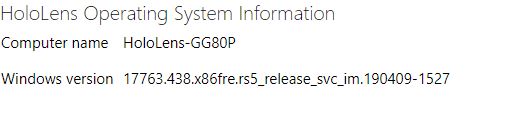
This is what I get when I try to manipulate an object

Then the gaze cursor permanently turns to a round open circle as it does when you focus and click on an object.
Walker8711
on 18 Apr 2019
@julenka I have updated my mrtk_development branch with the latest as of this am. I rebuilt (from scratch, new project) a simple spinning cube test. The color changes when the cube is clicked with a hand gesture. This test works when running inside Unity. For that, I use the spacebar to produce the bone hand and use the mouse to click on the cube when it has focus. This works without errors. I can also build and deploy this project to my headset, where it will work without errors. It is only when using the Holographic remoting app on the headset in conjunction with Holographic emulation on the Unity editor that this is a problem. I was able to get a NullReference exception at GGVPointer.cs Line 170 when running the above setup through VS 2017. The exception seems to be intermittent for my setup.
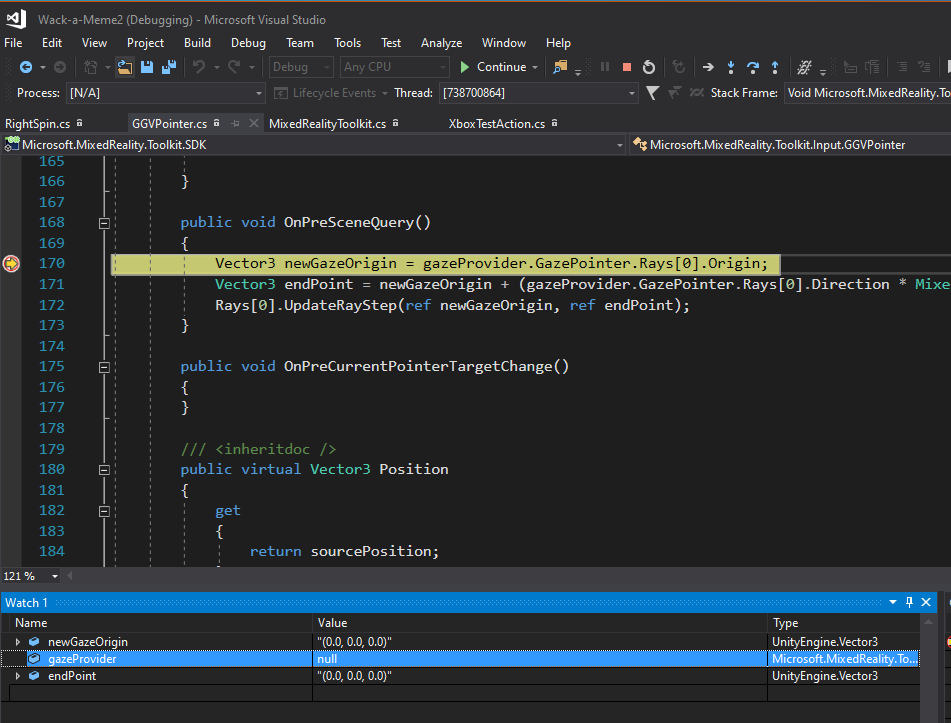
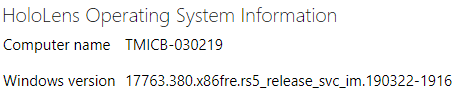
ArtieTwelve
on 18 Apr 2019
When using simulated input in Unity even when you use the articulating hands, The gaze cursor stays in a open circle animation when you look elsewhere. You are still able to move the object while using the articulating hands, but the gaze cursor is stuck in that open position and you cannot move the object at all with gaze. I imagine that you can use both gaze and articulating hands with the hololens 2.
Walker8711
on 18 Apr 2019
@ArtieTwelve this is an excellent writeup of the issue with repro steps. Thank you very much for clarifying. From your description, it sounds like the issue happens ONLY when performing holographic remoting. I am updating the bug and changing title to reflect that this happens only when holographic remoting.
julenka
on 18 Apr 2019
So this issue appears to be an oldie but goldie.
https://github.com/Microsoft/MixedRealityToolkit-Unity/issues/3456
There's evidently been an issue in the information reported by Unity's InteractionSourceState.selectPressed API which seems to always report false when using HoloLens 1 remoting.
This was reported long ago and from chatting with some folks, should have been fixed but I can't find any artifacts or data pointing to the version of Unity it was fixed in. At this point I can't tell if it was fixed and regressed, or if the fixed binaries never ended up shipping.
I'm going to follow up with some folks who worked on this area originally to get a sense of what happened here.
In the meantime, people can workaround this issue by patching this change:
https://github.com/Microsoft/MixedRealityToolkit-Unity/pull/3496/files
I've confirmed on my HL1 that this addresses the issue when doing holographic remoting.
I would rather not reintroduce this to the codebase at this moment until we have a chance to do correct followups, but in the meantime people who are blocked by this can use that to workaround the problem.
 wiwei
on 19 Apr 2019
wiwei
on 19 Apr 2019
For future folks, in terms of how this was debugged (from the perspective of a person who has never touched this area before):
1) Tried looking at how this works by using the input simulator (i.e. running in editor, pressing space bar, and seeing what happened). It actually turns out that this was a bad idea, because the input simulation stack has some degrees of uniqueness that made it not a good comparison (you really needed to see what the callstack looked like when Unity raised the event, rather than when simulation code raised the event).
But for future reference anyway, in order to test out HoloLens 1 style input, you have to change the hand simulation setting in the input simulation settings to this value:
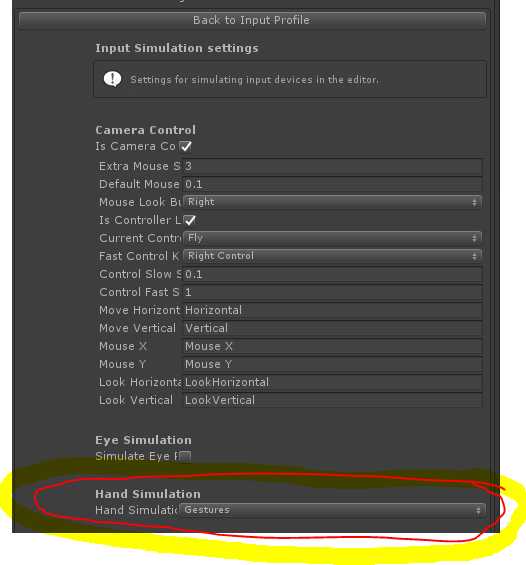
Notice that it's "gestures" instead of "articulated hand"
2) Next step was to get onto an actual HoloLens 1 device and do debugging here. Thankfully .NET scripting support was working again so I was actually able to debug C# code and not C++ code. I set a breakpoint on GGVPointer.cs here:
public void OnInputDown(InputEventData eventData)
And saw the interesting correct callstack, mentally wrote that down (in particular, UpdateTriggerData in WindowsMixedRealityController.cs seemed interesting), and then proceeded to move onto remoting:
3) Try to same scenario but with Holographic Remoting.
Basically with the correct callstack in mind, I set a breakpoint at each function that I expected to hit (i.e. first in OnInputDown in GGVPointer.cs, and then when that didn't hit, I went up another frame in the callstack I got from the functioning scenario, and so on until I found the difference.
wiwei
on 19 Apr 2019
I applied the patch above and air taps, both via MRTK and via GestureRecognizer, are working in Holographic Remoting for me now.
 fast-slow-still
on 19 Apr 2019
fast-slow-still
on 19 Apr 2019
This problem also occurs in the hololens emulator.
Steps to reproduce
- Create new unity project
- Pull newest commit from mrtk_development
- Copy Asset folder into unity project root folder => Wait until assets are loaded
- Configure scene: Mixed Reality Toolkit --> Add to scene and configure... --> Select default configuration
- Switch build settings to UWP
- Change Player settings: Project Settings --> Player --> XR Settings --> Virtual Reality Supported
- Build using Utilites: Mixed Reality Tookit --> Utilities --> Build Window --> Build Unity Project
- Deploy to emulator: Open Visual Studio Solution --> Switch to x86 --> Select Hololens Emulator --> Click Start
I also tried with the hotfix mentioned by @wiwei, but couldn't get it up and running.
 SimMue
on 19 Apr 2019
SimMue
on 19 Apr 2019
@SimMue that's a different scenario (this one is about holographic remoting, the other is the hololens emulator, which is similar in name but different in how things work) - can you please file another issue to track that?
wiwei
on 19 Apr 2019
I'll be checking in the workaround, scoped to only when remoting is connected/active. Should lessen the chance that this workaround will affect any other scenarios unintentionally.
wiwei
on 15 May 2019
Should be good in latest mrtk_development
wiwei
on 16 May 2019
Related issues
 dfields-msft
·
3Comments
dfields-msft
·
3Comments
 DanAndersen
·
3Comments
DanAndersen
·
3Comments
 rigma
·
3Comments
rigma
·
3Comments
 reillydonovan
·
3Comments
reillydonovan
·
3Comments
 StephenHodgson
·
3Comments
StephenHodgson
·
3Comments
Most helpful comment
For future folks, in terms of how this was debugged (from the perspective of a person who has never touched this area before):
1) Tried looking at how this works by using the input simulator (i.e. running in editor, pressing space bar, and seeing what happened). It actually turns out that this was a bad idea, because the input simulation stack has some degrees of uniqueness that made it not a good comparison (you really needed to see what the callstack looked like when Unity raised the event, rather than when simulation code raised the event).
But for future reference anyway, in order to test out HoloLens 1 style input, you have to change the hand simulation setting in the input simulation settings to this value:
Notice that it's "gestures" instead of "articulated hand"
2) Next step was to get onto an actual HoloLens 1 device and do debugging here. Thankfully .NET scripting support was working again so I was actually able to debug C# code and not C++ code. I set a breakpoint on GGVPointer.cs here:
public void OnInputDown(InputEventData eventData)
And saw the interesting correct callstack, mentally wrote that down (in particular, UpdateTriggerData in WindowsMixedRealityController.cs seemed interesting), and then proceeded to move onto remoting:
3) Try to same scenario but with Holographic Remoting.
Basically with the correct callstack in mind, I set a breakpoint at each function that I expected to hit (i.e. first in OnInputDown in GGVPointer.cs, and then when that didn't hit, I went up another frame in the callstack I got from the functioning scenario, and so on until I found the difference.