Mixedrealitytoolkit-unity: Type or namespace QRCodesTrackerPlugin could not be found (SpectatorView)
Does this affect the legacy HoloToolkit (master) or the Mixed Reality Toolkit (mrtk_release)?
HoloToolkit
Describe the bug
I'm following these instructions: https://docs.microsoft.com/en-us/windows/mixed-reality/spectator-view
I try to just use the SpectatorViewExample scene, the one with the star in it, and am able to build for Hololens. However, if I switch to iPhone in the SpectatorView GameObject, and then try to build for iOS, Unity gives me these errors:
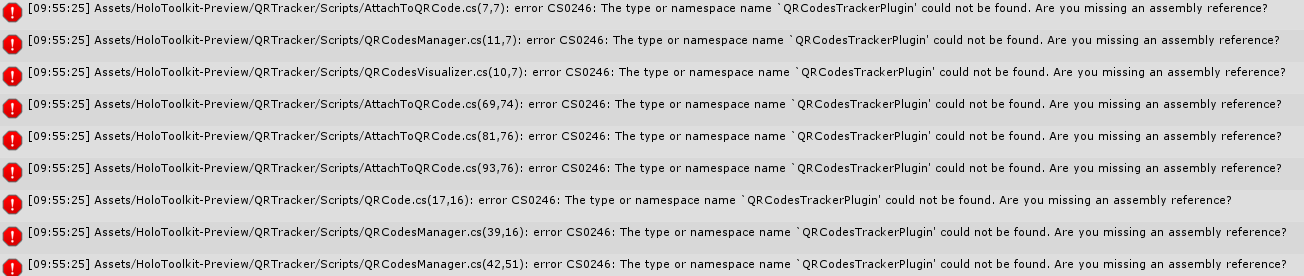
How can I solve this conflict?
Unity Editor Version
2018.1.0f2
 benzben
All 16 comments
We also get this. To be honest we always get a ton of errors from a fresh holotoolkit addition into a project, which then requires us to manually edit them. We deleted eveyrthing to do with spectator view (including the examples) to solve this.
Also we get lots of issues with applicationviewmanager making an ambigous call to "frame" when it should specifiy the namespace. We add the namespace qualifier to the call and that fixes it. Just in case you also have that issue
 isurfraz
on 9 Nov 2018
isurfraz
on 9 Nov 2018
@isurfraz allright. Do I need the QRTracker in the iPhone app, or can I simply comment out the code that produces the errors?
benzben
on 9 Nov 2018
@benzben unfortunately if you are using spectator view you will need it as i believe it uses this to authenticate and connect to the session :/ we were not using the feature so we simply removed it all
isurfraz
on 9 Nov 2018
How unfortunate... I mean, how am I supposed to use the SpectatorView if I can only build the sample project for the iPhone without the QRTracker? :-D
Aww man.
Or wait; I don't need to scan a code with the iPhone, right? I'm creating a code on iphone which is scanned by the HoloLens?
benzben
on 9 Nov 2018
I'm having the exact same issue,
I'm using Unity 2017.2.1p2 (64-bit), I've tried 2 different machines following the instructions mentioned above but still get the same errors related to the QRTracker namespace/Plugin.
The build works fine for Hololens but does not build for iOS.
Has anyone been able to isolate the problem?
 asanint
on 11 Nov 2018
asanint
on 11 Nov 2018
You should be able to delete the QRTracker folder - it is not required for SpectatorView.
At least, I was able to get SpectatorView working without it.
 MrGuy
on 12 Nov 2018
MrGuy
on 12 Nov 2018
This worked for me to build to iOS:
Find the QRCodesTrackerPlugin.Placeholder and check the inspector. Tick iOS. Thus Editor and IOS should be selected.
Next i got build Errors. I solved this by encapsulating the affected lines inside the UWP conditionals in SpatialGraphCoordinateSystem.cs. like this:
#if WINDOWS_UWP
            CurrentState = UnityEngine.XR.WSA.WorldManager.state;
            UnityEngine.XR.WSA.WorldManager.OnPositionalLocatorStateChanged += WorldManager_OnPositionalLocatorStateChanged;
            if (CoordinateSystem == null)
            {
                CoordinateSystem = Windows.Perception.Spatial.Preview.SpatialGraphInteropPreview.CreateCoordinateSystemForNode(id);
            }
#endif
Then i was able to build, Transfer the xcode solution to a mac and create an app on an iPhone X. Everything works to the Point of finding ground and displaying a qr Code.
Unfortunatly i can´t get a Connection with the HoloLens. Nothing happens when starring at the qr Code. However, i don´t have the latest update on the HoloLens, mine is at 17134.285.x86fre.rs4_release_svc_prod1.180830-1731. And it is now stuck at Windows Update, Please Wait... forever.
Let me know if you can connect!
 MarjanPl
on 12 Nov 2018
MarjanPl
on 12 Nov 2018
The latest htk_development branch with https://github.com/Microsoft/MixedRealityToolkit-Unity/pull/2985 should unblock building for iOS. Please let me know if you run into any issues with it. Otherwise, I'll mark a release to resolve this issue.
 keveleigh
on 12 Nov 2018
keveleigh
on 12 Nov 2018
Finally got a Connection!
Don´t know if this was the issue:
- Installed rs5 on HoloLens via Windows Insider. (Is this really reqiered)?
- Most of the instructions are outdated or not clear. it is often stated, that "SpectatorViewNetworking" prefab should be in the Scene. This is NOT true, as the same components are now already inside the spectator view prefab under "shared".
- once again i build for HoloLens, then switching platform to IOS and make a build for that without closing the editor (is this really still required?)
- our wLan does not allow UNet Connections for some reason. Opening a hot spot on the iPhone and connect Hololens to this Network works though.
I would be really helpfull to keep readmes and instructions up to date, at least all this:
MarjanPl
on 14 Nov 2018
@keveleigh Using the latest htk_development version I was able to build the example scene for Hololens and iOS, thank you!
However, I noticed that it's unreasonably complicated to deploy the app to the iPhone :-(
Is there an easy way to do so using a Windows PC?
@MarjanPl how did you deploy your app to the iPhone?
benzben
on 15 Nov 2018
@benzben unfortunately iOS deployment is painful in itself. There's no way of doing it through a PC.
 danielescudero
on 15 Nov 2018
danielescudero
on 15 Nov 2018
I just build from the windows version. Change Platform to iOS and make sure that the iOS setUp within the inspector is set to IOS. Then build.
Then i copied the Folder with the result to my mac, open in Xcode and build to device. There were no problems at all, no missing libraries etc.
But yeah, as always you need a mac and an iOS Developer account to do so.
Just from your PC this is not possible.
It is not "painful". Its just a matter of your experience and what you are used to. I could also say, that it is "painful" to build from Unity Mac to UWP. Same thing.
Edit: I did not use vnext. just the latest release of this
MarjanPl
on 16 Nov 2018
Facing the same issues..
Got the IOS QRtracker issue resolved with @MarjanPl suggestion.
But get this issue now :
The type or namespace name PositionalLocatorState' does not exist in the namespaceUnityEngine.XR.WSA'. Are you missing an assembly reference?
 lexiconcreation
on 3 Dec 2018
lexiconcreation
on 3 Dec 2018
Facing the same issues..
Got the IOS QRtracker issue resolved with @MarjanPl suggestion.But get this issue now :
The type or namespace namePositionalLocatorState' does not exist in the namespaceUnityEngine.XR.WSA'. Are you missing an assembly reference?
Well it worked with the latest build.
But Hololens cannot detect the QR code
Need help.....
lexiconcreation
on 3 Dec 2018
It may be worth calling out that SpectatorView is based on ArUco markers and opencv based detection logic. QR code tracking is another feature in the preview folder, but it isn't needed for spectator view.
@lexiconcreation what version of unity re you using? Are you seeing this missing assembly reference error when building for HoloLens or iOS? Have you compiled the SpectatorViewPlugin dll (https://github.com/Microsoft/MixedRealityToolkit/tree/master/SpectatorViewPlugin ) and copied it and its dependencies into a plugins folder in your unity project?
 chrisfromwork
on 19 Feb 2019
chrisfromwork
on 19 Feb 2019
I am closing this issue based on a lack of activity. QRCodeTrackerPlugin dlls will be distributed through NuGet in the future compared to the MRTK.
For the time being, deleting the qr detection assets folder should unblock holotoolkit spectator view work because holotoolkit spectator view has no actual dependencies on qr code detection.
If you experience additional problems in the future, please reopen this issue.
chrisfromwork
on 31 May 2019
Related issues
 nuernber
·
3Comments
chrisfromwork
·
3Comments
nuernber
·
3Comments
chrisfromwork
·
3Comments
 matatabi-ux
·
3Comments
matatabi-ux
·
3Comments
 Alexees
·
3Comments
Alexees
·
3Comments
 markgrossnickle
·
3Comments
markgrossnickle
·
3Comments