Mintty: Line height too narrow for some fonts
Using proggytiny TTF font on Windows 10, with and without font smoothing I see at least one pixel of the font is being cut off.
This font previously worked with an older version of mintty.
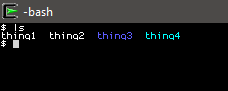
Using cygwin-x86_64 distributed mintty-3.1.0-1:
Leading is reported as -2, font height is too small, RowSpacing has no visible effect with values -4, -2, 0, 2, 4.
Screenshot:
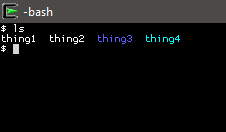
Using cygwin-x86_64 distributed mintty-3.0.6-1:
Leading is reported as 0, correctly rendered, changing RowSpacing has a visible effect.
Screenshot with RowSpacing=0:
 Veltas
All 8 comments
Likely same issue as #946. Can you provide the font for testing please?
 mintty
on 20 Dec 2019
mintty
on 20 Dec 2019
 BrianInglis
on 21 Dec 2019
BrianInglis
on 21 Dec 2019
Thanks for the test case.
The font contains an internal leading advice of -5 which is causing the squeezed line height.
Why the previous mintty version did not consider this, I cannot say right now. I'll check that out later (in January) for curiosity. But I'd say the change was rather a fix than a bug, and the font is buggy.
mintty
on 21 Dec 2019
I can believe the font is buggy. I can't remember if I tried with RowSpacing=5 or higher, will try when I get back to work after holidays. But if that doesn't change the rendering then maybe there's a bug in not being able to force different leading? I'd like to continue using my albeit buggy font.
Veltas
on 22 Dec 2019
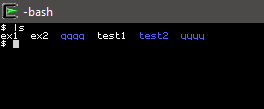
This is with RowSpacing=10, still seems to make no difference. (mintty-3.1.0-1 cygwin-x86_64)
Veltas
on 2 Jan 2020
RowSpacing should indeed compensate for the negative internal leading value...
mintty
on 10 Jan 2020
This was caused by a bug in 3.1.0 "fix"
- Adjust row spacing ("Leading") for high DPI monitors (#777).
caused by the declaration of the dpi value as unsigned and the quirky fact that C coerces both operands to unsigned in a signed / unsigned arithmetic division;
with the result of a leading value of 44739236 which is apparently and fortunately handled as invalid by Windows...
mintty
on 10 Jan 2020
Released 3.1.4.
mintty
on 25 Feb 2020
Related issues
mintty
·
8Comments
 avoidik
·
12Comments
avoidik
·
12Comments
 oxo42
·
10Comments
oxo42
·
10Comments
 Trismegistos84
·
13Comments
Trismegistos84
·
13Comments
 E3V3A
·
11Comments
E3V3A
·
11Comments
Most helpful comment
Proggy Fonts Site
Proggy Fonts Downloads
Proggy Tiny TTF Zip