Mintty: Weird behavior with Meslo fonts (inducing condensed ligatures)
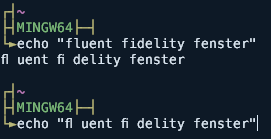
On the first line you can see in echo output that "f"-character somehow influences the next character after it. When I press Up arrow on keyboard (select previous command from history) same issue occurs for actual input.
mintty 2.8.4
Font MesloLGM NF from here:
https://github.com/ryanoasis/nerd-fonts/tree/master/patched-fonts/Meslo/M/complete
 avoidik
All 12 comments
"fl" is substituted by an fl ligature here.
For a fixed-width font, if it includes ligature replacement, the ligatures used as substitutes should not affect the total string width, like FiraCode does (see #601). Apparently this Meslo version does not respect fixed font width when handling ligatures. Please report this as a bug to the font.
 mintty
on 20 Mar 2018
mintty
on 20 Mar 2018
More interestingly that I haven't had any issues with 2.7.9 version
avoidik
on 20 Mar 2018
2.8.3 fixed ligature support. But the behaviour of that font is broken.
mintty
on 21 Mar 2018
https://github.com/ryanoasis/nerd-fonts/issues/186 might be of relevance to you
 ryanoasis
on 21 Mar 2018
ryanoasis
on 21 Mar 2018
Cannot reproduce with the linked font, was it updated meanwhile?
As a workaround, you could also try to set -o FontRender=textout.
mintty
on 24 Mar 2018
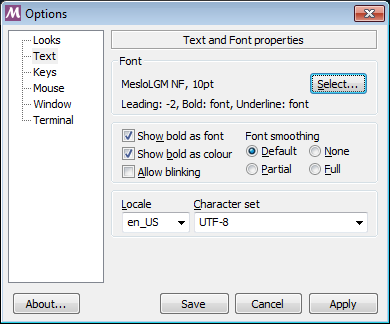
Could you please try with following settings
minttyconfig
BoldAsFont=-1
Columns=161
Rows=35
ThemeFile=4bit.theme
ClipShortcuts=yes
WindowShortcuts=yes
SwitchShortcuts=yes
AltFnShortcuts=yes
ScrollbackLines=5000
CopyOnSelect=yes
ClickTargetMod=shift
ClicksTargetApp=no
CopyAsRTF=yes
RightClickAction=menu
Locale=en_US
Charset=UTF-8
Language=
Font=MesloLGM NF
FontHeight=10
minttythemes4bit.theme
BackgroundColour=13,25,38
ForegroundColour=217,230,242
CursorColour=217,230,242
Black=0,0,0
BoldBlack=38,38,38
Red=184,122,122
BoldRed=219,189,189
Green=122,184,122
BoldGreen=189,219,189
Yellow=184,184,122
BoldYellow=219,219,189
Blue=122,122,184
BoldBlue=189,189,219
Magenta=184,122,184
BoldMagenta=219,189,219
Cyan=122,184,184
BoldCyan=189,219,219
White=217,217,217
BoldWhite=255,255,255
With -o FontRender=textout it worked as expected, without the glitch. mintty is from git-for-windows package
avoidik
on 24 Mar 2018
Cannot reproduce with your config file. I doubt we're having the same font version because for me the font properties info show Leading: -3, Underline: manual.
mintty
on 25 Mar 2018
I would have waited with closing this issue until I could reproduce a Meslo update that fixes this.
However, as I couldn't even reproduce the broken ligatures in the first place, can we close the issue or is anything still unclear?
mintty
on 28 Mar 2018
Yes, please close it
avoidik
on 28 Mar 2018
With the next release, it will be possible to configure using a "nerd font" or otherwise for for "Powerline" only for Private Use ranges.
mintty
on 19 Nov 2019
Released 3.1.0.
mintty
on 23 Nov 2019
Related issues
 jdforsythe
·
11Comments
jdforsythe
·
11Comments
 AyushAgrawalProgrammer
·
8Comments
AyushAgrawalProgrammer
·
8Comments
 GoogleCodeExporter
·
16Comments
GoogleCodeExporter
·
16Comments
 E3V3A
·
11Comments
E3V3A
·
11Comments
 long-nguyenxuan
·
3Comments
long-nguyenxuan
·
3Comments