Mintty: Long line continues on the *same* line instead of wrapping to the next
Steps to reproduce.

I haven't got the slightest idea how to reproduce it, but *after a while* the
problem always resurfaces, even if I don't do anything special.

Environment.

* Windows 7 (with every possible updates available)
* mintty 1.1.2
* cygwin 1.7.17 (with every possible updates available)

(However, the problem to be described isn't new to me at all, so it's possible
that other versions would produce the same problem.)

Other information.

I've attached a screenshot which shows my problem. After I use mintty for
5/10/X minutes and I start writing a long line then mintty (or maybe something
else entirely) instead of wrapping it just starts to *overwrite* the characters
from the start of the same line.

Sorry if this is confusing it's hard for me to put this into words, this is
something one has to see, but I hope that I was able to catch the *essence* of
my problem.

Now I haven't got the faintest idea what could cause this. Sometimes I only use
Vim from the command line for a short time and nothing else and the same
happens. Sometimes I work for hours with Git, Maven, Vim, Subversion, etc.
without this annoyance even coming up once.

One thing I always use is Bash's incremental/reverse search thingy
(reverse-i-search, Ctrl-R). Most of the time I realize that long lines aren't
wrapped anymore is when I use this feature: when I'm searching and I *hit* a
long line it doesn't get wrapped.

When this happens I have to restart mintty to be able to use it again because
it's just too much annoying that I can't see the start of my lines sometimes.

I'm not sure if this problem is new, but I didn't find anything searching
through open/closed tickets (hard to find a keyword for *this*).

Please, if more information is needed to get to the bottom of this then please
tell what. I'm willing to do anything to solve this (if you tell me to
pay/donate some dough, then I'll will - I didn't found a donate button anywhere
around tho') , because I use mintty/cygwin daily and this annoyance can ruin my
whole day.
Original issue reported on code.google.com by [email protected] on 14 Mar 2013 at 12:44
Attachments:
 GoogleCodeExporter
All 16 comments
Issue 191?
Original comment by andy.koppe on 14 Mar 2013 at 1:00
- Changed state: Waiting
GoogleCodeExporter
on 4 Jun 2015
I'm not exactly sure right now if my problem and the ones reported in issue 191
(and those that were merged into it) are related, but I'll look into it and
report back with my findings. (I hope this is the problem, because it's driving
me crazy.)
Anyway, here's my Bash-prompt-thingy that I use.
export PS1="\w \\$ "
That's it. I'm not if I have to use \[ or \] to escape anything here, but I
guess not (I'm never fiddle with the prompt too much, so I don't know jack
about it).
Original comment by [email protected] on 14 Mar 2013 at 1:23
GoogleCodeExporter
on 4 Jun 2015
I've tried the following.
1. I've run setup.exe and updated cygwin.
2. I've opened up mitty. Entered 'history -c'.
3. I've entered the following long command and executed it.
find /usr/share/texmf -type f -print0 | xargs -0 -I {} echo "What's this heh?
{} $(date)" | grep -iP "^.*?2013.*$" | sed -n 's,2013,THE CURRENT YEAR
WOOOHOOO!,p'
4. I've pressed the up arrow in the terminal. The following command appeared.
5. I've navigated to the start of the line, added some stuff, then navigated to
the end and added some more stuff so that I got the following command (I've
nagivated using the arrow keys and Ctrl-F/B).
echo "START" && find /usr/share/texmf -type f -print0 | xargs -0 -I {} echo
"What's this heh? {} $(date)" | grep -iP "^.*?2013.*$" | sed -n 's,2013,THE
CURRENT YEAR WOOOHOOO!,p' && echo "END
Then I've executed the command.
6. After this I've recalled the command in the first command using Ctrl-R. I've
deleted the 'echo "START"' part and ran it.
Nothing out of the ordinary happened. I've tried doing the same, but inside a
directory, so that my prompt would show a long
/directory_this/subdirectory_that/whatever_here/something_else_inside_this path.
I didn't resize the terminal. I've tried *not resizing* the terminal, because I
thought maybe if I resize it mintty will get confused or something, but even
though I leaved the terminal as is, the problem I've described occurred again.
I'm not saying that issue 191 isn't at work *here*, but to me it seems to be a
different problem. (The problems maybe different but of course the same
mintty/bash/readline/etc. module/piece of code/whatever could cause both of
them.)
By the way, my whole cygwin configuration is here:
https://github.com/kohanyirobert/cygwin, I use the exact same thing at
home/work.
I'm keeping my eyes open to hunt down the of cause of the problem and I'll try
to get back with more information.
Original comment by [email protected] on 14 Mar 2013 at 3:36
GoogleCodeExporter
on 4 Jun 2015
I agree, the prompt setting looks fine. Another quick question: what's the
output of 'stty' when the issue occurs?
Original comment by andy.koppe on 14 Mar 2013 at 3:57
GoogleCodeExporter
on 4 Jun 2015
During last week the problem didn't occur at all - until now. Here's the output
stty.
speed 38400 baud; line = 0;
ixany
If it helps I was running mintty in a maximized window (not full screen).
What I noticed is that after executing the stty command the problem went away.
(At least that's what I like to believe.) I have no clue what is ssty at this
point, but next time I encounter the problem I'll try and see if running this
command fixes my issue or not.
Original comment by [email protected] on 27 Mar 2013 at 10:11
GoogleCodeExporter
on 4 Jun 2015
I have this same issue. My output from stty is the same as kohanyi...'s.
It takes absolutely no special anything in order to reproduce this. Using
mintty on Win 8 w/ default prompt, start typing; when you get to the end of the
line, we wrap, but we wrap into the same line, not a new line.
http://screencast.com/t/7u5e1j3YjIsE
Original comment by [email protected] on 22 Jul 2013 at 8:41
GoogleCodeExporter
on 4 Jun 2015
When I encountered this bug, this helped:

export TERM=cygwin
Original comment by [email protected] on 19 Dec 2014 at 9:02
GoogleCodeExporter
on 4 Jun 2015
#7 fixed it immediately for me as well. (I'd tried 'stty sane', ^L, mintty
reset, all sort of tricks, none worked.)

For some reason $TERM defaults to "xterm". It should really default to "cygwin"
-- unless of course you are actually using xterm.

Try putting export TERM=cygwin in your .bashrc or .profile and see if it makes
it go away permanently.
Original comment by [email protected] on 20 Feb 2015 at 6:36
GoogleCodeExporter
on 4 Jun 2015
$TERM=cygwin does NOT fix this issue and after this vim mouse control won't work

This bug makes it really hard to impossible to work with long lines or even
line editing functions (where I use: set -o vi)
Original comment by [email protected] on 14 May 2015 at 3:36
GoogleCodeExporter
on 4 Jun 2015
This sometimes works for me.

$ stty sane
Original comment by [email protected] on 22 May 2015 at 11:42
GoogleCodeExporter
on 4 Jun 2015
Try to log mintty output (run mintty -l logfile) until the issue occurs.
Then we can try to reproduce it with the tail of the logfile, cross-check with xterm, etc.
 mintty
on 23 Jun 2015
mintty
on 23 Jun 2015
I see a few cases that can create this problem:
- The shell not having the proper idea of the screen dimensions. This frequently happens if you resize the terminal window while in a program, then return to the shell. Diagnostic information needed: stty size.
- The shell not having the proper idea of the current cursor position, e.g. caused by a misconfigured prompt (-> 191). Diagnostic information needed: terminal log (mintty -l log).
- The terminal having run into a special state, e.g. a scrolling region set up by a program and not reset. Diagnostic information needed: terminal log (mintty -l log).
- Wraparound mode (DECAWM) has been disabled by escape sequence
ESC[?7l. - The shell running in a locale not matching the terminal character encoding, e.g. setting LC_ALL=de_DE inside bash inside a UTF-8 terminal. Diagnostic information needed: locale charset, value of Options... -> Text -> Character set.
Unless someone provides further debugging info, I will close the issue soon.
mintty
on 4 Sep 2015
I'd like to help :slightly_smiling_face: :.
- The
stty sizedoes get updated, it just outputsybeforex. It does get updated on resize. - (this one sounds likely to me) log bellow
- Log bellow
- In my case, I just set the PS1 to this
PS1='\033[1;33m>\033[0m '(from here). Is there any other way that this sequence can be inserted? I've disabled my .bashrc (just renamed) it, set the PS1 to the one above, and I still got this issue. - My encoding settings:
en_USandUTF-8
It works properly if there isn't any escape sequence in PS1 though.
 math2001
on 8 Sep 2017
math2001
on 8 Sep 2017
Please look at the last example in the doc you quoted: escape sequences in PS1 must be embedded in \[...\] to prevent their accounting for the line length. (This is the second item in my previous comment above.)
mintty
on 8 Sep 2017
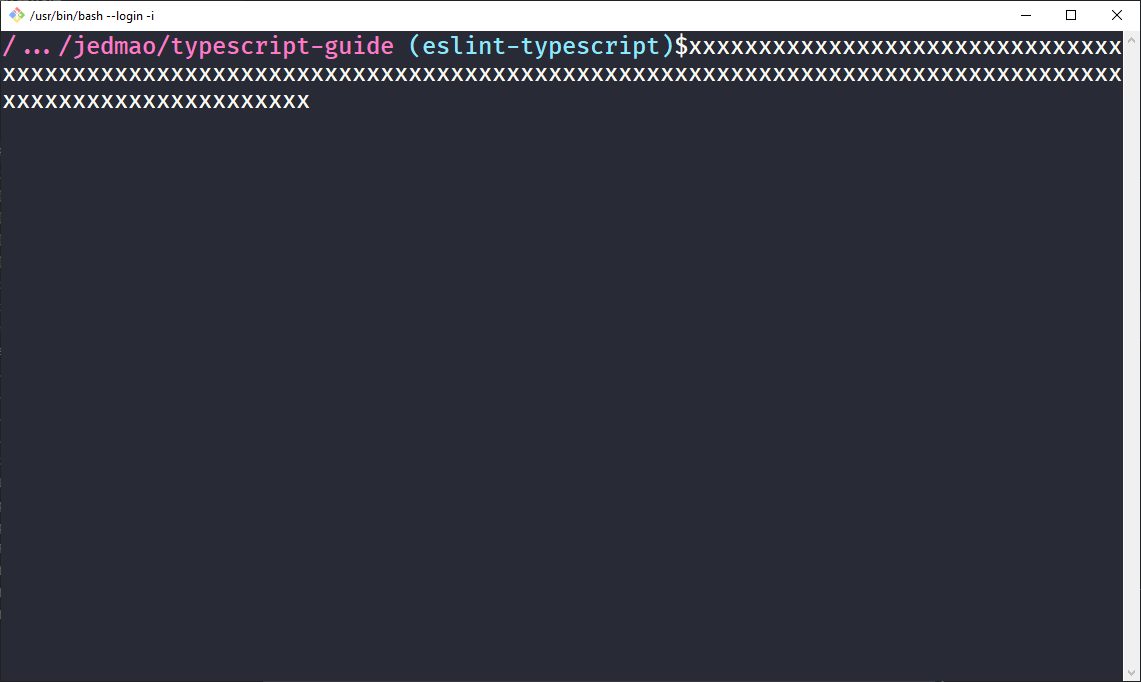
Same issue. Fixed it by changing my custom/broken PS1 to the following in .bashrc on Windows 10:
PS1='\[\033]0;$TITLEPREFIX:$PWD\007\]\n\[\033[35m\]$(shortwd) \[\033[36m\]$(git_branch)\[\033[0m\]$'
#    |           title bar             |   pink   |    \W     |   cyan   |  __git_ps1  |  white  |$
Where shortwd is a modified short working directory:
function shortwd() {
    num_dirs=3
    pwd_symbol="..."
    newPWD="${PWD/#$HOME/~}"
    if [ $(echo -n $newPWD | awk -F '/' '{print NF}') -gt $num_dirs ]; then
        newPWD=$(echo -n $newPWD | awk -F '/' '{print $1 "/.../" $(NF-1) "/" $(NF)}')
    fi
    echo -n $newPWD
}
And git_branch is self-explanatory:
git_branch() {
    git branch 2> /dev/null | sed -e '/^[^*]/d' -e 's/* \(.*\)/(\1)/'
}
Looks and wraps great now! (Dracula theme)
 jedmao
on 25 Jan 2019
jedmao
on 25 Jan 2019
bash PS1 wd is \w, short wd is \W, both use ~ tilde - I use \W in the prompt and \w in the window title with PS1="[\e]0;\u@\h ${debian_chroot:+($debian_chroot) }\w\a]..."
 BrianInglis
on 25 Jan 2019
BrianInglis
on 25 Jan 2019
Related issues
mintty
·
8Comments
 megapctr
·
13Comments
megapctr
·
13Comments
 nyuszika7h
·
5Comments
nyuszika7h
·
5Comments
 fengyichui
·
5Comments
fengyichui
·
5Comments
 AyushAgrawalProgrammer
·
8Comments
AyushAgrawalProgrammer
·
8Comments
Most helpful comment
Original comment by
[email protected]on 19 Dec 2014 at 9:02