Metabase: [BUG] Spark SQL Driver not working

Created on 3 May 2018  Â·  49Comments  Â·  Source: metabase/metabase

Hi, I'm testing the new Spark SQL driver in Metabase v0.29 and it's not working. O filled the "new database" form with required info and got the error Couldn't connect to the database. Please check the connection details.

When I check the logs the following info is displayed:

05-02 22:18:30 DEBUG metabase.middleware :: GET /api/user/current 200 (7 ms) (1 DB calls). Jetty threads: 8/50 (4 busy, 6 idle, 0 queued)
05-02 22:18:31 DEBUG metabase.middleware :: GET /api/setting 200 (2 ms) (0 DB calls). Jetty threads: 8/50 (4 busy, 6 idle, 0 queued)
05-02 22:18:50 ERROR metabase.driver :: Failed to connect to database: java.lang.NoClassDefFoundError: org/apache/hadoop/conf/Configuration

It seems that we're missing some hadoop-commons files in the build (reference: https://github.com/metabase/metabase/issues/2157#issuecomment-386065796). Not sure if it's important to highlight, but I'm trying to connect to a remote Spark (I can access it using other tools, but I'm not able to to this using my Metabase).

  • Operating System: Ubuntu 17;10
  • Database: Spark SQL
  • Metabase version: 0.29.0-RC1 and 0.29.0
  • Metabase hosting environment: Docker in my local machine
  • Metabase internal Database: PostgreSQL
P1 Bug

Most helpful comment

@lucasloami does it show up if you do as mentioned in https://github.com/metabase/metabase/issues/7528#issuecomment-388231703 above (not clear to me if you did this or not):

Note that for the time being, we ask that you download the dependencies as a separate jar as described here

edit: Oh wait, just tried a fresh 0.29.2 jar download and startup (On Win 10, Java 8, H2), and @salsakran I can repro what @lucasloami reported:

  1. On startup I see:
May 11 21:06:08 INFO metabase.core :: Starting Metabase version v0.29.2 (db39083 release-0.29.2) ...
May 11 21:06:08 INFO metabase.core :: System timezone is 'Europe/Paris' ...
May 11 21:06:08 INFO metabase.plugins :: Loading plugins in directory C:\Hub\app\plugins...
May 11 21:06:08 INFO metabase.plugins :: Loading plugin C:\Hub\app\plugins\metabase-sparksql-deps-1.2.1.spark2-standalone.jar... 
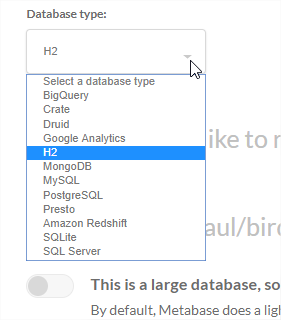
  1. When I got to the database config I don't see any SparkSQL either:

image

All 49 comments

Discourse discussion is here http://discourse.metabase.com/t/connecting-to-local-spark/3444

@wjoel have you ever seen the

java.lang.NoClassDefFoundError: org/apache/hadoop/conf/Configuration

error before when trying to use the SparkSQL driver?

Not sure what dependency we're missing. Apparently it doesn't happen in the build you did from a while back

It might be that Drill stuff you ended up taking out?

I'm also trying to debug this ATM with my limited context... I'm attaching the jars with java -cp "${spark_dir}/jars/*" metabase.jar

and my hive metastore jar seems to have the thing it's saying is not there...

jar tf hive-metastore-1.2.1.spark2.jar | grep "org/apache/hadoop/hive/metastore/api/MetaException"
org/apache/hadoop/hive/metastore/api/MetaException$1.class
org/apache/hadoop/hive/metastore/api/MetaException$_Fields.class
org/apache/hadoop/hive/metastore/api/MetaException$MetaExceptionStandardScheme.class
org/apache/hadoop/hive/metastore/api/MetaException$MetaExceptionStandardSchemeFactory.class
org/apache/hadoop/hive/metastore/api/MetaException$MetaExceptionTupleScheme.class
org/apache/hadoop/hive/metastore/api/MetaException$MetaExceptionTupleSchemeFactory.class
org/apache/hadoop/hive/metastore/api/MetaException.class

@camsaul looks like hadoop-common is missing from project.clj, can you try
including it?

On Thu, May 3, 2018, 02:32 Cam Saul notifications@github.com wrote:

Discourse discussion is here
http://discourse.metabase.com/t/connecting-to-local-spark/3444

@wjoel https://github.com/wjoel have you ever seen the

java.lang.NoClassDefFoundError: org/apache/hadoop/conf/Configuration

error before?

Not sure what dependency we're missing. Apparently it doesn't happen in
the build you did from a while back

—
You are receiving this because you were mentioned.
Reply to this email directly, view it on GitHub
https://github.com/metabase/metabase/issues/7528#issuecomment-386162061,
or mute the thread
https://github.com/notifications/unsubscribe-auth/AAPcFmO7hd0iSBcpKzabsHCrFvQqDziFks5tulA1gaJpZM4TwQvB
.

FWIW I checked out the project & I didn't get this error. I only got it from the uberjar I downloaded from the website

@munro were you seeing the same

java.lang.NoClassDefFoundError: org/apache/hadoop/conf/Configuration

error? And when you ran locally from master did you make any changes to project.clj?

@lucasloami can you try running Metabase from master and let me know if you still see this issue?

Hi, @camsaul , I built Metabase from master and tried to connect again to my Spark SQL and got the same error:

05-04 14:21:38 DEBUG metabase.middleware :: POST /api/util/password_check 200 (2 ms) (0 DB calls). Jetty threads: 8/50 (4 busy, 6 idle, 0 queued)
05-04 14:22:02 ERROR metabase.driver :: Failed to connect to database: java.lang.NoClassDefFoundError: org/apache/hadoop/conf/Configuration
05-04 14:22:02 DEBUG metabase.middleware :: POST /api/setup/validate 400 (43 ms) (0 DB calls).
{:errors {:dbname "java.lang.NoClassDefFoundError: org/apache/hadoop/conf/Configuration"}}

@lucasloami @munro what versions of spark are you running and how are you running it?

@salsakran I have a cloudera hadoop cluster in a remote machine that comes with tools such as Hive, Spark, HBase, Hue, Pig and so on. We config Hive in Spark conf and Yarn as its resource manager. I'm using spark 1.6 here but I can change to 2.x versions if required.

I also have a Spark 2.3 installed in my local machine (I followed this tutorial to install) and I tried to connect to Spark SQL using localhost, spark://localhost and these options didn't work, they gave me the same error displayed above.

It works for me after adding hadoop-common as a dependency in project.clj,
so please try that and let us know if it helps.

On Fri, May 4, 2018, 22:30 Lucas Lo Ami notifications@github.com wrote:

@salsakran https://github.com/salsakran I have a cloudera hadoop
cluster in a remote machine that comes with tools such as Hive, Spark,
HBase, Hue, Pig and so on. We config Hive in Spark conf and Yarn as its
resource manager. I'm using spark 1.6 here but I can change to 2.x versions
if required.

I also have a Spark 2.3 installed in my local machine (I followed this
tutorial http://www.admintome.com/blog/installing-spark-on-ubuntu-17-10/
to install) and I tried to connect to Spark SQL using localhost,
spark://localhost and these options didn't work, they gave me the same
error displayed above.

—
You are receiving this because you were mentioned.
Reply to this email directly, view it on GitHub
https://github.com/metabase/metabase/issues/7528#issuecomment-386726303,
or mute the thread
https://github.com/notifications/unsubscribe-auth/AAPcFt43hLNKMRdwaY5TChmLir8fUqSqks5tvLpxgaJpZM4TwQvB
.

@wjoel , @camsaul I added hadoop-common as a dependency in my project.clj (like shown below), rebuilt the project and now I'm getting the following error:

{:errors {:dbname "java.lang.NoClassDefFoundError: org/apache/hadoop/hive/conf/HiveConf"}}

It seems that there is some missing HiveConf. When I installed Spark 2.3.0 in my local machine, I configured hive-site.xml, core-site.xml and hdfs-site.xml in order to connect my spark to my remote Hadoop cluster. When I test PySpark and Spark-shell they are able to correctly search info in Hive and HDFS, so I believe my Spark is correctly configured.

Am I missing some step here to make it work? Sorry if it seems to be a dumb question, but I'm not a Clojure programmer, so I should have missed something.

; MY project.clj FILE
[...]
[org.spark-project.hive/hive-jdbc "1.2.1.spark2"     ; JDBC Driver for Apache Spark
                  :exclusions [org.apache.curator/curator-framework
                               org.apache.curator/curator-recipes
                               org.apache.thrift/libfb303
                               org.apache.zookeeper/zookeeper
                               org.eclipse.jetty.aggregate/jetty-all
                               org.spark-project.hive/hive-common
                               org.spark-project.hive/hive-metastore
                               org.spark-project.hive/hive-serde
                               org.spark-project.hive/hive-shims]]
[org.apache.hadoop/hadoop-common "3.1.0"]   
[...]

Those exclusions look far too aggressive, quite different from what I had in my branch: https://github.com/wjoel/metabase/blob/spark-sql/project.clj#L97

Please try with something like this:

                 [org.apache.hadoop/hadoop-common "2.7.3"]
                 [org.spark-project.hive/hive-jdbc "1.2.1.spark2"     ; JDBC Driver for Apache Spark
                  :exclusions [org.apache.curator/curator-framework
                               org.apache.curator/curator-recipes
                               org.apache.thrift/libfb303
                               org.apache.zookeeper/zookeeper
                               org.eclipse.jetty.aggregate/jetty-all]]

@lucasloami please try https://wjoel.com/files/metabase-0.29-spark-sql-2018-05-05.jar which is 0.29 with the following changes:

diff --git a/project.clj b/project.clj
index c86d62e82..fc168aabb 100644
--- a/project.clj
+++ b/project.clj
@@ -93,16 +93,13 @@
                  [org.liquibase/liquibase-core "3.5.3"]               ; migration management (Java lib)
                  [org.postgresql/postgresql "42.1.4.jre7"]            ; Postgres driver
                  [org.slf4j/slf4j-log4j12 "1.7.25"]                   ; abstraction for logging frameworks -- allows end user to plug in desired logging framework at deployment time
+                 [org.apache.hadoop/hadoop-common "2.7.3"]
                  [org.spark-project.hive/hive-jdbc "1.2.1.spark2"     ; JDBC Driver for Apache Spark
                   :exclusions [org.apache.curator/curator-framework
                                org.apache.curator/curator-recipes
                                org.apache.thrift/libfb303
                                org.apache.zookeeper/zookeeper
-                               org.eclipse.jetty.aggregate/jetty-all
-                               org.spark-project.hive/hive-common
-                               org.spark-project.hive/hive-metastore
-                               org.spark-project.hive/hive-serde
-                               org.spark-project.hive/hive-shims]]
+                               org.eclipse.jetty.aggregate/jetty-all]]
                  [org.tcrawley/dynapath "0.2.5"]                      ; Dynamically add Jars (e.g. Oracle or Vertica) to classpath
                  [org.xerial/sqlite-jdbc "3.21.0.1"]                  ; SQLite driver
                  [org.yaml/snakeyaml "1.18"]                          ; YAML parser (required by liquibase)

Hi, @wjoel , thanks for you reply. I rebuilt the project using your specification and it worked properly.

@camsaul there are some points to note:

1. I had several problems with JDBC driver version: we are using Cloudera Hadoop Cluster here, that have outdated versions of Hive, Spark, YARN, etc. So, to use hive-jdbc "1.2.1.spark2" didn't work for me. I had to use v0.13.x. When I used v1.2.1.spark2 I received the following error: java.sql.SQLException: Could not establish connection to jdbc:hive2://[MY_HOST]:10000/default: Required field 'client_protocol' is unset! Struct:TOpenSessionReq(client_protocol:null), which is related to a mismatch between jdbc driver and hiveserver2 (please check this link)

2. Joel is right about the agressive exclusions in project.clj: I built the project keeping the org.spark-project.hive/ exclusions and it didn't work. I received the error: {:errors {:dbname "java.lang.NoClassDefFoundError: org/apache/hadoop/hive/conf/HiveConf"}}.

3. It's possible to use a newest version of hadoop-common: it's not a requirement to use v2.7.3

In summary, my suggestions to solve the problem are:

  1. To remove hive exclusions from project.clj
  2. To add hadoop-common dependency
  3. Keep latest spark-project.hive in project dependencies. People that use older versions of Hive (such as me) should recompile the project with proper dependencies.

@mazameli would it be a good idea to create a FAQ about this connector in order to report these points we are discovering in this debug? Even if it's not a Metabase problem, I think Metabase users will benefit from it.

I put the aggressive exclusions in because without them the hive-jdbc dependency was adding something like 20,000 files to metabase.jar and IIRC almost 25MB to the JAR size. Older versions of Java 7 (which we still support) have a 64k file limit in JARs so without the exclusions it put us over the limit and broke Java 7 compatibility.

I'll have to play around with these exclusions or see if I can clear some headroom somewhere else or it's going to be challenging to ship these fixes without breaking Java 7 compatibility

@salsakran @senior Good news and bad news. The good news is it sounds like we can fix SparkSQL support by adding Hadoop as a dependency and removing the Hive exclusions I put in, which fixes the issues (thanks @lucasloami @wjoel). The bad news is it adds a whopping 47 MB to the size of metabase.jar and almost 30,000 files, putting us well over the Java 7 64k file limit.

Here's the JAR with and without the extra deps for comparison:


So I think our options for fixing this issue boil down to:

  • Accept a 50% increase in JAR size and drop Java 7 support in order to fix SparkSQL support
  • Bundle up Hadoop + Hive JDBC driver + Metabase driver and ship SparkSQL driver separately as a plugin
  • Ship separate versions of Metabase: Java 7 edition and SparkSQL edition
  • Attempt to trim the Hadoop/Hive dependencies somewhat while keeping things working, and possibly remove some other dependencies from elsewhere, to get back under 64k files. But I am not bullish on being able to accomplish this

what do those extra files do to our memory footprint?

Let me see if I can profile and get some numbers

~This is not super scientific but for me at least it's adding around 50MB memory usage after startup when I run locally~

Ugh. Let's see what gets reclaimed from the #7480

0.29 has already taken us over the 512M threshold and blown heroku's free tier out of the water.

I think a plugin might be the way to go on this.

@salsakran

EDIT: I think my methodology was off the first time I measured it. It looks like the extra stuff is adding around 8 MB of memory usage at launch for me. Of course, the usage would end up being a lot higher if you connected to a SparkSQL DB and actually ended up loading some of these extra classes

I believe this is fixed in 0.29.2.

Note that for the time being, we ask that you download the dependencies as a separate jar as described in https://github.com/metabase/metabase/blob/release-0.29.4/docs/administration-guide/databases/spark.md

We'll be releasing 0.29.2 shortly.

@lucasloami @munro just pushed 0.29.2 out. If you have a moment, would really appreciate it if you could verify that things work (or don't work) on that version.

Hi, @salsakran

I tested v.0.29.2 following your instructions and Metabase does not show Spark SQL option as a Datasource, so I was not able to test the connection.

Do I have to execute metabase.jar with some special argument?

Info:

  • Metabase version: v0.29.2
  • Java Version: Java 8
  • Environment: Ubuntu 17.10
  • Metabase distribution: JAR file downloaded from Metabase website

@lucasloami does it show up if you do as mentioned in https://github.com/metabase/metabase/issues/7528#issuecomment-388231703 above (not clear to me if you did this or not):

Note that for the time being, we ask that you download the dependencies as a separate jar as described here

edit: Oh wait, just tried a fresh 0.29.2 jar download and startup (On Win 10, Java 8, H2), and @salsakran I can repro what @lucasloami reported:

  1. On startup I see:
May 11 21:06:08 INFO metabase.core :: Starting Metabase version v0.29.2 (db39083 release-0.29.2) ...
May 11 21:06:08 INFO metabase.core :: System timezone is 'Europe/Paris' ...
May 11 21:06:08 INFO metabase.plugins :: Loading plugins in directory C:\Hub\app\plugins...
May 11 21:06:08 INFO metabase.plugins :: Loading plugin C:\Hub\app\plugins\metabase-sparksql-deps-1.2.1.spark2-standalone.jar... 
  1. When I got to the database config I don't see any SparkSQL either:

image

Sorry, @jornh , I think it was not clear in my report. But the point is exactly what you said.

I have the same problem as @jornh. When I try to view an existing Spark SQL database it gets stuck showing a spinner and "Loading..." and Spark SQL is not available when trying to add a new database, despite the log message saying 05-11 22:05:02 INFO metabase.plugins :: Loading plugin /tmp/plugins/metabase-sparksql-deps-1.2.1.spark2-standalone.jar...

ugh

I'm having trouble reproing this

here's a picture of it working for me below:

captura de pantalla 2018-05-14 a la s 1 00 21 pm

By the way this is what the logs should show

05-14 12:59:26 INFO metabase.core :: Starting Metabase version v0.29.3 (0de4585 release-0.29.3) ...
05-14 12:59:26 INFO metabase.core :: System timezone is 'America/Los_Angeles' ...
05-14 12:59:26 INFO metabase.plugins :: Loading plugins in directory /Users/cam/metabase/plugins...
05-14 12:59:26 INFO metabase.plugins :: Loading plugin /Users/cam/metabase/plugins/metabase-sparksql-deps-1.2.1.spark2-standalone.jar... 🔌
05-14 12:59:27 INFO driver.sparksql :: Found metabase.driver.FixedHiveDriver.
05-14 12:59:27 INFO driver.sparksql :: Successfully registered metabase.driver.FixedHiveDriver with JDBC.
05-14 12:59:27 INFO metabase.core :: Setting up and migrating Metabase DB. Please sit tight, this may take a minute...

Actually I was in fact able to repro this. When I build the JAR locally it works fine but the JAR available from our downloads page doesn't work for some reason.

@camsaul BOOM - ended up in the classic 'works-on-my-machine' ¯_(ツ)_/¯ good it's isolated.

I actually just retested before I saw your last comment (with v0.29.3) and it's the same. But now you have a repro I'll just limit my comment for now with that you log snippet above has two lines I don't see:

05-14 12:59:27 INFO driver.sparksql :: Found metabase.driver.FixedHiveDriver.
05-14 12:59:27 INFO driver.sparksql :: Successfully registered metabase.driver.FixedHiveDriver with JDBC.

That's probably a clue, anyways will leave you to it.

edit Ah yes - one final though (sorry, can't help it). How much would development/testing with #7380 hamper your normal workflow with full builds (of course still use REPL and WebPack hot reloads as you guys may do). It would bring us some amount closer to my == your machine.

Further narrowed this down and can confirm it's a problem specifically with the Metabase JAR once it's signed. It stops working after signing. Investigating futher

Good news
I figured out if I sign the driver-deps JAR with the same key we sign metabase.jar with it works

I don't 100% understand why this is the case, but we do at least have a fix.

Ok @jornh @salsakran @wjoel @lucasloami @m30m I was able to track down the root of this issue and just pushed a fix. If the Metabase JAR is signed the SparkSQL dependencies JAR also has to be signed, or Java ignores blocks it. I pushed a properly signed version of the dependencies JAR to https://s3.amazonaws.com/sparksql-deps/metabase-sparksql-deps-1.2.1.spark2-standalone.jar, the same location as the old one.

To get Spark working, please:

  1. Download this updated JAR and put it in your ./plugins directory, replacing the old one
  2. Restart Metabase.

Please try it and let me know if it's working!

Nice @camsaul, I think we're getting close. My previous datasource now shows up and I can ask a question about it, but I get exceptions like this one:

Exception in thread "com.mchange.v2.async.ThreadPoolAsynchronousRunner$PoolThread-#0" Exception in thread "com.mchange.v2.async.ThreadPoolAsynchronousRunner$PoolThread-#1" java.lang.NoClassDefFoundError: java/sql
/ShardingKey
        at java.lang.Class.getDeclaredMethods0(Native Method)
        at java.lang.Class.privateGetDeclaredMethods(Class.java:2701)
        at java.lang.Class.privateGetMethodRecursive(Class.java:3048)
        at java.lang.Class.getMethod0(Class.java:3018)
        at java.lang.Class.getMethod(Class.java:1784)
        at com.mchange.v2.c3p0.impl.C3P0ImplUtils.supportsMethod(C3P0ImplUtils.java:309)
        at com.mchange.v2.c3p0.impl.NewPooledConnection.<init>(NewPooledConnection.java:101)
        at com.mchange.v2.c3p0.WrapperConnectionPoolDataSource.getPooledConnection(WrapperConnectionPoolDataSource.java:198)
        at com.mchange.v2.c3p0.WrapperConnectionPoolDataSource.getPooledConnection(WrapperConnectionPoolDataSource.java:171)
        at com.mchange.v2.c3p0.impl.C3P0PooledConnectionPool$1PooledConnectionResourcePoolManager.acquireResource(C3P0PooledConnectionPool.java:137)
        at com.mchange.v2.resourcepool.BasicResourcePool.doAcquire(BasicResourcePool.java:1014)
        at com.mchange.v2.resourcepool.BasicResourcePool.access$800(BasicResourcePool.java:32)
        at com.mchange.v2.resourcepool.BasicResourcePool$AcquireTask.run(BasicResourcePool.java:1810)
        at com.mchange.v2.async.ThreadPoolAsynchronousRunner$PoolThread.run(ThreadPoolAsynchronousRunner.java:696)

Note that this isn't a Spark class, just java.sql.ShardingKey: https://docs.oracle.com/javase/9/docs/api/java/sql/ShardingKey.html

@wjoel are you on Java 8? That class is new to Java 9 so sounds I need to set some additional compilation flags

@camsaul I don't see a /plugins directory in the docker image. So, I added JAVA_OPTS="${JAVA_OPTS} -classpath \".:/app/plugins/*\"" to /app/run_metabase.sh and added your jar to a directory mapped to /app/plugins.

Unfortunately, I'm still seeing the java.lang.NoClassDefFoundError: org/apache/hadoop/conf/Configuration error. Am I doing it wrong? How do I get the docker container to work with your new jar?

@pakdev
You just have to set MB_PLUGINS_DIR environment variable and set it to plugins directory. This is described in this link

@camsaul
I have the same problem as @wjoel and I'm on java 8:
openjdk version "1.8.0_111-internal"

@camsaul that was on Java 8, I just tried Java 9 and it doesn't load seem to load the plugin correctly (but it does try to, it seems?)

On Java 8:

05-15 08:40:13 INFO metabase.plugins :: Loading plugins in directory /tmp/plugins...
05-15 08:40:13 INFO metabase.plugins :: Loading plugin /tmp/plugins/metabase-sparksql-deps-1.2.1.spark2-standalone.jar... 🔌
05-15 08:40:14 INFO driver.sparksql :: Found metabase.driver.FixedHiveDriver.
05-15 08:40:14 INFO driver.sparksql :: Successfully registered metabase.driver.FixedHiveDriver with JDBC.
05-15 08:40:14 INFO metabase.core :: Setting up and migrating Metabase DB. Please sit tight, this may take a minute...
05-15 08:40:14 INFO metabase.db :: Verifying h2 Database Connection ...

On Java 9:

05-15 08:38:31 INFO metabase.plugins :: Loading plugins in directory /tmp/plugins...
05-15 08:38:31 INFO metabase.plugins :: Loading plugin /tmp/plugins/metabase-sparksql-deps-1.2.1.spark2-standalone.jar... 🔌
05-15 08:38:32 INFO metabase.core :: Setting up and migrating Metabase DB. Please sit tight, this may take a minute...
05-15 08:38:32 INFO metabase.db :: Verifying h2 Database Connection ...

@m30m Ahh, thanks for the pointer. I had to explicitly set MB_PLUGINS_DIR even though the documentation states it should only be necessary if the plugins directory is in a non-standard location.

@wjoel unfortunately Java 9 has some restrictions about adding JARs to the classpath dynamically so you need to launch Metabase in a different way. Check out our instructions for using SparkSQL with Java 9 here: https://github.com/metabase/metabase/blob/release-0.29.4/docs/administration-guide/databases/spark.md#adding-additional-dependencies-with-java-9

@m30m @pakdev @wjoel if you're still using Java 7 or 8 I'll have a fix for the issue @wjoel described shortly

Ok I figured out the issue. When compiling the dependencies JAR with Java 9, the code therein assumes the presence of new Java 9 classes, meaning the compiled JAR won't work on Java 8. Compiling with Java 8 seems to do the trick. I'm sure there's some library-specific compiler flags we could set to tell it not to use the new Java 9 classes regardless, but I'm not sure which dependency is at fault, or what the flags are. (Suggestions appreciated!)

Anyways, I've went ahead and uploaded a new version of the dependencies JAR that works with both Java 8 and 9. Find it at https://s3.amazonaws.com/sparksql-deps/metabase-sparksql-deps-1.2.1.spark2-standalone.jar

@jornh @wjoel @lucasloami @m30m please try and let me know if it works!

PS

Updated instructions for adding the dependencies JAR are available here

@camsaul I followed your instructions and everything worked properly. I tested two cenarios:

  1. Downloading metabase jar from website + spark-deps from S3 - :+1:
  2. Building unsigned jars (using Java 8) of metabase and spark-deps (I need this because the newest SparkSQL driver doesn't work with my Hive version) :+1:

I'm still having the problem described in https://github.com/metabase/metabase/issues/7630 . Is anyone here having this problem?

@camsaul works great with both Java 8 and Java 9. Nice!

Cool. Going to close this out now that it sounds like it's working for everyone.

@lucasloami It sounds like #7630 is a separate issue so let's continue the conversation about it over there.

Hi, @wjoel , thanks for you reply. I rebuilt the project using your specification and it worked properly.

@camsaul there are some points to note:

1. I had several problems with JDBC driver version: we are using Cloudera Hadoop Cluster here, that have outdated versions of Hive, Spark, YARN, etc. So, to use hive-jdbc "1.2.1.spark2" didn't work for me. I had to use v0.13.x. When I used v1.2.1.spark2 I received the following error: java.sql.SQLException: Could not establish connection to jdbc:hive2://[MY_HOST]:10000/default: Required field 'client_protocol' is unset! Struct:TOpenSessionReq(client_protocol:null), which is related to a mismatch between jdbc driver and hiveserver2 (please check this link)

2. Joel is right about the agressive exclusions in project.clj: I built the project keeping the org.spark-project.hive/ exclusions and it didn't work. I received the error: {:errors {:dbname "java.lang.NoClassDefFoundError: org/apache/hadoop/hive/conf/HiveConf"}}.

3. It's possible to use a newest version of hadoop-common: it's not a requirement to use v2.7.3

In summary, my suggestions to solve the problem are:

  1. To remove hive exclusions from project.clj
  2. To add hadoop-common dependency
  3. Keep latest spark-project.hive in project dependencies. People that use older versions of Hive (such as me) should recompile the project with proper dependencies.

@mazameli would it be a good idea to create a FAQ about this connector in order to report these points we are discovering in this debug? Even if it's not a Metabase problem, I think Metabase users will benefit from it.

hey there
i have the same problem with using the metabase-sparksql-deps-1.2.1.spark2-standalone.jar to connect the older version of Hive,
so how can i solve this problem like this?

12-19 09:11:57 DEBUG metabase.middleware :: POST /api/database 400 (5 s) (0 DB calls). {:valid false, :dbname "Timed out after 5000 milliseconds.", :message "Timed out after 5000 milliseconds."}
12-19 09:13:08 ERROR metabase.driver :: Failed to connect to database: java.sql.SQLException: Could not open client transport with JDBC Uri: jdbc:hive2://172.0.0.11:8080/test: Invalid status 72

thx

Was this page helpful?
0 / 5 - 0 ratings

Related issues

chadbean picture chadbean  Â·  42Comments

CCoffie picture CCoffie  Â·  57Comments

hopsoft picture hopsoft  Â·  53Comments

rafaelveloso picture rafaelveloso  Â·  44Comments

rgabo picture rgabo  Â·  76Comments
JARsizenumber of files
Metabase 0.29.0100 MB62,841
Metabase 0.29.0 with Hadoop + Hive147 MB91,450