Metabase: Limit the number of options displayed in a filter based on the selection of another filter.
Currently, we have 5 filters added to our dashboard. Each filter is designed to systematically filter the data displayed within the dashboard. The user will start with filter 1 and end with filter 5. We have the following filters with the corresponding number of options within each filter:
Filter 1 - 10 options
Filter 2 - 60 options
Filter 3 - 350 options
Filter 4 - 1,200 options
Filter 5 - 7,000 options
Based on the current design, it is very taxing to select 1 option from the list of 7,000 options. It would be a great idea to create a filter that is 'filtered' based on the selection of another filter. For example, filter 2 has 60 options, but only 6 relate to each option in filter 1. Ideally, when the user selects an option in filter 1, only the corresponding options are shown in filter 2, ie. 6 and not 60.
⬇️ Please click the 👍 reaction instead of leaving a +1 or 👍 comment
 jeandeklerk
All 48 comments
@jeandeklerk You found any workaround for this? I have a similar problem.
 deadlocks
on 9 Feb 2018
deadlocks
on 9 Feb 2018
@deadlocks Unfortunately I haven’t. Hopefully this will be addressed in future updates.
jeandeklerk
on 9 Feb 2018
Related to #4691.
If we let you define custom drilldown hierarchies maybe we could repurpose them for this?
 tlrobinson
on 13 Feb 2018
tlrobinson
on 13 Feb 2018
Absolutely! As long as we are able to populate the ‘filters’/dropdown with the hierarchies that we define. This should definitely be a good way to address the above mentioned feature request.
jeandeklerk
on 14 Feb 2018
This would be extremely welcome! Right now we're handling a similar situation by adding short prefixes so long dropdown lists can be better navigated. It's not pretty, it gets the job done but definitely looking forward to the day dropdowns can be limited based on the selection of a preceding dropdown in a cascade type fashion.
 MarcGJA
on 3 Apr 2018
MarcGJA
on 3 Apr 2018
Is this going to be available soon?When is next release of metabase ?
 probaner
on 18 Apr 2018
probaner
on 18 Apr 2018
Somewhat divergently, I think this feature could help to prevent the exposure of private category data in the filter select list when the dashboard is embedded elsewhere for use by a user that should only have a limited scope of access to the dataset, and thus should not have access to a complete enumeration of all possible categories across the dataset. For instance, if your dashboard has a locked filter (e.g. Customer ID) and a category filter (e.g. Employee Department), the latter filter will give as options all Employee Departments for all Customers. What I would like is for the locked filter to restrict the options in the category filter to those that exist only in the filtered dataset.
Correct me if I'm wrong, but I believe that the only workaround here is to switch to a plain input box for the filter, which results in an inferior experience for the user of the dashboard.
 timabdulla
on 6 Dec 2018
timabdulla
on 6 Dec 2018
@timabdulla, Normally a dependent/linked/cascading/etc. filter should do exactly what you describe regardless of whether the first filter in line is a locked parameter or not. We'll have to wait and see what actually gets implemented in practice and take it from there. This feature request comes up so often from so many users I'm really quite astonished that it hasn't been implemented yet.
Personally I'd be willing to forgo a multitude of other fixes and enhancements for just this one thing, dependent filters. My only workaround at this time is providing multiple filters for basically the same thing and instructing users on how to avoid filter conflicts of between widgets organized by category and widgets organized by some subcategory where non-existent combinations result in no-data or strangely limited data. All I can do is be upfront about the current limits of the technology that are out of my control, sheepishly offer my apologies for bloat and clutter, and assure them that it's on the to-do list.
MarcGJA
on 12 Dec 2018
I would like to be able to have narrowed filters somehow too. However, I don't think it's as straight forward as it sounds. The problem with implementing something like this is it would have implications for a single filter covering multiple fields (#8698, #7168) as well as filtering on segments (#3015). Any solution would have to be created that does not prevent those other features from being possible.
 MarkRx
on 13 Dec 2018
MarkRx
on 13 Dec 2018
@MarkRx, Good point, it might not be so straightforward after all when it comes to querying natively within Metabase. After reading and re-reading the issues referenced I'm not quite clear on them and it dawned on me that perhaps that's because I never use Metabase to ask a "Question" and I completely ignore "Segments" and "Metrics" when joining to an external database. My use case is strictly embedding custom SQL results so as to leverage some advanced features of a joined database. So from my perspective the ability to select a State thereby narrowing the City choices and selecting a City and narrowing down the Zip choices is a normal and expected feature. That Metabase hasn't had that from the get-go just boggles my mind and your points may explain why something apparently so simple may not be so simple after all. Even so with every new release and update that's the first thing I look for and I'm sure I'm not alone.
MarcGJA
on 13 Dec 2018
Is this feature going to be added to the roadmap soon?
More than year has passed since the issue has been added and still nothing :(
 ser1103
on 26 Mar 2019
ser1103
on 26 Mar 2019
@ser1103 Upvote the issue's original post above if you haven't already and urge others to do the same. See the following Discussion Forum post for references to related filter enhancements that may also inspire upvotes: https://discourse.metabase.com/t/metabase-0-32-rc1-is-out/5725
With 32 upvotes as of today on this one issue alone I'd imagine it's definitely on the radar. There's probably some complication with just going in there and plopping it in that's not as simple as it seems. Definitely this is the kind of basic filtering that would make a huge impact for a great many users.
MarcGJA
on 27 Mar 2019
Hi all just wanted to put my thoughts on this. a drill-down filter is a major challenge UI/UX wise but it could be a significant enhancement for metabase. up till now I did not engage the community but I believe this feature may be a game changer for metabase. the rate of adoption for this product may skyrocket uppon implementing it.
In any BI system, I implemented the drill down is the most requested feature I ever encountered, with the current upvote standing on 43 I hope that this feature gets to the roadmap quick.
Cheers and thank you guy's for the excellent work
 skaboy007
on 28 Apr 2019
skaboy007
on 28 Apr 2019
Perhaps being able to substitute one filter widget for another based on SQL defined local variable would serve. Right now a local variable isn't recognized as a widget reference but it might be an interim solution. Something along these lines:
DECLARE
@widget2 VARCHAR(4) ='category1'; -- defaults to [db].[schema].[view1]
SET @widget2 = (CASE
WHEN {{widget1}} = 2 THEN 'category2' -- becomes [db].[schema].[view2]
WHEN {{widget1}} = 3 THEN 'category3' -- becomes [db].[schema].[view3]
WHEN {{widget1}} = 4 THEN 'category4' -- becomes [db].[schema].[view4]
WHEN {{widget1}} = 5 THEN 'category5' -- becomes [db].[schema].[view5]
ELSE @widget2 END)
SELECT count(*)
FROM products
WHERE {{@widget2}} -- @widget2 is not recognized as a widget reference but if it could be, problem solved!
This could be made much more elegant by using a single view with a [CATEGORY_N] field filtered on the selected value of {{widget1}}. SQL Server, for example, could use it's in-built Table-Valued-Parameters to create and populate a temporary table on the fly to serve as the basis of {{@widget2}} rather than a pre-built set of views. Other SQL engines could use other means but it's the same basic concept illustrated above.
MarcGJA
on 9 Jun 2019
As of today this issue and the related GitHub Issue #4691 Additional/custom drill-down hierarchies have a combined upvote count of 75. So if this could be put into the Milestone 0.34.0 series as GitHub Issue #4788 Add option to display data values on charts has been that would be awesome!
MarcGJA
on 9 Jun 2019
This is the number one feature I want to have in this otherwise awesome software.
Filtering based on categories is currently not usable for our use case, because we would be exposing data of other customers in those filters. I am quite puzzled on how there is still no mentioning of this in any milestone.
 remis87
on 20 Jun 2019
remis87
on 20 Jun 2019
@remis87, Have a look at "Locked Parameters" if you haven't already regarding user-specific embedding and search the same here and on the discussion forum:
https://metabase.com/docs/latest/administration-guide/13-embedding.html
You'd have to develop the user id specific infrastructure in your own application though.
As for this issue, take heart, combined with the related issue GitHub Issue #4691 Additional/custom drill-down hierarchies they have a total upvote count of 81 as of today! Still a ways to go to match the 124 of GitHub Issue #4788 Add option to display data values on charts that has been included in Milestone 0.34.0.
We're all so accustomed to dependent filters these days that doing something like Country->State->City just seems so natural and it's expected right out of the box. I've lost count of how many times this issue has been mentioned in the discussion forum and inevitably somebody points to this issue #5540. It's a wonder it hasn't gotten more upvotes by now. This will definitely help a great many users once implemented. In the meantime, all that can be done is to design around it and or build custom dependent filter mechanisms outside of Metabase in embedding applications. And keep those upvotes coming!
MarcGJA
on 21 Jun 2019
Would love to have this feature in Metabase. My team is currently exploring this as our official dashboard for our end users. It would be a head-scratcher for users if selected values in a filter would not affect the other and vice versa. Intuition says it should.
I am thinking that a way to implement this would be to assign a "meta" filter table (based on a query) where you can assign filters that should be interdependent with one another. Now, depending on the options selected in one of the filters, it would actually filter this "meta" table to display updated filter results to the other filters.
Example:
I have list of country, region, and a set of branch IDs. I would like to have 3 filters set to these columns and it should be interdependent. In order to do this, I would create a meta filter table based on a query (either custom SQL or via designer) that shows all possible combinations of the three columns and elect that as the meta filter table. Something like this:
SELECT DISTINCT country, region, branch FROM my_table;
Each meta filter table can be linked to multiple dashboards (for reusability)
 smic-datalabs-von
on 5 Sep 2019
smic-datalabs-von
on 5 Sep 2019
Hi, my company is interested in this functionality and we can work on it.
We have worked with Metabase for a year developing a driver like a plugin for our own database.
Have you started any task about this issue? any recommendation/initial design?
Thank you.
 screspo-stratio
on 10 Oct 2019
screspo-stratio
on 10 Oct 2019
@MarcGJA The issue with locked parameters is exactly that they cannot be used for embedding in a multi-customer setting. The autocomplete/content of the filters will always leak data from other companies.
If I filter by a locked parameter, I would expect all other filters on the page to respect this filter. As it stands now, metabase is only usable without filters in such a context which might be a deal breaker depending on how long this feature needs to ship.
remis87
on 29 Oct 2019
This is definitely a must-have for us right now, hopefully it'll be considered in 0.34
 marcoruggine
on 9 Dec 2019
marcoruggine
on 9 Dec 2019
Combined with related issue #4691 this now has a combined 124 upvotes as of today.
MarcGJA
on 9 Dec 2019
@MarcGJA Yep, definitely on our radar, among the other highly-requested items.
 mazameli
on 9 Dec 2019
mazameli
on 9 Dec 2019
Is there any indication when we can expect this feature?
 NielsB95
on 26 Jan 2020
NielsB95
on 26 Jan 2020
Yaaayyy! This just made it into the top 10 highly-requested items! Combined with closely related issue #4691 this now has 142 upvotes as of today!
MarcGJA
on 27 Jan 2020
Hi Everyone, could you tell me if current development of filters/dropdowns based on data from different selected field could be combined with another similar data-dependent use-case. I want to implement following scenario:
in Form
 kLkA
on 4 Feb 2020
kLkA
on 4 Feb 2020
Woo hoo! This issue has made it onto the Metabase Project Roadmap for v0.37! Combined with related issue #4691 this now has 160 upvotes!
Being able to Filter member custom ordering on a secondary field #9591 would also be most helpful so as to avoid having to manipulate select option names by numbering such as "1|San Francisco", "2|Fresno", "3|Los Angeles" to get them in a North to South order, for example, would also be most helpful.
And Filter using "contains" rather than "begins with" #8219 similar to how the path "Question>Variables panel>Field to map to" is coded should be an easy win and really help when searching long lists without knowing how particular items necessarily start.
MarcGJA
on 14 Mar 2020
Please include limiting a filter based on a LOCKED PARAMETER, that's an VERY important point for embeds. An embed with filters based on a locked parameter is a MUST HAVE for this functionality.
Examples include:
A sales rep's dropdowns would only be populated with territories and products for which they are responsible,
A tier 2 user's dropdowns would only be populated with historical years while a tier 3 user's drowpdowns would also have forecast years,
Company A's dropdowns would only be populated with their own contracts and wouldn't even be able to see dropdown references company B's contracts (privacy & liability, you don't want companies spying on each by guessing what others are up to just by scrolling thru dropdown items)!
Support keeps growing, 176 upvotes combined with related issue #4691 as of today!
MarcGJA
on 4 May 2020
@MarcGJA, you've been a cheerleader for this feature for a long time now. :) If you want to email me (maz at metabase dot com), I'd love to see if we could set up a call and I can give you some insight into where we are with this feature. We'd appreciate your feedback.
mazameli
on 4 May 2020
This feature is needed everywhere. It would be great if we can have this.
 vietvudanh
on 1 Aug 2020
vietvudanh
on 1 Aug 2020
@MarcGJA, you've been a cheerleader for this feature for a long time now. :) If you want to email me (maz at metabase dot com), I'd love to see if we could set up a call and I can give you some insight into where we are with this feature. We'd appreciate your feedback.
Any way I could get a sneak preview or description of how this will look / work?
 lutvdh
on 9 Sep 2020
lutvdh
on 9 Sep 2020
@MarcGJA, you've been a cheerleader for this feature for a long time now. :) If you want to email me (maz at metabase dot com), I'd love to see if we could set up a call and I can give you some insight into where we are with this feature. We'd appreciate your feedback.
Any way I could get a sneak preview or description of how this will look / work?
@salsakran , are you able to share a sneak preview / details on how this will look/work?
lutvdh
on 15 Sep 2020
Hey @lutvdh — send me a note at maz at metabase dot com.
mazameli
on 16 Sep 2020
Hey @lutvdh — send me a note at maz at metabase dot com.
Hey @mazameli , have send you a note, please advise if you received.
lutvdh
on 18 Sep 2020
@mazameli , thank you for giving me a sneak preview. Have not been this excited about a feature in a while :-) Keep up the great work team Metabase!!
lutvdh
on 22 Sep 2020
Wondering when the rest of the world can see this? Or maybe an alpha release?
 manojgeorge
on 28 Sep 2020
manojgeorge
on 28 Sep 2020
Any updates on this? An ETA on when 0.37.0 will be released (if it does include a workaround for this filter issue) would be very helpful, @mazameli !
A sneak preview or rough explanation of how it would work, would be highly appreciated at this time so we can see if it's something that would work for us. This is a feature we have been waiting for months and some of the dashboards we make cannot be shared with our clients the way we would like to due to this not being solved and the privacy issues entailed.
Cheers!
 okcomputerik
on 6 Oct 2020
okcomputerik
on 6 Oct 2020
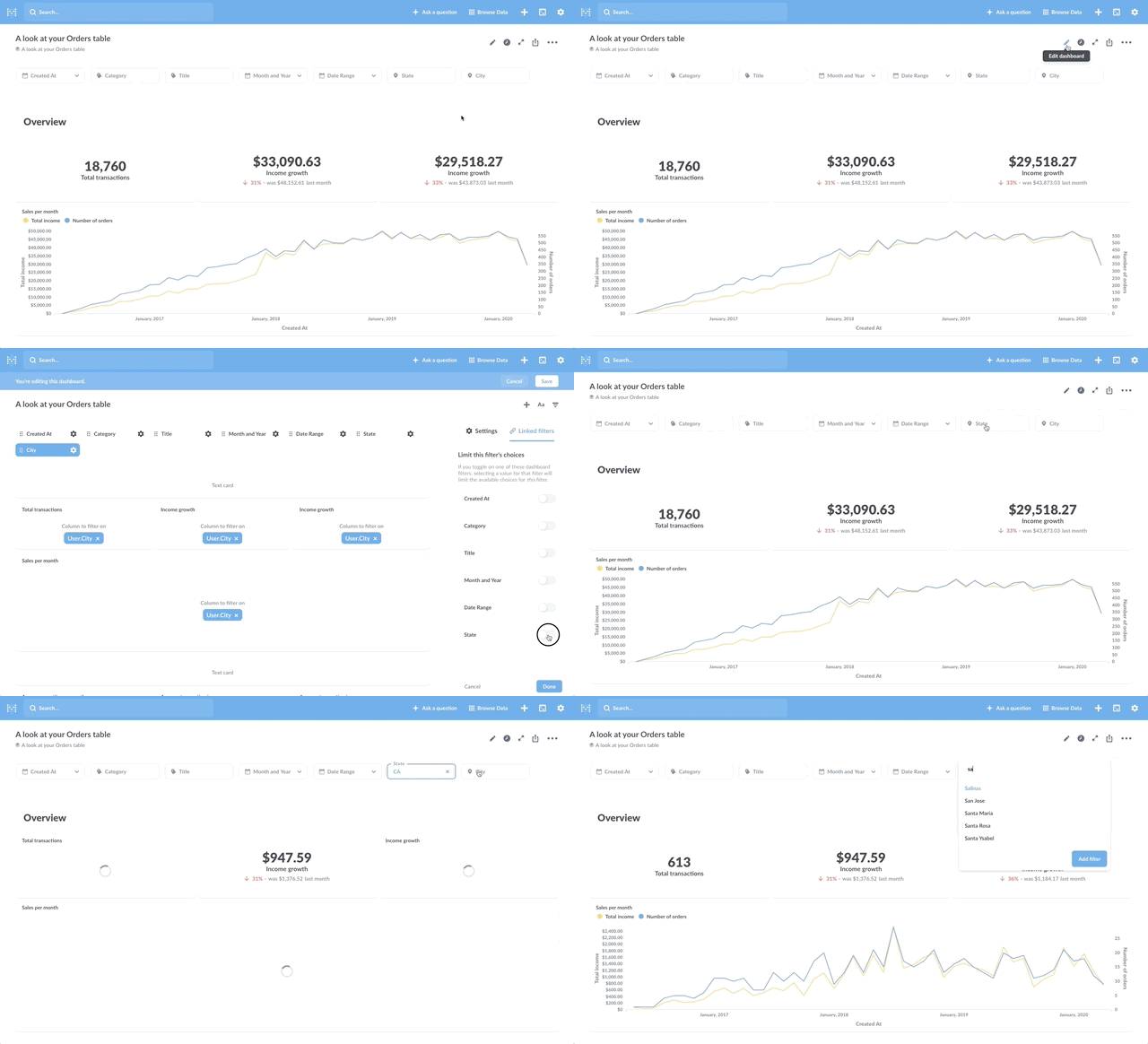
@manojgeorge @okcomputerik, you can actually try this out for yourself in the release candidate for 0.37: https://github.com/metabase/metabase/releases/tag/v0.37.0-rc2 Just remember, this is not the final release, so there are still bits of polish and bugs being fixed. :)
Here's a brief gif of what the flow looks like — I have a State and a City filter, and I can configure the City filter to have its options limited by the selection(s) of the State filter:
mazameli
on 9 Oct 2020
As @mazameli pointed out, this has been delivered in 37! 😀
 rlotun
on 10 Oct 2020
rlotun
on 10 Oct 2020
Great news @mazameli & @rlotun ! It sure looks good! We'll give it a try and come back at you with any feedback!
okcomputerik
on 10 Oct 2020
great news! We implement our own custom drop downs short term- but look forward to this feature going GA so we can switch to using it. Any rough ETA on when this will go GA?
manojgeorge
on 11 Oct 2020
IS this going to be part of Enterprize like Drill through? https://www.metabase.com/docs/latest/enterprise-guide/customizing-drill-through.html
skaboy007
on 13 Oct 2020
@skaboy007 No, it's been added to 0.37.0 - you can try yourself: https://github.com/metabase/metabase/releases/tag/v0.37.0-rc2
 flamber
on 13 Oct 2020
flamber
on 13 Oct 2020
@flamber @mazameli I just tried the rc2, but the filter linking did not work on my tests. I could enable the linked filter option (very intuitive UI, btw) and when I click the filter, I can see the API request returning the filtered options. But the values shown are not filtered.
API response: (/api/dashboard/1/params/552c93/values?5f9c217b=FIRST_FILTER_VALUE)
~
[[11,"FILTERED VALUE 1"]]
~
Options shown in the filter (from /api/dashboard/ I imagine):
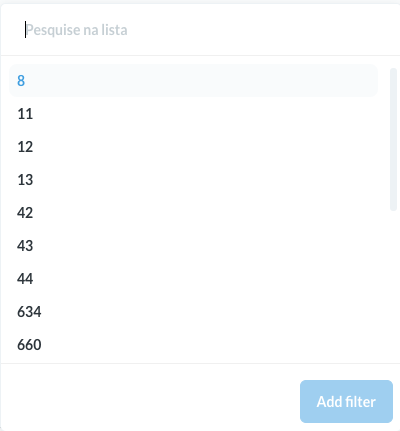
Should I open an issue or this is expected in the rc2 stage?
 petrusgomes
on 15 Oct 2020
petrusgomes
on 15 Oct 2020
@petrusgomes
Yes, please open a new issue. And if you can somehow reproduce with Sample Dataset, then it would be much appreciated :heart:
flamber
on 15 Oct 2020
Thanks, @flamber. https://github.com/metabase/metabase/issues/13491 created.
petrusgomes
on 15 Oct 2020
@flamber @mazameli I've also tried 0.37 rc2 with the Sample Dataset and the filter still shows all values when applying other filters. When I select a State the City values should only display the values corresponding to that State, right? Well, I get the exact same values for all states. Now, I'm no expert in US geography, but I think that points to an issue...
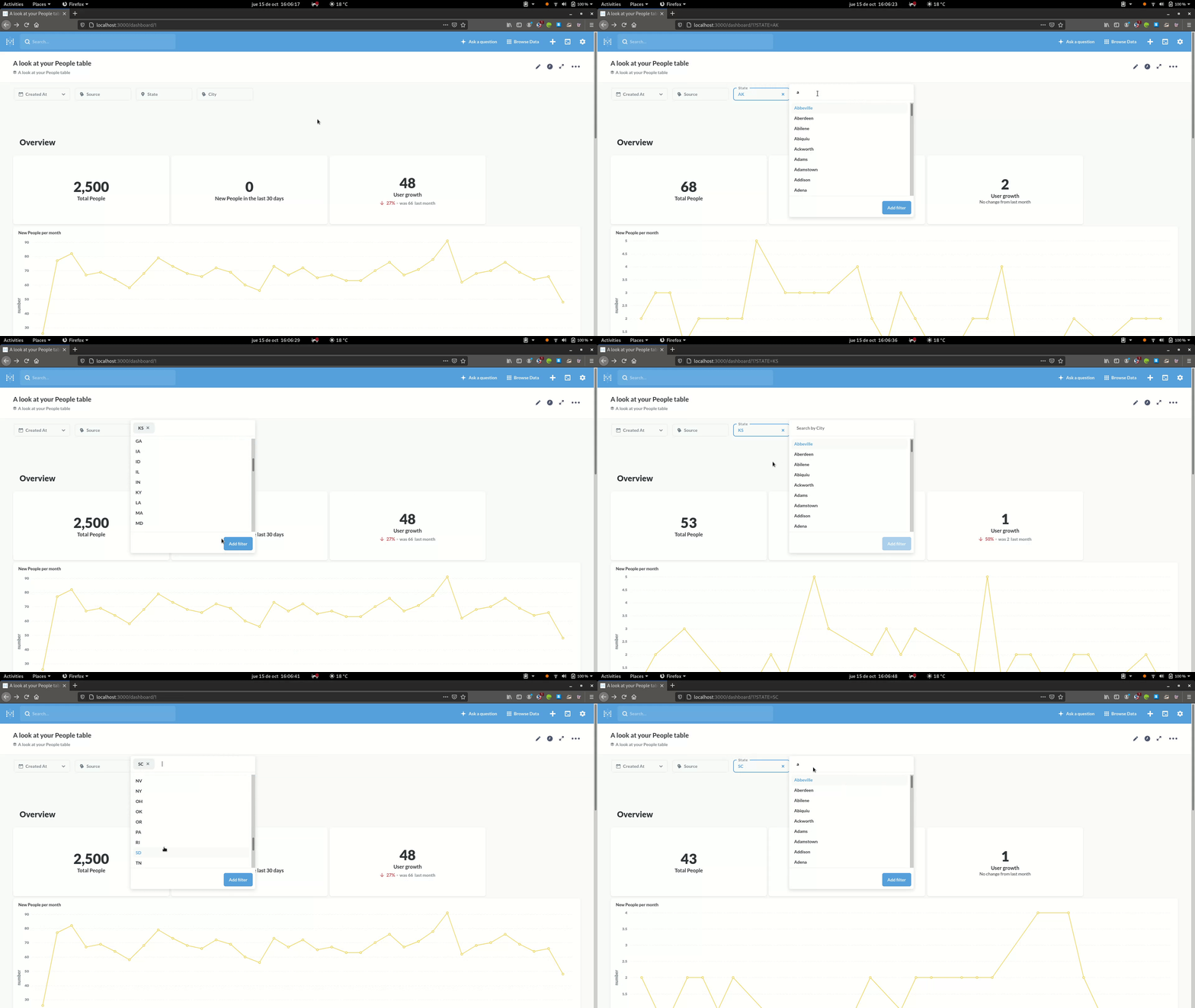
Should I take this to the issue @petrusgomes just opened? (just as I was about to post this...)
Cheers!
okcomputerik
on 15 Oct 2020
@okcomputerik Let's continue in the other #13491. Too many people gets notifications from this issue.
flamber
on 15 Oct 2020
Related issues
 kristian-elder
·
3Comments
kristian-elder
·
3Comments
 iwaffles
·
3Comments
iwaffles
·
3Comments
 salsakran
·
3Comments
salsakran
·
3Comments
 alirezastack
·
3Comments
alirezastack
·
3Comments
 fetanchaud
·
3Comments
fetanchaud
·
3Comments
Most helpful comment
Somewhat divergently, I think this feature could help to prevent the exposure of private category data in the filter select list when the dashboard is embedded elsewhere for use by a user that should only have a limited scope of access to the dataset, and thus should not have access to a complete enumeration of all possible categories across the dataset. For instance, if your dashboard has a locked filter (e.g. Customer ID) and a category filter (e.g. Employee Department), the latter filter will give as options all Employee Departments for all Customers. What I would like is for the locked filter to restrict the options in the category filter to those that exist only in the filtered dataset.
Correct me if I'm wrong, but I believe that the only workaround here is to switch to a plain input box for the filter, which results in an inferior experience for the user of the dashboard.