Metabase: It should be possible to add OR statements to question filters
For what I can see, only AND statements are added to question filters. i.e, it would be great to be able to add field1 = 'x' OR field2 >= 4.
⬇️ Please click the 👍 reaction instead of leaving a +1 or 👍 comment
 rafaelveloso
All 44 comments
Another related proposal from our users is to add list of value separated by semi colon.
It would go like
Add filter, on Fruit , "is list" and you enter "Apple; Banana; Kiwi"
 moumny
on 23 Aug 2016
moumny
on 23 Aug 2016
Functionality similar to SQL "OR" and "IN" would be awesome.
 calleo
on 13 Sep 2016
calleo
on 13 Sep 2016
Just figured out I can do this already (at least the "IN" part):

calleo
on 13 Sep 2016
Yes, IN is already possible, but not OR.
rafaelveloso
on 28 Sep 2016
Our backend supports OR filtering and an older version of the query builder did too. I think we took it out because most people didn't use it and we were trying to simplify things
 camsaul
on 15 Oct 2016
camsaul
on 15 Oct 2016
@camsaul is there any possibility of adding this? If the backend supports it I think it could be added, right?
 sabino
on 10 Feb 2017
sabino
on 10 Feb 2017
This feature is becoming each time more necessary for more complex and relevant custom metrics. The lack of this prevents users from using query builder and go raw instead, any possibility of considering adding this back @camsaul?
 mfpinhal
on 20 May 2017
mfpinhal
on 20 May 2017
The following are designs by @mazameli from duplicate issue #5870. Everything past this point is a cut-and-paste of his comment
Designs
I've thought about this a little, and here's one way that I think this could work:
- The filter popover menu doesn't change at all.
- When each filter after the first is added, it defaults to ANDs in between, as this is the existing (invisible) behavior.
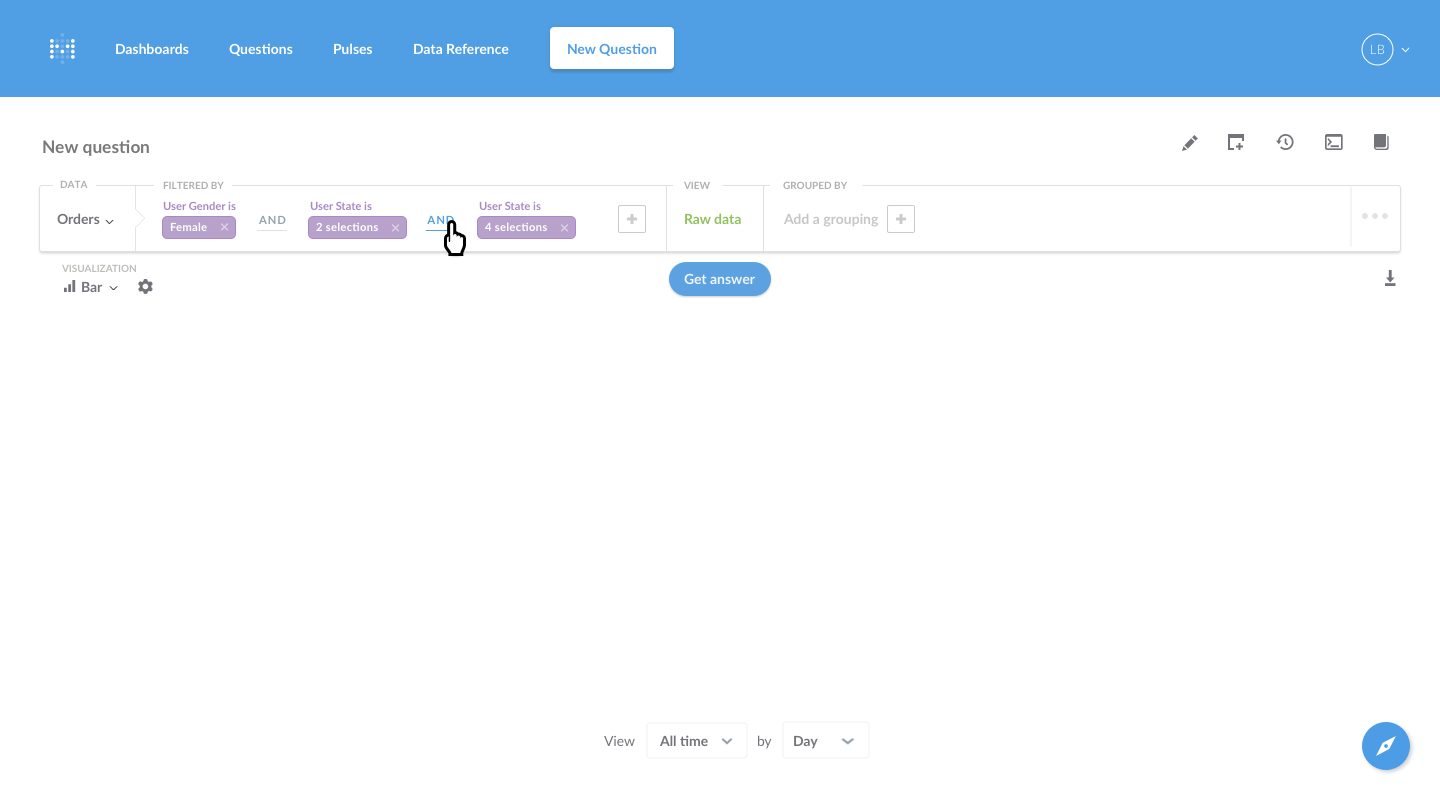
- Clicking on the AND simply toggles it to an OR, and vice a versa.
- The X button on filters has been moved into the filter token to reduce clutter.
- I think @mokra's suggestion for how the mixed and/or logic should work is reasonable enough.
Screens:
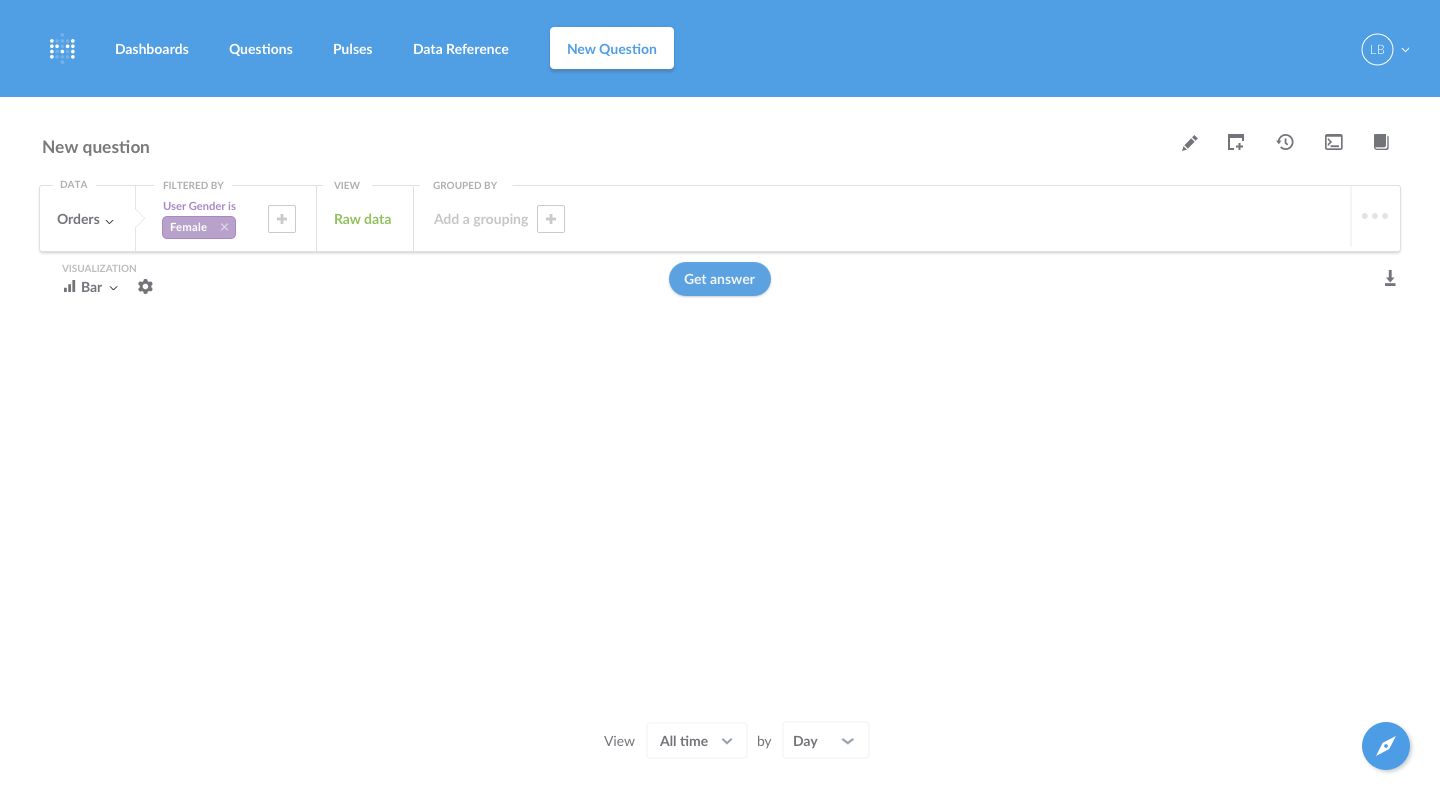
Starting scenario, with one filter already present:
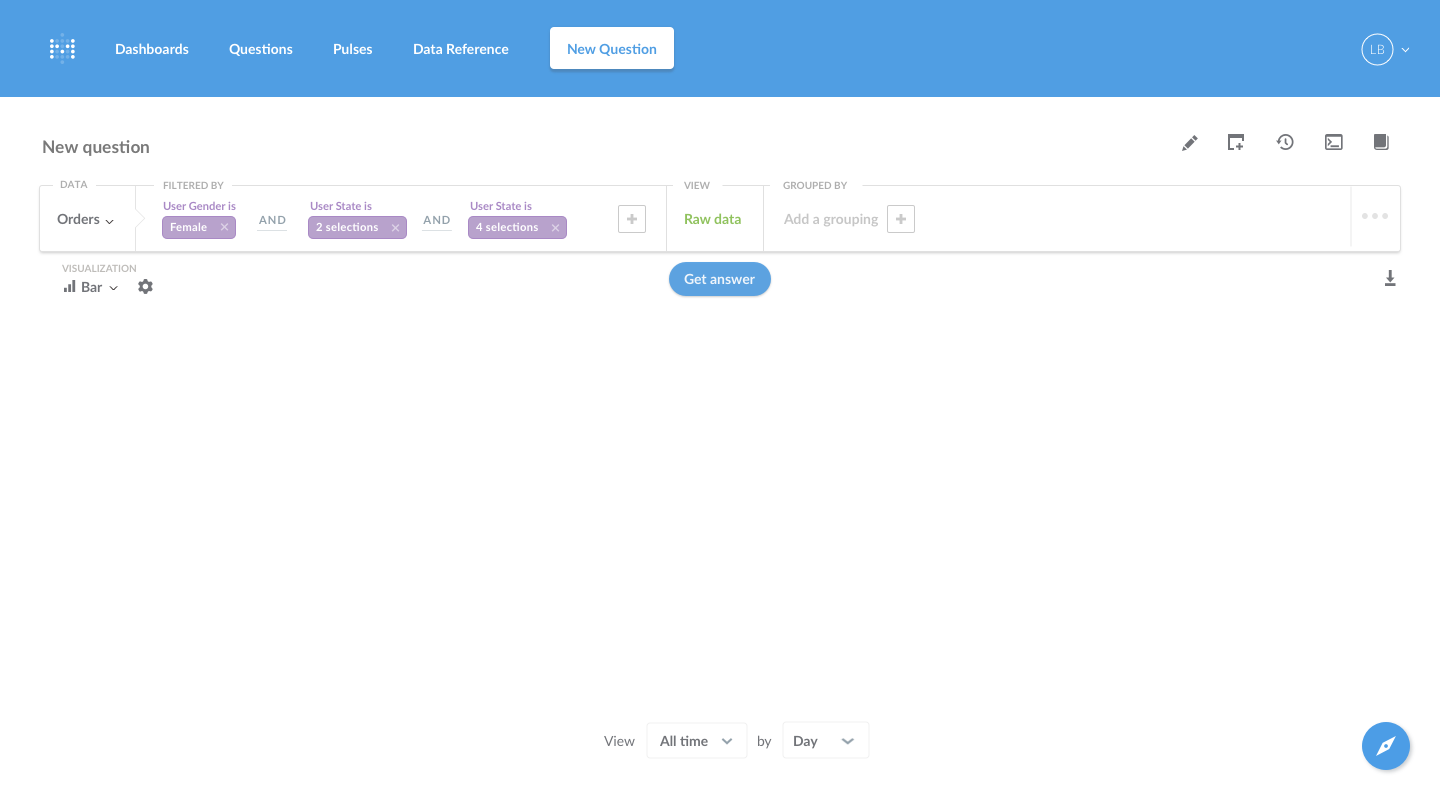
Subsequent filters that are added default to having ANDs between them:
The ANDs can be clicked on to change them to ORs, and vice a versa:
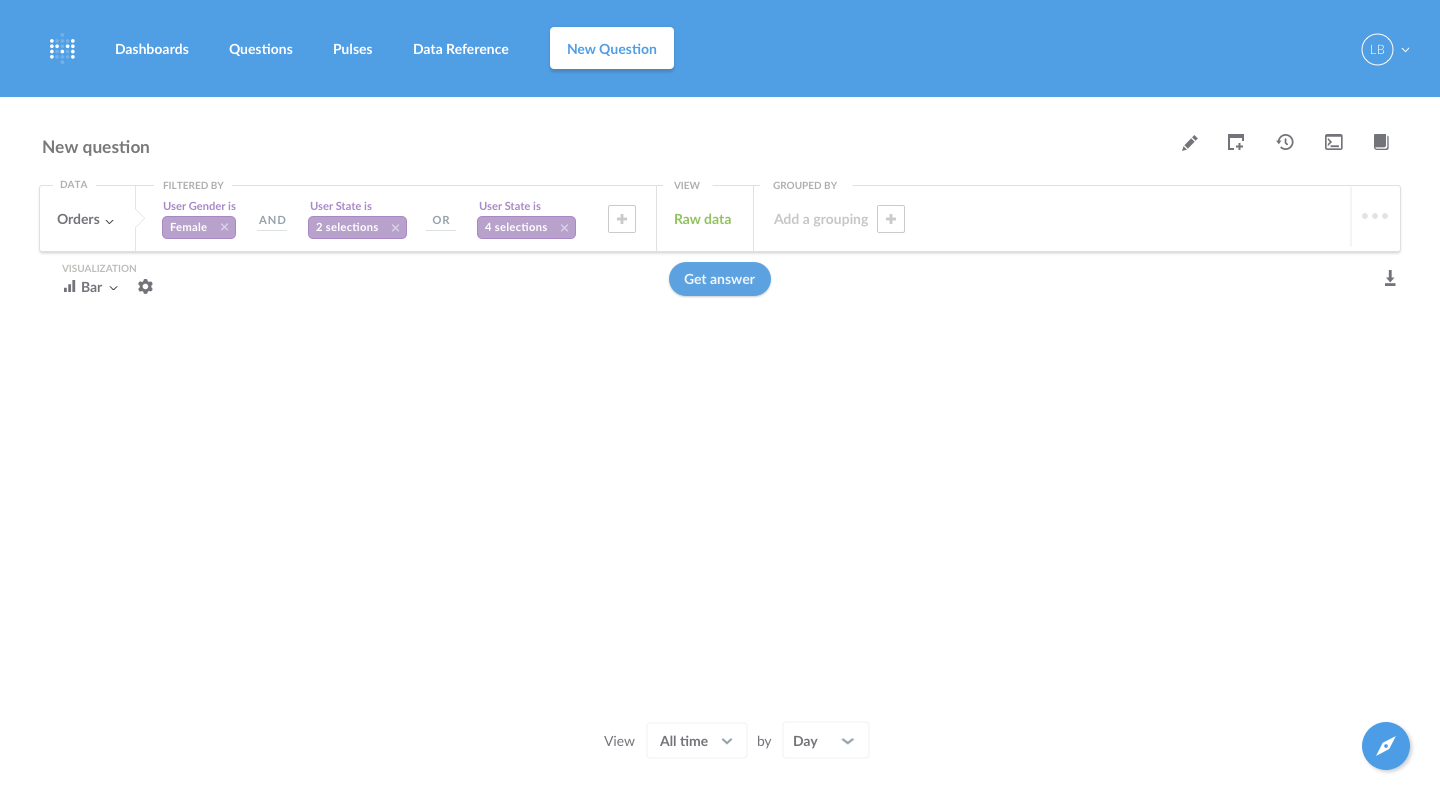
The AND has been changed to an OR:
One possible riff would be to increase the padding between ORs and decrease the padding between ANDs when they're mixed in order to clarify the logical groupings:
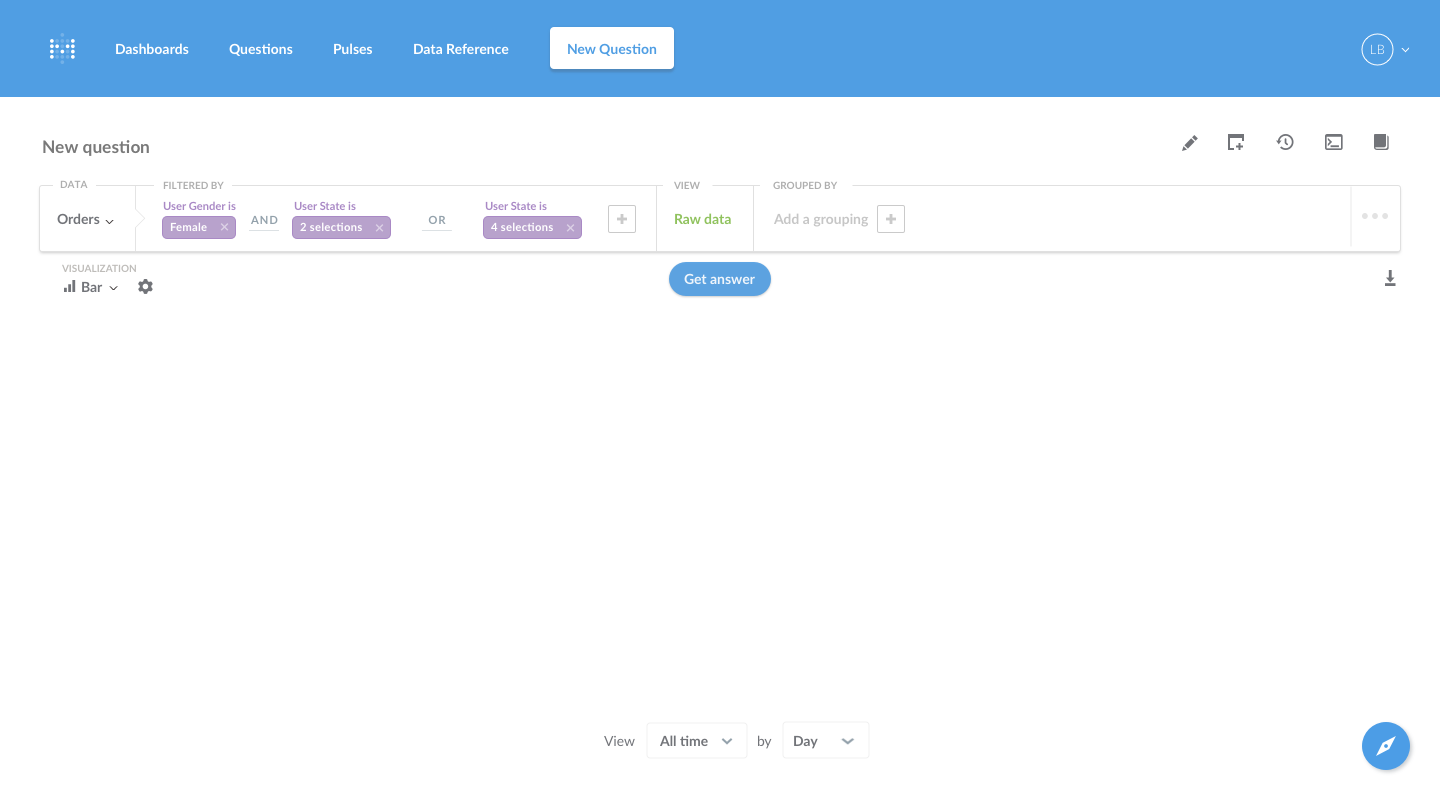
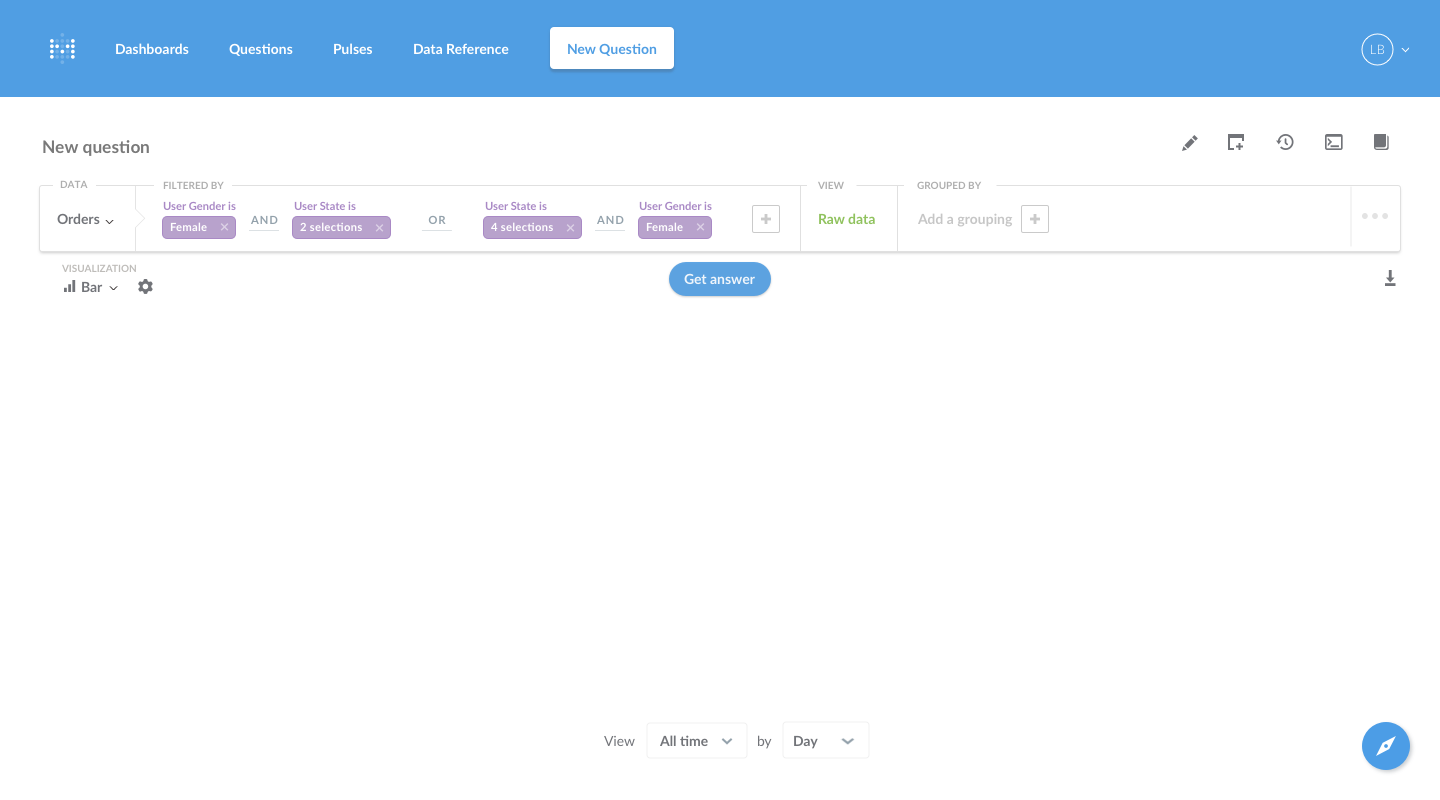
This would hopefully clarify a scenario like this, where the user is trying to find orders from female users in either one group of states, or orders from female users in a different group of states:
camsaul
on 11 Nov 2017
I'd really love this feature!
 mokra
on 11 Nov 2017
mokra
on 11 Nov 2017
@mazameli @salsakran @kdoh I started taking a look at implementing this and realized there's a complication with only allowing filters of the form (a AND b) OR (c AND d): drill-down relies on being able to add an AND filter on top of all the existing filters.
contrived example:
(vendor = Amazon) OR (category = Widget)
becomes
(vendor = Amazon) OR (category = Widget AND date = 2017-11-20)
whereas you actually want
((vendor = Amazon) OR (category = Widget)) AND (date = 2017-11-20)
But now you have 2 levels of nesting which isn't handled in the proposed UI.
 tlrobinson
on 20 Nov 2017
tlrobinson
on 20 Nov 2017
@mazameli There's also a slight UX issue with moving the "x" in the value bubbles: some filters have multiple values (BETWEEN, INSIDE)
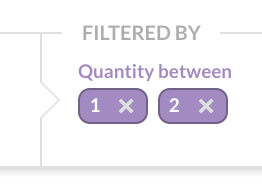
That said, I don't think the existing UI for filters with multiple values is ideal, so maybe we should rethink it.
tlrobinson
on 20 Nov 2017
any updates on this feature?
 gabiudrescu
on 22 Jun 2018
gabiudrescu
on 22 Jun 2018
Very interested!
 lp-lima
on 11 Jul 2018
lp-lima
on 11 Jul 2018
@tlrobinson I think it'd still be a big win to facilitate one level of nesting of AND/OR, then for more than that guide the user towards a native question. Those determined to stay in the QB could do things the long way:
(vendor = Amazon AND date = 2017-11-20) OR (category = Widget AND date = 2017-11-20)
 lindsay-stevens
on 12 Jul 2018
lindsay-stevens
on 12 Jul 2018
Even just an OR or IN would be nice. There seem to be a few instances where substantial features were removed in the name of simplicity, resulting in sizable regressions in capability.
 etcook
on 12 Jul 2018
etcook
on 12 Jul 2018
Is there any update about this? We just started using this tool and it's amazing but missing this feature is not allowing us to create some questions we need for our dashboard :disappointed:
 jhoanmanuelms
on 3 Aug 2018
jhoanmanuelms
on 3 Aug 2018
@jhoanmanuelms you can still create those questions, admitted not through the query builder, but you can build part of the question and then convert it to SQL and continue with SQL.
See: https://metabase.com/docs/latest/users-guide/04-asking-questions.html#using-sql
 jornh
on 3 Aug 2018
jornh
on 3 Aug 2018
Dropping to custom SQL ruins the report ... you lose drilldowns and the ability to WYSIWYG edit, two of the primary benefits of using this tool.
Without this simple functionality you are forcing us to play games with the underlying fact table, creating pseudo-measures to indicate various composite filtering predicates we might use on the table.
At a minimum can't you just implement the same Custom Expression builder that you have for the select "View" columns?
Or give us pass-thru SQL edit capability on just the WHERE clause, which shouldn't affect WYSIWYG View column selection, Groupings or Drilldowns. In fact this would be a very useful feature as we could add arbitrary subquery filters referencing other database objects (tables, views, SPs) which is not possible today.
 jkowtko
on 9 Aug 2018
jkowtko
on 9 Aug 2018
This is a feature I would be waiting for. Right now I had to combine columns using Coalesce or subquery and then filter on the resulted column.
 tashiritzy
on 10 Aug 2018
tashiritzy
on 10 Aug 2018
Dropping some examples of UI for "query builders" : https://github.com/FGRibreau/ui-predicate and https://www.quora.com/What-are-some-examples-of-an-elegant-UI-that-allows-filtering-by-conditionals
 revolunet
on 18 Nov 2018
revolunet
on 18 Nov 2018
I understand the support of full binary logic would be not straightforward.
A quick fix for this would be to add support for "custom condition" as a field when adding a predicate, the same way we can have "custom expressions" in the "View" pane of the custom query editor.
 antoine-lizee
on 11 Feb 2019
antoine-lizee
on 11 Feb 2019
Please support this soon :)
 constantx
on 13 May 2019
constantx
on 13 May 2019
Started working on this today. No nesting yet, and the design can be improved, but I'd love to receive some feedback :smile:

 matthieu-foucault
on 29 May 2019
matthieu-foucault
on 29 May 2019
Started working on this today. No nesting yet, and the design can be improved, but I'd love to receive some feedback 😄
Hi Matthieu, the visual you present looks very nice, but a single AND/OR toggle only scratches the surface of the type of logic that would be needed in most cases. Using the graphical form that you are proposing, I would suggest allowing nesting of logic groups with parentheses would be the minimum requirement to be really useful.
Thanks. John
jkowtko
on 29 May 2019
@matthieu-foucault congrats. looks good.
question: how can we help you out with testing? also, what happens if you add 3 conditions? how is the AND / OR operator behaving then?
gabiudrescu
on 29 May 2019
@jkowtko Of course, as I said, that was only the first day of working on that :wink: . It looks like adding nesting to the UI will require some reworking: the StructuredQuery API does not handle nesting and assumes that the "AND" operator is used. The API it is wrapping (query) does though, so it's a matter of making the nested queries available, and adding the UI for it.
As a first step regarding nesting, I think the UI should default to a disjunctive normal form ((a AND b) OR (c AND d)) , as showed in @mokra 's examples. More design would be needed to have a UI that allows the user to choose where the "parentheses" are, if this is something that we want. We can also require that the user writes the filter as a DNF, which will keep the UI a bit simpler (as @lindsay-stevens suggested).
@gabiudrescu For now, I have a single CompoundFilter, meaning that the same operator would be used between the three filters (i.e. they would both switch when you click on one). This is going to change when I add nesting though.
Regarding testing, I'm not there yet. I'll get back to you when it's ready to be tested :)
matthieu-foucault
on 29 May 2019
This is what a nested statement looks like:

matthieu-foucault
on 30 May 2019
@matthieu-foucault looking good, thanks so much for working on this. For when there is 4 or more filters to consider, maybe parentheses could work by adding an icon under the x for deleting the filter. Like a little parenthesis or something, and when you click it it disables the filtering UI (maybe a light grey background to indicate when it's disabled) so you can select another filter to group with (or add to) in a parenthesis. Once that selection is made the icon is dark grey, and finally to ungroup a filter click the icon again and the icon goes back to grey.
lindsay-stevens
on 30 May 2019
@matthieu-foucault it looks great. can't hardly wait to test it.
gabiudrescu
on 30 May 2019
The way your animation looks, if you click on an OR operator it would change to an AND operator and enclose any same-level block of OR conditions preceding it within a set of parentheses. I think that would work, although the default when adding a new condition would be to make it an OR by default. Is this what you were intending?
jkowtko
on 30 May 2019
Looking at the interaction in my last comment, I don't like how the parentheses appear around another operator than the one that is clicked, it's a bit confusing.
Here's my latest proposal: when you click on an operator, it wraps the two surrounding filters in parentheses, switches the operator, and removes extra parentheses (e.g. ((a or b) or c) becomes (a or b or c))

And here's an example of what happens when you click on an operator that is in a nested statement.

@lindsay-stevens I see what you mean regarding moving filters into parentheses. I think the current interaction allows most (or all?) combinations of ANDs and ORs (albeit maybe with a few extra clicks), while keeping the interface relatively simple.
@camsaul I'd love your feedback on this, before I go through the effort of making it PR-ready
matthieu-foucault
on 30 May 2019
@matthieu-foucault Considering that the entire QB is being changed in 0.33, I would probably wait until that is released to continue the work. You can follow the changes in PR #9592
 flamber
on 30 May 2019
flamber
on 30 May 2019
@Flamber beat me to it as usual. :D We love the enthusiasm you guys are showing here, but there are a couple things to note before you spend too much more time on this:
- We're looking at pretty significantly changing the GUI querying experience to allow more space for more powerful questions.
- When we've looked at similar UI/interaction solutions to the nested ANDs plus ORs problem, we've kept coming back to the feeling that _typing_ out a filter expression feels a lot more natural. (Solving the nested conditions problem is a requirement for this because of drill-through.)
We still agree that the lack of ORs is a big problem; we just want to get the solution right.
 mazameli
on 30 May 2019
mazameli
on 30 May 2019
Screenshots in #9592 show large QB UI changes, but do seem to leave a filter bar. @flamber @mazameli disclosures notwithstanding, is there value in exploring potential UI patterns for the filter bar here so that when 0.33 lands we can pick up work on this?
 wenzowski
on 30 May 2019
wenzowski
on 30 May 2019
Looking at the interaction in my last comment, I don't like how the parentheses appear around another operator than the one that is clicked, it's a bit confusing.
Here's my latest proposal: when you click on an operator, it wraps the two surrounding filters in parentheses, switches the operator, and removes extra parentheses (e.g.((a or b) or c)becomes(a or b or c))
And here's an example of what happens when you click on an operator that is in a nested statement.
@lindsay-stevens I see what you mean regarding moving filters into parentheses. I think the current interaction allows most (or all?) combinations of ANDs and ORs (albeit maybe with a few extra clicks), while keeping the interface relatively simple.
@camsaul I'd love your feedback on this, before I go through the effort of making it PR-ready
(acknowledging the comments about waiting for the new GUI before attempting this ...)
I think your idea here looks good ...
And ... I just remembered, we will also need the ability to insert conditions in the middle of an expression that has mixed logic in it. So, how about a small '+' below the 'x' for each expression, which will add a new expression to the right of it?
jkowtko
on 30 May 2019
hey guys, I see that the whole query builder has changed since this discussion ended and there is no OR support there from what I see... can you give an update on this item? for us a simple OR might help in quite a few cases, while for more complex cases with nesting I think it should be a part of the data model that is developed by data engineers
 AlexYeskov
on 9 Oct 2019
AlexYeskov
on 9 Oct 2019
Since my last went unanswered...dropping a little reminder here to maintainers that members of the community are happy to contribute both code and design drafts when core team is ready to receive those contributions and have capacity to collaborate.
wenzowski
on 10 Oct 2019
closed in #11868
 salsakran
on 13 Mar 2020
salsakran
on 13 Mar 2020
@salsakran how can I do this? I'm using v0.35.4 and don't see how to do it.
 montanaflynn
on 23 Jul 2020
montanaflynn
on 23 Jul 2020
@montanaflynn scroll to Filter expressions and including ORs in filters in https://www.metabase.com/docs/latest/users-guide/custom-questions.html in the users guide.
Also covered in https://www.metabase.com/blog/custom-expressions/index.html#custom-filters on the blog.
jornh
on 23 Jul 2020
@jornh thanks, I was just trying to figure it out from within metabase. It looks like custom expressions don't support is not null though. I can add two filters user_id is not emptyAND group_id is not empty but when using custom expressions it doesn't let me check if a field is null or "not empty".
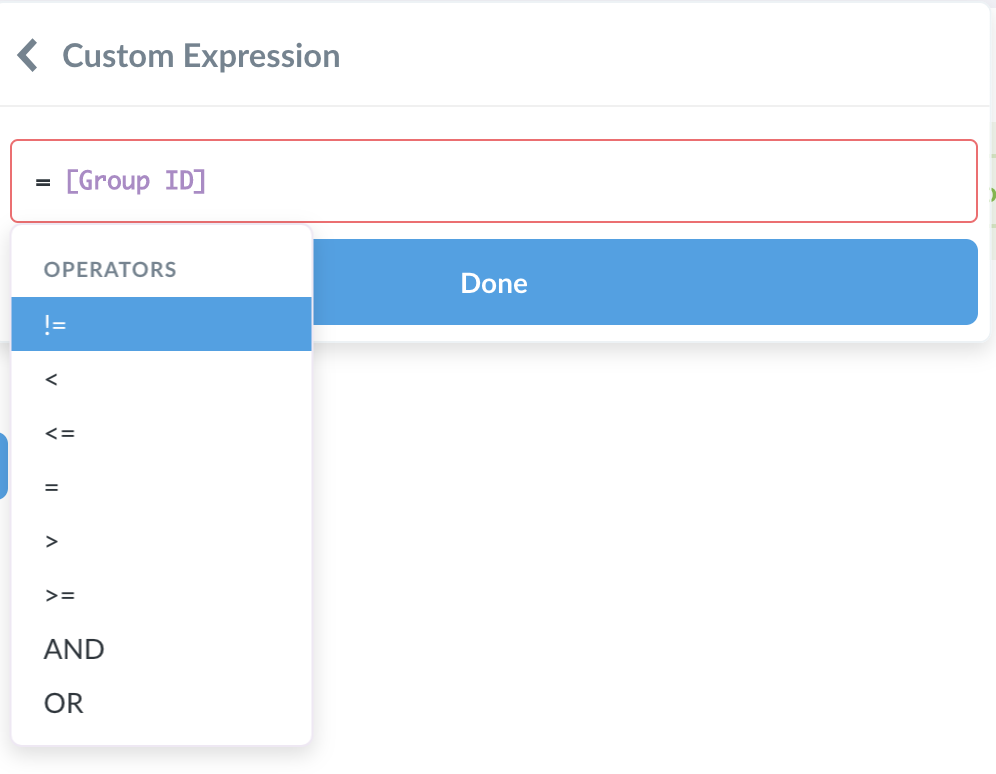
Alas I'm just using SQL but it degrades the experience since you cannot select a segment of rows from visualizations.
montanaflynn
on 23 Jul 2020
@montanaflynn this has been added in #12947
 sbelak
on 23 Jul 2020
sbelak
on 23 Jul 2020
Custom Expression is not available on segments with the last version v0.36.3

 maximepvrt
on 5 Aug 2020
maximepvrt
on 5 Aug 2020
@maximepvrt It's not in any of the 0.36 - but it doesn't have anything to do with this issue - tracking here: #13069
flamber
on 5 Aug 2020
Related issues
 arasmussen
·
44Comments
salsakran
·
51Comments
arasmussen
·
44Comments
salsakran
·
51Comments
 joklee
·
52Comments
joklee
·
52Comments
 hopsoft
·
53Comments
hopsoft
·
53Comments
 iwozzy
·
42Comments
iwozzy
·
42Comments
Most helpful comment
The following are designs by @mazameli from duplicate issue #5870. Everything past this point is a cut-and-paste of his comment
Designs
I've thought about this a little, and here's one way that I think this could work:
Screens:
Starting scenario, with one filter already present:
Subsequent filters that are added default to having ANDs between them:
The ANDs can be clicked on to change them to ORs, and vice a versa:
The AND has been changed to an OR:
One possible riff would be to increase the padding between ORs and decrease the padding between ANDs when they're mixed in order to clarify the logical groupings:
This would hopefully clarify a scenario like this, where the user is trying to find orders from female users in either one group of states, or orders from female users in a different group of states: