Metabase: Unable to connect to MongoDB Atlas Cluster
I am unable to connect Metabase to my MongoDB Atlas 4.0 database. It seems like several other people on this closed issue are experiencing the same issue, so I'm re-opening it here.
For the host, I've tried entering the cluster (xxx-xxx.mongodb.net) and each of the shards (xxx-shard-00-0x-xxx.mongodb.net).
For the MongoDB user, I've tried giving them read-only, readwrite, and admin access.
My authentication database is set to admin. My connection string is ssl=true&replicaSet=xxx-shard-0&readPreference=secondary.
I've also tried seemingly all the various permutations of the above configurations. It seems that no matter what I do, I get the following connection error:
com.mongodb.MongoTimeoutException: Timed out after 3000 ms while waiting to connect. Client view of cluster state is {type=UNKNOWN, servers=[{address=xxx-shard-00-0x-xxx.mongodb.net:27017, type=UNKNOWN, state=CONNECTING, exception={com.mongodb.MongoSocketReadException: Prematurely reached end of stream}}]
Connecting to my database with the following command line works:
mongo "mongodb+srv://xxx-xxx.mongodb.net/xxx" --username xxx -pxxx
Versions
- Browser: Chrome 73.0.3683.103
- OS: macOS Mojave 10.14.4
- Database: MongoDB 4.0.9
- Metabase: 0.32.5
- Metabase hosting environment: EC2 using
metabase.jar - Metabase internal database: H2 (default)
Repro Steps
- Create an account at https://cloud.mongodb.com
- Create a MongoDB Atlas cluster (Configuration: any, MongoDB v4.0.9)
- In security, add
0.0.0.0/0to IP whitelist (all IPs) - In security, add a user with name
metabaseand any permission - Try to connect to this MongoDB cluster with any Metabase instance
 arasmussen
All 44 comments
Also worth noting, IMO, is that this seems to be the issue with a form for adding the database connection. If I add it manually in psql, all works 👌
 harunsmrkovic
on 30 Apr 2019
harunsmrkovic
on 30 Apr 2019
I am using M0 Sandbox for my personal project.
I got this problem when I switch my laptop's public IP.
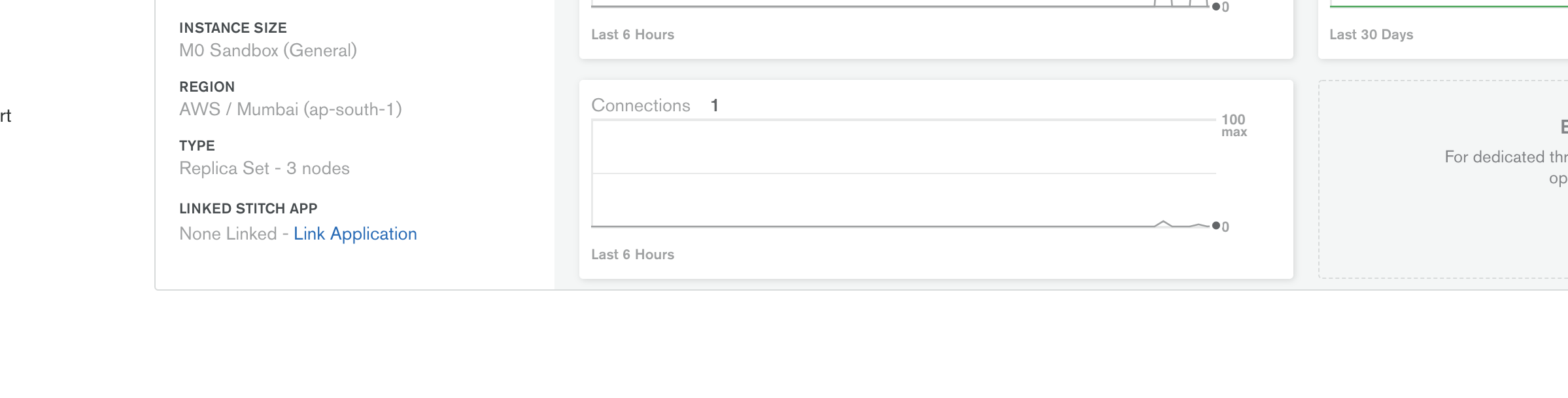
Whitelisting my public IP solved my problem. :)

Hope this helps
 JoooJooo
on 2 May 2019
JoooJooo
on 2 May 2019
@JoooJooo thanks for the comment. As specified in the original issue, I have 0.0.0.0/0 whitelisted, which is all IP addresses.
Can you post your full Metabase database page (host, database name, port, authentication database, additional options, etc), and also mention which version of Metabase/MongoDB you're on?
arasmussen
on 2 May 2019
URI: "mongodb://
I have whitelisted specific IPs Who can hit these clusters.
I am using Java application for CRUD operation on my DB.
JoooJooo
on 2 May 2019
I'm facing the same problem here. If someone had success, please share with us.
 vitoresende
on 14 May 2019
vitoresende
on 14 May 2019
@mazameli thanks for noticing and triaging! Do you have any idea if this is a priority for the Metabase team, and if so when it'll be addressed? We've been unable to use Metabase for the past few months and are pretty close to just giving up.
arasmussen
on 23 May 2019
I am experiencing same issue. Is there any solution? Because of this I am planing to move atlas to some dedicated vm instance.
 beykansen
on 26 May 2019
beykansen
on 26 May 2019
I've solved by manually added mongo db to postgres db of metabase
beykansen
on 26 May 2019
I am having the same issue when connecting to MongoDB. Everything was working fine prior to the latest update but I am now unable to connect to MongoDB. The data is still updating in the already created dashboards and questions. However, I am getting a timeout exception when trying to connect to any of my databases, even the ones that already exist.
This has rendered Metabase unusable.
 marcowbb
on 5 Jun 2019
marcowbb
on 5 Jun 2019
Receiving the exact same error message:
com.mongodb.MongoTimeoutException: Timed out after 3000 ms while waiting to connect. Client view of cluster state is {type=UNKNOWN, servers=[{address=xxx-shard-00-0x-xxx.mongodb.net:27017, type=UNKNOWN, state=CONNECTING, exception={com.mongodb.MongoSocketReadException: Prematurely reached end of stream}}]
Is there any update on this?
 TheJoshE
on 5 Jun 2019
TheJoshE
on 5 Jun 2019
@TheJoshE me too, have tried everything to get this working, all different tags for metabase containers. @harunsmrkovic How did you go about adding it manually when I "docker exec" into my docker container psql doesn't seem to be installed?
 stuart-clark-45
on 5 Jun 2019
stuart-clark-45
on 5 Jun 2019
Facing the same issue. Had to temporarily move to Redash for the basic data. Any idea on the timelines for this?
 sanjukurian
on 10 Jun 2019
sanjukurian
on 10 Jun 2019
I'm working on a fix for this now, I'll have something to try out soon.
 ogeagla
on 13 Jun 2019
ogeagla
on 13 Jun 2019
I'm working on a fix for this now, I'll have something to try out soon.
How long can I get it? I have a job that requires this feature.
 logosty
on 13 Jun 2019
logosty
on 13 Jun 2019
Fix will be out with release 0.32.9 in a few days, I'll comment here once it's merged if you all want to try out from master or Docker image.
ogeagla
on 13 Jun 2019
Fix is merged. On master, when adding MongoDB, you'll now see a Use DNS SRV when connecting option. I was able to connect to my Atlas cluster with no additional options when using DNS SRV. LMK if you all are able to test this.
ogeagla
on 14 Jun 2019
Thanks for fixing! Happy to test it out.
How can we access the .jar from master? I don't see it in the repo.
arasmussen
on 14 Jun 2019
There is no jar in the codebase. You have a few options:
- Wait for our latest Docker image to build and I'll post a link here.
- Pull
masterand build a jar yourself using./bin/buildor just run the application directly usingyarn run build && lein run. - Wait for
0.32.9release, which is planned for later today.
ogeagla
on 14 Jun 2019
Fixed by #10130, planning on shipping this as part of our 0.32.9 release later today.
 camsaul
on 14 Jun 2019
camsaul
on 14 Jun 2019
I tried master. I can sucsesfully connected now. But this time none of tables showing. Tried synic db schema too.
beykansen
on 15 Jun 2019
Thanks for fixing!
But I can't see my tables too!
logosty
on 17 Jun 2019
@beykansen @logosty Do you see any errors in the log, if you do a forced sync?
Admin > Databases > (database) > Sync database schema now.
 flamber
on 17 Jun 2019
flamber
on 17 Jun 2019
I know what happened, it only show the Authentication Database.
logosty
on 17 Jun 2019
@flamber of course I did.
@logosty Did you manage to show all of them?
beykansen
on 17 Jun 2019
@beykansen I can't find the place to set, but fortunately I just want to query one database.
logosty
on 17 Jun 2019
@ogeagla This has not worked for me....
com.mongodb.MongoConfigurationException: Unable to look up SRV record for host XXXXXXXXXXXX.
Can you provide any advice please?
marcowbb
on 17 Jun 2019
@marcowbb Are you connecting to MongoDb Atlas? Are you able to connect to your cluster using mongo shell using the mongodb+srv// connection string? Anything you can grab from the logs as well?
@beykansen You probably checked this, but are you connecting to an Atlas database with actual data in it? Did you see any errors in the sync logs?
I would also be curious to know how many others are still experiencing issues after trying the fix.
ogeagla
on 17 Jun 2019
@ogeagla yes mongodb+srv// works from the command line.
The logs are showing the following info, have redacted server info:
`
Jun 18 11:52:04 INFO metabase.sync.util :: FINISHED: Analyze data for mongo Database 11 'BSM' (508 ms)
Jun 18 11:56:12 DEBUG metabase.middleware.log :: GET /api/user/current 401 107 µs (0 DB calls)
"Unauthenticated"
Jun 18 11:56:12 DEBUG metabase.middleware.log :: GET /api/session/properties 200 4 ms (1 DB calls) Jetty threads: 3/50 (4 idle, 0 queued) (147 total active threads) Queries in flight: 0
Jun 18 11:56:12 DEBUG metabase.middleware.log :: GET /api/user/current 401 216 µs (0 DB calls)
"Unauthenticated"
Jun 18 11:56:14 DEBUG metabase.middleware.log :: POST /api/session 200 158 ms (2 DB calls) Jetty threads: 3/50 (4 idle, 0 queued) (148 total active threads) Queries in flight: 0
Jun 18 11:56:14 DEBUG metabase.middleware.log :: GET /api/user/current 200 3 ms (3 DB calls) Jetty threads: 3/50 (4 idle, 0 queued) (148 total active threads) Queries in flight: 0
Jun 18 11:56:14 DEBUG metabase.middleware.log :: GET /api/database 200 7 ms (4 DB calls) Jetty threads: 3/50 (4 idle, 0 queued) (148 total active threads) Queries in flight: 0
Jun 18 11:56:14 DEBUG metabase.middleware.log :: GET /api/collection/root/items 200 17 ms (6 DB calls) Jetty threads: 3/50 (4 idle, 0 queued) (148 total active threads) Queries in flight: 0
Jun 18 11:56:14 DEBUG metabase.middleware.log :: GET /api/collection/root 200 3 ms (2 DB calls) Jetty threads: 3/50 (4 idle, 0 queued) (148 total active threads) Queries in flight: 0
Jun 18 11:56:14 DEBUG metabase.middleware.log :: GET /api/database 200 6 ms (3 DB calls) Jetty threads: 3/50 (4 idle, 0 queued) (148 total active threads) Queries in flight: 0
Jun 18 11:56:15 DEBUG metabase.middleware.log :: GET /api/automagic-dashboards/database/10/candidates 200 464 ms (6 DB calls) Jetty threads: 3/50 (4 idle, 0 queued) (148 total active threads) Queries in flight: 0
Jun 18 11:56:17 DEBUG metabase.middleware.log :: GET /api/session/properties 200 2 ms (1 DB calls) Jetty threads: 3/50 (4 idle, 0 queued) (148 total active threads) Queries in flight: 0
Jun 18 11:56:17 DEBUG metabase.middleware.log :: GET /api/setting 200 403 µs (0 DB calls) Jetty threads: 3/50 (4 idle, 0 queued) (148 total active threads) Queries in flight: 0
Jun 18 11:56:17 DEBUG metabase.middleware.log :: GET /api/setup/admin_checklist 200 4 ms (10 DB calls) Jetty threads: 3/50 (4 idle, 0 queued) (148 total active threads) Queries in flight: 0
Jun 18 11:56:22 DEBUG metabase.middleware.log :: GET /api/database/9 200 2 ms (3 DB calls) Jetty threads: 3/50 (4 idle, 0 queued) (148 total active threads) Queries in flight: 0
Jun 18 11:56:27 DEBUG metabase.middleware.log :: PUT /api/database/9 400 16 ms (1 DB calls)
{:valid false,
:dbname "com.mongodb.MongoConfigurationException: Unable to look up SRV record for host XXXXXXXXXXXX.XXX.mongodb.net",
:message "com.mongodb.MongoConfigurationException: Unable to look up SRV record for host XXXXXXXXXXXX.XXX..mongodb.net"}
`
marcowbb
on 18 Jun 2019
@marcowbb Are you putting the shard in the hostname? IE, does it look like cluster-0-shard-0.mongodb.net or cluster-0.mongodb.net? I would make sure to use the latter. Probably not the issue since it connects from mongo shell.
Can you also paste the redacted result of dig $hostname?
ogeagla
on 18 Jun 2019
Yes doesn't work for either but I was including the shard. When I remove the shard on Metabase I get another error.
com.mongodb.MongoSecurityException: Exception authenticating MongoCredential{mechanism=SCRAM-SHA-1, userName='_xxxx_', source='_xxxx_', password=
Running dig provides the following (italics for redacted info):
; <<>> DiG 9.10.6 <<>> _xxxxxxxxxxxxxx.xxx._mongodb.net
;; global options: +cmd
;; Got answer:
;; ->>HEADER<<- opcode: QUERY, status: NOERROR, id: _00000_
;; flags: qr rd ra; QUERY: 1, ANSWER: 1, AUTHORITY: 0, ADDITIONAL: 1
;; OPT PSEUDOSECTION:
; EDNS: version: 0, flags:; udp: 4000
;; QUESTION SECTION:
;_xxxxxxxxxxx.xxx.mongodb.net_. IN A
;; ANSWER SECTION:
_xxxxxxxxxxxxx.xxx.mongodb.net_. 59 IN A _12.345.678.90_
;; Query time: 17 msec
;; SERVER: _123.345.678.90_#53(_123.345.678.90_)
;; WHEN: Tue Jun 18 13:21:47 BST 2019
;; MSG SIZE rcvd: 87
marcowbb
on 18 Jun 2019
Are you providing an auth DB for the connection? If not, can you try providing the same one as DB name? If you are using auth DB, can you try removing?
Are you behind any NATs/firewalls/proxies/VPNs?
ogeagla
on 18 Jun 2019
We had some of the problems mentioned above like 'Prematurely end of stream', 'Connection timeout', etc but with a IBM Cloud Database for MongoDB service. We thought at first this is a problem related to the service deploying a replica set. But it wasn't the issue.
Another thing worth mentioning was that the service was using self signed certificates. This somehow lead us to the solution. We had to download and import the certificates and follow the steps mentioned in #3877.
Now we can successfully connect to the service. Not sure if it will help you but i struggled a lot with these error and i thought any thing can be helpful.
 andreitere
on 25 Jun 2019
andreitere
on 25 Jun 2019
I also had the same problem and solved it using this method --


Now the parameters to fill in Metabase's "New Database" page are:-
Name : [Any name for your db]
Host : [your db instance].mongodb.net (note from screen 2 above)
Database name : test
Port : 27017
Database username : [a db username who has enough permissions to query db]
Database password : [password for the username above]
Authentication database : admin
Use DNS SRV when connecting : Tick it
-Save-
 sunnytambi
on 19 Jul 2019
sunnytambi
on 19 Jul 2019
@andreitere @sunnytambi Great feedback, thanks. I'll get some MongoDB-specific docs in place with this info.
ogeagla
on 19 Jul 2019
Now the parameters to fill in Metabase's "New Database" page are:-
Name : [Any name for your db]
Host : [your db instance].mongodb.net (note from screen 2 above)
Database name : test
Port : 27017
Database username : [a db username who has enough permissions to query db]
Database password : [password for the username above]
Authentication database : admin
Use DNS SRV when connecting : Tick it
Didn't work for me showing xxx-mongodb.net is not reachable until I made Authentication database empty.
 sergeyfilimonov
on 20 Sep 2019
sergeyfilimonov
on 20 Sep 2019
When I connected all I got was a bunch of system tables (named "Sy Ste M
The resolution was to leave the authentication database empty.
Found this by looking at the logs, noticed it was searching the wrong database even though I specified the correct one.
 noetix
on 13 Nov 2019
noetix
on 13 Nov 2019
i have a problem like this after add the DB_URI , if i run code "node seedDB.js" . its will error like this
 { Error: queryTxt ETIMEOUT xxxxxxxxxx.mongodb.net
  at QueryReqWrap.onresolve [as oncomplete] (dns.js:196:19)
  errno: 'ETIMEOUT',
  code: 'ETIMEOUT',
  syscall: 'queryTxt',
  hostname: 'cluster0-ub7sx.mongodb.net' }
Error: Error connecting to db: queryTxt ETIMEOUT xxxxxxxxx.mongodb.net
    at C:\xampp\htdocs\nuxt-promo-yourself\node_modules\connect-mongodb-session\index.js:75:17
    at err (C:\xampp\htdocs\nuxt-promo-yourself\node_modules\mongodb\lib\utils.js:411:14)
    at executeCallback (C:\xampp\htdocs\nuxt-promo-yourself\node_modules\mongodb\lib\utils.js:401:25)
    at err (C:\xampp\htdocs\nuxt-promo-yourself\node_modules\mongodb\lib\operations\mongo_client_ops.js:285:21)
    at parseFn (C:\xampp\htdocs\nuxt-promo-yourself\node_modules\mongodb\lib\operations\mongo_client_ops.js:197:21)
    at QueryReqWrap.dns.resolveTxt [as callback] (C:\xampp\htdocs\nuxt-promo-yourself\node_modules\mongodb-core\lib\uri_parser.js:86:18)
    at QueryReqWrap.onresolve [as oncomplete] (dns.js:196:10
)
```
what just happen ???
 Adhik13th
on 6 Feb 2020
Adhik13th
on 6 Feb 2020
Try using native mongodb:// pattern and not mongod+srv URL. It has some bug.
mongodb://username:password@project0-shard-00-00-####.mongodb.net:27017,your-proj-shard-00-01-xxxxx.mongodb.net:27017,project0-shard-00-02-####.mongodb.net:27017/database_name?ssl=true&replicaSet=project0-shard-0&&authSource=admin&retryWrites=true
 ashish3x3
on 11 May 2020
ashish3x3
on 11 May 2020
queryTxt ETIMEOUT
Had somewhat a same issue, turned out my friend was able to connect to my DB but i wasn't. So i changed my DNS to google's public DNS.
Throwing a link for the same here
Try making one of your friends try it or maybe change your DNS. Hope it works out buddy!
 aajinkya1203
on 15 May 2020
aajinkya1203
on 15 May 2020
Now the parameters to fill in Metabase's "New Database" page are:-
Name : [Any name for your db]
Host : [your db instance].mongodb.net (note from screen 2 above)
Database name : test
Port : 27017
Database username : [a db username who has enough permissions to query db]
Database password : [password for the username above]
Authentication database : admin
Use DNS SRV when connecting : Tick itDidn't work for me showing
xxx-mongodb.net is not reachableuntil I madeAuthentication databaseempty.
Same was my solution! Don't fill admin in the authentication database!
 rubenstolk
on 12 Jun 2020
rubenstolk
on 12 Jun 2020
I was facing similar issue, and was trying to connect via mongoose in my node applications. Got it fixed by adding useUnifiedTopology: true to mongoose.connect options.
Ref. https://mongodb.github.io/node-mongodb-native/3.3/reference/unified-topology/
 kushalarora92
on 16 Jun 2020
kushalarora92
on 16 Jun 2020
Try using native mongodb:// pattern and not mongod+srv URL. It has some bug.
mongodb://username:password@project0-shard-00-00-####.mongodb.net:27017,your-proj-shard-00-01-xxxxx.mongodb.net:27017,project0-shard-00-02-####.mongodb.net:27017/database_name?ssl=true&replicaSet=project0-shard-0&&authSource=admin&retryWrites=true
Solved my issue!
 yptuapp
on 16 Jun 2020
yptuapp
on 16 Jun 2020
Hi i have been trying to connect my Data as well and i faced the same issue with the pattern mongodb+srv But i manage to come trough by using the mongodb syntax :
mongodb://<UserName>:<Encode(password)>@List({host}:{port})/<DataBase>?ssl=true&replicaset=<dbName>-shard-0&authSource=admin
List({host}:{port}) = all my replica
mongodb+srv://digazu:<password>@digazu-tme-test-cbj5w.gcp.mongodb.net/<dbname>?retryWrites=true&w=majoritywith that one i'm getting
Unable to look up TXT record for hosterror !
 Schmidt96u
on 22 Jun 2020
Schmidt96u
on 22 Jun 2020
i solved it by changing the version of node to (2.2.12) as below:
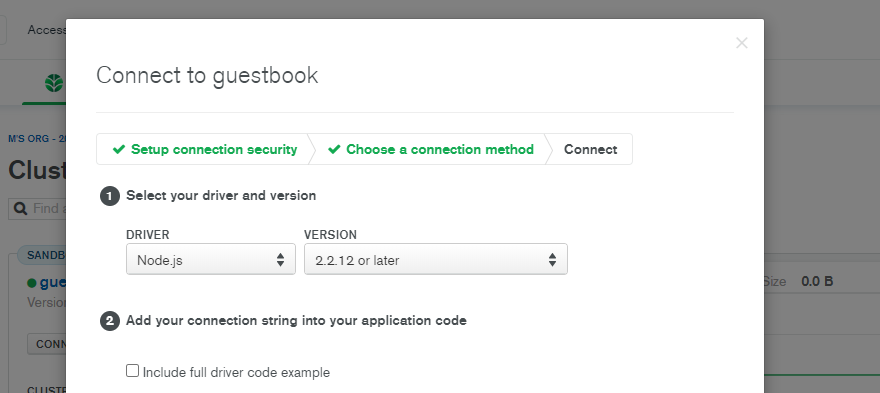
and then make sure to add ip address and it's shortlisted like below:

this should help ;)
 Mnabawy
on 16 Sep 2020
Mnabawy
on 16 Sep 2020
Related issues
 ayukidawe
·
85Comments
ayukidawe
·
85Comments
 gseva
·
44Comments
gseva
·
44Comments
 salsakran
·
51Comments
salsakran
·
51Comments
 rgabo
·
76Comments
rgabo
·
76Comments
 lucasloami
·
49Comments
lucasloami
·
49Comments
Most helpful comment
Receiving the exact same error message:
com.mongodb.MongoTimeoutException: Timed out after 3000 ms while waiting to connect. Client view of cluster state is {type=UNKNOWN, servers=[{address=xxx-shard-00-0x-xxx.mongodb.net:27017, type=UNKNOWN, state=CONNECTING, exception={com.mongodb.MongoSocketReadException: Prematurely reached end of stream}}]Is there any update on this?