Metabase: Connection to ms sql server no longer works
Connection to sql server no longer works, v25.2 works fine.
Tested with a clean and updated instance.
ERROR metabase.driver :: Failed to connect to database: Timed out after 5000 milliseconds.
- Your databases: Microsoft SQL Server 11.0.6251.0
- Metabase version: v26.0 + v.26.1 (both tested)
- Metabase hosting environment: Docker
Metabase internal database: MySQL
Repeatable steps to reproduce the issue
Add a MS SQL Server connection
⬇️ Please click the 👍 reaction instead of leaving a +1 or 👍 comment
 joklee
All 52 comments
From the error message, looks like we should focus in on how we are connecting to SQL Server. With the 0.26.0 release, we switched to the official Microsoft JDBC driver (https://github.com/metabase/metabase/pull/5491). Maybe there's something in your connection parameters that worked on the old driver and is causing a failure to connect on this new driver. Can you include what settings your using to connect to SQL Server, such as whether you are using SSL, how you are specifying the user name (i.e. with a domain or not) etc.
Is it possible that there is high latency between the Metabase instance and the SQL Server instance?
 senior
on 2 Oct 2017
senior
on 2 Oct 2017
I too am experiencing this issue, it seems as if no matter what you insert into the settings, the database never creates.
 rwatts3
on 5 Oct 2017
rwatts3
on 5 Oct 2017
I am experiencing the same problem. I was able to connect to a SQL Server endpoint using the Metabase v0.25.2 docker image without any specified connect parameters. The same connection does not work with the v0.26.1 docker image.
Error that I see when trying to add a SQL Server database. Below, I have replaced my domainusername with 'DOMAINuser'.
com.microsoft.sqlserver.jdbc.SQLServerException: Login failed for user 'DOMAINuser'. ClientConnectionId:c2e63b19-9db7-4b66-adb6-92d22aa46b3f
 lloonngg
on 6 Oct 2017
lloonngg
on 6 Oct 2017
Could it be related to this post?
https://github.com/metabase/metabase/issues/6069
[Note: No, that's a different driver - Cam]
I tried including the forward slash in the host field and got a different error: timeout after 5000 millisecond error.
lloonngg
on 7 Oct 2017
Is it possible that there is high latency between the Metabase instance and the SQL Server instance?
No and works with v25.2 fine.
We use this database into a application with the official Microsoft JDBC driver, too.
We have no domain user.
joklee
on 10 Oct 2017
Just a quick update: I just tried the v0.26.2 docker image, and I still have the same problem connecting to a SQL Server endpoint which continues to work in the v0.25.2 docker image.
lloonngg
on 22 Oct 2017
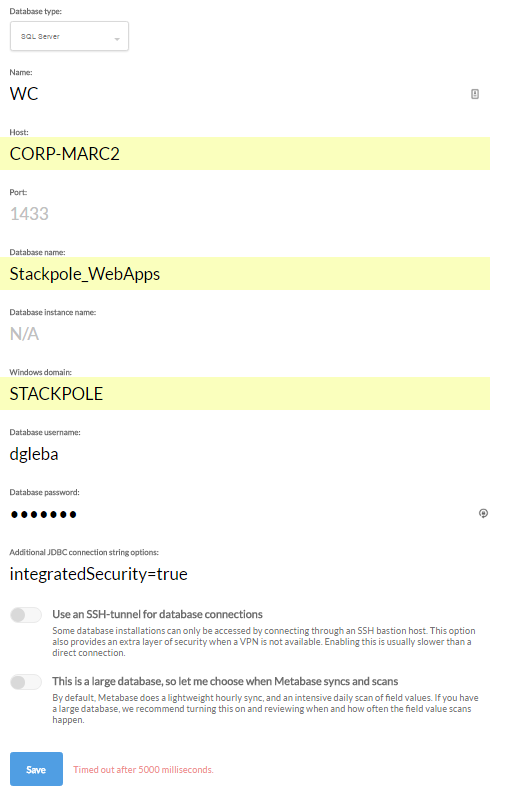
I have tried many entries in the form pictured below.
You can see the error on the pic. The same error is on the metabase console.
I am using v 26.1.
Any ideas?

 dgleba
on 24 Oct 2017
dgleba
on 24 Oct 2017
@dgleba I'm not sure why the official driver can't connect to your SQLServer instance, maybe you can help with troubleshooting it as I'm far from an expert in windows authentication.
When we setup the connection, we will prefix the name with the domain automatically, so your database username should just be dgleba. I think the above settings will cause 'STACKPOLEstackpoledgleba`.
If that doesn't work, it looks like you can put integratedSecurity=true into the Additional JDBC connection string options, which will use the credentials of the logged in user running Metabase to log into SQLServer.
senior
on 24 Oct 2017
@senior - I tried username as dgleba. Same error.
Pic below shows integratedSecurity=true included. Same error.
I can connect the same way (integratedSecurity=true) using dBeaver with either the jtds or the MS drivers. They both work.
So - I still cannot connect with Metabase.
dgleba
on 24 Oct 2017
Strange, with a AWS RDS instance works version 26.2 without problems.
joklee
on 25 Oct 2017
I had a similar problem with my SQL Server when I updated from 2.5.2 to 2.6.2. The connection was working just fine with the 2.5.2 version, but it stopped working after the update.
Apparently it is not working with domain accounts.
My configurations were as follow:
Windows Domain: DOMAIN.com
Database Username: USERNAME (No slash and domain name here, just the username)
No additional configurations, no SSH, etc.
I changed the account to a SQL Server account and it worked immediately. It is just a workaround though.
 Leoat12
on 27 Oct 2017
Leoat12
on 27 Oct 2017
@Leoat12 I'm not familiar with the different types of accounts used to log into SQL Server. Could you give some more detail about what kind of account you were using before that wasn't working and what the difference is between that and the SQL Server account that you're using that works?
senior
on 27 Oct 2017
@senior
SQL Server accepts two types of accounts to have access of the database engine: Domain Account or SQL Server Account. A domain account is an account that was created in an Active Directory. An Active Directory allows you to use the same account in multiple computers in an organization and in compatible applications, mostly by Microsoft, including SQL Server. When you use a domain account you have to specify the domain along with the user name usually in two formats: DOMAINUSERNAME or [email protected].
A SQL Server account is an account created withing SQL Server itself, so it doesn't have a domain or anything.
If you need more information, feel free to ask.
Leoat12
on 28 Oct 2017
Same problem over here ... want to try metabase but the connection to SQL Server with Domain credentials DOMAINUSERNAME is not working.
 philde
on 8 Nov 2017
philde
on 8 Nov 2017
We had to setup Kerberos on the server before we were able to connect with Domain Credentials.
Following Microsofts Guides :
https://docs.microsoft.com/en-us/sql/linux/sql-server-linux-active-directory-authentication
https://docs.microsoft.com/en-us/sql/connect/jdbc/using-kerberos-integrated-authentication-to-connect-to-sql-server
After Kerberos was working from the first guide, the important parts from the second guide are
- Creating a SQLJDBCDriver.conf
SQLJDBCDriver {
com.sun.security.auth.module.Krb5LoginModule required useTicketCache=true;
};
- Setting up Java to use the inf and krb.conf, this is the line we use
/usr/bin/java -Djava.security.auth.login.config=/opt/metabase/SQLJDBCDriver.conf -Djava.security.krb5.conf=/etc/krb.conf -jar /opt/metabase/metabase.jar > /var/log/metabase.log
I also had to set it up using the UserPrincipalName, with the domain in upper case (Referenced in Microsofts above guide)

The important part of the JDBC string to make Kerberos authentication work after Kerberos is setup and the metabase is launched to use Kerberos
integratedSecurity=true;authenticationScheme=JavaKerberos
Edit: We are on v0.26.2 on a CentOS 1708 box, using PostgreSQL as the as the internal database.
The tested SQL Servers are SQL Server 2012 Standard
 maltobelli
on 8 Nov 2017
maltobelli
on 8 Nov 2017
Great find and explanation @maltobelli including the extra details that you’re on Linux
I guess this means https://github.com/metabase/metabase/blob/master/bin/docker/Dockerfile needs updating to include Kerberos and some mechanism to point to a krb.conf to resolve the issue for OP’s environment. Here’s a Dockerfile for another java and apk image based tool that already supports Kerberos: https://github.com/streamsets/datacollector-docker
 jornh
on 8 Nov 2017
jornh
on 8 Nov 2017
Is there any with ad credentials working version out there?
Is it possible to fix the download version under https://www.metabase.com/start/jar.html ?
philde
on 13 Nov 2017
I wish I didn't have to, but I went back to v 25.2 and it is now working. I can connect from my Ubuntu server that is not on the domain -- it is within the corporate network though. I hope you get to the bottom of the issue in v 26.2 and beyond.
dgleba
on 13 Nov 2017
@philde It seems at least one person got it working as reported in https://github.com/metabase/metabase/issues/6056#issuecomment-342901500 above. Note this might also require some Kerberos configuration on the database server end.
If you’re not able to go with that and want to take a jar version with the old jTDS driver for a spin one option could be to step back to a pre 0.26 version like e.g. the jar attached to https://github.com/metabase/metabase/releases/tag/v0.25.0.RC2 - alternatively set up a SQL Server user.
Going forward I tend to agree with the Metabase team that the Microsoft driver is the right choice. There were other scenarios not supported by the jTDS driver (search issues here) and it hasn’t seen updates for some time whereas the Microsoft driver is being actively developed.
jornh
on 13 Nov 2017
Thank you Jornh for the 0.25.0.RC2 link - im going to try this version.
Now metabase is working! Metabase is such a great tool - Thank you!
sadly im not able to add users on this server on my own, adding new users will end up in a never ending discussion ;)
philde
on 14 Nov 2017
I have the same problem. Works on v0.25.RC2, v0.25.2, but not on v0.26.0 or v0.26.2
ERROR metabase.driver :: Failed to connect to database: Timed out after 5000 milliseconds.
- Your databases: Microsoft SQL Server
- Metabase version: v0.26.0 or v0.26.2 (tested both, not working)
- Metabase hosting environment: Docker
- Metabase internal database: MySQL
- Repeatable steps to reproduce the issue
Add a MS SQL Server connection
I'm using SQL Authentication, and still can't get the database to connect using v0.26+.
I've been reading the MS connection string docs here: https://docs.microsoft.com/en-us/sql/connect/jdbc/setting-the-connection-properties and have been able to successfully connect to the same database using RazorSQL on MacOS X.
In RazorSQL I'm using the 'com.microsoft.sqlserver.jdbc.SQLServerDriver' driver and the following connection string...
jdbc:sqlserver://<hostname>;databaseName=Testdb;integratedSecurity=false;instanceName=IT;trustServerCertificate=true;authenticationScheme=NativeAuthentication;authentication=SqlPassword;selectMethod=cursor;encrypt=false;serverName=<server name>
Using this I can successfully connect to the server in RazorSQL, but when replicated in the Metabase connection settings, I can't connect :(
Please can this bug be investigated further? Thanks.
 jgibbarduk
on 15 Nov 2017
jgibbarduk
on 15 Nov 2017
I can confirm connection to SQL Server using Integrated Authentication works-for-me based on the description in the https://github.com/metabase/metabase/issues/6056#issuecomment-342901500 above. Note: this is the case using Metabase.jar directly, not Docker yet
My current config:
Your databases: Microsoft SQL Server 2008
Metabase version: yesterdays master (but since this is driver/config related I think 0.26.2 and up)
Metabase hosting environment: Metabase.jar on Windows 10 tested both in a CMD shell and a Ubuntu WSL shell (so essentially Linux)
Metabase internal database: H2
Additional notes:
To have Integrated Auth working with
authenticationScheme=JavaKerberosit looks like you MUST have akrb.conffile and point to it. See the Microsoft docs.To check your
krb.confworks to authenticate with the credentials you want to use: on Windows you can use<Java path>\bin\kinit.exe [user], on Linuxkinit [user]I could get my setup working without the optional login configuration file so my start command is stripped down to
java -Djava.security.krb5.conf=c:/Hub/kerberos/krb.conf -jar metabase.jarupdate the discussion in http://discourse.metabase.com/t/connect-to-sql-server-via-windows-authentication/2801 now contains further details including a
krb.conftemplate matching screenshot in maltobelli's comment above.
A bit more work is needed to have the above working in Docker ...
jornh
on 16 Nov 2017
If I've correctly understand all comments above, since the 0.26.0 release, a new SQL Microsoft JDBC driver (#5491) is used. All connections parameters that worked on the old driver no longer work now on this new driver.
From new SQL driver, a SQL Server connection must include a SSL / Kerberos?
On my current Metabase release (0.25), all my Metabase Database SQL Server connections are simply setup with a host, Windows domain, username and password and work fine.
"Additional JDBC connection string options" has been added during Add Database setup.
Someone know if a specific value must be added to the "Additional JDBC connection string options" to use a Windows domain account without SSL / Kerberos?
Or the 0.26 release and beyond will no longer work with a standard Windows Domain account?
 hexleyOlive
on 20 Dec 2017
hexleyOlive
on 20 Dec 2017
Anyone found a solution or good JDBC connection strings to use latest version of Metabase with MSSQL Server?
On my side, after lot of tests and research, below my results:
All my connections parameters for SQLServer that worked on v0.25 no longer work now on v0.27.2 (in fact since the v0.26).
Without changes connections parameters, 2 errors occurs during SQLServer connection (same case for new metabase installation):
ERROR metabase.driver :: Failed to connect to database: com.microsoft.sqlserver.jdbc.SQLServerException: The driver could not establish a secure connection to SQL Server by using Secure Sockets Layer (SSL) encryption. Error: "sun.security.validator.ValidatorException: PKIX path building failed: sun.security.provider.certpath.SunCertPathBuilderException: unable to find valid certification path to requested target". ClientConnectionId:1234567890
ERROR metabase.driver :: Failed to connect to database: com.microsoft.sqlserver.jdbc.SQLServerException: Login failed for user 'DOMAIN\user'. ClientConnectionId:1234567890
So, SSL is now used for all JDBC connection to MSSQL Server.
As explained above, MSSQL Driver has been upgrade with the latest version of JDBC Driver (com.microsoft.sqlserver/mssql-jdbc "6.2.1.jre7"), so if the SSL is not enabled on SQL Server and without extra connection string, all MSSQL connections will fail.
Now, based on the Microsoft documentation about JDBC properties available, some "Additional JDBC connection string options" can be used in Metabase.
Based on Microsoft documentation, connection string below must be able to be sufficient to use standard connection (Windows domain without SSL):
trustServerCertificate=true;encrypt=false;integratedSecurity=false
Below details about each string:
trustServerCertificate=true
Set to "true" to specify that the Microsoft JDBC Driver for SQL Server will not validate the SQL Server SSL certificate.
encrypt=false
Set to "true" to specify that the SQL Server uses Secure Sockets Layer (SSL) encryption for all the data sent between the client and the server if the server has a certificate installed. The default value is false.
integratedSecurity=false
"false," the username and password must be supplied.
Once these "Additional JDBC connection string options" are enabled, the connection always fail but SSL error is now gone.
ERROR metabase.driver :: Failed to connect to database: com.microsoft.sqlserver.jdbc.SQLServerException: Login failed for user 'DOMAIN\user'. ClientConnectionId:1234567890
That mean's now the SSL is no longer used during the JDBC connection.
However, a standard error is always present.
Any help will be appreciated.
hexleyOlive
on 27 Dec 2017
We have the same problem with version 0.24.2 and cannot upgrade to the latest, because of the new driver.
Is there any plan to resolve this and any out of the box solution?
Our MSSQL2008 is hosted on Win2008 server and tried to set the SSL for Database, but still we got:
ERROR metabase.driver :: Failed to connect to database: com.microsoft.sqlserver.jdbc.SQLServerException: Login failed for user 'DOMAIN\administrator'. ClientConnectionId:1234567890
 sbakurdzhiev
on 8 Jan 2018
sbakurdzhiev
on 8 Jan 2018
Only solution for me is to setup a SQL account and no longer used the DOMAIN account.
hexleyOlive
on 8 Jan 2018
Does we need to create a new SQL account or we can use the default SA user?
We've tried with the default SA user and we got the same error.
sbakurdzhiev
on 8 Jan 2018
Always better to create dedicated SQL account for this kind of uses (manage permissions and identify clearly SQL user)
hexleyOlive
on 8 Jan 2018
Will this issue be addressed? Seems like a serious problem but it still hasn't been assigned to anyone.
 sldorman
on 22 Jan 2018
sldorman
on 22 Jan 2018
Thanks to the advice above, managed to get it working on my test Windows 2012R2 host using authenticationScheme=JavaKerberos and krb.conf.
It was pretty painful, would be nice to have this fixed properly.
 seapsv
on 22 Jan 2018
seapsv
on 22 Jan 2018
The discussion in http://discourse.metabase.com/t/connect-to-sql-server-via-windows-authentication/2801 now contains further configuration details for setup using the Microsoft JDBC driver including a krb.conf template matching Metabase database setting screenshot in maltobelli's comment above.
Would be good to have more people wanting Windows Authentication to verify those steps work in different environments running with Metabase.jar. With that the foundation would be there for re-coding for a better UX, including ultimately getting it baked into the Metabase Docker image.
jornh
on 26 Jan 2018
I am also experiencing this on version v0.28.1. I am using a SQL Server account and I just get a "Failed to connect to database: Timed out after 5000 milliseconds." message.
Any ideas on how to fix?
 IkeLutra
on 8 Mar 2018
IkeLutra
on 8 Mar 2018
I've read through the comments and other pages multiple times and there seems to be a conclusion that the problem only exists if one is connecting via the Windows domain. That is not the case for me, I have a SQL Server user and cannot connect. I stayed with version 0.24 for a long time due to this problem. I just downloaded 0.28.6 and tried again and the result was the same as @IkeLutra - it will not work with a SQL Server user (I've used the default 'sa' and a created user - both work in the older Metabase). I've tried the various JDBC connection strings mentioned above without success.
@hexleyOlive - you said you were able to connect using a SQL Server user. Can you tell me what you set differently from earlier versions?
The Metabase team has a done a great job fixing other issues which I need but I can't upgrade because I can't connect to SQL Server.
Your browser and the version: Firefox 59.0.2 (64-bit)
Your operating system: Windows 7
Your databases: SQL Server 2012
Metabase version: 0.24.1 (works), 0.26 (doesn't work), 0.28.6 (doesn't work)
Metabase hosting environment: jar on Win 7 - SQL Server, jar, and browser all on same local host
Metabase internal database: H2 (default)
Here is my connection info for version 0.24:
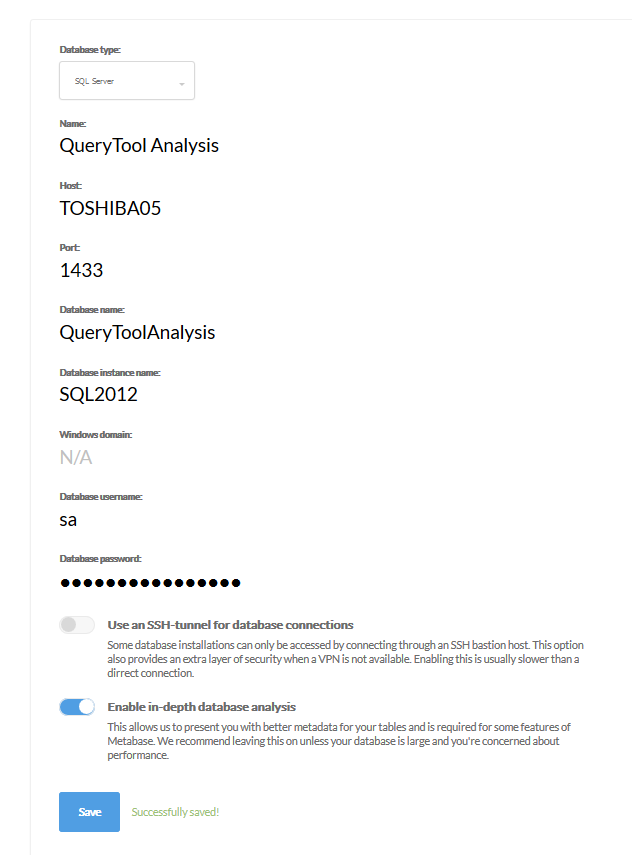
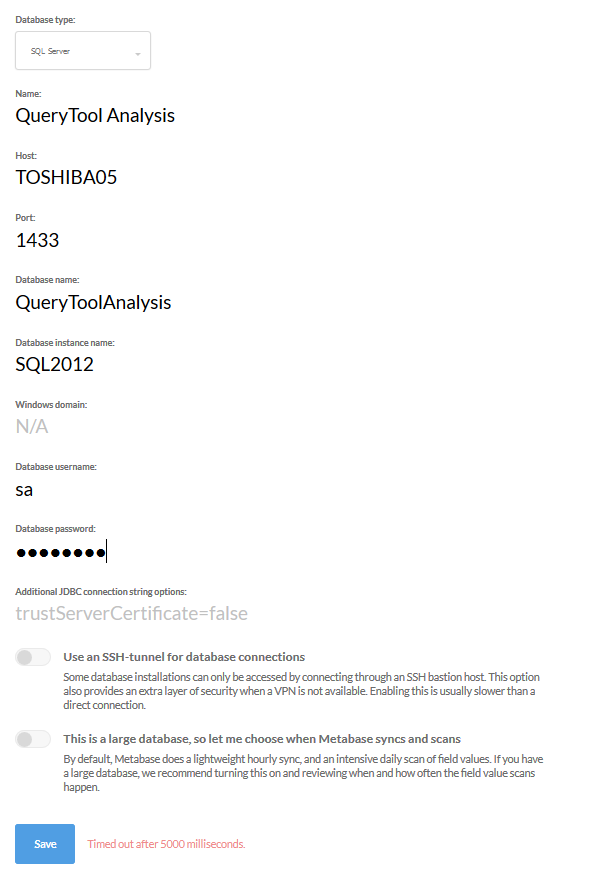
Here is my connection info for version 0.28.6:
sldorman
on 24 Apr 2018
@sldorman
As you saying:
the problem only exists if one is connecting via the Windows domain
Solution: no longer used the DOMAIN account (setup and use SQL local account)
hexleyOlive
on 25 Apr 2018
I've only ever used a SQL Server account yet I can't get it to work with the newer versions.
sldorman
on 25 Apr 2018
@sldorman I see you are using a named instance. Does this discourse comment help?
Also try with a FQDN hostname as suggested in https://github.com/metabase/metabase/issues/1854#issuecomment-353705244
If that still isn’t it I suggest trying debugging the driver/connectivity related issue with this well explained small reference example:
https://www.microsoft.com/en-us/sql-server/developer-get-started/java/windows/step/2.html
I think it should be possible to follow even if you don’t have a lot of programming skills. It can work as a standin replacement for your suggestion of https://github.com/metabase/metabase/issues/7443 for debugging. I’m willing to follow you on the journey on a https://discourse.metabase.com thread.
jornh
on 26 Apr 2018
@jornh Your reference to the discourse comment was very helpful. Even though I had read this comment before, re-reading caused me to notice a very important line.
My issue was indeed related to the use of dynamic ports instead of the static 1433 I kept entering in my connection settings. 1433 worked in the earlier version of Metabase and works whenever I connect to the database from .NET applications. However, those connections use ODBC which, according to the commenter AndrewMBaines, takes care of the port difference for you:
"A normal ODBC connection has the sense to first connect to the listener on 1434 to find out the correct port."
I changed SQL Server to have a fixed port and then entered that port in the Metabase admin screen - it worked! Finally!
I will add detail on how to set a fixed port in the discourse discussion.
Thanks again!
sldorman
on 26 Apr 2018
Ok, so after messing around for a long while, here is the simple solution...
The way the SQL Server JDBC driver is implemented is not pooling 1434 for the correct instance port, so you need to do this yourself on your SQL Server by running:
SELECT DISTINCT
local_tcp_port
FROM sys.dm_exec_connections
WHERE local_tcp_port IS NOT NULL
Then when creating your connection to your SQL Server instance use this port that is returned there instead of 1433, that should get you connected, if you restart your SQL Server you may need to do that again...
 johnceci-m3
on 1 May 2018
johnceci-m3
on 1 May 2018
Being able to connect with a SQL Server account, named instance, and fixed port solved my problem for my local environment but using a fixed port on our servers is not acceptable by IT. I need the ability to use dynamic ports.
To use dynamic ports, the port should NOT be included in the connection string. SQL Browser will determine the proper port to use without issue. I have confirmed through a number of tests that Metabase is putting port 1433 in the connection string even when the user doesn't enter one in the Admin Panel. If Metabase didn't include a port, everything would work fine. I will write up a separate issue on this with details about my tests.
sldorman
on 1 May 2018
I definitely agree what I put out there is less than ideal, however for most people it will be a mid-term solution since how often do we restart our SQL Servers, and that is the only time the port may change...They need to correct the bug, however this let me get along with my setup and testing...figured others would want a way to keep progressing while they fix it properly....
johnceci-m3
on 1 May 2018
Has there been any confirmation from the Metabase team that they see this as a critical problem and plan to resolve it? I understand that there is a very technical work around for this problem, but we dont have to jump through the same hoops for any other db connection so why should it be so difficult for one of the most popular databases in organisations? Would appreciate anybody from Metabase team that could provide clarity.
 lutvdh
on 27 Jun 2018
lutvdh
on 27 Jun 2018
@luthervdh so our official position is: "we want Metabase to work super easily with SQL Server (and all other supported databases)"
The functional reality is that there are a _lot_ of ways people run SQL Server in its various editions, no one on the core team is a SQL Server expert, and it's not one of the databases we run production loads on. There's a practical limit to how much we can do as non-production users of SQL Server. We've committed to maintaining the driver, and all our functionality on SQL Server, and have it in our continuous testing infrastructure.
This is a place where we need help. Please help us figure out how to solve this =)
Metabase is an open source project, the MB driver protocol is documented, and we could really use help from someone who understands the specifics of SQL Server as it's deployed in your organizations. Presumably you all are paying Microsoft for SQL Server in some fashion (some of you a lot, I'm sure), and if you're getting value from (Metabase+SQL Server), you can help everyone else continue to get these benefits by helping us fix this.
 salsakran
on 27 Jun 2018
salsakran
on 27 Jun 2018
@salsakran , that is great news that Metabase team is committed to making Metabase work super easily with MS SQL Server. I'm not a MS SQL SQL expert but think we have some knowledgable contributors on the thread that could add their voice.
I'm running Metabase on a CentOS Linux, connecting to a remote MS SQL using Windows Authentication.
@jornh , do you have any ideas on what the Metabase team can do to improve the ease of use for working with MS SQL Server db's?
lutvdh
on 27 Jun 2018
Please see #7597 for a easy solution (with full explanation of the cause) to this problem.
sldorman
on 29 Jun 2018
Hey folks! The fix mentioned above by @sldorman got released as part of v0.30.0. Would be good to know if that fixes the issue for you (or not)!
Kudos to @sldorman for the very structured effort on clarifying the dynamic port issue in #7597.
I believe it fixes an important issue - potentially biting a lot of you here - but that there’s still the possibility that there are some corner cases not solved in the:
"we want Metabase to work super easily with SQL Server (and all other supported databases)"
... Way, to quote https://github.com/metabase/metabase/issues/6056#issuecomment-400817803. I expect those should be mostly related to that you MUST run on non-Windows hosts (so also Docker) AND that you can’t set up an SQL user, but MUST use Kerberos/Windows domain accounts (but, hey, I’ve been wrong in believing stuff before 🙄)
To not spam everybody too much please just 👍 on this post, if Metabase+SQL Server works for you - if you still see important issues please share appropriately!
A good starting point for planning to go to v0.30.0 (or 0.30.1 if you prefer to wait for that) - as it contains quite some UI changes etc. is
https://metabase.com/blog/before-upgrading-to-0.30/index.html#before-you-upgrade
Thanks 🙏
jornh
on 19 Aug 2018
@jornh & @sldorman , upgraded metabase and tried connect to db again. Getting following error in logs. Will appreciate any insights.
Sep 26 16:24:25 ERROR metabase.driver :: Failed to connect to database: com.microsoft.sqlserver.jdbc.SQLServerException: The driver could not establish a secure connection to SQL Server by using Secure Sockets Layer (SSL) encryption. Error: "sun.security.validator.ValidatorException: PKIX path building failed: sun.security.provider.certpath.SunCertPathBuilderException: unable to find valid certification path to requested target". ClientConnectionId:627fb507-8300-4147-b636-36e941e370b7
Sep 26 16:24:30 ERROR metabase.driver :: Failed to connect to database: Timed out after 5000 milliseconds.
Sep 26 16:24:30 DEBUG metabase.middleware :: POST /api/database 400 (5 s) (0 DB calls).
{:valid false, :dbname "Timed out after 5000 milliseconds.", :message "Timed out after 5000 milliseconds."}
lutvdh
on 26 Sep 2018
@lutvdh the error message you got in the post just above this one is to be expected if the certificate handed out by your SQL server is not trusted by Java on your Metabase machine - simplest workaround for that part is well described in https://github.com/metabase/metabase/issues/6056#issuecomment-354136193 and should consist of adding trustServerCertificate=true
If that alone is not enough to get you running I propose you start a fresh new issue and give details on your specific environment as requested by the issue template. This thread is already long and sad enough as it stands, and not everyone on here might want to follow along.
I’m committed to go through this as far as I possibly can and also pick out and raise separate technical GitHub issues towards the Metabase team. I think we have the first with often needing to set trustServerCertificate=true which I’ll raise later today.
jornh
on 26 Sep 2018
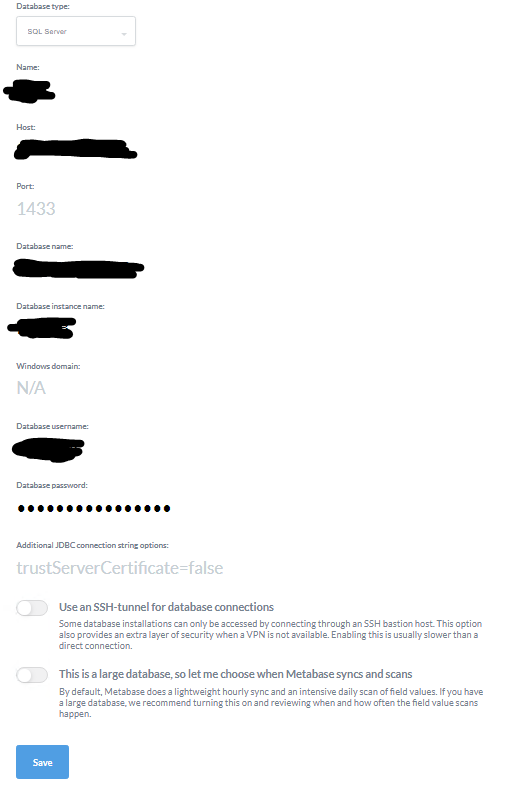
Thanks for the review of these threads, Finally Im able to connect into the system, here is my configuration, all I did was:
- Disable firewall (I'll do the enabling adjustments afterwards)
- leave the port blank cause its already a default value
- leave the domain blanks
My server specs:
- Windows 2016 (both db and web)
- DB server located in secret secured underground based connected using VPN 👍 :)
- SQL server 2014
Hope this will get somebody to work on their SQL Server Metabase
Dont give up and Good luck!
 tombradev
on 23 Jan 2019
tombradev
on 23 Jan 2019
I'm on Metabase version v0.31.2. I just spent the last few hours on this, finally got it to work. The port was the issue. I'm new to metabase so this wasn't a case of it working before and then it stopped, it just didn't work as since I ran the jar for the first time a few days ago. I had issues connecting locally on my windows 10 environment, as well on a hosted linux box. In both environments I was able to connect metabase to another SQL Server instance hosted elsewhere. I was also able to connect to the problematic SQL Server instance via DBeaver/Squirrel and via php sqlsrv_connect, so I KNEW it's not a firewall issue. Understand that I do not control either instance, so my options altering the SQL Server instances are non-existent. The discussion above regarding port clued me in to what was going on. When I left the port blank, or explicitly 1433 (or 1434) it would not connect. So, I connected by dbeaver and launched Windows' Resource Monitor to monitor the ports and noted that DBeaver was actually connecting on a different port:
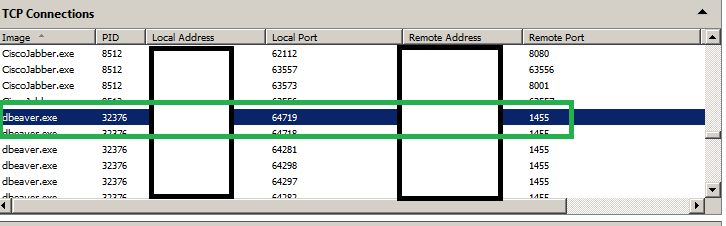
...so I put this port in (the remote port, of course) and voila, it connected!!! Again, I don't control this SQL Server instance, so I hope this port is relatively static, but at least I can connect and so confirm what the issue was. Obviously your port will be different so do the same procedure to find your port. I'm sure this will help at least someone. :)
Note that you CAN query the DB to get the port:
SELECT DISTINCT local_tcp_port FROM sys.dm_exec_connections WHERE local_tcp_port IS NOT NULL
...but that's assuming you have rights to such a query, which I do not.
 alexwestconsulting
on 23 Feb 2019
alexwestconsulting
on 23 Feb 2019
Closing this since the root cause was identified in #7597 and fixed in #8107
salsakran
on 5 Aug 2019
I also met the same problem that failed to connect my SQL Server from Metabase with the error message "Timed out after 5.0 s", while I can successfully connect to it with DBeaver .
 cucmeliu
on 28 Feb 2020
cucmeliu
on 28 Feb 2020
Yep, I've given up trying to connect using trusted authentication, I can
only connect to MSSQL using sql authentication.
On Fri, Feb 28, 2020 at 4:26 PM Leo notifications@github.com wrote:
I also met the same problem that failed to connect my SQL Server from
Metabase with the error message "Timed out after 5.0 s", while I can
successfully connect to it with DBeaver .—
You are receiving this because you were mentioned.
Reply to this email directly, view it on GitHub
https://github.com/metabase/metabase/issues/6056?email_source=notifications&email_token=AJCOF6N5AC3K2OMFA7HONXTRFENLHA5CNFSM4D4VCLT2YY3PNVWWK3TUL52HS4DFVREXG43VMVBW63LNMVXHJKTDN5WW2ZLOORPWSZGOENIWF6Y#issuecomment-592536315,
or unsubscribe
https://github.com/notifications/unsubscribe-auth/AJCOF6MGL6VPXE7BVTT6Q33RFENLHANCNFSM4D4VCLTQ
.
lutvdh
on 28 Feb 2020
Related issues
 dcoueron
·
129Comments
dcoueron
·
129Comments
 lucasloami
·
49Comments
lucasloami
·
49Comments
 Jacob-Kroeze
·
64Comments
Jacob-Kroeze
·
64Comments
 CCoffie
·
57Comments
CCoffie
·
57Comments
 hopsoft
·
53Comments
hopsoft
·
53Comments
Most helpful comment
Anyone found a solution or good JDBC connection strings to use latest version of Metabase with MSSQL Server?
On my side, after lot of tests and research, below my results:
All my connections parameters for SQLServer that worked on v0.25 no longer work now on v0.27.2 (in fact since the v0.26).
Without changes connections parameters, 2 errors occurs during SQLServer connection (same case for new metabase installation):
So, SSL is now used for all JDBC connection to MSSQL Server.
As explained above, MSSQL Driver has been upgrade with the latest version of JDBC Driver (com.microsoft.sqlserver/mssql-jdbc "6.2.1.jre7"), so if the SSL is not enabled on SQL Server and without extra connection string, all MSSQL connections will fail.
Now, based on the Microsoft documentation about JDBC properties available, some "Additional JDBC connection string options" can be used in Metabase.
Based on Microsoft documentation, connection string below must be able to be sufficient to use standard connection (Windows domain without SSL):
trustServerCertificate=true;encrypt=false;integratedSecurity=false
Below details about each string:
trustServerCertificate=true
Set to "true" to specify that the Microsoft JDBC Driver for SQL Server will not validate the SQL Server SSL certificate.
encrypt=false
Set to "true" to specify that the SQL Server uses Secure Sockets Layer (SSL) encryption for all the data sent between the client and the server if the server has a certificate installed. The default value is false.
integratedSecurity=false
"false," the username and password must be supplied.
Once these "Additional JDBC connection string options" are enabled, the connection always fail but SSL error is now gone.
That mean's now the SSL is no longer used during the JDBC connection.
However, a standard error is always present.
Any help will be appreciated.