Messagekit: Input bar covers last message
General Information
MessageKit Version: 0.13.1
iOS Version(s): 10.3.3(Device) & 11.3(Simulator)
Swift Version: 4.0
Devices/Simulators: Iphone SE
What happened?
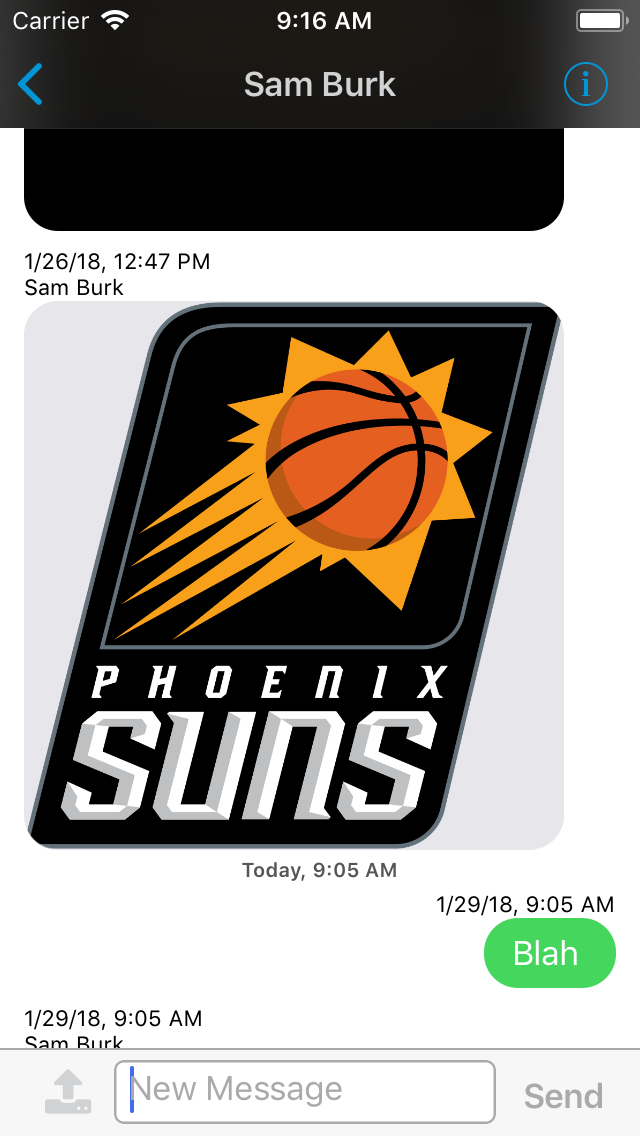
The last message is behind the input bar.
What did you expect to happen?
The last message to be above the input bar.
 NiklasWilson
All 16 comments
@NiklasWilson Thanks for reporting this but we need more information to help. You haven’t told us if it is replicable in the example project or not. Have you done anything to modify the top inset or bottom insets yourself?
Sent with GitHawk
 SD10
on 29 Jan 2018
SD10
on 29 Jan 2018
@SD10
I will look into testing it on the example project, was hoping to avoid doing that.
The only thing I do is add a NSAttributed string to top cell label.
now my extension to the MessagesLayoutDelegate does have
func heightForLocation(message: MessageType, at indexPath: IndexPath, with maxWidth: CGFloat, in messagesCollectionView: MessagesCollectionView) -> CGFloat {
return 0;
}
could that be the problem?
NiklasWilson
on 29 Jan 2018
Not likely any of those are the issue. Share your message input bar code?
Sent with GitHawk
SD10
on 29 Jan 2018
My message input bar code doesn't seem like it would effect it.
This is my input bar delegate
https://pastebin.com/s7492CWd
This is how I add the upload button
// Appends the upload button to input bar
var currentLeftStack = messageInputBar.leftStackViewItems
currentLeftStack.append(uploadButton)
messageInputBar.setStackViewItems(
currentLeftStack,forStack: InputStackView.Position.left,animated: false
)
messageInputBar.setLeftStackViewWidthConstant(to: 45, animated: false)
but I dont do anything anywhere to modify its height.
NiklasWilson
on 29 Jan 2018
@SD10 It did not occur in the example project, but all I did was run the example project.
So something that I am doing is messing it up.
My previous view has a bottom nav bar which was actually preventing this issue as it was beneath the input bar, but I was able to slightly see the bottom nav bar as the input bar didn't cover it 100% so i turned it off and now this problem has occurred.
NiklasWilson
on 30 Jan 2018
https://github.com/MessageKit/MessageKit/issues/399 This seems to be related to my problem as this is exactly the problem I had which I solved by turning on "_hidesBottomBarWhenPushed_" which then resulted in my current problem.
NiklasWilson
on 2 Feb 2018
SOLUTION
override func viewDidLayoutSubviews() {
messagesCollectionView.contentInset.bottom = messageInputBar.frame.height
messagesCollectionView.scrollIndicatorInsets.bottom = messageInputBar.frame.height
}
Which is apparently in the example app, must have missed that, but for anyone else who runs into the issue, this fixes it. (Solution proved by Corey)
NiklasWilson
on 5 Feb 2018
This is a bad very solution. If I'm using a UICollectionView subclass, I should be able to set the contentInset the same way I would for any UICollectionView type and see the same effect. If the MessagesViewController is to have a UICollectionView property, it should either document the weird behavior or let the collection view behave like it should. If the view controller fails to honor that, that's the library's fault. I shouldn't have to compensate for that behavior.
I happened to run into this issue because setting messagesCollectionView.contentInset.bottom did nothing. Maybe I should file an issue...
 funct7
on 18 Nov 2018
funct7
on 18 Nov 2018
Use the didChangeIntrinsicContentSize delegate method of the MessageInputBar to adjust the bottom inset.
Sent with GitHawk
 nathantannar4
on 18 Nov 2018
nathantannar4
on 18 Nov 2018
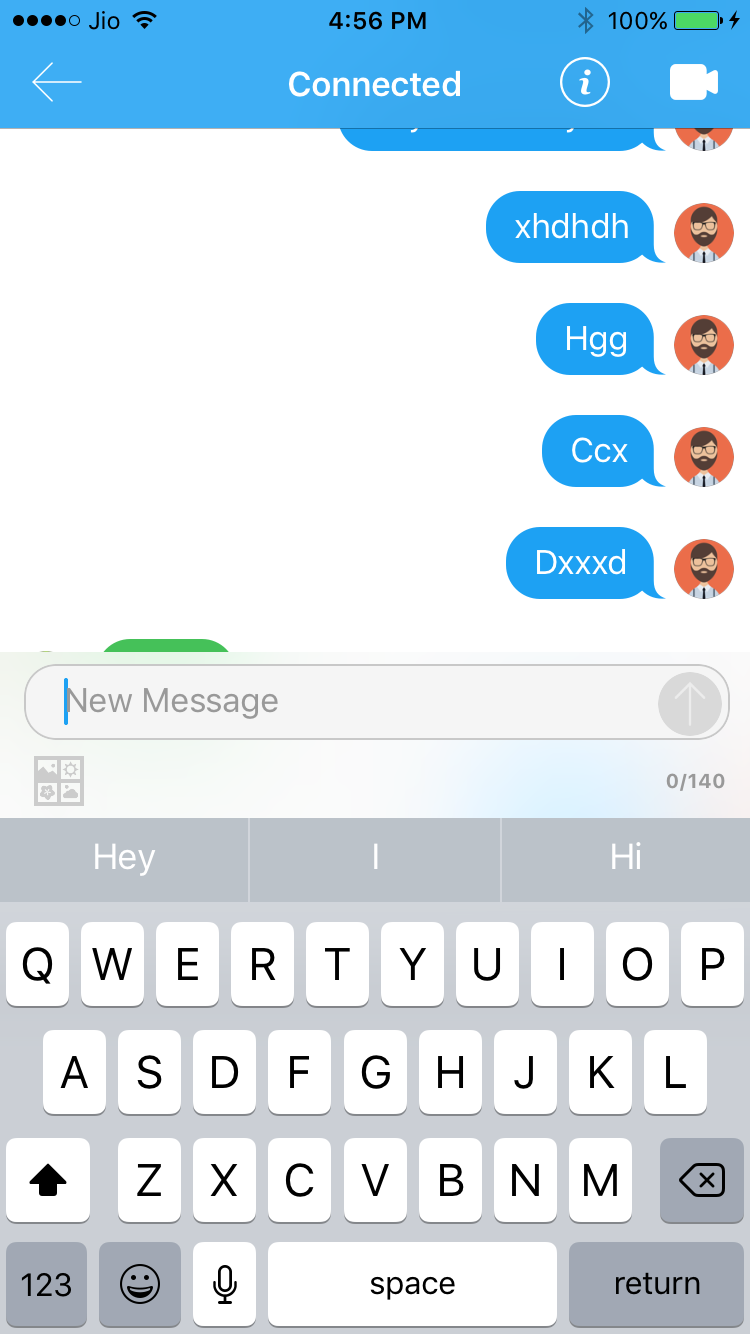
I too face the same issue. What is the fix? Can anyone give the code?
 karthikkmanoj
on 5 Dec 2018
karthikkmanoj
on 5 Dec 2018
@nathantannar4 Yeah... but that ain't the same as UICollectionView.contentInset. As I mentioned in another thread, if a subclass breaks the behavior of the parent class, it's not a valid subtype.
funct7
on 5 Dec 2018
@funct7 we adjust the content inset automatically. I believe this issue is outdated for MessageKit 2.0. We added an additionalBottomContentInset if you want to increase it.
Sent with GitHawk
nathantannar4
on 5 Dec 2018
@nathantannar4 If I may repeat myself, you guys are breaking the behavior of the parent class. If you guys are willing to do that, which I really believe you shouldn't, at least provide enough documentation about it. People should be able to use a library by looking at just the interface, not poring over private code.
funct7
on 6 Dec 2018
@karthikkmanoj did you found any solution?
 bhaveshbc
on 19 Dec 2018
bhaveshbc
on 19 Dec 2018
@bhaveshbc No Dude. When the keyboard is open, the last message gets covered. What version of Message Kit you using?
karthikkmanoj
on 19 Dec 2018
2.0
bhaveshbc
on 19 Dec 2018
Related issues
 ChandraPrakashJangid
·
3Comments
ChandraPrakashJangid
·
3Comments
 emmanuelay
·
3Comments
NiklasWilson
·
4Comments
emmanuelay
·
3Comments
NiklasWilson
·
4Comments
 brandon-haugen
·
3Comments
brandon-haugen
·
3Comments
 nitrag
·
3Comments
nitrag
·
3Comments