Messagekit: Could changing the size of an Avatar also update the insets for MessageBottomLabelAlignment?
- What version of MessageKit are you using? 1.0.0
- What version of iOS are you running on? 11.4
- What version of Swift are you running on? 4.1
- What device(s) are you testing on? Are these simulators? iPhone 8 (physical device) and iPhone X Simulator
- Is the issue you're experiencing reproducible in the example app? Yes
If you increase the size of an Avatar using setMessageIncomingAvatarSize or setMessageOutgoingAvatarSize you run the risk of having the Avatar overlap the MessageBottomLabel as in this screenshot.
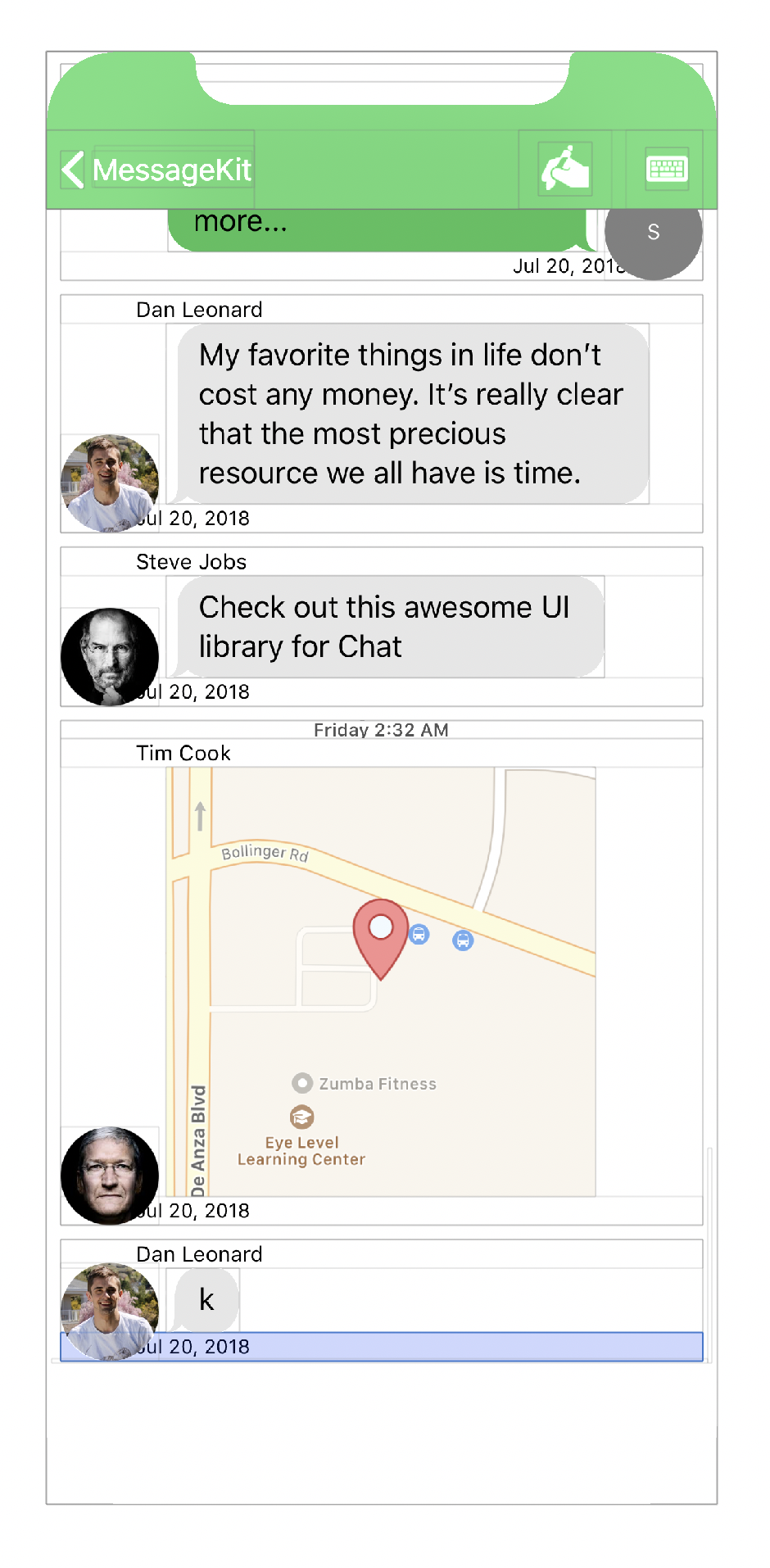
The MessageBottomLabel with the date runs under the Avatar and obscures part of the date. This can be reproduced in the Example app with the following code applied in viewDidLoad of ConversationViewController
if let layout = messagesCollectionView.collectionViewLayout as? MessagesCollectionViewFlowLayout {
        layout.setMessageIncomingAvatarSize(.init(width: 55, height: 55))
        layout.setMessageOutgoingAvatarSize(.init(width: 55, height: 55))
}
To fix this, users of MessageKit can adjust the LabelAlignment of the incoming or outgoing message by using the following code in the same if block mentioned above
layout.setMessageIncomingMessageBottomLabelAlignment(LabelAlignment.init(textAlignment: .left, textInsets: .init(top: 0, left: 57, bottom: 0, right: 57)))
layout.setMessageOutgoingMessageBottomLabelAlignment(LabelAlignment.init(textAlignment: .right, textInsets: .init(top: 0, left: 57, bottom: 0, right: 57)))
This sort of feels wrong though because you have to know the default LabelAlignment settings being used so that the new LabelAlignment only changes the textInsets and not the textAlignment, not a huge issue but something users must be careful with.
Is this the right approach? Or is there a better way to adjust the MessageBottomLabelAlignment? Or could/should the MessageBottomLabel be constrained to the inside edge (edge closest to the MessageCell of the Avatar if displayed so that it does not run under the Avatar?
There is one related issue to this but it is from before 1.0.0 was finalized: #542
Maybe there should be documentation similar to the MessageInputBar for this to help users understand how each of the pieces are put together?
I know users of MessageKit will probably want a number of different options for configuring the Avatar so it might not make sense to change the current behavior, I would rather ask about it though and help turn some of this into documentation for other users than to not say anything at all 😄.
👻
 brandon-haugen
All 3 comments
@brandon-haugen It looks like your AvatarPosition.Vertical is to to .cellBottom and not .messageBottom.
Two things:
- We allow overlapping to create more complex UIs
- The bottom label is a static size for performance reasons, so it will always expand the full width of the cell. The proper way to fix that would be to set a greater inset or just use
.messageBottom
I think that AvatarPosition really needs to use .messageBottom by default to make this more apparent 🤔
 SD10
on 18 Jul 2018
SD10
on 18 Jul 2018
Thanks @SD10! I did not even know that that AvatarPosition could be changed like that!
I ended up settling on .messageCenter without needing to change the textInsets at all.
Edit: I will see if I can find a good place in the FAQ to point this out as well. Probably near the talk about hiding the Avatar?
brandon-haugen
on 18 Jul 2018
Thanks @brandon-haugen 👍 Yeah, docs can always be improved. I seldom have time to work on things like that 😭
SD10
on 18 Jul 2018
Related issues
 anandatswayam
·
4Comments
anandatswayam
·
4Comments
 robertoferraz
·
3Comments
robertoferraz
·
3Comments
 omaralbeik
·
4Comments
omaralbeik
·
4Comments
 nitrag
·
3Comments
nitrag
·
3Comments
 pawankmrai
·
3Comments
pawankmrai
·
3Comments
Most helpful comment
@brandon-haugen It looks like your
AvatarPosition.Verticalis to to.cellBottomand not.messageBottom.Two things:
.messageBottomI think that
AvatarPositionreally needs to use.messageBottomby default to make this more apparent 🤔