Messagekit: Group the messages according to date
Great Library! : ) 👍
I want to group messages according to the date.
Just like we have in _WhatsApp_ Today, Yesterday etc etc. This would be a great feature many like me would be looking for.
Thank you.
 ikyh
ikyh
All 25 comments
Hey @ikyh,
This complicates things a bit because we currently group each message in its own section. I've just briefly looked into removing this limitation so I can't really offer much input here
 SD10
on 4 Dec 2017
SD10
on 4 Dec 2017
@SD10 No problem..! But this feature would be really great and delight many hearts, because in chats we mostly see them grouped/sectioned according to dates. Hope to see this feature in future :)
ikyh
on 5 Dec 2017
I do believe this is a functionality you could achieve on your own. We allow for a lot of customization. You should just have to develop the algorithm for sorting the messages to determine when to have the header date labels
 nathantannar4
on 8 Dec 2017
nathantannar4
on 8 Dec 2017
@nathantannar4 Yes. I managed. Thankyou
ikyh
on 11 Dec 2017
I see this is already implemented, close the issue?
 Joker666
on 6 Jan 2018
Joker666
on 6 Jan 2018
@Joker666 I thought this issue was describing putting all the messages from a certain date range into a single section. Thus, removing the 1 message to 1 section ratio.
SD10
on 6 Jan 2018
@SD10 right. What I did was a patch. Please do not close this issue. I want to sort the messages according to the date when they were received or sent.
ikyh
on 29 Jan 2018
@ikyh I don't think we'll be able to remove the 1 message to 1 section ratio. We may allow more than 1 cell in a section but not more than 1 message. For what reason do you need to sort these messages? We support things like bubble stacking, optional time stamps, etc. with the current architecture
SD10
on 29 Jan 2018
Hi, I think that it's a nice feature to group the messages according date just like how WhatsApp are doing it for instance. So what I think can be done is to split the date time into a date and a time, then group all similar dates and then in the UI create an header for the date (e.g. today, yesterday, .... etc.) and in each message we can show the time above or below the message bubble. If we will use sections it will make the solution more efficient because we can first create the sections and then show the UI otherwise, we will need to sort the message and then calculate in which group this message belong (today, yesterday, 2 days ago etc.)
 ranhsd
on 4 Feb 2018
ranhsd
on 4 Feb 2018
Hi, the following code will group your messages by date:
    func shouldDisplayHeader(for message: MessageType, at indexPath: IndexPath, in messagesCollectionView: MessagesCollectionView) -> Bool {

        if indexPath.section == 0 {
            return true
        }

        // get previous message
        let previousIndexPath = IndexPath(row: 0, section: indexPath.section - 1)
        let previousMessage = messageForItem(at: previousIndexPath, in: messagesCollectionView)

        if message.sentDate.isInSameDayOf(date: previousMessage.sentDate){
            return false
        }

        return true
    }

    func messageHeaderView(for message: MessageType, at indexPath: IndexPath, in messagesCollectionView: MessagesCollectionView) -> MessageHeaderView {
        let header = messagesCollectionView.dequeueReusableHeaderView(MessageDateHeaderView.self, for: indexPath)
        header.dateLabel.text = message.sentDate.toString(dateStyle: .short,
                                                          timeStyle: .none,
                                                          isRelative: true,
                                                          timeZone: .current,
                                                          locale: .current)
        return header
    }
If you want to display the time of the message you can do it in one of the following ways:
In the bottom of the cell by overriding the cellBottomLabelAttributedText method
Inside the message bubble via NSAttributeString
In the footer view
ranhsd
on 4 Feb 2018
@ranhsd Hey I did the same thing, sorting the messages according to date format. Comparing dates by components and grouping previous dates together in one section, today's date in one section. But the problem was in my database (I had used Realm) the dates got messed up while performing some operations...like (26/11/2017, 27/11/2017, 26/11/2017 ) And I couldn't get proper results. Probably my logic was not correct I suppose.
@SD10 Hi..!! I need this feature because I have a messaging feature in my app and I need to filter messages according to the dates, so that it is feasible to read and keep a record of them.
ikyh
on 14 Feb 2018
Hi @ikyh can you fetch the items from Realm with orderby so your query to Realm will return sorted data set?
ranhsd
on 14 Feb 2018
@ranhsd Yes I will.. Thanks : )
ikyh
on 14 Feb 2018
@ranhsd what is
 isInSameDayOf(date: previousMessage.sentDate){
            return false
        }
 4taras4
on 6 Mar 2018
4taras4
on 6 Mar 2018
Thanks @ranhsd
I'll clear:
>>> MessagesLayoutDelegate

extension Date {
    func isInSameDayOf(date: Date) -> Bool {
        return Calendar.current.isDate(self, inSameDayAs:date)
    }
}

func shouldDisplayHeader(for message: MessageType, at indexPath: IndexPath, in messagesCollectionView: MessagesCollectionView) -> Bool {
        if indexPath.section == 0 {
            return true
        }

        // get previous message
        let previousIndexPath = IndexPath(row: 0, section: indexPath.section - 1)
        let previousMessage = messageForItem(at: previousIndexPath, in: messagesCollectionView)

        if message.sentDate.isInSameDayOf(date: previousMessage.sentDate) {
            return false
        }

        return true
    }

func messageHeaderView(for message: MessageType, at indexPath: IndexPath, in messagesCollectionView: MessagesCollectionView) -> MessageHeaderView {
        let header = messagesCollectionView.dequeueReusableHeaderView(MessageDateHeaderView.self, for: indexPath)
        header.dateLabel.text = MessageKitDateFormatter.shared.string(from: message.sentDate)
        return header
    }

func headerViewSize(for message: MessageType, at indexPath: IndexPath, in messagesCollectionView: MessagesCollectionView) -> CGSize {
        let fullHeight = CGSize(width: messagesCollectionView.bounds.width, height: 40)

        if indexPath.section == 0 {
            return fullHeight
        }

        // get previous message
        let previousIndexPath = IndexPath(row: 0, section: indexPath.section - 1)
        let previousMessage = messageForItem(at: previousIndexPath, in: messagesCollectionView)

        if message.sentDate.isInSameDayOf(date: previousMessage.sentDate) {
            return CGSize.zero
        }

        return fullHeight
    }
How to display data of the message inside the bubble? With appending it to the end?
 NikKovIos
on 22 Mar 2018
NikKovIos
on 22 Mar 2018
Hi @NikKovIos you just need to update your data source and then reload data
ranhsd
on 25 Mar 2018
@ranhsd i mean, is there a way to place data string at specific please inside the bubble?
NikKovIos
on 25 Mar 2018
Hi @NikKovIos If you take a look at the MessageType protocol you will find there the MessageData enum. In this enum you will see that you have the ability to create text for the bubble using NSAttributedString. the NSAttributedString is very flexible and allows you to create various type of texts and even it support adding attachment to the text. One of the nice features of it is the ability to align and set the line spacing between lines. One of the disadvantages of it is that you need to write a lot of code in order to create something nice that's the reason why I use this library: https://github.com/Raizlabs/BonMot which really help with building NSAttributedString objects.
Hope it helps.
ranhsd
on 25 Mar 2018
In MessageKit 1.0.0-beta.1 you can control both the number of sections and number of items per sections, thus you can group messages any way you want. Thank you 👍
SD10
on 5 May 2018
That’s amazing @SD10 thank you !
ranhsd
on 5 May 2018
@ranhsd hi, can you update code for lasted version? Thanks.
 fukemy
on 4 Jun 2020
fukemy
on 4 Jun 2020
@fukemy
This is what I have for the latest version
collectionView.register(MessageDateReusableView.self, forSupplementaryViewOfKind: UICollectionView.elementKindSectionHeader)
func headerViewSize(for section: Int, in messagesCollectionView: MessagesCollectionView) -> CGSize {
    let size = CGSize(width: messagesCollectionView.frame.width, height: 50)
    if section == 0 {
      return size
    }

    let currentIndexPath = IndexPath(row: 0, section: section)
    let lastIndexPath = IndexPath(row: 0, section: section - 1)
    let lastMessage = messageForItem(at: lastIndexPath, in: messagesCollectionView)
    let currentMessage = messageForItem(at: currentIndexPath, in: messagesCollectionView)

    if currentMessage.sentDate.isInSameDayOf(date: lastMessage.sentDate) {
      return .zero
    }

    return size
  }

// MARK: Header

  func messageHeaderView(
    for indexPath: IndexPath,
    in messagesCollectionView: MessagesCollectionView
  ) -> MessageReusableView {
    let messsage = messageForItem(at: indexPath, in: messagesCollectionView)
    let header = messagesCollectionView.dequeueReusableHeaderView(MessageDateReusableView.self, for: indexPath)
    header.messageText.text = MessageKitDateFormatter.shared.string(from: messsage.sentDate)
    return header
  }
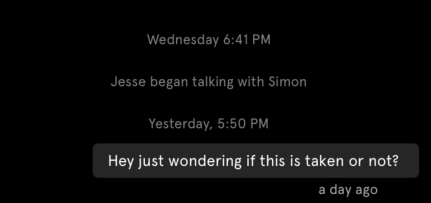
and the end result is:
 jesster2k10
on 27 Jun 2020
jesster2k10
on 27 Jun 2020
hi, can you show the class of "MessageDateReusableView", thanks
fukemy
on 29 Jun 2020
@fukemy
This is what I have for the latest version
collectionView.register(MessageDateReusableView.self, forSupplementaryViewOfKind: UICollectionView.elementKindSectionHeader)func headerViewSize(for section: Int, in messagesCollectionView: MessagesCollectionView) -> CGSize { let size = CGSize(width: messagesCollectionView.frame.width, height: 50) if section == 0 { return size } let currentIndexPath = IndexPath(row: 0, section: section) let lastIndexPath = IndexPath(row: 0, section: section - 1) let lastMessage = messageForItem(at: lastIndexPath, in: messagesCollectionView) let currentMessage = messageForItem(at: currentIndexPath, in: messagesCollectionView) if currentMessage.sentDate.isInSameDayOf(date: lastMessage.sentDate) { return .zero } return size } // MARK: Header func messageHeaderView( for indexPath: IndexPath, in messagesCollectionView: MessagesCollectionView ) -> MessageReusableView { let messsage = messageForItem(at: indexPath, in: messagesCollectionView) let header = messagesCollectionView.dequeueReusableHeaderView(MessageDateReusableView.self, for: indexPath) header.messageText.text = MessageKitDateFormatter.shared.string(from: messsage.sentDate) return header }and the end result is:
Can you please show the “MessageDateReusableView” class?
 aniket1101
on 26 Aug 2020
aniket1101
on 26 Aug 2020
@fukemy @aniket1101 here you go
func headerViewSize(for section: Int, in messagesCollectionView: MessagesCollectionView) -> CGSize {
  let size = CGSize(width: messagesCollectionView.frame.width, height: 20)
  if section == 0 {
    return size
  }

  let currentIndexPath = IndexPath(row: 0, section: section)
  let lastIndexPath = IndexPath(row: 0, section: section - 1)
  let lastMessage = messageForItem(at: lastIndexPath, in: messagesCollectionView)
  let currentMessage = messageForItem(at: currentIndexPath, in: messagesCollectionView)

  if currentMessage.sentDate.isInSameDayOf(date: lastMessage.sentDate) {
    return .zero
  }

  return size
}

// MARK: Header

func messageHeaderView(
  for indexPath: IndexPath,
  in messagesCollectionView: MessagesCollectionView
) -> MessageReusableView {
    let messsage = messageForItem(at: indexPath, in: messagesCollectionView)
    let header = messagesCollectionView.dequeueReusableHeaderView(MessageDateReusableView.self, for: indexPath)
    if messsage.sentDate.isToday() {
        header.label.text = "Today"
    } else if messsage.sentDate.wasYesterday() {
        header.label.text = "Yesterday"
    } else {
        header.label.text = AppUtil.getFormattedDateFromTimestamp(unixTime: Int(messsage.sentDate.timeIntervalSince1970*1000), dateFormat: "E, d MMM")
    }

    return header
}


class MessageDateReusableView: MessageReusableView {
    var label: PaddingLabel!

    override init (frame : CGRect) {
        super.init(frame : frame)
        self.backgroundColor = .none

        label = PaddingLabel()
        label.backgroundColor = UIColor(red: 50/255, green: 50/255, blue: 50/255, alpha: 1.0)
        label.textColor = UIColor.white
        label.textAlignment = .center
        label.numberOfLines = 1
        label.font = UIFont.systemFont(ofSize: 11)
        label.paddingLeft = 5
        label.paddingRight = 5
        self.addSubview(label)

        label.clipsToBounds = true
        label.layer.cornerRadius = 3

        label.snp.makeConstraints { (make) in
            make.center.equalTo(self.center)
            make.top.equalTo(self.snp.top).offset(2)
            make.bottom.equalTo(self.snp.bottom).offset(-2)
        }
    }

    required init?(coder aDecoder: NSCoder) {
        fatalError("init(coder:) has not been implemented")
    }
}

class PaddingLabel: UILabel {

    var textEdgeInsets = UIEdgeInsets.zero {
         didSet { invalidateIntrinsicContentSize() }
     }

     open override func textRect(forBounds bounds: CGRect, limitedToNumberOfLines numberOfLines: Int) -> CGRect {
         let insetRect = bounds.inset(by: textEdgeInsets)
         let textRect = super.textRect(forBounds: insetRect, limitedToNumberOfLines: numberOfLines)
         let invertedInsets = UIEdgeInsets(top: -textEdgeInsets.top, left: -textEdgeInsets.left, bottom: -textEdgeInsets.bottom, right: -textEdgeInsets.right)
         return textRect.inset(by: invertedInsets)
     }

     override func drawText(in rect: CGRect) {
         super.drawText(in: rect.inset(by: textEdgeInsets))
     }


     var paddingLeft: CGFloat {
         set { textEdgeInsets.left = newValue }
         get { return textEdgeInsets.left }
     }

     var paddingRight: CGFloat {
         set { textEdgeInsets.right = newValue }
         get { return textEdgeInsets.right }
     }

     var paddingTop: CGFloat {
         set { textEdgeInsets.top = newValue }
         get { return textEdgeInsets.top }
     }

     var paddingBottom: CGFloat {
         set { textEdgeInsets.bottom = newValue }
         get { return textEdgeInsets.bottom }
     }
 }


extension Date {
    func isInSameDayOf(date: Date) -> Bool {
        return Calendar.current.isDate(self, inSameDayAs: date)
    }

    func isToday() -> Bool {
        return Calendar.current.isDateInToday(self)
    }

    func wasYesterday() -> Bool {
        return Calendar.current.isDateInYesterday(self)
    }

}
 buildFlash
on 21 Nov 2020
buildFlash
on 21 Nov 2020
Related issues
 nitrag
·
3Comments
nitrag
·
3Comments
 mlequeux
·
3Comments
mlequeux
·
3Comments
 bilaalrashid
·
3Comments
bilaalrashid
·
3Comments
 brandon-haugen
·
3Comments
brandon-haugen
·
3Comments
 JulienLevallois
·
4Comments
JulienLevallois
·
4Comments
Most helpful comment
Hi, the following code will group your messages by date:
If you want to display the time of the message you can do it in one of the following ways:
In the bottom of the cell by overriding the cellBottomLabelAttributedText method
Inside the message bubble via NSAttributeString
In the footer view