Messagekit: Laggy animations with stutters
Describe the bug
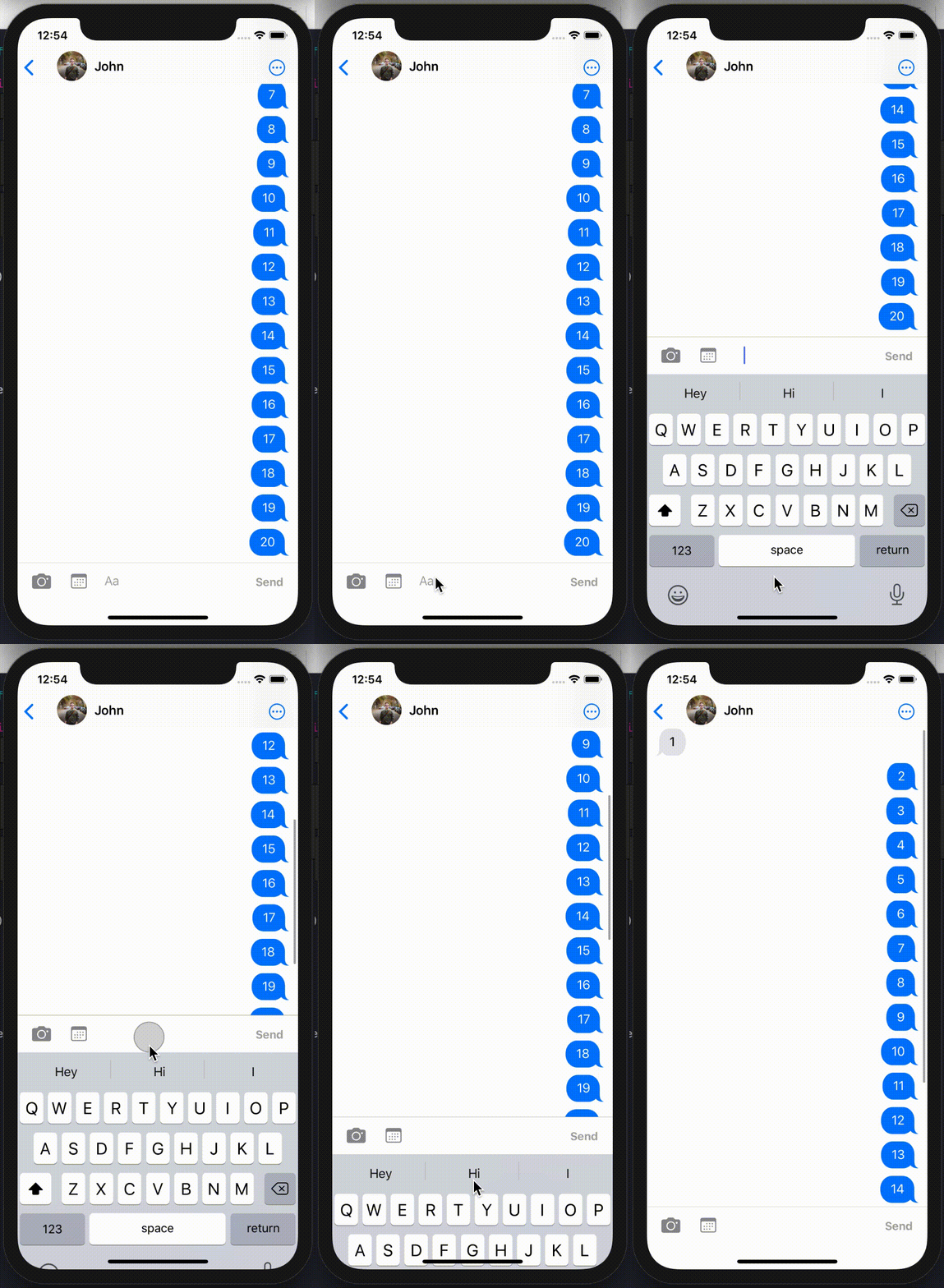
The input bar is very unresponsive to user touch and takes a long time, with a laggy animation to display the keyboard, when dismissing the keyboard, the animation freezes part way through and one of the messages momentarily doesn't layout properly (message 5 in the video). Additionally, scrolling through long amounts of messages can sometimes cause a momentary stutter/freeze. Similar to #1211.
These issues get worse, the more messages there are being displayed, with almost no issue when there are 2 - 3 messages being displayed.
Get the following error messages to the console:
[TableView] Warning once only: UITableView was told to layout its visible cells and other contents without being in the view hierarchy (the table view or one of its superviews has not been added to a window). This may cause bugs by forcing views inside the table view to load and perform layout without accurate information (e.g. table view bounds, trait collection, layout margins, safe area insets, etc), and will also cause unnecessary performance overhead due to extra layout passes. Make a symbolic breakpoint at UITableViewAlertForLayoutOutsideViewHierarchy to catch this in the debugger and see what caused this to occur, so you can avoid this action altogether if possible, or defer it until the table view has been added to a window. Table view: <UITableView: 0x7fc5a70c7600; frame = (0 0; 375 812); clipsToBounds = YES; autoresize = W+H; gestureRecognizers = <NSArray: 0x6000000b6c40>; layer = <CALayer: 0x600000e9fdc0>; contentOffset: {0, -140}; contentSize: {375, 200}; adjustedContentInset: {140, 0, 83, 0}; dataSource: <Afterglow.MessagesListTableViewController: 0x7fc5a786ac00>>
```
API error: <_UIKBCompatInputView: 0x7fc5a6cafc10; frame = (0 0; 0 0); layer =
[Common] _BSMachError: port e403; (os/kern) invalid capability (0x14) "Unable to insert COPY_SEND"
[View] First responder warning: '
**To Reproduce**
Code based off [Ray Wenderlich tutorial](https://www.raywenderlich.com/5359-firebase-tutorial-real-time-chat) and the Example app.
<!--
If the bug can be reproduced in the MessageKit example app, this is really helpful to us!

In some cases it can be really helpful to provide a short example of your code.
If so, please wrap these code blocks in backticks, like this:

```swift
*your code goes here*
Please, do not submit screenshots of code, instead copy and paste it as above.
-->
class MessageDetailViewController: MessagesViewController {

    /// The messages to display to the user
    private var messages = [Message]()

    private var isSendingPhoto = false {
        didSet {
            DispatchQueue.main.async {
                self.messageInputBar.leftStackViewItems.forEach { item in
                    if let item = item as? InputBarButtonItem {
                        item.isEnabled = !self.isSendingPhoto
                    }
                }
            }
        }
    }

    // MARK: - Life cycle methods

    override func viewDidLoad() {
        super.viewDidLoad()

        DispatchQueue.global(qos: .userInitiated).async {
            // Load initial messages to display
        }

        self.setupDelegates()
        // Configure UI
    }

    override func viewDidAppear(_ animated: Bool) {
        super.viewDidAppear(animated)

        DispatchQueue.global(qos: .userInitiated).async {
            // Load new messages being sent
        }
    }

    deinit {
        self.messageListener?.remove()
    }

    // MARK: - Private methods

    /// Sets the delegates the for view controller
    private func setupDelegates() {
        self.messagesCollectionView.messagesDataSource = self
        self.messagesCollectionView.messagesLayoutDelegate = self
        self.messagesCollectionView.messagesDisplayDelegate = self
        self.messagesCollectionView.messageCellDelegate = self
        self.messageInputBar.delegate = self
    }

    /// Add new message into the view
    /// - Parameter message: The message to add into the view
    private func insert(new message: Message) {
        guard !self.messages.contains(message) else { return }

        self.messages.append(message)
        self.messages.sort()

        let isLatestMessage = self.messages.firstIndex(of: message) == (messages.count - 1)

        DispatchQueue.main.async {
            let shouldScrollToBottom = self.messagesCollectionView.isAtBottom && isLatestMessage

            self.messagesCollectionView.reloadData()

            if shouldScrollToBottom {
                self.messagesCollectionView.scrollToBottom()
            }
        }
    }

    /// Adds a series of new messages into the view
    /// - Parameter messages: The messages to add into the view
    private func insert(new messages: [Message]) {
        self.messages.append(contentsOf: messages)
        self.messages.sort()

        DispatchQueue.main.async {
            let shouldScrollToBottom = self.messagesCollectionView.isAtBottom

            self.messagesCollectionView.reloadData()

            if shouldScrollToBottom {
                self.messagesCollectionView.scrollToBottom()
            }
        }
    }

}


// MARK: - MessagesDataSource

extension MessageDetailViewController: MessagesDataSource {

    func currentSender() -> SenderType {
        return Sender(senderId: String(SessionController.getUserId()), displayName: self.loggedInUser.firstName)
    }

    func messageForItem(at indexPath: IndexPath, in messagesCollectionView: MessagesCollectionView) -> MessageType {
        return self.messages[indexPath.section]
    }

    func numberOfSections(in messagesCollectionView: MessagesCollectionView) -> Int {
        return self.messages.count
    }

}

// MARK: - MessagesLayoutDelegate

extension MessageDetailViewController: MessagesLayoutDelegate {

    func footerViewSize(for section: Int, in messagesCollectionView: MessagesCollectionView) -> CGSize {
        return CGSize(width: 0, height: 8)
    }

    func heightForLocation(message: MessageType, at indexPath: IndexPath, with maxWidth: CGFloat, in messagesCollectionView: MessagesCollectionView) -> CGFloat {
        return 0
    }

}

// MARK: - MessagesDisplayDelegate

extension MessageDetailViewController: MessagesDisplayDelegate {

    func backgroundColor(for message: MessageType, at indexPath: IndexPath, in messagesCollectionView: MessagesCollectionView) -> UIColor {
        return isFromCurrentSender(message: message) ? .systemBlue : .systemGray5
    }

    func shouldDisplayHeader(for message: MessageType, at indexPath: IndexPath, in messagesCollectionView: MessagesCollectionView) -> Bool {
        return false
    }

    func messageStyle(for message: MessageType, at indexPath: IndexPath, in messagesCollectionView: MessagesCollectionView) -> MessageStyle {
        let corner: MessageStyle.TailCorner = isFromCurrentSender(message: message) ? .bottomRight : .bottomLeft
        return .bubbleTail(corner, .curved)
    }

}

// MARK: - InputBarAccessoryViewDelegate

extension MessageDetailViewController: InputBarAccessoryViewDelegate {

    // Sends a textual message
    func inputBar(_ inputBar: InputBarAccessoryView, didPressSendButtonWith text: String) {
        self.send(text: text.trimmed() ?? "")
        inputBar.inputTextView.text = ""
    }

}
Expected behavior
Animations should be clear and smooth
Screenshots

Environment
- What version of MessageKit are you using? 3.1.0
- What version of iOS are you running on? iOS 13.4
- What version of Swift are you running on? 5.0
- What device(s) are you testing on? Are these simulators? iPhone X and Simulator iPhone 11 Pro
- Is the issue you're experiencing reproducible in the example app? No
 bilaalrashid
All 3 comments
Hey @bilaalrashid thanks opening an issue! 👍
Your view controller does not compile within the example app. Would you be able to get a minimal example of this view controller working within the example app (using the mock data provided) or an example that I can compile and run?
In general though, if you're experiencing performance issues make sure you check how expensive all of your methods calls are in your delegate implementations.
For example: when you return the current sender in your delegate method you call SessionController.getUserId() which may be an expensive call (I'm not sure since its implementation is not included in your example). Check if your program is spending too much time in a certain method which is called a lot by MessageKit. You can do this using the Xcode Time Profiler instrument which will show you the % of time spent in a method relative to runtime.
 kinoroy
on 22 May 2020
kinoroy
on 22 May 2020
@kinoroy Thanks for that!
SessionController.getUserId() fetches from the keychain, which I thought was less expensive. I've now cached the result in the view controller and the performance is fine now.
I didn't realise that func currentSender() -> SenderType was called that often. Is that necessary?
I still get the following messages in the console, but I presume that this is just noise and can be safely ignored?
API error: <_UIKBCompatInputView: 0x7f894edd35d0; frame = (0 0; 0 0); layer = <CALayer: 0x6000025659c0>> returned 0 width, assuming UIViewNoIntrinsicMetric
[TableView] Warning once only: UITableView was told to layout its visible cells and other contents without being in the view hierarchy (the table view or one of its superviews has not been added to a window). This may cause bugs by forcing views inside the table view to load and perform layout without accurate information (e.g. table view bounds, trait collection, layout margins, safe area insets, etc), and will also cause unnecessary performance overhead due to extra layout passes. Make a symbolic breakpoint at UITableViewAlertForLayoutOutsideViewHierarchy to catch this in the debugger and see what caused this to occur, so you can avoid this action altogether if possible, or defer it until the table view has been added to a window. Table view: <UITableView: 0x7f895001de00; frame = (0 0; 375 812); clipsToBounds = YES; autoresize = W+H; gestureRecognizers = <NSArray: 0x600002ac3690>; layer = <CALayer: 0x600002550b00>; contentOffset: {0, -140}; contentSize: {375, 200}; adjustedContentInset: {140, 0, 83, 0}; dataSource: <Afterglow.MessagesListTableViewController: 0x7f894f88d200>>


md5-dbd296e19ad32c1b3588342d50d1bbd2


[View] First responder warning: '<InputBarAccessoryView.InputTextView: 0x7f8950101c00; baseClass = UITextView; frame = (0 0; 191 38); text = ''; clipsToBounds = YES; gestureRecognizers = <NSArray: 0x600002aa1350>; layer = <CALayer: 0x600002554b60>; contentOffset: {0, 0}; contentSize: {28, 36.333333333333336}; adjustedContentInset: {0, 0, 0, 0}>' rejected resignFirstResponder when being removed from hierarchy
currentSender() is called within the default implementation of MessagesDataSource.isFromCurrentSender(message: MessageType) which is called many times for each cell, in the size calculator, in the display delegate, etc to determine how to layout the cell.
It might be possible to cache it so it's only called once per cell but I don't think it could be called less than that because we wouldn't know when to purge the cache. So the end complexity is still O(n). But this is probably a good thing to include in our documentation so that it's clear for future users.
Regarding the other logs I don't think they're an issue. MessageKit doesn't even use UITableView so that must be something in your app. If there's no issue in your app it should be safe to ignore.
kinoroy
on 22 May 2020
Related issues
 nitrag
·
3Comments
nitrag
·
3Comments
 ahmedwasil
·
3Comments
ahmedwasil
·
3Comments
 emmanuelay
·
3Comments
emmanuelay
·
3Comments
 ichikmarev
·
4Comments
ichikmarev
·
4Comments
 brandon-haugen
·
3Comments
brandon-haugen
·
3Comments
Most helpful comment
currentSender()is called within the default implementation ofMessagesDataSource.isFromCurrentSender(message: MessageType)which is called many times for each cell, in the size calculator, in the display delegate, etc to determine how to layout the cell.It might be possible to cache it so it's only called once per cell but I don't think it could be called less than that because we wouldn't know when to purge the cache. So the end complexity is still
O(n). But this is probably a good thing to include in our documentation so that it's clear for future users.Regarding the other logs I don't think they're an issue. MessageKit doesn't even use UITableView so that must be something in your app. If there's no issue in your app it should be safe to ignore.