Meshroom: [2020.1.0] VCRUNTIME140_1.dll not found
Hi,
I'm working on Windows 10 with the new 2020.1.0 version.
Drag&dropping pics, it returns an error with CameraInit saying that it "cannot find VCRUNTIME140_1.dll, try to reinstall".
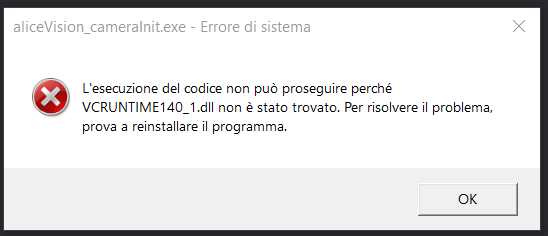
Closing the first warning, it throws a second one: "Probably you have corrupted image".
The same set of images works in 2019.2.0 with no issues at all. I checked in the folders and I found many "VCRUNTIME140.dll" but not the "_1". Is it a typo? or maybe the dll hasn't been shipped with the original package..?
 spono
spono
All 5 comments
If you don’t have it installed already, you need to install the Microsoft Visual C++ Redistributable Package 2015, 2017 and 2019 available on Microsoft’s Support portal: https://support.microsoft.com/en-us/help/2977003/the-latest-supported-visual-c-downloads.
 natowi
on 11 Oct 2020
natowi
on 11 Oct 2020
@fabiencastan Maybe we can have a look at this
https://devblogs.microsoft.com/cppblog/how-to-redistribute-the-visual-c-libraries-with-your-application/
to see if we can embed it in the application
 simogasp
on 11 Oct 2020
simogasp
on 11 Oct 2020
A more recent article:
https://docs.microsoft.com/en-us/cpp/windows/determining-which-dlls-to-redistribute
 fabiencastan
on 14 Oct 2020
fabiencastan
on 14 Oct 2020
Does https://github.com/alicevision/meshroom/releases/tag/v2020.1.1 solves your issue?
fabiencastan
on 14 Oct 2020
now it works, but in the meantime, as suggested by Natowi, I installed Microsoft Visual C++ Redistributable Package 2015, 2017 and 2019....so I don't really know if it's thanks to the installation or the new addition.
BTW thank you very much for the quick fix!
spono
on 16 Oct 2020
Related issues
 flolu
·
3Comments
flolu
·
3Comments
 zhangalex
·
5Comments
zhangalex
·
5Comments
 NorthernXY
·
3Comments
NorthernXY
·
3Comments
 ethansu1992
·
3Comments
ethansu1992
·
3Comments
 pr0eXeler0
·
5Comments
pr0eXeler0
·
5Comments
Most helpful comment
@fabiencastan Maybe we can have a look at this
https://devblogs.microsoft.com/cppblog/how-to-redistribute-the-visual-c-libraries-with-your-application/
to see if we can embed it in the application