Meshcentral: Need help server is now running on Port 1029
My meshcentral server has always been running on port 1027 and for some reason my server went down and now when i start it,
it runs on port 1029 and none of my clients report back now.
is there a way i can start the service on a specific port.
the command i use to start meshcentral is
nohup node ./node_modules/meshcentral &
any help would be appreciated thanks.
 haxmachine
All 18 comments
Hi. The quick answer is that your probably running MeshCentral twice or more. Do ps -aux | grep mesh and look to see if other processes are running.
The longer answer is that MeshCentral will try to use the ports that are specified in config.json, but if not available will use the next available port. So, if 1027 is busy and it's going to jump to the next available higher port. Your going to have to stop MeshCentral, stop the process that is using port 1027 and start MeshCentral again.
Try running MeshCentral without the & at the end and you will see what ports it's using and can hit ctrl-c to stop and start again. Should make it easy to see what is going on.
Hope that helps,
Ylian
 Ylianst
on 6 Sep 2020
Ylianst
on 6 Sep 2020

haxmachine
on 6 Sep 2020
So, screen shows MeshCentral running. Your going to have to diagnose this a bit more. Kill that version and try running it again.
Ylianst
on 6 Sep 2020
i have stopped meshcentral and confirmed with my Host that port 1027 is free and available yet meshcentral wants to start on 1029.
is there a way i can set the port in the config.json to always use port 1027?
haxmachine
on 6 Sep 2020
confirmed with my Host that port 1027 is free
Do you mean you have verified yourself that nothing else is running on that port? What does netstat -tulpn show ?
 drnikcuk
on 6 Sep 2020
drnikcuk
on 6 Sep 2020
There is a sample config.json here and a more advanced sample here.
You can set the port like this:
{
  "settings": {
    "cert": "myserver.mydomain.com",
    "_WANonly": true,
    "_LANonly": true,
    "port": 443,
    "redirPort": 80
  },
  "domains": {
    "": {
      "_title": "MyServer",
      "_title2": "Servername",
      "_minify": true
    }
  }
}
Change port 80 and 443 to the ports you want.
I also would like to know what "netstat -tulpn" returns.
Ylianst
on 6 Sep 2020
I wasnt able to run the command netstat -tulpn it returned the below message

haxmachine
on 6 Sep 2020
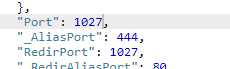
also changed these to 1027 and some reason it still start on 1029
haxmachine
on 6 Sep 2020
@haxmachine The Port and RedirPort values have to be different; they can't occupy the same port.
 whalehub
on 7 Sep 2020
whalehub
on 7 Sep 2020
RedirPort is a HTTP port that typically redirects users to the HTTPS port, it's optional, if you don't want it, put 0 as the value.
Ylianst
on 7 Sep 2020
I wasnt able to run the command netstat -tulpn it returned the below message
Whats your OS ?
drnikcuk
on 7 Sep 2020
Its running on my web-host shared server which is a Linux distro not sure which one though.
haxmachine
on 7 Sep 2020
@haxmachine You can find out which distribution you're running by executing the following command(s):
cat /etc/issue
cat /etc/*-release
cat /proc/version
If netstat isn't installed on it by default, which seems to be the case here, you can get it by installing the package net-tools.
whalehub
on 7 Sep 2020
doesnt matter what i do to my config it starts on port 1029 LOL this a killer.
was working perfectly fine before now i have lost all remote access
haxmachine
on 7 Sep 2020
Linux version 3.10.0-962.3.2.lve1.5.27.el7.x86_64 ([email protected]) (gcc version 4.8.5 20150623 (Red Hat 4.8.5-39) (GCC) ) #1 SMP Sat Nov 30 02:18:52 EST 2019
haxmachine
on 7 Sep 2020
netstat is not included in redhat by default I believe, try:
https://ostechnix.com/linux-troubleshooting-netstat-command-not-found-in-centos-7-rhel-7/
drnikcuk
on 7 Sep 2020
since its on a shared webhost i will not be able to run that command, the helpdesk assure me that port 1027 is not being used by anything
haxmachine
on 9 Sep 2020
any other ideas ive been trying my hardest to get it to run on port 1027 but it always goes to port 1029
haxmachine
on 11 Sep 2020
Related issues
 darryl-h
·
3Comments
darryl-h
·
3Comments
 M1CK431
·
3Comments
M1CK431
·
3Comments
 PathfinderNetworks
·
3Comments
PathfinderNetworks
·
3Comments
 LPJon
·
3Comments
LPJon
·
3Comments
 coolwormgit
·
3Comments
coolwormgit
·
3Comments
Most helpful comment
Do you mean you have verified yourself that nothing else is running on that port? What does netstat -tulpn show ?