Meshcentral: Server Stats Graph: Break server stats line when server was off
This is a feature request regarding the "My Server Stats" page.
(By the way, should it say "Server Statistics" instead of "Server Stats"?)
I'd like to see the lines on the graph break or drop to 0 (or -1) during times when the server wasn't running. I imagine this being done by having an event logged during server startup which the web app shows by breaking the line between the last data point and the next. As things currently stand I can tell that there was downtime due to the lack of data points on the graph, but whether you're looking at the memory usage, or the number of connections, having a line drawn between the last point before the server went down and the first point after it started up is misrepresenting the data, by which I mean that it _looks_ like it's saying that there were connections or memory usage during that time when realistically, there weren't because the server wasn't operating, so there were no connections to it and it wasn't using any memory.
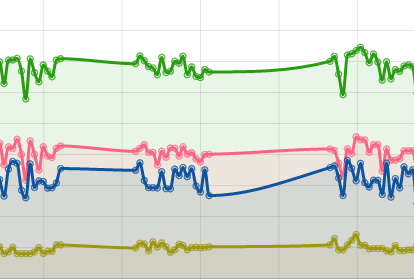
This graph shows two instances of downtime, which can only be recognized by looking for the space where there are no little circles, as these little circles represent points of data.
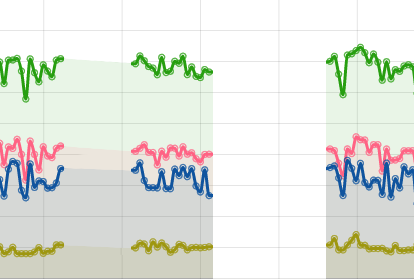
Here's a demonstration of the kind of thing I'm envisioning.
This shows the above graph without lines where the downtime occurred. To demonstrate a couple of possibilities, the first instance of downtime keeps the shading that normally accompanies the lines, and second shows it without the shading. If a broken line is not possible, dropping the line to 0, (or perhaps -1 to indicate that it's not really 0 since some lines could hit 0 with real data) would also work for me.
 MailYouLater
All 3 comments
Good request. I use ChartJS to make that chart. I will have to investigate how to do this. There is already an event placed in the database when the server starts, so I should have the data needed to "cut the line" on the graph.
 Ylianst
on 5 Mar 2020
Ylianst
on 5 Mar 2020
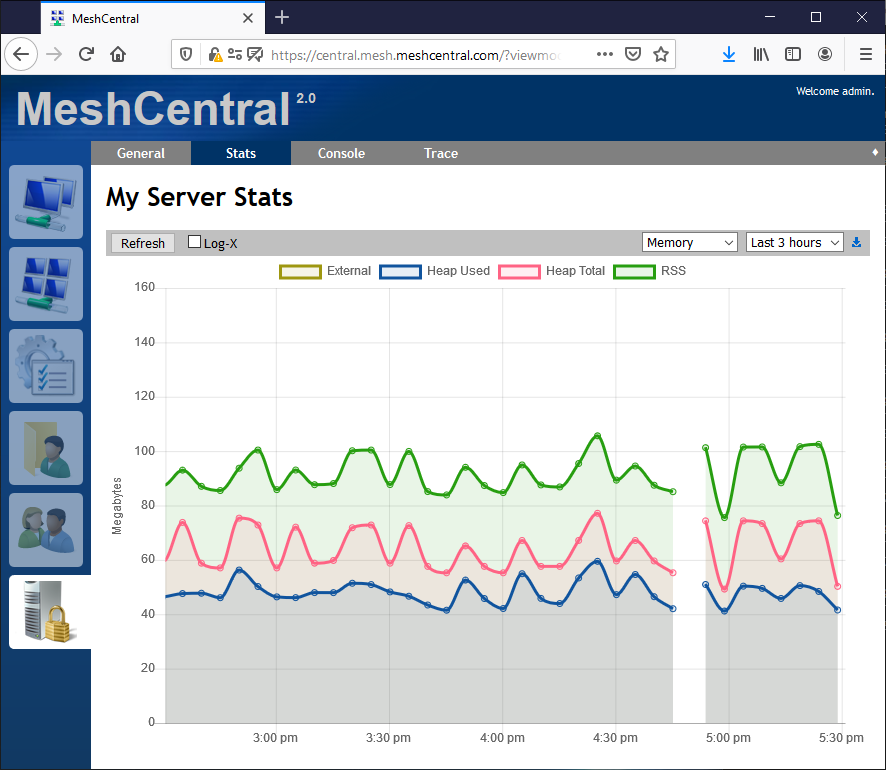
Just checked-in an update to MeshCentral that fixes this. The first event that is stored by the server is marked as being "first" and now causes a break in the graph. This will not work for existing data, but going forward it should work. It's going to be in MeshCentral v0.5.0-r when I next published it.
Ylianst
on 22 Mar 2020
Ok, published MeshCentral v0.5.0-r with this fix.
Ylianst
on 22 Mar 2020
Related issues
 haxmachine
·
3Comments
haxmachine
·
3Comments
 petervanv
·
3Comments
petervanv
·
3Comments
 hellofaduck
·
3Comments
hellofaduck
·
3Comments
 M1CK431
·
3Comments
M1CK431
·
3Comments
 penguinthingie
·
4Comments
penguinthingie
·
4Comments
Most helpful comment
Ok, published MeshCentral v0.5.0-r with this fix.