Meshcentral: Hiding the multi-desktop view in the web application
Hello Ylianst, good afternoon!
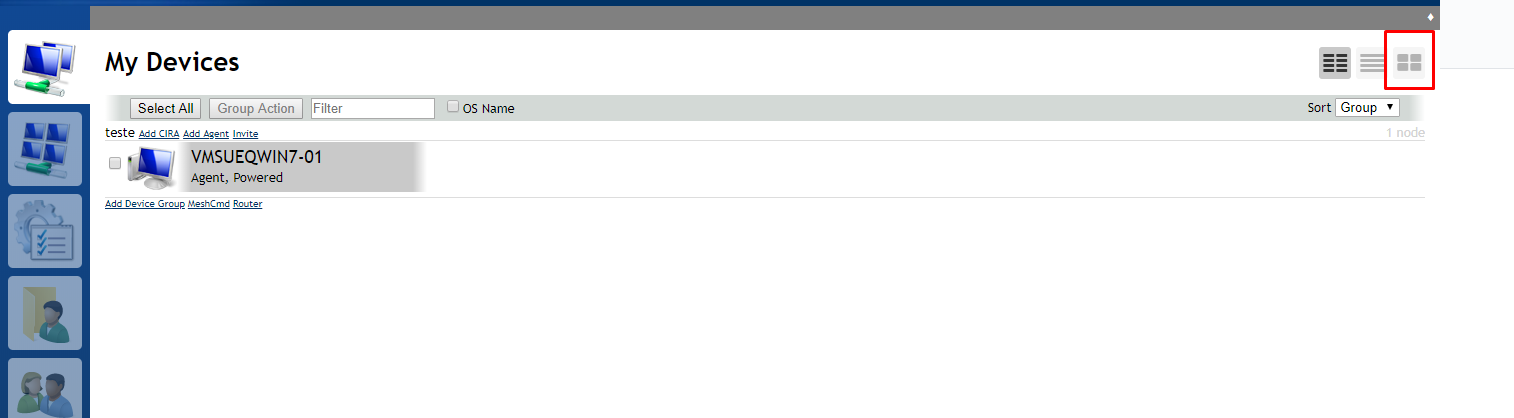
Can you help me? I am trying to disable the type of visualization below without harming the system but I am not getting it, could you help me? Is it possible to make "optional" the existence or not of this feature? Follow print:
 geanferrani123
All 4 comments
Same method as last time you asked this question except you want to add style="display: none;" to the element with id="devViewButton3" instead of the one with id="autoConnectDesktopCheckbox".
@Ylianst: Could a custom .css file be loaded from the meshcentral-data folder to make this kind of change a little easier, as well as to allow it to survive updates? Then this element could be hidden just by adding this to the .css file:
#devViewButton3 {
    display: none;
}
 MailYouLater
on 18 Oct 2019
MailYouLater
on 18 Oct 2019
@MailYouLater Thank for answering this and your help in general. I am been heads down coding multi-language support.
 Ylianst
on 19 Oct 2019
Ylianst
on 19 Oct 2019
Guys, good morning!
At first the suggestion of MailYouLater answered, but I noticed that the system was a little slow, but it is nothing serious. If this slowness makes any impact I will make the third view visible again. Thank you all for your attention!
geanferrani123
on 21 Oct 2019
I will close this issue since it seems solved. I will note that hiding the multi-desktop button should have no impact on performance.
Ylianst
on 26 Oct 2019
Related issues
 hellofaduck
·
3Comments
hellofaduck
·
3Comments
 M1CK431
·
3Comments
M1CK431
·
3Comments
 PathfinderNetworks
·
3Comments
PathfinderNetworks
·
3Comments
 vish84
·
3Comments
vish84
·
3Comments
 nroach44
·
3Comments
nroach44
·
3Comments