MeshCentral behind Microsoft Azure Application Proxy
Hi Ylianst / community,
Apologies in advance if I've posted this in the wrong forum. I was wondering if anyone has had any experience with using MeshCentral behind Microsoft Azure's Application Proxy (AAP) as a reverse proxy setup?
At present when using MeshCentral behind AAP I'm getting the error "Unable to perform authentication, click to reconnect." after logging in to MeshCentral.
When running MeshCentral in debug mode and accessing the WEB UI externally the following error is displayed in the terminal window:
WEBREQUEST: /control.ashx/.websocket?auth=cqchuvn7wlhk5tomjr6qxkhnkhgscdmm6bvphrsqszkpkgund6$np9rjwppg5smfezbm@ko@mgaszf7ltpfrbw6nbzfm@hxq9pmfwbojr79jaklxudhvejuqfj3kzqyhvafdnk75mxjwrw==
COOKIE: ERR: Bad AESGCM cookie due to exception: Error: Unsupported state or unable to authenticate data
WEB: ERR: Websocket bad cookie auth: cqchuvn7wlhk5tomjr6qxkhnkhgscdmm6bvphrsqszkpkgund6$np9rjwppg5smfezbm@ko@mgaszf7ltpfrbw6nbzfm@hxq9pmfwbojr79jaklxudhvejuqfj3kzqyhvafdnk75mxjwrw==
Please note: When logging in to MeshCentral using the same credentials locally or without going through Azure Application Proxy, I can successfully login without the above error. I could have sworn I had this working previously however for the life of me and after trying many config variants below I still cannot get this to work.
Environment specs:
Server OS: Windows Server 2019 Std (Version 1809, Build 17763.973)
Node.js version: v11.10.1
MeshCentral version: 0.4.7-x
Configuration options:
The following additional options are available when configureing AAP
Use HTTP-Only Cookie (Using an HTTP-Only cookie setting protects against cross site scripting (XSS) by preventing client-side script from using the cookie. If publishing RDS, this setting must be "No".)
Yes
No
Use Secure Cookie (Using a Secure cookie ensures that the cookie is only transmitted over an encrypted HTTPS request.)
Yes
No
Use Persistent Cookie (Using a Persistent cookie allows the access cookie to not expire when the web browser is closed, instead it will last for the duration of the lifetime of the access token.)
Yes
No
Translate URLs In:
Headers (For applications that require the original host header in the request, set the Translate URL in Headers to No.
Yes
No
Application Body (Enable this feature if your application contains links to resources published through Application Proxy with the msappproxy.net domain. If the applications you published with Application Proxy have the same internal and external names, you don't need to enable this feature.)
Yes
No
In regards to MeshCentral config file I have tried all sorts of variants such as Enabled / Disabled TLS offload and cert URL.
With "CertUrl": enabled and URL of to Microsoft application proxy address defined the following error is displayed in terminal when starting MeshCentral: Failed to load web certificate at: "https://mywebaddress.msappproxy.net". With TLS offload enabled SSL error messages are displayed in browser and MeshCentral page doesn't load locally or externally.
Above is a brain dump of what I have done thus far so hopefully it makes sense. Please let me know if further info is required to assist with troubleshooting. Any help is much appreciated!
Thanks
David.
 davscot
All 14 comments
Oh dear! Working on this now.
 Ylianst
on 26 Jan 2020
Ylianst
on 26 Jan 2020
Just published MeshCentral v0.4.7-y, you must update by going in the folder above "node_modules" and type npm install meshcentral. Make sure you get v0.4.7-y or better. If not, explicitly type npm install [email protected].
In this version, when you run the server with --debug webrequest you will now see the public IP address the request is coming from. For example:
WEBREQUEST: (127.0.0.1) /
WEBREQUEST: (192.168.2.121) /agent.ashx/.websocket
WEBREQUEST: (127.0.0.1) /styles/style.css
WEBREQUEST: (127.0.0.1) /scripts/common-0.0.1.js
WEBREQUEST: (127.0.0.1) /scripts/u2f-api.js
WEBREQUEST: (127.0.0.1) /welcome.jpg
WEBREQUEST: (127.0.0.1) /logo.png
Second, when you run the server with --debug web, it's possible you will see one of the following two new messages:
WEB: ERR: Invalid cookie IP address, got "127.0.0.11", expected "127.0.0.1".
WEB: ERR: Invalid domain, got "xxx", expected "".
I am going to take a wild guess what you will see the "Invalid cookie IP address" in your case. This is because for security, I embed the public IP address in the cookie and expect the cookie to be used from that IP address. If this is in fact the problem, there are two solutions:
- The quick way is to disable the cookie IP checking by adding
"CookieIpCheck": falseto the settings section of the config.json. This is a new setting added in v0.4.7-y that will work around this problem. - A better way would be to have the reverse proxy send MeshCentral the real public IP address of the client. If you have not done this, instead of
"TlsOffload": truechange it to"TlsOffload": "1.2.3.4"where 1.2.3.4 is the IP address of the reverse proxy.
Before I go on, can you update and confirm this is what is going on and the quick trick works? Thanks.
Ylianst
on 26 Jan 2020
Hi Ylianst,
Thanks for your prompt reply.
I've upgraded MeshCentral to version v0.4.7-z, please see my results below.
Starting MeshCentral after upgrade without any config changes:
WEBREQUEST: (10.124.105.101) /control.ashx/.websocket?auth=jg63yhgh130vlkusqvgtrq9yzuofgqhkeysqiof1fmcjmqt6ilghwbxuab9b1wzfdnmoa5bavjdvnzlwrnv6do@fuocooitufxpi6jw1$rmogyoxbdyd@qx1pfyely@aokasxlltoaa9gq==
COOKIE: ERR: Bad AESGCM cookie due to exception: Error: Unsupported state or unable to authenticate data
WEB: ERR: Websocket bad cookie auth (Cookie:false): jg63yhgh130vlkusqvgtrq9yzuofgqhkeysqiof1fmcjmqt6ilghwbxuab9b1wzfdnmoa5bavjdvnzlwrnv6do@fuocooitufxpi6jw1$rmogyoxbdyd@qx1pfyely@aokasxlltoaa9gq==
node meshcentral --debug webrequest
WEBREQUEST: (10.124.105.101) /control.ashx/.websocket?auth=rm1$tun@k2r3xp5o7q@zaqbrartq5hrs6cvniiibmzvrwxktfji6kdbvcm4yv6zrvau3boqrsvtfq0b8s7w4q3zxcu8zzlyktabdluuiiflkfhr2znw7vstnvcbxevgiwxrcfxfy$g1wkw==
node meshcentral --debug web
WEB: handleRootRequestLogin()
WEB: handleRootPostRequest, action: login
WEB: handleLoginRequest: successful login
WEB: handleLoginRequest: login ok (2)
WEB: handleRootRequestEx: success.
WEB: ERR: Websocket bad cookie auth (Cookie:false): pfqmyqn82yvxwt148oesehltpjpuwri0r8d1idjaculgh5jb$pm1my6dp@bxcox7kvg3ow57cvaz9ai8mwzn3axm9y85mjrvfro7dzqmmzawgedrbyqgzy3tsackqm2kthjennslgrcerq==
With ("CookieIpCheck": false,) added to config file the same error is displayed as above.
Please note, the IP address above (10.124.105.101) is the internal IP address of the Application Proxy Connector, however I don't believe it would be considered as a proxy server. From my understanding the external web request hits Microsoft external domain then passes the data to onsite Application Proxy Connector which then interfaces directly with on premise web servers. This provides a far more secure environment as the internal servers are never public facing.
Here is a link with more info: https://docs.microsoft.com/en-us/azure/active-directory/manage-apps/application-proxy
Regarding TLS offload I've never had much luck with setting. With this setting enabled regardless if I specify an IP or set to 'true', the following error is displayed locally in the web browser: ERR_SSL_PROTOCOL_ERROR
When specifying an IP for TLS offload I've attempted to use the internal IP of Application Proxy Connector and also external proxy IP of Microsoft's servers. Both resulting in the ERR_SSL_PROTOCOL_ERROR error when browsing locally.
Thanks
David.
davscot
on 26 Jan 2020
Thanks for the response. Seems I totally misdiagnosed this. I need a new theory as to what is going on. I tried NGINX and Caddy on my side and did not see this problem. Tomorrow, I an going to build and publish a new version with a lot more logging. I want to see exactly what code path is being taken.
Also, if you can mail me privately full output logs or if you have a test server I can try, feel free to mail me privately at the address on the contact page. You can use my PGP key if you like. I would really like to see the lines before and after the "Bad AESGCM cookie". Also, feel free to use --debug web,webrequest,cookie next time. Apologies, I was not suggesting to do separate tests with each debug option separately. You can do everything at once. Thanks in advance.
Ylianst
on 27 Jan 2020
Thanks Ylianst, I'll set up a test environment for you and provide the login details via email as soon as I can.
David.
davscot
on 27 Jan 2020
That would be wonderful! Thank you. If it's too much trouble, I can still try to make a debug version, but being able to debug in the real environment is certainly the best. Thanks.
Ylianst
on 27 Jan 2020
FYI. I have not received any emails or further data. When you do mail me, please also post here so I can make sure I make progress on this issue. Thanks.
Ylianst
on 28 Jan 2020
Appologies for the delays with getting back to you. I havent yet sent an email with login details or additional debug logs. I'm currently tied up with some other things and hope to have this info to you by end of week. I will be in touch asap.
Thanks.
davscot
on 29 Jan 2020
No worries, just making sure I am not leaving you stuck. Keep in touch. As indicated, this problem is of high interest.
Ylianst
on 29 Jan 2020
Hi Ylianst,
Thanks for your patience! Email sent, subject: MeshCentral issue 872 - Server access for troubleshooting.
David.
davscot
on 2 Feb 2020
Turns out the problem was visible on the messages above, Azure Application Proxy seems to lowercase websocket URL's. Since the cookies are Base64 encoded, they break when this happens. I can't seem to find anything only about this problem, so to get around it, I will need to HEX encode the cookies. I will published a new version of MeshCentral tomorrow that has an additional configuration option for this and possibly some automatic detection of this problem.
Many thanks for the help in resolving this problem, it's much appreciated.
Ylianst
on 3 Feb 2020
Just published MeshCentral v0.4.8-k with a fix for this. You can now add the following to the settings section of config.json:
"CookieEncoding": "hex",
In addition, I added code to detect that the reverse proxy is upper/lower-casing the URL and now display this:
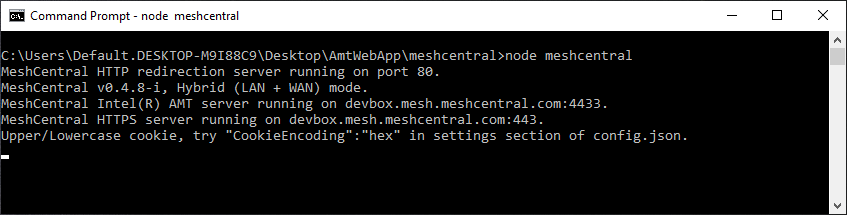
That should help anyone else that encounters this situation in the future. Let me know if this works.
Ylianst
on 3 Feb 2020
Thanks Ylian for your efforts, confirmed working.
davscot
on 4 Feb 2020
Hi Ylianst / community,
Apologies in advance if I've posted this in the wrong forum. I was wondering if anyone has had any experience with using MeshCentral behind Microsoft Azure's Application Proxy (AAP) as a reverse proxy setup?
At present when using MeshCentral behind AAP I'm getting the error "Unable to perform authentication, click to reconnect." after logging in to MeshCentral.
When running MeshCentral in debug mode and accessing the WEB UI externally the following error is displayed in the terminal window:
WEBREQUEST: /control.ashx/.websocket?auth=cqchuvn7wlhk5tomjr6qxkhnkhgscdmm6bvphrsqszkpkgund6$np9rjwppg5smfezbm@ko@mgaszf7ltpfrbw6nbzfm@hxq9pmfwbojr79jaklxudhvejuqfj3kzqyhvafdnk75mxjwrw==
COOKIE: ERR: Bad AESGCM cookie due to exception: Error: Unsupported state or unable to authenticate data WEB: ERR: Websocket bad cookie auth: cqchuvn7wlhk5tomjr6qxkhnkhgscdmm6bvphrsqszkpkgund6$np9rjwppg5smfezbm@ko@mgaszf7ltpfrbw6nbzfm@hxq9pmfwbojr79jaklxudhvejuqfj3kzqyhvafdnk75mxjwrw==Please note: When logging in to MeshCentral using the same credentials locally or without going through Azure Application Proxy, I can successfully login without the above error. I could have sworn I had this working previously however for the life of me and after trying many config variants below I still cannot get this to work.
Environment specs:
Server OS: Windows Server 2019 Std (Version 1809, Build 17763.973)
Node.js version: v11.10.1
MeshCentral version: 0.4.7-xConfiguration options:
The following additional options are available when configureing AAP
Use HTTP-Only Cookie (Using an HTTP-Only cookie setting protects against cross site scripting (XSS) by preventing client-side script from using the cookie. If publishing RDS, this setting must be "No".)
Yes
No
Use Secure Cookie (Using a Secure cookie ensures that the cookie is only transmitted over an encrypted HTTPS request.)
Yes
No
Use Persistent Cookie (Using a Persistent cookie allows the access cookie to not expire when the web browser is closed, instead it will last for the duration of the lifetime of the access token.)
Yes
No
Translate URLs In:
Headers (For applications that require the original host header in the request, set the Translate URL in Headers to No.
Yes
No
Application Body (Enable this feature if your application contains links to resources published through Application Proxy with the msappproxy.net domain. If the applications you published with Application Proxy have the same internal and external names, you don't need to enable this feature.)
Yes
No
In regards to MeshCentral config file I have tried all sorts of variants such as Enabled / Disabled TLS offload and cert URL.
With "CertUrl": enabled and URL of to Microsoft application proxy address defined the following error is displayed in terminal when starting MeshCentral: Failed to load web certificate at: "https://mywebaddress.msappproxy.net". With TLS offload enabled SSL error messages are displayed in browser and MeshCentral page doesn't load locally or externally.
Above is a brain dump of what I have done thus far so hopefully it makes sense. Please let me know if further info is required to assist with troubleshooting. Any help is much appreciated!
Thanks
David.
Hi David,
I am also configuring the similar setup. Can i get your configuration screen shot for both Azure configuration and Mesh Server?
I am trying this from past 4 days But i am not able to crack it. Can you please help me on this?
Thanks
Dharmaraj.G
 aimdharma1990
on 14 Mar 2021
aimdharma1990
on 14 Mar 2021
Related issues
 M1CK431
·
3Comments
M1CK431
·
3Comments
 haxmachine
·
3Comments
haxmachine
·
3Comments
 robclay
·
3Comments
robclay
·
3Comments
 PathfinderNetworks
·
3Comments
PathfinderNetworks
·
3Comments
 vish84
·
3Comments
vish84
·
3Comments