I think this is reporting incorrect installation size.
Agent OS : Windows 10 Pro 1909

My Server : Ubuntu 18.04 x64
Mesh Central Version : 0.4.6-u
 openmoto
All 24 comments
I just took a look and am seeing the same thing. Shows exactly 2.03GB. But definitely incorrect as the actual installed size is 3.39mb.
 PathfinderNetworks
on 3 Jan 2020
PathfinderNetworks
on 3 Jan 2020
Interesting... probably one that Bryan can look at when back from holidays.
 Ylianst
on 3 Jan 2020
Ylianst
on 3 Jan 2020
I also see the same thing, and this was also mentioned briefly in a comment by infineonnetworks in a different issue. My question is: Where is it getting this incorrect value from?
 MailYouLater
on 3 Jan 2020
MailYouLater
on 3 Jan 2020
I just found the problem. Line 278 of this file. The MeshAgent places a hard coded value in the registry when installing the agent, the value is 0x00208000 which is 2129920. Seems that value is kilobytes, not bytes. Would be nice to have the actual size of the executable be used... Bryan will likely fix this on Monday.
Ylianst
on 3 Jan 2020
I just found the problem. Line 278 of this file.
Direct link: https://github.com/Ylianst/MeshAgent/blob/8133e2481f0f63821c7a98966e9c08713f641992/meshservice/ServiceMain.c#L278
Would be nice to have the actual size of the executable be used...
In the case of the Mesh Agent, to be accurate it would be the size of the contents of C:\Program Files\Mesh Agent. Is it possible to tell windows this and have it detect the size based on the size of the appropriate folder?
Bryan will likely fix this on Monday.
Sweet!
MailYouLater
on 3 Jan 2020
Thanks for the direct link I just took a look and found "Copy Permalink". I will use that in the future.
As for the size, I don't think there is a way to ask Windows to update that value, it's just an estimate. So, maybe the agent size + 1mb?
Ylianst
on 3 Jan 2020
Just published MeshCentral v0.4.6-y with Bryan's fix for this. Once updated, all existing agents will have the correct size shown in the Windows Control Panel. Let us know if this works.
Ylianst
on 6 Jan 2020
at my pc's it is not working, windows 10 pro (19-09) x64, removed the agent en downloaded a fresh one from my server, that did not resize it in the add/remove software
 petervanv
on 6 Jan 2020
petervanv
on 6 Jan 2020
Hi. You don't need to re-install or update the agents, just update the server to MeshCentral v0.4.6-y and it should automatically be fixed. Make sure you have the right server version by going to "My Server" and click "Check server version".
Ylianst
on 6 Jan 2020
i know, i did update the server to the latest version. i removed the agent because it did not update the size in the software screen, and to test if it works with an clean version i reinstalled an fresh version.
did check it on 2 computers. both are windows 10 x64 but distribution is home and pro
petervanv
on 6 Jan 2020
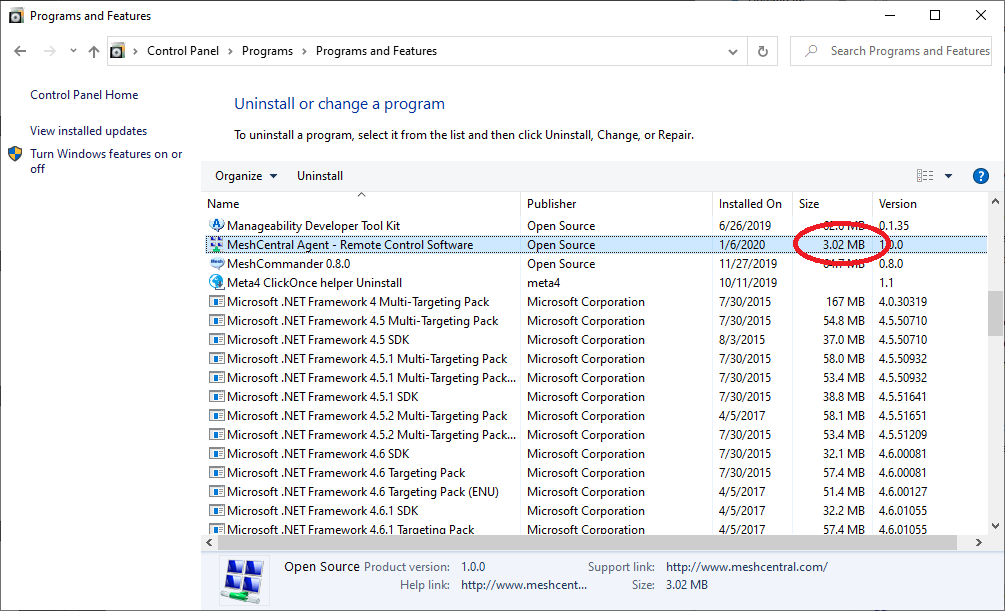
That is weird, I updated my servers and see the change right away. See picture below, it changed from gigabytes to megabytes. Note that meshcentral.com was not updated yet. Did you not see this fix on any computers? Any hints appreciated.
Ylianst
on 6 Jan 2020
nope, none of the computers did present the correct sive, w7PRO x86, Winsvr2016 X64.
when i looked at the sign date it say's 13-12-2019 as date. going to restart my server now
petervanv
on 6 Jan 2020
Oddly enough, I'm on 0.4.6-x and see 3.46MB (Win10 Pro, 1903)
 ryanblenis
on 6 Jan 2020
ryanblenis
on 6 Jan 2020
even after an reboot it stay's 2,03GB, and same sign date as earlier reported. looks like the file's are not updated
petervanv
on 6 Jan 2020
The "MeshAgent.exe" will not change, Bryan made the fix using an updated "meshcore.js" that is sent to and run by the MeshAgent, so the executable is unchanged.
Ylianst
on 7 Jan 2020
When I get in the office tomorrow, I'll add a console command to check/update this value, returning any errors, that you can run to see if we can get to the bottom of this...
 krayon007
on 7 Jan 2020
krayon007
on 7 Jan 2020
Seems no change here.
I waited an hour after upgrading server to 0.4.6-y, then reinstalled agent

I'm actually on Windows 10, 1909. I'll see if I can test on a different machine tomorrow as well.
openmoto
on 7 Jan 2020
Same, still says 2.03 GB both in the "Apps & Features" section of Windows 10's "Settings" app and in the "Programs and Features" section of the older "Control Panel".
MailYouLater
on 7 Jan 2020
If you update your server to 0.4.6-z, you will be able to use the 'agentsize' console command. Please report back any errors that are reported when you run that command. It will basically run the same code to update the size, but will report the errors instead of silently ignoring them...
krayon007
on 7 Jan 2020
thx, it works for my systems, it say's now 3099kb on windows 10 and windows 7
petervanv
on 7 Jan 2020
Interesting, simply updating to 0.4.6-z fixed it for me, I didn't need to run the agentsize command. I wonder if another change between 0.4.6-y and 0.4.6-z fixed what was preventing it from working correctly.
MailYouLater
on 7 Jan 2020
Ah, I see. I just checked the differences between the versions, and it looks like the agent install size fix was in the meshcore.js in 0.4.6-y, but not in the meshcore.min.js file. 0.4.6-z fixed that, and now it works.
MailYouLater
on 8 Jan 2020
Arrggg.... So, it was my fault all along, I published without doing the minification of the meshcore.js. Ok, I think we can close this issue now :) Please re-open if needed.
Ylianst
on 8 Jan 2020
Shouldn't you have a release script that does all of those potentially missable steps for you, just to make sure you don't forget something like that?
MailYouLater
on 8 Jan 2020
Related issues
MailYouLater
·
3Comments
MailYouLater
·
4Comments
 veitw
·
4Comments
veitw
·
4Comments
 penguinthingie
·
4Comments
PathfinderNetworks
·
3Comments
penguinthingie
·
4Comments
PathfinderNetworks
·
3Comments
Most helpful comment
Arrggg.... So, it was my fault all along, I published without doing the minification of the meshcore.js. Ok, I think we can close this issue now :) Please re-open if needed.