Meshcentral: feature request -> when a job is finished -> popup for information
save like a comment what the admin has done in this session - store in the log so that we can export it...
thanks and best regards
am
 wvt-adm
All 12 comments
Great idea. This could be a useful feature.
 PathfinderNetworks
on 8 Oct 2019
PathfinderNetworks
on 8 Oct 2019
Not sure what the request is. What is a "job"? Where would the pop-up go? Apologies in advance, I don't do user support.
 Ylianst
on 9 Oct 2019
Ylianst
on 9 Oct 2019
Is this audit trail/activity log?
 jsastriawan
on 9 Oct 2019
jsastriawan
on 9 Oct 2019
In my mind it's just a text note field where the user could type in notes about what they did to the device. Similar to the existing notes field I suppose. Would be nice if it were time stamped. The thinking (to me at least) is for to be used to track who did what to a device. I'm a one-man shop so it would be less useful for me than it would be to multi-employee shops. But, yes, an audit/activity log type of thing like jsastriawan mentioned.
PathfinderNetworks
on 9 Oct 2019
Ha! Say I allowed users to manually add events for a device and added a way to filter event types? So you could show only manual events, would that work? This way, you could see all the manually entered events for a given device or from a user.
Ylianst
on 9 Oct 2019

hope you understand what i mean... ;-) thanks a lot and best regards am
wvt-adm
on 9 Oct 2019
OK, I think I understand what you meant, and it's a little different to what I initially thought, but both could be merged pretty easily.
I'm not sure this needs to be directly connected to the Desktop tab's Disconnect button, as a technician may have done their work via the Terminal, Files, or even Console tabs, but there should be a way to log an event, which opens a box requesting a type, and the text for the event to be saved. This should have a text area where the technician can type a description of what was done, and OK and Cancel buttons. This could also have an option to pop up a dialog box containing the information on the remote computer which would be useful for delivering information about the diagnosis and status (e.g. solution/future necessary steps) of a problem to the customer if they have left the area after letting the technician take control, or even if they simply aren't tech-savvy enough to understand what was the technician was doing while they were connected.
 MailYouLater
on 9 Oct 2019
MailYouLater
on 9 Oct 2019
Thanks @MailYouLater. I will start by adding an was to enter new events manually and work from there with feedback from you guys.
Ylianst
on 9 Oct 2019
i was just thinking about it like this: im working on many places afterwars on one day, so i thought maybe there was a way to let the programm record the timestamps of you that you can take those infos for the accounting.
am
wvt-adm
on 12 Oct 2019
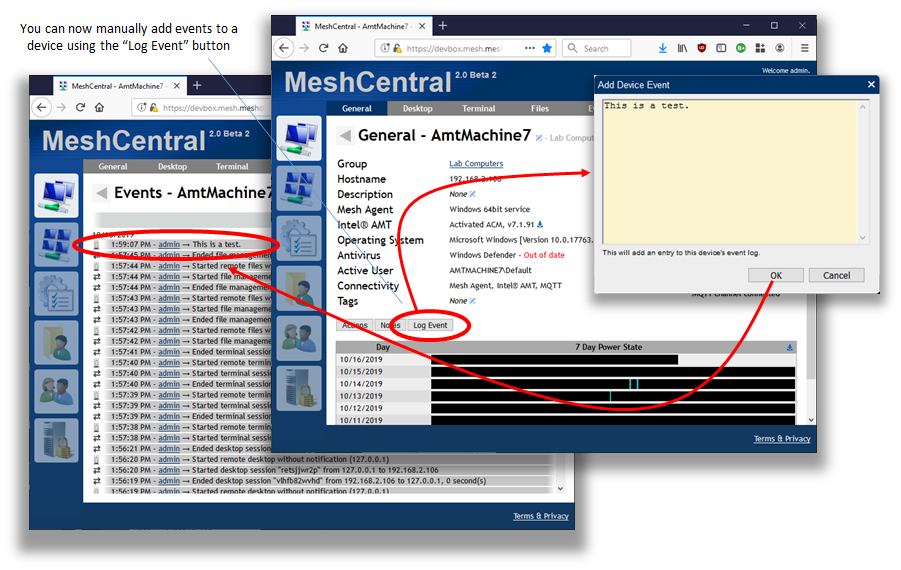
Published MeshCentral v0.4.2-t with a new "Log Event" button in the device tab so you can enter your own event. More needs to be done to make this work fully like filtering events to only see the manual ones, etc. Feedback welcome.
Ylianst
on 16 Oct 2019
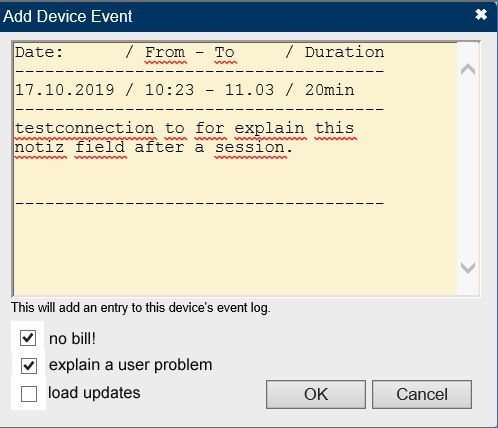
that's very close. now it doesn't fit into the work process yet. since you note the note after a desktop, terminal or files session, it's rather cumbersome to click on the first tab separately again. it's possible to combine this: 1. if you click on disconnect in the desktop session, the note field opens automatically as a popup. secondly - the log entry with the session duration is filled automatically and i can add my info. - even more ingenious would be if you could check four / five freely selectable template texts in the notes window (see an example screenshot).
Translated with www.DeepL.com/Translator
wvt-adm
on 17 Oct 2019
FYI I've posted a Sample Plugin to go along with my latest pull request that is a very simplistic version of this as an example for plugin developers.
 ryanblenis
on 23 Nov 2019
ryanblenis
on 23 Nov 2019
Related issues
 LPJon
·
3Comments
LPJon
·
3Comments
 haxmachine
·
3Comments
PathfinderNetworks
·
3Comments
MailYouLater
·
4Comments
MailYouLater
·
3Comments
haxmachine
·
3Comments
PathfinderNetworks
·
3Comments
MailYouLater
·
4Comments
MailYouLater
·
3Comments