Mentorship-android: Write “Edit Profile” screen Espresso test
Write “Edit Profile” screen Espresso test
Describe the solution you'd like
Unit tests to cover the Edit Profile feature of the app.
The tests would go here
Acceptance criteria:
- [ ] Connect Android device or open the emulator
- [ ] On terminal type ./gradlew clean build connectedAndroidTest --stacktrace
- [ ] Wait for your test to complete
- [ ] See the complete report ../mentorship-android/app/build/reports/androidTests/connected/index.html and check if this test passed.
 anna4j
All 37 comments
@anna4j I would like to work on this, please assign this to me on 1st
 prayutsu
on 30 Aug 2020
prayutsu
on 30 Aug 2020
@anna4j I would like to work on this, please assign this to me on 1st
Ok
 aditmehta9
on 31 Aug 2020
aditmehta9
on 31 Aug 2020
@aditmehta9 Please make sure that participants don't get assigned to multiple issues :)
anna4j
on 1 Sep 2020
@aditmehta9 @anna4j As there are no espresso tests for fragments in the project. It seems very difficult to write the test. I am trying hard to fix this but I need your help now.
        with(launchFragment<EditProfileFragment>(), {
            onFragment { fragment ->
                assertNotNull(fragment.dialog)
                assertEquals(fragment.requireDialog(), isDisplayed())
            }

            // Assumes that the dialog had a button
            // containing the text "Cancel".
            onView(withText("Cancel")).check(doesNotExist())
        })
I am trying to test the launching of the fragment but it gives me an

error
prayutsu
on 2 Sep 2020
@rpattath please help us out here 😅
anna4j
on 2 Sep 2020
@aditmehta9 @anna4j As there are no espresso tests for fragments in the project. It seems very difficult to write the test. I am trying hard to fix this but I need your help now.
        with(launchFragment<EditProfileFragment>(), {
            onFragment { fragment ->
                assertNotNull(fragment.dialog)
                assertEquals(fragment.requireDialog(), isDisplayed())
            }

            // Assumes that the dialog had a button
            // containing the text "Cancel".
            onView(withText("Cancel")).check(doesNotExist())
        })
I am trying to test the launching of the fragment but it gives me an
error
I am not good at Espresso testing. If you have doubts or you are stuck you can ask on Zulip.
aditmehta9
on 3 Sep 2020
@aditmehta9 Actually I found out a solution but I am waiting for #838 to get merged. As it already contains the files that I need. So, to avoid duplicacy, let that PR get merged first.
prayutsu
on 3 Sep 2020
@aditmehta9 Actually I found out a solution but I am waiting for #838 to get merged. As it already contains the files that I need. So, to avoid duplicacy, let that PR get merged first.
Actually it might take a while to get merged. Most probably after OSH is over
anna4j
on 3 Sep 2020
@prayutsu Hi. I think you should try this without launchFragment method. Since the fragment testing library needs jvm 1.8 and currenty the project is based on jvm 1.6 #838 is my PR. Firstly I also used fragment testing library, but it would give you a hard time most probably simply because of the jvm version.
 justdvnsh
on 3 Sep 2020
justdvnsh
on 3 Sep 2020
hey @justdvnsh, actually I also tried another way but That also gives the same error. Intent could not be launched within 45 seconds. I even turned off the animations of my physical device.
prayutsu
on 3 Sep 2020
Let me check !! @prayutsu
justdvnsh
on 3 Sep 2020
import androidx.test.espresso.Espresso.onView
import androidx.test.espresso.action.ViewActions.click
import androidx.test.espresso.assertion.ViewAssertions.matches
import androidx.test.espresso.matcher.RootMatchers.isDialog
import androidx.test.espresso.matcher.ViewMatchers.*
import androidx.test.internal.runner.junit4.AndroidJUnit4ClassRunner
import androidx.test.rule.ActivityTestRule
import org.junit.Before
import org.junit.Rule
import org.junit.Test
import org.junit.runner.RunWith
import org.systers.mentorship.R
import org.systers.mentorship.view.activities.MainActivity
@RunWith(AndroidJUnit4ClassRunner::class)
class EditProfileFragmentTest{
@get:Rule
val activityTestRule = ActivityTestRule(MainActivity::class.java)

@Before
fun setup() {
    onView(withId(R.id.navigation_profile)).perform(click())
    var timeout = 0L
    while(timeout < 5000) {
        try {
            onView(withId(R.id.imgUserAvatar)).check(matches(isDisplayed()))
            break
        } catch (e: Exception) {
            Thread.sleep(1000)
            timeout += 1000
        }
    }
    onView(withId(R.id.menu_edit_profile)).perform(click())
}

@Test
fun check_if_cancel_button_is_dimissing_the_dialog() {
    onView(withText(R.string.cancel)).inRoot(isDialog()).check(matches(isDisplayed())).perform(click())
}
}
justdvnsh
on 3 Sep 2020
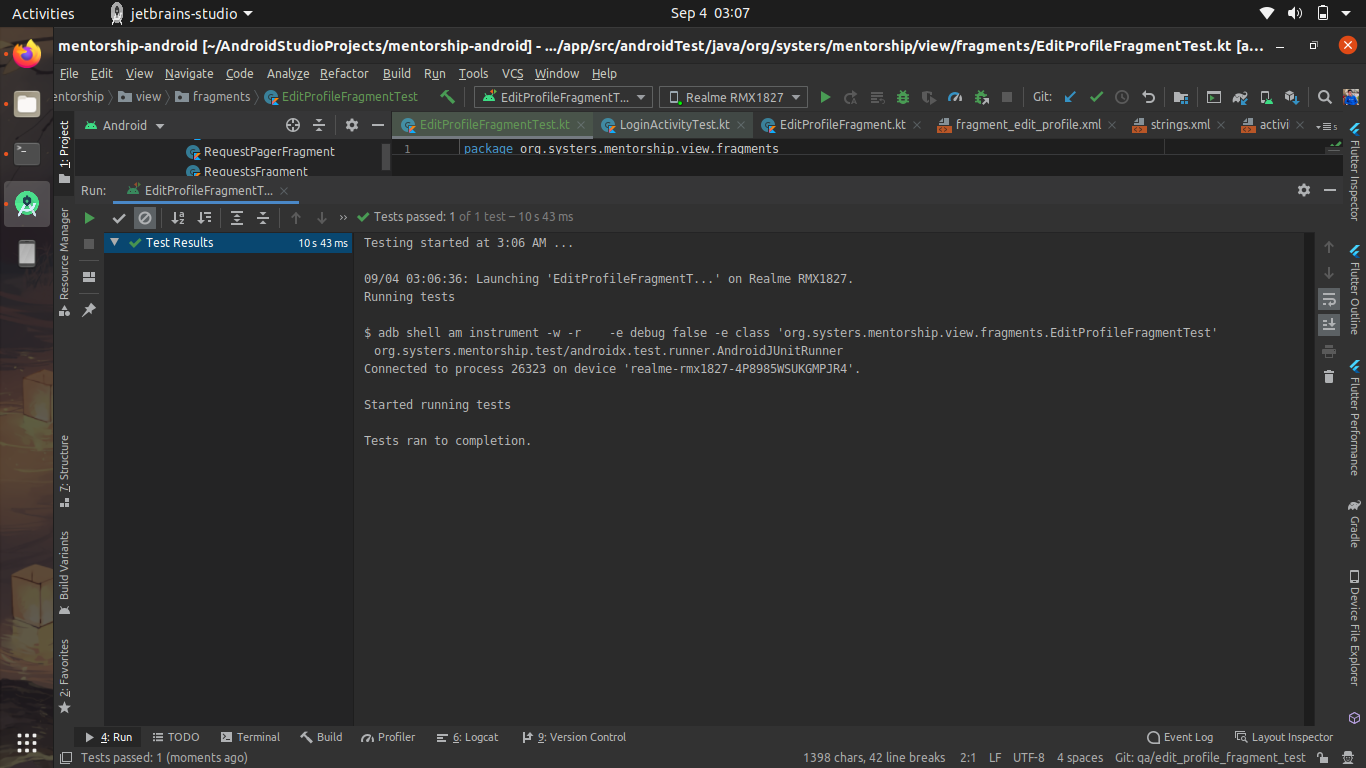
Try this code. @prayutsu . The tests are running just fine. Here in the code, Since, the edit profile is a dialog fragment, hence I am waiting for the swipe refresh to stop loading since, it has the window focus. Once It stops loading, I click the edit profile button and click the cancel button. Plus, you would not have to change any other file.
justdvnsh
on 3 Sep 2020
@justdvnsh Awesome buddy!! Thank you so much!
prayutsu
on 3 Sep 2020
Now I can add more tests to it
prayutsu
on 3 Sep 2020
@prayutsu . No problems mate.
justdvnsh
on 4 Sep 2020

But why is it failing on my system
prayutsu
on 4 Sep 2020
@prayutsu Yeah. Now you just need to add different test cases . Thats why I added the opening of dialogue fragment in before block so that it gets executed before all your tests. So just add different test cases. This code has only one drawback that the test take around 4-6 seconds to run, due to Thread.sleep()
justdvnsh
on 4 Sep 2020
That would be fine but I don't know why it's failing on my system.
On Fri, 4 Sep 2020, 3:35 am Divyansh Dwivedi, notifications@github.com
wrote:
@prayutsu https://github.com/prayutsu Yeah. Now you just need to add
different test cases . Thats why I added the opening of dialogue fragment
in before block so that it gets executed before all your tests. So just add
different test cases. This code has only one drawback that the test take
around 8-9 seconds to run !—
You are receiving this because you were mentioned.
Reply to this email directly, view it on GitHub
https://github.com/anitab-org/mentorship-android/issues/794#issuecomment-686787959,
or unsubscribe
https://github.com/notifications/unsubscribe-auth/ANA273MEECN4SERRGXP5LOTSEAHMNANCNFSM4QPRVEOA
.
prayutsu
on 4 Sep 2020
@prayutsu I think, since you've changed dependencies, this is happening. Try removing all of your changes from buil.gradle
justdvnsh
on 4 Sep 2020
@prayutsu I think, since you've changed dependencies, this is happening. Try removing all of your changes from buil.gradle
okay, I'll try that
prayutsu
on 4 Sep 2020
hey @justdvnsh, let's get connected on zulip first
prayutsu
on 4 Sep 2020
@prayutsu Sure.
justdvnsh
on 4 Sep 2020
I saw that private messages are not allowed in this organization. So, we can discuss it here only. Actually earlier tests didn't even launch the app, but this time it's opening the edit profile fragment but after that nothing happens. It is simply failing.

prayutsu
on 4 Sep 2020
@prayutsu Can you share the error message ? What is the error ? It is working fine on my device !
justdvnsh
on 4 Sep 2020
java.lang.RuntimeException: Could not launch intent Intent { act=android.intent.action.MAIN flg=0x14000000 cmp=org.systers.mentorship/.view.activities.MainActivity } within 45 seconds. Perhaps the main thread has not gone idle within a reasonable amount of time? There could be an animation or something constantly repainting the screen. Or the activity is doing network calls on creation? See the threaddump logs. For your reference the last time the event queue was idle before your activity launch request was 1599205226532 and now the last time the queue went idle was: 1599205230602. If these numbers are the same your activity might be hogging the event queue.
at androidx.test.runner.MonitoringInstrumentation.startActivitySync(MonitoringInstrumentation.java:481)
at androidx.test.rule.ActivityTestRule.launchActivity(ActivityTestRule.java:354)
at androidx.test.rule.ActivityTestRule$ActivityStatement.evaluate(ActivityTestRule.java:525)
at org.junit.rules.RunRules.evaluate(RunRules.java:20)
at org.junit.runners.ParentRunner.runLeaf(ParentRunner.java:325)
at org.junit.runners.BlockJUnit4ClassRunner.runChild(BlockJUnit4ClassRunner.java:78)
at org.junit.runners.BlockJUnit4ClassRunner.runChild(BlockJUnit4ClassRunner.java:57)
at org.junit.runners.ParentRunner$3.run(ParentRunner.java:290)
at org.junit.runners.ParentRunner$1.schedule(ParentRunner.java:71)
at org.junit.runners.ParentRunner.runChildren(ParentRunner.java:288)
at org.junit.runners.ParentRunner.access$000(ParentRunner.java:58)
at org.junit.runners.ParentRunner$2.evaluate(ParentRunner.java:268)
at org.junit.runners.ParentRunner.run(ParentRunner.java:363)
at org.junit.runners.Suite.runChild(Suite.java:128)
at org.junit.runners.Suite.runChild(Suite.java:27)
at org.junit.runners.ParentRunner$3.run(ParentRunner.java:290)
at org.junit.runners.ParentRunner$1.schedule(ParentRunner.java:71)
at org.junit.runners.ParentRunner.runChildren(ParentRunner.java:288)
at org.junit.runners.ParentRunner.access$000(ParentRunner.java:58)
at org.junit.runners.ParentRunner$2.evaluate(ParentRunner.java:268)
at org.junit.runners.ParentRunner.run(ParentRunner.java:363)
at org.junit.runner.JUnitCore.run(JUnitCore.java:137)
at org.junit.runner.JUnitCore.run(JUnitCore.java:115)
at androidx.test.internal.runner.TestExecutor.execute(TestExecutor.java:56)
at androidx.test.runner.AndroidJUnitRunner.onStart(AndroidJUnitRunner.java:388)
at android.app.Instrumentation$InstrumentationThread.run(Instrumentation.java:2145)
@justdvnsh

prayutsu
on 4 Sep 2020
@prayutsu Are the animations turned off ? please check once.
justdvnsh
on 4 Sep 2020
Yupp they are off. Now I am thinking of deleting my local project and set
it up again. I'll let you know if the problem persists.
Thanks!
On Fri, 4 Sep 2020, 5:57 pm Divyansh Dwivedi, notifications@github.com
wrote:
@prayutsu https://github.com/prayutsu Are the animations turned off ?
please check once.—
You are receiving this because you were mentioned.
Reply to this email directly, view it on GitHub
https://github.com/anitab-org/mentorship-android/issues/794#issuecomment-687111632,
or unsubscribe
https://github.com/notifications/unsubscribe-auth/ANA273JHSALTUOCFLBVKW7DSEDMJHANCNFSM4QPRVEOA
.
prayutsu
on 4 Sep 2020
@prayutsu Yes please do that. I am assuming that this problem is due to the changed buil.gradle file
justdvnsh
on 4 Sep 2020
@justdvnsh Still not working :(
prayutsu
on 4 Sep 2020
It shows the same error
prayutsu
on 4 Sep 2020
@aditmehta9 I am unassigning myself as I am not able to figure out a solution, you can assign this issue to @justdvnsh .
I'll try working on other issues
prayutsu
on 6 Sep 2020
@aditmehta9 @anna4j I'd like to carry this issue. It is already solved with me. I just have to create a PR.
justdvnsh
on 6 Sep 2020
Go ahead!
anna4j
on 6 Sep 2020
@anna4j Cool Thanks.
justdvnsh
on 6 Sep 2020
@anna4j Done. I've created a PR
justdvnsh
on 8 Sep 2020
Related issues
 Kavya-24
·
8Comments
Kavya-24
·
8Comments
 annabauza
·
8Comments
annabauza
·
7Comments
annabauza
·
8Comments
annabauza
·
7Comments
 Priyansh-Kedia
·
6Comments
Priyansh-Kedia
·
6Comments
 isabelcosta
·
6Comments
isabelcosta
·
6Comments