Mattermost-server: Show Keyboard Shortcuts on Tooltips
Add keyboard shortcuts to the following tooltips:
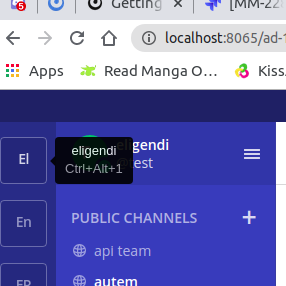
- Switch to a specific team
- History arrows (Desktop app only)
- Back in history
- Forward in history
- Write a Direct message - '+' plus icon in the LHS next to the Direct Message category header
- Recent Mentions
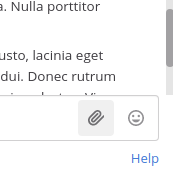
- Upload file - show tooltip on hover of the paperclip icon in the message input
If you're interested please comment here and come join our "Contributors" community channel on our daily build server, where you can discuss questions with community members and the Mattermost core team. For technical advice or questions, please join our "Developers" community channel.
New contributors please see our Developer's Guide.
 mattermod
All 3 comments
can i work on this issue ?
 sridhar02
on 22 Jul 2020
sridhar02
on 22 Jul 2020
@hmhealey , i have gone throught the isssue and i found that some functionality are already present and some are not present.These are the following:
- Switch to a specific team this already present in the application with the shortcut.
- There is no tool tip for the upload file icon , do i have to create a toop ttp and show the short cut.
 .
.
3.About the History arrows (Desktop app only) , i have not worked with the desktop application , i dont know where those tool tips will present , if u want me to look into it, i will try looking into the desktop application code.
sridhar02
on 23 Jul 2020
Hi @sridhar02. Thanks for the help on this! To answer your questions:
- A couple of these have existing tooltips with the keyboard shortcuts, but we'd like to update their design to better highlight the key combination. You can see the new design in Figma. The design in Figma includes more detailed styling information, but I'm not sure if it'll be accessible to you at this moment.
- Yeah, please add a tooltip to any of these that are missing it.
- Most of the desktop app is just the web app internally. If you override this function to always return true, it should turn on the history arrows, even in the browser.
Hopefully that'll help you out. Let me know if you have any other questions or need help getting pointed in the right direction.
 hmhealey
on 28 Jul 2020
hmhealey
on 28 Jul 2020
Related issues
 esethna
·
3Comments
esethna
·
3Comments
 chengweiv5
·
3Comments
esethna
·
3Comments
esethna
·
3Comments
esethna
·
3Comments
chengweiv5
·
3Comments
esethna
·
3Comments
esethna
·
3Comments
esethna
·
3Comments
Most helpful comment
can i work on this issue ?