Mattermost-server: WebApp: Improve how we display image thumbnails when batch uploading images
The goal is to improve how we show thumbnails when adding multiple files to the Mattermost web app. Users should be able to preview the images without having to open them in a full screen viewer to allow for faster scanning and reduced extra steps to have to view images in the full screen viewer.
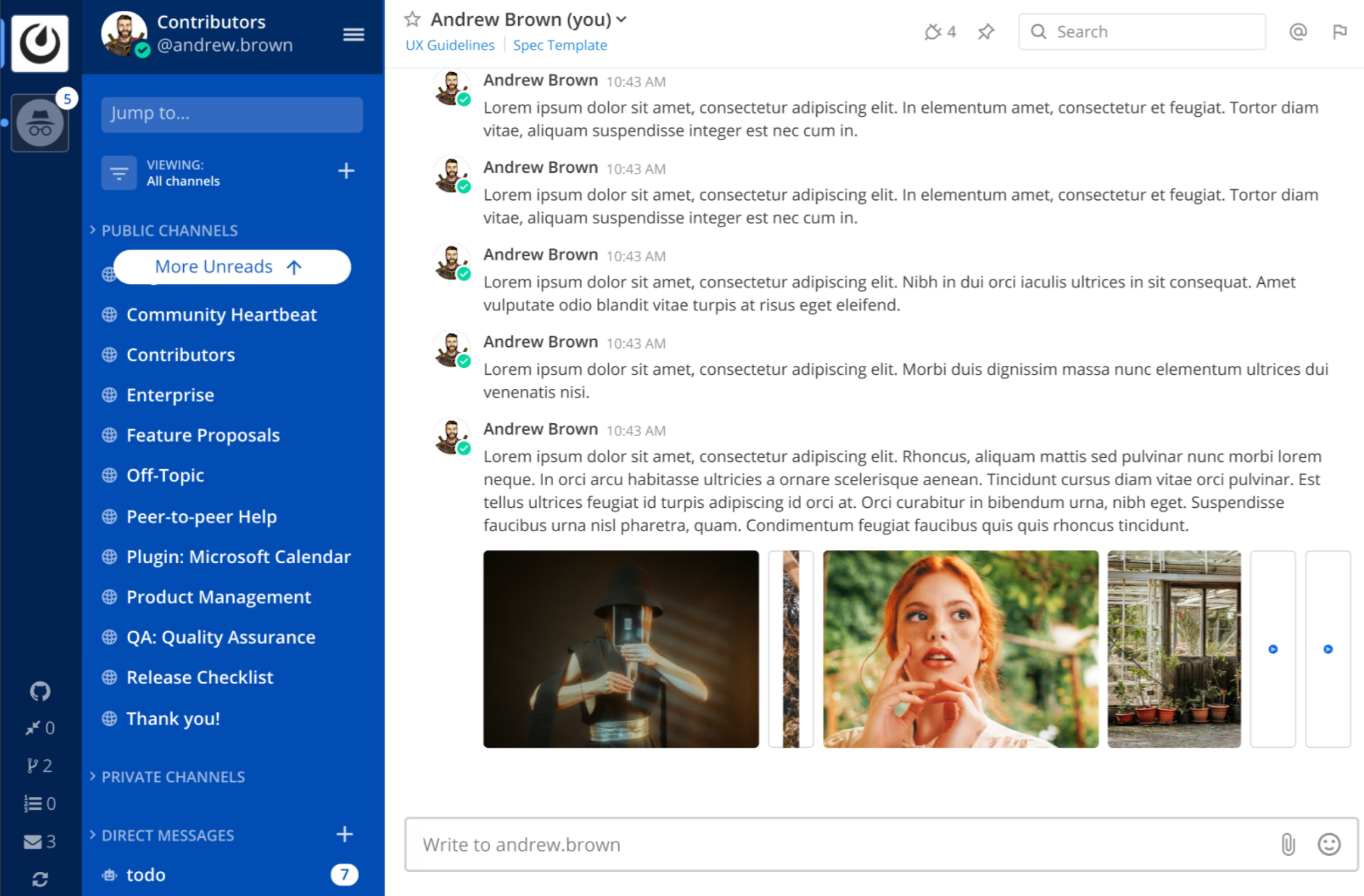
Figma design: https://www.figma.com/file/Tc4KvRC8NWSy5cpIkofaD2/Quick-Wins-Design-Sprint?node-id=531%3A543
Functional notes
The rules below apply to when more than one image is uploaded in a single post). Note that the rules for how single image thumbnails appear should not be changed with this ticket.
• The image with the largest height determines the overall height of the image containers
• If image with the largest height is above our max container height, then the height of the image containers should be set to max container height
• If while scaling the image to fit in the container dimensions, it becomes thinner than our min container width, then set the container width to our min image container width and center the image horizontally and vertically within the container.
• If after scaling the image, it is still above the max allowable width, then set the image container to the max image width, then center the image in the container
• Resizing the mattermost window will only change the image container dimentions if a breakpoint is reached (see below).
• If the images do not fit on one line, wrap them to the next line. Images that wrap to the next line should use the same container height as images in the first row. On large monitors, images can use a maximum of 1000px of screen width before the images wrap to the next line.
• Make sure scroll pop is not an issue (image container height should be accounted for in post metadata)
• If there are non-image attachments also in the same post, show them below the image attachments (see design)
Min and Max Image Container Sizes based on Breakpoints:
1024px and up
- Min width = 40px
- Min height = 40px
- Max width = 330px
- Max height = 204px
1023px and down
- Min width = 40px
- Min height = 40px
- Max width = 160px
- Max height = 120px
Aspect ratio for images:
• Always maintain the images aspect ratio
• Scale images to fit the container size based on the min and max rules
• Background = cover to resize the background image to cover the entire container, even if it has to stretch the image or cut a little bit off one of the edges
Grid Spacing:
• Spacing between images should always be 8px


If you're interested please comment here and come join our "Contributors" community channel on our daily build server, where you can discuss questions with community members and the Mattermost core team. For technical advice or questions, please join our "Developers" community channel.
New contributors please see our Developer's Guide.
 mattermod
All 9 comments
i can help resolving this
 Upinder123
on 14 Jul 2020
Upinder123
on 14 Jul 2020
Hey @Upinder123, how's this going? Let us know if you have any questions or if you're still working on this?
 esethna
on 4 Aug 2020
esethna
on 4 Aug 2020
Moving this back to up for grabs! @Upinder123 let us know if you're still working on it :)
esethna
on 9 Sep 2020
Hey team, wanted to work on this issue. Is anyone working on this or can i take it? :)
 14Richa
on 15 Sep 2020
14Richa
on 15 Sep 2020
@14Richa go for it!
esethna
on 15 Sep 2020
Ok. Thanks! :)
14Richa
on 16 Sep 2020
@14Richa how's this going?
esethna
on 15 Oct 2020
Hey @esethna, I got pulled into other things and won't be able to take a look this month. You can feel free to re-assign to someone else.
Thanks! :)
14Richa
on 16 Oct 2020
@14Richa no worries, I'll open this ticket up again, but feel free to come back to it later if it hasn't been picked up yet. Also if you're open to sharing your work in progress code that might help get someone else started on it
esethna
on 16 Oct 2020
Related issues
 clarfonthey
·
3Comments
clarfonthey
·
3Comments
 jwilander
·
3Comments
esethna
·
3Comments
esethna
·
3Comments
esethna
·
3Comments
jwilander
·
3Comments
esethna
·
3Comments
esethna
·
3Comments
esethna
·
3Comments