Materialdesigninxamltoolkit: Couldn't Re-Build Solution

When I tried to re-build the latest repository solution, It shows this problem.
 shunjid
All 23 comments
You may have to restart visual studio
 jespersh
on 7 Feb 2019
jespersh
on 7 Feb 2019
@jespersh Did that. Same problem.
shunjid
on 7 Feb 2019
Another problem I found was that if the build path is too long, then it wouldn't work (sometimes?)
Like if I tried to build from C:\Users\jsh\Downloads\MaterialDesignInXamlToolkit-master3\MaterialDesignInXamlToolkit-master, then it would fail until I moved it to C:\tmp\MaterialDesignInXamlToolkit-master
jespersh
on 8 Feb 2019
I don't know what is happening. But re-building from a short-path still didn't solve this problem :-(
@jespersh
shunjid
on 8 Feb 2019
@shunjid can you post your MSBuild log?
 Keboo
on 10 Feb 2019
Keboo
on 10 Feb 2019
Severity    Code    Description Project File    Line    Suppression State
Warning CS1584  XML comment has syntactically incorrect cref attribute 'https://materialdesignicons.com/'   MaterialDesignThemes.Wpf    C:\Users\Username\Downloads\MaterialDesignInXamlToolkit-master\MaterialDesignThemes.Wpf\Icon.cs 10  Active
Warning CS1584  XML comment has syntactically incorrect cref attribute 'https://materialdesignicons.com/'   MaterialDesignThemes.Wpf    C:\Users\Username\Downloads\MaterialDesignInXamlToolkit-master\MaterialDesignThemes.Wpf\IconType.cs 7   Active
Warning CS1584  XML comment has syntactically incorrect cref attribute 'https://materialdesignicons.com/'   MaterialDesignThemes.Wpf    C:\Users\Username\Downloads\MaterialDesignInXamlToolkit-master\MaterialDesignThemes.Wpf\PackIcon.cs 7   Active
Warning CS1584  XML comment has syntactically incorrect cref attribute 'https://materialdesignicons.com/'   MaterialDesignThemes.Wpf    C:\Users\Username\Downloads\MaterialDesignInXamlToolkit-master\MaterialDesignThemes.Wpf\PackIconKind.cs 11  Active
Warning CS1584  XML comment has syntactically incorrect cref attribute 'https://github.com/Templarian/MaterialDesign/blob/master/license.txt'   MaterialDesignThemes.Wpf    C:\Users\Username\Downloads\MaterialDesignInXamlToolkit-master\MaterialDesignThemes.Wpf\Icon.cs 11  Active
Warning CS1584  XML comment has syntactically incorrect cref attribute 'https://github.com/Templarian/MaterialDesign/blob/master/license.txt'   MaterialDesignThemes.Wpf    C:\Users\Username\Downloads\MaterialDesignInXamlToolkit-master\MaterialDesignThemes.Wpf\IconType.cs 8   Active
Warning CS1584  XML comment has syntactically incorrect cref attribute 'https://github.com/Templarian/MaterialDesign/blob/master/license.txt'   MaterialDesignThemes.Wpf    C:\Users\Username\Downloads\MaterialDesignInXamlToolkit-master\MaterialDesignThemes.Wpf\PackIconKind.cs 12  Active
Warning     The referenced component 'ShowMeTheXAML.AvalonEdit' could not be found. MaterialDesignDemo
Warning     The referenced component 'ShowMeTheXAML' could not be found.    MaterialDesignDemo
Warning     The referenced component 'ICSharpCode.AvalonEdit' could not be found.   MaterialDesignDemo
Warning CS0414  The field 'TransitioningContentBase._isOpeningEffectPending' is assigned but its value is never used    MaterialDesignThemes.Wpf    C:\Users\Username\Downloads\MaterialDesignInXamlToolkit-master\MaterialDesignThemes.Wpf\Transitions\TransitioningContentBase.cs 26  Active
Error       ShowMeTheXAML was added to the MaterialDesignDemo project. Please rebuild the project.  MaterialDesignDemo  C:\Users\Username\Downloads\MaterialDesignInXamlToolkit-master\MainDemo.Wpf\MaterialDesignDemo.csproj   462
Warning CS0612  'SmartHint.ContentNotEmptyName' is obsolete MaterialDesignThemes.Wpf    C:\Users\Username\Downloads\MaterialDesignInXamlToolkit-master\MaterialDesignThemes.Wpf\SmartHint.cs    16  Active
Warning CS0612  'SmartHint.ContentEmptyName' is obsolete    MaterialDesignThemes.Wpf    C:\Users\Username\Downloads\MaterialDesignInXamlToolkit-master\MaterialDesignThemes.Wpf\SmartHint.cs    15  Active
@Keboo
shunjid
on 11 Feb 2019
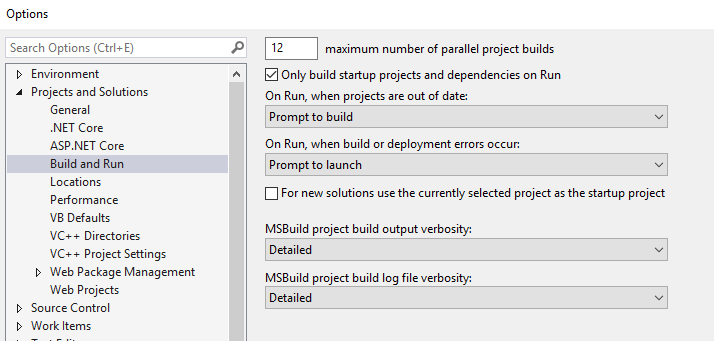
@shunjid could you increase the build verbosity? Unsure if Detailed or Diagnostic is what we'd like here.
Also copy from the Output Build log. I suspect you copied from the Error List.
jespersh
on 11 Feb 2019
1>------ Rebuild All started: Project: MaterialDesignColors.Wpf, Configuration: Debug Any CPU ------
1>  MaterialDesignColors.Wpf -> C:\Users\Username\Downloads\MaterialDesignInXamlToolkit-master\MaterialDesignColors.Wpf\bin\Debug\MaterialDesignColors.dll
2>------ Rebuild All started: Project: MaterialDesignThemes.Wpf, Configuration: Debug Any CPU ------
3>------ Rebuild All started: Project: MaterialDesignColors.Wpf.Tests, Configuration: Debug Any CPU ------
2>  Paket version 5.176.6
2>  C:\Users\Username\Downloads\MaterialDesignInXamlToolkit-master\paket-files\paket.locked is locked by paket.exe (PID = 4648). Waiting...
2>  Starting restore process.
2>  Performance:
2>   - Runtime: 3 seconds
2>C:\Users\Username\Downloads\MaterialDesignInXamlToolkit-master\MaterialDesignThemes.Wpf\Icon.cs(10,72,10,77): warning CS1584: XML comment has syntactically incorrect cref attribute 'https://materialdesignicons.com/'
2>C:\Users\Username\Downloads\MaterialDesignInXamlToolkit-master\MaterialDesignThemes.Wpf\Icon.cs(11,20,11,25): warning CS1584: XML comment has syntactically incorrect cref attribute 'https://github.com/Templarian/MaterialDesign/blob/master/license.txt'
2>C:\Users\Username\Downloads\MaterialDesignInXamlToolkit-master\MaterialDesignThemes.Wpf\IconType.cs(7,72,7,77): warning CS1584: XML comment has syntactically incorrect cref attribute 'https://materialdesignicons.com/'
2>C:\Users\Username\Downloads\MaterialDesignInXamlToolkit-master\MaterialDesignThemes.Wpf\IconType.cs(8,20,8,25): warning CS1584: XML comment has syntactically incorrect cref attribute 'https://github.com/Templarian/MaterialDesign/blob/master/license.txt'
2>C:\Users\Username\Downloads\MaterialDesignInXamlToolkit-master\MaterialDesignThemes.Wpf\PackIcon.cs(7,65,7,70): warning CS1584: XML comment has syntactically incorrect cref attribute 'https://materialdesignicons.com/'
2>C:\Users\Username\Downloads\MaterialDesignInXamlToolkit-master\MaterialDesignThemes.Wpf\PackIconKind.cs(11,72,11,77): warning CS1584: XML comment has syntactically incorrect cref attribute 'https://materialdesignicons.com/'
2>C:\Users\Username\Downloads\MaterialDesignInXamlToolkit-master\MaterialDesignThemes.Wpf\PackIconKind.cs(12,20,12,25): warning CS1584: XML comment has syntactically incorrect cref attribute 'https://github.com/Templarian/MaterialDesign/blob/master/license.txt'
2>C:\Users\Username\Downloads\MaterialDesignInXamlToolkit-master\MaterialDesignThemes.Wpf\SmartHint.cs(15,69,15,85): warning CS0612: 'SmartHint.ContentEmptyName' is obsolete
2>C:\Users\Username\Downloads\MaterialDesignInXamlToolkit-master\MaterialDesignThemes.Wpf\SmartHint.cs(16,69,16,88): warning CS0612: 'SmartHint.ContentNotEmptyName' is obsolete
2>C:\Users\Username\Downloads\MaterialDesignInXamlToolkit-master\MaterialDesignThemes.Wpf\Transitions\TransitioningContentBase.cs(26,22,26,45): warning CS0414: The field 'TransitioningContentBase._isOpeningEffectPending' is assigned but its value is never used
2>C:\Users\Username\Downloads\MaterialDesignInXamlToolkit-master\MaterialDesignThemes.Wpf\Icon.cs(10,72,10,77): warning CS1584: XML comment has syntactically incorrect cref attribute 'https://materialdesignicons.com/'
2>C:\Users\Username\Downloads\MaterialDesignInXamlToolkit-master\MaterialDesignThemes.Wpf\IconType.cs(7,72,7,77): warning CS1584: XML comment has syntactically incorrect cref attribute 'https://materialdesignicons.com/'
2>C:\Users\Username\Downloads\MaterialDesignInXamlToolkit-master\MaterialDesignThemes.Wpf\IconType.cs(8,20,8,25): warning CS1584: XML comment has syntactically incorrect cref attribute 'https://github.com/Templarian/MaterialDesign/blob/master/license.txt'
2>C:\Users\Username\Downloads\MaterialDesignInXamlToolkit-master\MaterialDesignThemes.Wpf\Icon.cs(11,20,11,25): warning CS1584: XML comment has syntactically incorrect cref attribute 'https://github.com/Templarian/MaterialDesign/blob/master/license.txt'
2>C:\Users\Username\Downloads\MaterialDesignInXamlToolkit-master\MaterialDesignThemes.Wpf\PackIcon.cs(7,65,7,70): warning CS1584: XML comment has syntactically incorrect cref attribute 'https://materialdesignicons.com/'
2>C:\Users\Username\Downloads\MaterialDesignInXamlToolkit-master\MaterialDesignThemes.Wpf\PackIconKind.cs(11,72,11,77): warning CS1584: XML comment has syntactically incorrect cref attribute 'https://materialdesignicons.com/'
2>C:\Users\Username\Downloads\MaterialDesignInXamlToolkit-master\MaterialDesignThemes.Wpf\PackIconKind.cs(12,20,12,25): warning CS1584: XML comment has syntactically incorrect cref attribute 'https://github.com/Templarian/MaterialDesign/blob/master/license.txt'
2>C:\Users\Username\Downloads\MaterialDesignInXamlToolkit-master\MaterialDesignThemes.Wpf\SmartHint.cs(15,69,15,85): warning CS0612: 'SmartHint.ContentEmptyName' is obsolete
2>C:\Users\Username\Downloads\MaterialDesignInXamlToolkit-master\MaterialDesignThemes.Wpf\SmartHint.cs(16,69,16,88): warning CS0612: 'SmartHint.ContentNotEmptyName' is obsolete
2>C:\Users\Username\Downloads\MaterialDesignInXamlToolkit-master\MaterialDesignThemes.Wpf\Transitions\TransitioningContentBase.cs(26,22,26,45): warning CS0414: The field 'TransitioningContentBase._isOpeningEffectPending' is assigned but its value is never used
2>  MaterialDesignThemes.Wpf -> C:\Users\Username\Downloads\MaterialDesignInXamlToolkit-master\MaterialDesignThemes.Wpf\bin\Debug\MaterialDesignThemes.Wpf.dll
3>  Paket version 5.176.6
3>  Starting restore process.
3>  Performance:
3>   - Disk IO: 2 seconds
3>   - Runtime: 3 seconds
3>  MaterialDesignColors.Wpf.Tests -> C:\Users\Username\Downloads\MaterialDesignInXamlToolkit-master\MaterialDesignColors.Wpf.Tests\bin\Debug\MaterialDesignColors.Wpf.Fixture.dll
4>------ Rebuild All started: Project: MaterialDesignThemes.MahApps, Configuration: Debug Any CPU ------
5>------ Rebuild All started: Project: MaterialDesignDemo, Configuration: Debug Any CPU ------
6>------ Rebuild All started: Project: MaterialDesignThemes.Wpf.Tests, Configuration: Debug Any CPU ------
4>  Paket version 5.176.6
4>  C:\Users\Username\Downloads\MaterialDesignInXamlToolkit-master\paket-files\paket.locked is locked by paket.exe (PID = 8252). Waiting...
4>  Starting restore process.
4>  Performance:
4>   - Disk IO: 617 milliseconds
4>   - Runtime: 3 seconds
4>  MaterialDesignThemes.MahApps -> C:\Users\Username\Downloads\MaterialDesignInXamlToolkit-master\MaterialDesignThemes.MahApps\bin\Debug\MaterialDesignThemes.MahApps.dll
6>  Paket version 5.176.6
6>  Starting restore process.
6>  Performance:
6>   - Disk IO: 980 milliseconds
6>   - Runtime: 2 seconds
6>  MaterialDesignThemes.Wpf.Tests -> C:\Users\Username\Downloads\MaterialDesignInXamlToolkit-master\MaterialDesignThemes.Wpf.Tests\bin\Debug\MaterialDesignThemes.Wpf.Tests.dll
7>------ Rebuild All started: Project: MahAppsDragablzDemo, Configuration: Debug Any CPU ------
5>  Paket version 5.176.6
5>  Starting restore process.
5>  Performance:
5>   - Disk IO: 245 milliseconds
5>   - Runtime: 1 second
5>C:\Users\Username\Downloads\MaterialDesignInXamlToolkit-master\MainDemo.Wpf\MaterialDesignDemo.csproj(462,5): error : ShowMeTheXAML was added to the MaterialDesignDemo project. Please rebuild the project.
7>  Paket version 5.176.6
7>  Starting restore process.
7>  Performance:
7>   - Disk IO: 1 second
7>   - Runtime: 2 seconds
7>  MahAppsDragablzDemo -> C:\Users\Username\Downloads\MaterialDesignInXamlToolkit-master\MahMaterialDragablzMashUp\bin\Debug\MahAppsDragablzDemo.exe
========== Rebuild All: 6 succeeded, 1 failed, 0 skipped ==========
@jespersh I guess, you are expecting this one, right?
shunjid
on 11 Feb 2019
Thanks @shunjid that log is helpful.
A few followup questions.
- From your screenshot it appears that you are running VS2017; is that correct? I assume this is also the latest code on the master branch?
- Is the Target framework of the MaterialDesignDemo project set to .NET Framework 4.5? (Right click on the project, go to Properties, and look under the Application tab).
- Can you check the contents of the generated packages directory. I would expect to see the following files:
packages\ShowMeTheXAML\lib\net45\ShowMeTheXAML.dllandpackages\ShowMeTheXAML.MSBuild\build\net45\ShowMeTheXAML.MSBuild.targets. Do those exist? - If you set the MSBuild output verbosity to Detailed (as @jespersh suggests) you should see something similar to this in the output:
5>Target "BuildXamlDictionary" in file "C:\Dev\MaterialDesignInXamlToolkit\packages\ShowMeTheXAML.MSBuild\build\net45\ShowMeTheXAML.MSBuild.targets" from project "C:\Dev\MaterialDesignInXamlToolkit\MainDemo.Wpf\MaterialDesignDemo.csproj" (target "BeforeCompile" depends on it):
5>Using "BuildXamlDictionaryTask" task from assembly "C:\Dev\MaterialDesignInXamlToolkit\packages\ShowMeTheXAML.MSBuild\build\net45\..\..\\ShowMeTheXAML.MSBuild.dll".
5>Task "BuildXamlDictionaryTask"
5>Done executing task "BuildXamlDictionaryTask".
5>Done building target "BuildXamlDictionary" in project "MaterialDesignDemo.csproj".
5>Target "BeforeCompile" in file "C:\Program Files (x86)\Microsoft Visual Studio\2017\Enterprise\MSBuild\15.0\Bin\Microsoft.Common.CurrentVersion.targets" from project "C:\Dev\MaterialDesignInXamlToolkit\MainDemo.Wpf\MaterialDesignDemo.csproj" (target "Compile" depends on it):
5>Done building target "BeforeCompile" in project "MaterialDesignDemo.csproj".
5>Target "ShowMeTheXAML_EnsureXamlCreated" in project "C:\Dev\MaterialDesignInXamlToolkit\MainDemo.Wpf\MaterialDesignDemo.csproj" (target "Compile" depends on it):
5>Task "Error" skipped, due to false condition; (('$(ShowMeTheXAMLGeneratedFileName)' == '' Or $(ShowMeTheXAMLGeneratedFileName) == '*Undefined*') And Exists('..\packages\ShowMeTheXAML.MSBuild\build\$(__paket__ShowMeTheXAML_MSBuild_targets).targets')) was evaluated as (('ShowMeTheXaml_XamlDictionary.g.cs' == '' Or ShowMeTheXaml_XamlDictionary.g.cs == '*Undefined*') And Exists('..\packages\ShowMeTheXAML.MSBuild\build\net45\ShowMeTheXAML.MSBuild.targets')).
5>Done building target "ShowMeTheXAML_EnsureXamlCreated" in project "MaterialDesignDemo.csproj".
Try doing searches in the output for BuildXamlDictionaryTask and ShowMeTheXAML_EnsureXamlCreated.
Just to clarify: the check that is failing is here. It uses the presence of the ShowMeTheXAMLGeneratedFileName variable to determine if the ShowMeTheXAML.MSBuild.targets was included as part of the build process. This file is expected to be included when paket downloads and installs the NuGet package.
Keboo
on 11 Feb 2019
@Keboo Answering serially:
Yes, Visual Studio 2017. Latest code
Yes, 4.5
Both the files exist
I set that to details and now the output log is quite big than the previous. I searched for those keywords in the output:
- For BuildXamlDictionaryTask
5>Target "BuildXamlDictionary" in file "C:\Users\Username\Downloads\MaterialDesignInXamlToolkit-master\packages\ShowMeTheXAML.MSBuild\build\net45\ShowMeTheXAML.MSBuild.targets" from project "C:\Users\Username\Downloads\MaterialDesignInXamlToolkit-master\MainDemo.Wpf\MaterialDesignDemo.csproj" (target "BeforeCompile" depends on it):
5>Using "BuildXamlDictionaryTask" task from assembly "C:\Users\Username\Downloads\MaterialDesignInXamlToolkit-master\packages\ShowMeTheXAML.MSBuild\build\net45\..\..\\ShowMeTheXAML.MSBuild.dll".
5>Task "BuildXamlDictionaryTask"
5>Done executing task "BuildXamlDictionaryTask".
- For ShowMeTheXAML_EnsureXamlCreated
5>Target "ShowMeTheXAML_EnsureXamlCreated" in project "C:\Users\Username\Downloads\MaterialDesignInXamlToolkit-master\MainDemo.Wpf\MaterialDesignDemo.csproj" (target "Compile" depends on it):
5>Task "Error" skipped, due to false condition; (('$(ShowMeTheXAMLGeneratedFileName)' == '' Or $(ShowMeTheXAMLGeneratedFileName) == '*Undefined*') And Exists('..\packages\ShowMeTheXAML.MSBuild\build\$(__paket__ShowMeTheXAML_MSBuild_targets).targets')) was evaluated as (('ShowMeTheXaml_XamlDictionary.g.cs' == '' Or ShowMeTheXaml_XamlDictionary.g.cs == '*Undefined*') And Exists('..\packages\ShowMeTheXAML.MSBuild\build\net45\ShowMeTheXAML.MSBuild.targets')).
5>Done building target "ShowMeTheXAML_EnsureXamlCreated" in project "MaterialDesignDemo.csproj".
@shunjid that is exactly how I would expect the log to look. And at least according to those small snippets it looks like the project compiled successfully. Are you still seeing that error?
Keboo
on 11 Feb 2019
@Keboo Yes, the project now compiled successfully and this time it has no error (except some warnings).
But what was the actual problem? Does making output verbosity to 'detailed' solved the problem?
shunjid
on 12 Feb 2019
@shunjid doubtful. I suspect changing the output level simply caused the MSBuild process to restart (which is what is really required to fix it).
Here is the long explanation of what is going on.
MaterialDesignInXaml (MDIX) does not have any dependencies other than its own colors library.
However, the demo app, does take some extra dependencies, one of these is ShowMeTheXAML (SMTX). It uses paket to download its dependencies (not NuGet directly). Paket adds an MSBuild task that will download any needed dependencies when it is run. This is the first half of the problem.
MSBuild is a two pass system. The first pass handles loading all of the imported files and building out the list of tasks to run. The second pass handles executing those tasks. In this case by the time paket installs SMTX, we are already in the second pass of the MSBuild process and there is not an opportunity to add a new task for MSBuild to execute. That is the reason for the error that you were seeing. There is a task inside of the project that checks to see if the SMTX targets has been loaded. This is basically a check to determine if the NuGet package was downloaded.
This brings the second problem. By default Visual Studio keeps the MSBuild process running. This is why you typically needs to restart Visual Studio and do a full re-build (not just a normal incremental build) after SMTX is downloaded. If you don't do this, Visual Studio wont run SMTX and the error will continue to happen. I suspect when you changed the output settings it forced the MSBuild process to restart thus "fixing" the issue.
Keboo
on 12 Feb 2019
Just to add, I think I've had a case where the ServiceHub.Host.Node.x86.exe process that spawns the MSBuild.exe hung around after closing Visual Studio that somehow caused VS to reuse that tree of processes.
So it might even be necessary to look around for orphan processes if restarting VS didn't help either.
jespersh
on 12 Feb 2019
try to clean the solution...
 ylandau
on 22 Jul 2019
ylandau
on 22 Jul 2019
try to clean the solution...
This worked for me
 StylesGumede
on 1 Aug 2019
StylesGumede
on 1 Aug 2019
Downloaded vs 2019
 Briankeith88
on 15 Nov 2019
Briankeith88
on 15 Nov 2019
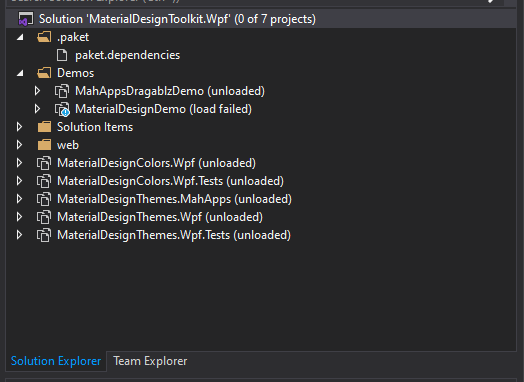
Could any one help me ? I cannot complie MaterialDesignToolkit.Wpf.sln File
 letuan710
on 9 Feb 2020
letuan710
on 9 Feb 2020
@letuan710 take a look at the wki page https://github.com/MaterialDesignInXAML/MaterialDesignInXamlToolkit/wiki/Compiling-From-Source
Keboo
on 9 Feb 2020
@letuan710 do you have .net core 3.0 installed? If you have latest Visual Studio installed you maybe have .net core 3.1 but not 3.0
 Mrxx99
on 9 Feb 2020
Mrxx99
on 9 Feb 2020
how i find rebuild app this toolkit
 SobirjonovSodiqjonovich
on 5 Dec 2020
SobirjonovSodiqjonovich
on 5 Dec 2020
i am very interesting that.
But i don't rebuild this in vs2019
unfortunately
i have two problem
SobirjonovSodiqjonovich
on 5 Dec 2020
@SobirjonovSodiqjonovich unfortuently you will need VS 2019 if you want to compile from source. Specifically you will need v16.8 or later, the C# 9 compiler is required, with .NET 5.0.100 SDK or later installed
Keboo
on 7 Dec 2020
Related issues
 maciz84
·
36Comments
maciz84
·
36Comments
 ttweixiao9999
·
14Comments
ttweixiao9999
·
14Comments
 mgnslndh
·
14Comments
mgnslndh
·
14Comments
 Arshad8464
·
31Comments
Arshad8464
·
31Comments
 Tyrrrz
·
12Comments
Tyrrrz
·
12Comments
Most helpful comment
Another problem I found was that if the build path is too long, then it wouldn't work (sometimes?)
Like if I tried to build from
C:\Users\jsh\Downloads\MaterialDesignInXamlToolkit-master3\MaterialDesignInXamlToolkit-master, then it would fail until I moved it toC:\tmp\MaterialDesignInXamlToolkit-master