Materialdesigninxamltoolkit: Could not load file or assembly 'MaterialDesignColors, Culture=neutral' or one of its dependencies
Hi am getting the following error when running my class library project.
"Could not load file or assembly 'MaterialDesignColors, Culture=neutral' or one of its dependencies. The system cannot find the file specified.":"MaterialDesignColors, Culture=neutral"} System.Exception {System.IO.FileNotFoundException
I tried the below link forthe issue Could not load file or assembly 'MaterialDesignThemes.Wpf and the issue got fixed by adding the piece of code suggested as below .
   public partial class UserControl1 : UserControl
    {
        public UserControl1()
        {
            InitializeComponent();
            ShadowAssist.SetShadowDepth(this, ShadowDepth.Depth0);
        }
    }
Is there any fix like above available for `MaterialDesignColors.dll ?
Note : All the dlls exists in same folder.
 Arshad8464
All 31 comments
it would be interesting which dependency you could not load. Can you specify more detailed information. You can catch a ReflectionTypeLoadException. There is a Types property, which lists all types they could not be loaded.
 Streissi
on 12 Jul 2018
Streissi
on 12 Jul 2018
I have added MaterialDesignColors.dll and used in my application .But when running getting an error as Could not load file MaterialDesignColors.dll
Arshad8464
on 13 Jul 2018
@Arshad8464 take a look at Fuselofvw for debugging assembly resolution errors (example of using it here). There are many reasons why this error could occur. The most common is a version mismatch from the version of MaterialDesignColors.dll that your app was compiled against and the one sitting in the directory. The other time this occurs is when this library is used as part of an extension for some other application.
 Keboo
on 13 Jul 2018
Keboo
on 13 Jul 2018
Hi! I am interested if you can elaborate on this statement "The other time this occurs is when this library is used as part of an extension for some other application." I am trying to use MaterialDesignThemes in a class library. I am able to reference it correctly, but I get the same error as the original poster. Thank you.
I figured my problem out and I am ashamed to admit how simple the solution was - I simply wasn't copying the referenced .dll(s) to the location where the assembly is during run time. Once I fixed that it was perfect. Thank you.
 dnenov
on 15 Jul 2018
dnenov
on 15 Jul 2018
I use with prism in the following way:
My shell has the nuget reference to material design xaml library and in the
app.xaml I set it up.
My modules also have nuget reference to material design xaml lib. As you
know, UI modules are wpf usercontrols, so in each page I include the
material design xaml as resource. This allows me to see styles in design
time.
When I deploy my modules everything is loaded correctly.
There's no duplicate resources because I use a specialized resource class
to load resources only in design time in my modules.
On Sun, Jul 15, 2018, 19:56 Deyan Nenov notifications@github.com wrote:
Hi! I am interested if you can elaborate on this statement "The other time
this occurs is when this library is used as part of an extension for some
other application." I am trying to use MaterialDesignThemes in a class
library. I am able to reference it correctly, but I get the same error as
the original poster. Thank you.—
You are receiving this because you are subscribed to this thread.
Reply to this email directly, view it on GitHub
https://github.com/ButchersBoy/MaterialDesignInXamlToolkit/issues/980#issuecomment-405110585,
or mute the thread
https://github.com/notifications/unsubscribe-auth/AH_-jzI9Abbw4jVoW453QgHYqKpxdApxks5uG5BMgaJpZM4VHIlR
.
 quicoli
on 15 Jul 2018
quicoli
on 15 Jul 2018
I had the same error. I used the shadow assist code above for the 'MD Themes' and used the code below to get the 'Colors'.
var hue = new Hue("Dummy", Colors.AliceBlue, Colors.AntiqueWhite);
 z3ke1r
on 9 Oct 2018
z3ke1r
on 9 Oct 2018
Is there a solution to this problem? I get a very similar error:
`System.Windows.Markup.XamlParseException: ''Set property 'System.Windows.ResourceDictionary.Source' threw an exception.
FileNotFoundException: Could not load file or assembly 'MaterialDesignThemes.Wpf, Culture=neutral' or one of its dependencies`.
I am developing a class library.
I created a resource dictionary file with the following content:
<ResourceDictionary xmlns="http://schemas.microsoft.com/winfx/2006/xaml/presentation">
<ResourceDictionary.MergedDictionaries>
<ResourceDictionary Source="pack://application:,,,/MaterialDesignThemes.Wpf;component/Themes/MaterialDesignTheme.Light.xaml" />
<ResourceDictionary Source="pack://application:,,,/MaterialDesignThemes.Wpf;component/Themes/MaterialDesignTheme.Defaults.xaml" />
<ResourceDictionary Source="pack://application:,,,/MaterialDesignColors;component/Themes/Recommended/Primary/MaterialDesignColor.DeepPurple.xaml" />
<ResourceDictionary Source="pack://application:,,,/MaterialDesignColors;component/Themes/Recommended/Accent/MaterialDesignColor.Lime.xaml" />
</ResourceDictionary.MergedDictionaries>
</ResourceDictionary>
And i use it on my initial page in a following way:
<Page.Resources>
<ResourceDictionary Source="/MyAsembly;component/ResourceDictionary/MaterialDesign.xaml" />
</Page.Resources>
Unfortunately, i do not have admin privileges on the computer where i'm developing code, so i cannot run Fuselofvw as suggested in one of the previous posts.
 JovanovicMarija
on 11 Apr 2019
JovanovicMarija
on 11 Apr 2019
@JovanovicMarija there is not really a single solution. As the error indicates the issue is the running process is unable to locate the assembly. Can you provide more detail on what type of app this is, how your projects reference each other, and which ones are referencing the material design library.
Keboo
on 11 Apr 2019
The problem might be Revit and the way it's loading dlls. I introduced the following code
AppDomain.CurrentDomain.AssemblyResolve += CurrentDomain_AssemblyResolve; and
Assembly CurrentDomain_AssemblyResolve(object sender, ResolveEventArgs args)
{
if (args.Name.Contains("MaterialDesignTheme"))
{
string filename = Path.GetDirectoryName(Assembly.GetExecutingAssembly().Location);
filename = Path.Combine(filename, "MaterialDesignTheme.Wpf.dll");
if (File.Exists(filename))
{
return Assembly.LoadFrom(filename);
}
}
return null;
}
But now i get the error:
System.Windows.Markup.XamlParseException: ''Set property 'System.Windows.ResourceDictionary.Source' threw an exception.'
FileNotFoundException: Could not find file 'MaterialDesignTheme.Wpf.resources'.
I have found this github issue that faces the same problem, but his app runs and my app chrashes.
JovanovicMarija
on 12 Apr 2019
@JovanovicMarija ah so this is being loaded as part of an extension. Dynamic assembly loading can be quite tricky. The code you have above is only attempting to load the MaterialDesignTheme.Wpf.dll but it is ignoring the MaterialDesignColors.dll which you will need to load as well.
Keboo
on 12 Apr 2019
@Keboo i apologise for my late response. My second post was only one of many quick&dirty ways i tried in order to solve the problem, i should have posted the code that covers loading MatreialDesignColors as well (yet the error message would have been the same).
What solved my problem was completely abendoning the code snipped from my second post and doing what @Arshad8464 and @z3ke1r did.
I didn't originally understand that this approach would solve the problem, because i was trying to follow MVVM pattern and keep code behind clean. Therefore it didn't make any sense to me that they were suggesting to put bullshit code in the file that i was trying to keep empty. But hey, it works now! :)
JovanovicMarija
on 23 Apr 2019
Closing for now as all of the issues appear to be outside of this library. Let me know if there is more that needs to be addressed here.
Keboo
on 23 Apr 2019
For folks still encountering this issue: this post by Carlos Anderson explains what's going on:
There’s another tricky thing. Because you don’t use any classes in the Material Design assemblies, your script assembly doesn’t load those assemblies. It’s the XAML parser that uses the Material Design assemblies and therefore tries to load them. The problem is that, because it’s not your assembly that loads them, .NET looks for the Material Design assemblies in the wrong place.
And provides a solution similar to what @z3ke1r suggests:
public MainWindow()
{
    InitializeMaterialDesign();
    InitializeComponent();
}

private void InitializeMaterialDesign()
{
    // Create dummy objects to force the MaterialDesign assemblies to be loaded
    // from this assembly, which causes the MaterialDesign assemblies to be searched
    // relative to this assembly's path. Otherwise, the MaterialDesign assemblies
    // are searched relative to Eclipse's path, so they're not found.
    var card = new Card();
    var hue = new Hue("Dummy", Colors.Black, Colors.White);
}
This solved it for me.
 mswaidan
on 23 May 2019
mswaidan
on 23 May 2019
@mswaidan does that also work in release builds? I'm using some code at work that also requires me to reference the Colors dll and do a noop call because a method like yours gets optimized away.
 jespersh
on 23 May 2019
jespersh
on 23 May 2019
@jespersh Just checked, and that solution works on my project's release build. This is definitely at the edges of my understanding though, so can't say whether it will work in other cases.
mswaidan
on 23 May 2019
Found it again. If @mswaidan's suggestion doesn't work, try this (from https://stackoverflow.com/a/39755840):
C#
Action<Type> noop = _ => {};
var dummy = typeof(Card);
noop(dummy);
You'd need the same for the Color dll (Hue for example)
jespersh
on 23 May 2019
Hi. I tried everything from this discussion... And finally i still getting an error.
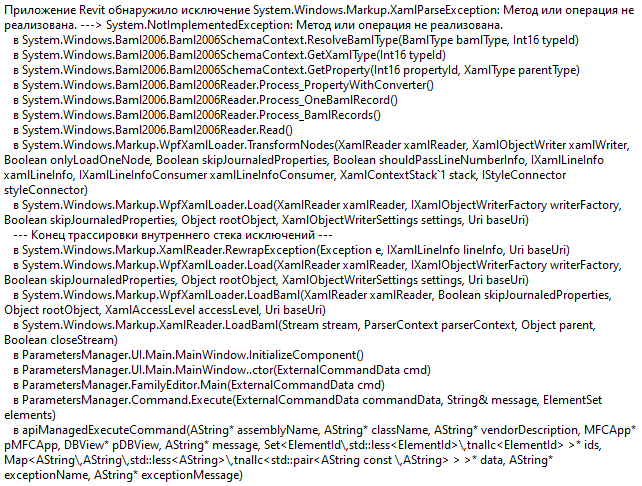
The only solution i found is to put MaterialDesign libraries into Revit app folder. (C:Program FilesAutodeskRevit 2017). I tried to load these libraries at runtime with but still got same exception. Does anybody knows any better solution?
 hedinjke
on 25 Sep 2019
hedinjke
on 25 Sep 2019
Finally found solution.
May be this gonna help someone. Here is it:
public class AssemblyLoader: IDisposable {
 private static string ExecutingPath => Assembly.GetExecutingAssembly().Location;

 public AssemblyLoader() {
  AppDomain.CurrentDomain.AssemblyResolve += LoadMaterialDesign;
 }

 private static Assembly LoadMaterialDesign(object sender, ResolveEventArgs args) {
  if (null == ExecutingPath) return null;
  string assemlyToLoad = string.Empty;

  string GetAssemblyName(string fullName) => fullName.Substring(0, fullName.IndexOf(','));

  var path = ExecutingPath;
  var dir = new FileInfo(path).Directory;

  var assemblies = from file in dir.EnumerateFiles()
  where file.Name.EndsWith(".dll") ||
   file.Name.EndsWith(".exe")
  select Assembly.LoadFrom(file.FullName);

  foreach(var assembly in assemblies) {

   var assemName = GetAssemblyName(assembly.FullName);
   var requested = GetAssemblyName(args.Name);

   try {
    if (assemName == requested) {
     return assembly;
    }
   } catch (Exception) {
    continue;
   }

   //}
  }
  return null;
 }

 void IDisposable.Dispose() {
  AppDomain.CurrentDomain.AssemblyResolve -= LoadMaterialDesign;
 }
}
Usage example:
[Transaction(TransactionMode.Manual)]
public class Command : IExternalCommand
{
    public Result Execute(ExternalCommandData commandData,
                        ref string message,
                        ElementSet elements)
    {
        using var loader = new AssemblyLoader();
                /// Your command implementation
        return Result.Succeeded();
    }
}
@hedinjke could you also make it a gist?
jespersh
on 25 Sep 2019
@jespersh yes, of cause. If i understood you right... Here is it. I'm sorry, but i'm new in C#, Git and english skills... So if u help me to improve anything here would be awesome :)
hedinjke
on 25 Sep 2019
Got the same issue on several machines. Even with a complete fresh installation. Even the demo projects wont work and throw following error on debug:
FileLoadException: Die Datei oder Assembly "MaterialDesignThemes.Wpf, Version=1.0.7222.22334, Culture=neutral, PublicKeyToken=38dcbcee103a64ec" oder eine Abhängigkeit davon wurde nicht gefunden. Die gefundene Manifestdefinition der Assembly stimmt nicht mit dem Assemblyverweis überein. (Ausnahme von HRESULT: 0x80131040)
Only happens with newest 2.6. version.
Older 2.5 version i was using is working fine in my product and the demo projects are working.
 xHatti
on 10 Oct 2019
xHatti
on 10 Oct 2019
@xHatti can you check and see if you have any binding redirects in your appconfig?
These may need to be removed or updated to the latest version.
Keboo
on 10 Oct 2019
@Keboo Thanks for reply.
No there is no binding redirect present. Not in the project or in machine.config
The workarround from @hedinjke is working fine for me. But as said, even the 2.6.0 Release source code isnt working for me in debug mode with a fresh system and fresh vs2017
fuslogvw showed me, that it searches for "MaterialDesignThemes.Wpf, Culture=neutral" which can be found in the debug folder of the project. But it also searches for "MaterialDesignThemes.Wpf, Version=1.0.7226.18106, Culture=neutral, PublicKeyToken=38dcbcee103a64ec" which cant be found/mismatch with the revision number of the dll in debug folder.
Fuslog says, it only found "MaterialDesignThemes.Wpf, Version=1.0.7226.22802, Culture=neutral, PublicKeyToken=38dcbcee103a64ec." in debug folder.
After that, fuslog shows me that it wants to load 2 resource.dll for materialdesign
"MaterialDesignThemes.Wpf.resources, Version=1.0.7226.22802, Culture=de, PublicKeyToken=38dcbcee103a64ec"
and the other is almost the same but with Culture "de-DE"
but both cant be found either.
xHatti
on 14 Oct 2019
@xHatti first of all u don't need to check version number inside assembly resolve event. And u don't need to load .resources files, u should return null. Here is the updated version of my solution. Hope that's gonna help you :)
hedinjke
on 14 Oct 2019
@Arshad8464 @Keboo Solving it was pretty simple. Just Install MaterialDesignColors over NuGet as well
 FriedrichRehren
on 19 Dec 2019
FriedrichRehren
on 19 Dec 2019
@Arshad8464 @Keboo Solving it was pretty simple. Just Install MaterialDesignColors over NuGet as well
Use version 3.0.0 in WPF and this works
 imckl
on 22 Dec 2019
imckl
on 22 Dec 2019
For anyone using this library in a Visual Studio extension, you have to do two things:
1) Sign the assembly (necessary for all VSIX dependencies). The easiest way is using the StrongNamer package. Just add it to your project as a reference and it will sign all unsigned dependencies at build time. No further setup needed.
2) Add the [ProvideBindingPath] attribute to extension's Package or AsyncPackage file. This tells your XAML files to look at all the project's references. See here for more details.
 DeanMauro
on 14 Feb 2020
DeanMauro
on 14 Feb 2020
For anyone using this library in a Visual Studio extension, you have to do two things:
- Sign the assembly (necessary for all VSIX dependencies). The easiest way is using the StrongNamer package. Just add it to your project as a reference and it will sign all unsigned dependencies at build time. No further setup needed.
- Add the
[ProvideBindingPath]attribute to extension'sPackageorAsyncPackagefile. This tells your XAML files to look at all the project's references. See here for more details.
I've spent so many hours trying to fix this. Thank you.
 naldorp
on 27 Apr 2020
naldorp
on 27 Apr 2020
Since it's a reference error, i checked to see what could be a possible solution.
All i did was:
Right click your project
Select Add --> Reference
In the menu Assemblies make sure Accessibility is activated.
That's it, everything is working.
 R3ap4r
on 16 May 2020
R3ap4r
on 16 May 2020
I had a similar problem that I resolved by removing any implicit initialization of all the wpf controls containing material design reference and group there initialization into a function "Initialize" that I call one time before using my controls
 finti3295
on 16 Jun 2020
finti3295
on 16 Jun 2020
Hi,
I encountered the same issue while attempting to load an application.
I built upon @hedinjke's good work by removing unnecessary calls to the Assembly.LoadFrom() method. I noticed that your suggestion would lead to many unnecessary calls - in my case, the same assembly would be loaded 16 times or so.
Instead of using a foreachstructure to iterate over the list of assemblies returned by:
var assemblies = from file in dir.EnumerateFiles()
    where file.Name.EndsWith(".dll") ||
    file.Name.EndsWith(".exe")
    select Assembly.LoadFrom(file.FullName);
I return a list of strings and use LINQ expressions to compare between the assemblies already loaded, and the ones required by the AppDomain.CurrentDomain.AssemblyResolve event.
- If the assembly is already loaded, we return it, as expected by the event
- If the assembly is not loaded, and requested and present in the list of files, we return it via
return Assembly.LoadFrom(assemblyToLoad); - If the assembly is not loaded, and requested, but missing from the build directory, we return null.
AssemblyLoader.cs
using System;
using System.Collections.Generic;
using System.Diagnostics;
using System.IO;
using System.Linq;
using System.Reflection;

namespace App.Namespace
{
    /// <summary>
    /// Used to determine the UNC path of the solution files (on the file system)
    /// and load the assembly
    /// </summary>
    public class AssemblyLoader : IDisposable
    {
        private static string _executingPath;
        public AssemblyName _assemblyName;

        private DirectoryInfo _fileInfo;
        private IEnumerable<string> _assemblies;

        readonly AppDomain currentDomain = AppDomain.CurrentDomain;

        private IEnumerable<Assembly> _domainAssemblies;

        /// <summary>
        /// Default constructor
        /// </summary>
        public AssemblyLoader()
        {
            // Store the loaded assemblies
            _executingPath = Assembly.GetExecutingAssembly().Location;
            _fileInfo = new FileInfo(_executingPath).Directory;

            // Return a list of all DLLS from the executing directory
            _assemblies = EnumerateFiles.GetFiles(_fileInfo);
            _domainAssemblies = currentDomain.GetAssemblies().Where(a => !a.IsDynamic);

            AppDomain.CurrentDomain.AssemblyResolve += LoadApplicationAssemblies;
        }

        /// <summary>
        /// Event handler to return an assembly
        /// </summary>
        /// <param name="sender">The object that raises the event</param>
        /// <param name="args">Supplementary parameters</param>
        /// <returns>The name of the a assembly</returns>
        public Assembly LoadApplicationAssemblies(object sender, ResolveEventArgs args)
        {
            if (string.IsNullOrEmpty(_executingPath))
                return null;

            try
            {
                // Ignore missing resources
                if (args.Name.Contains(".resources"))
                    return null;

                // Check for assemblies already loaded
                Assembly loadedAssembly = _domainAssemblies.FirstOrDefault(x => x.FullName == args.Name);
                if (loadedAssembly != null)
                    return loadedAssembly;

                var requestedAssembly = args.Name.Split(',')[0];
                var assemblyToLoad = _assemblies.Where(x => x.Contains(requestedAssembly)).FirstOrDefault();

                return Assembly.LoadFrom(assemblyToLoad);
            }

            catch (Exception e)
            {
                // or rethrow the exception
                // throw;
                return null;
            }
        }

        public void Dispose()
        {
            AppDomain.CurrentDomain.AssemblyResolve -= LoadApplicationAssemblies;
        }
    }
}
EnumerateFiles.cs
using System.Collections.Generic;
using System.IO;
using System.Linq;

namespace App.Namespace
{
    /// <summary>
    /// Return a list of DLLs in-use by the project. See the <see cref=AssemblyLoader"/> class
    /// for an example
    /// </summary>
    class EnumerateFiles
    {
        /// <summary>
        /// Return the list of files in fileInfo
        /// </summary>
        /// <param name="fileInfo">The directory</param>
        /// <returns>A read-only enumerable (list) that contains a list of files in use</returns>
        public static IEnumerable<string> GetFiles(DirectoryInfo fileInfo)
        {
            return from file in fileInfo.EnumerateFiles()
                   where (file.Name.EndsWith(".dll") || file.Name.EndsWith(".exe"))
                   select file.FullName;
        }
    }
}
 Razique
on 23 Jan 2021
Razique
on 23 Jan 2021
Related issues
 bebenins
·
11Comments
bebenins
·
11Comments
 swingfox
·
25Comments
swingfox
·
25Comments
 oSethoum
·
10Comments
oSethoum
·
10Comments
 rrs
·
18Comments
rrs
·
18Comments
 arc95
·
10Comments
arc95
·
10Comments
Most helpful comment
For folks still encountering this issue: this post by Carlos Anderson explains what's going on:
And provides a solution similar to what @z3ke1r suggests:
This solved it for me.