Materialdesigninxamltoolkit: How to display the window of selecting the tool component and copying the code in MaterialDesignInXamlToolkit?
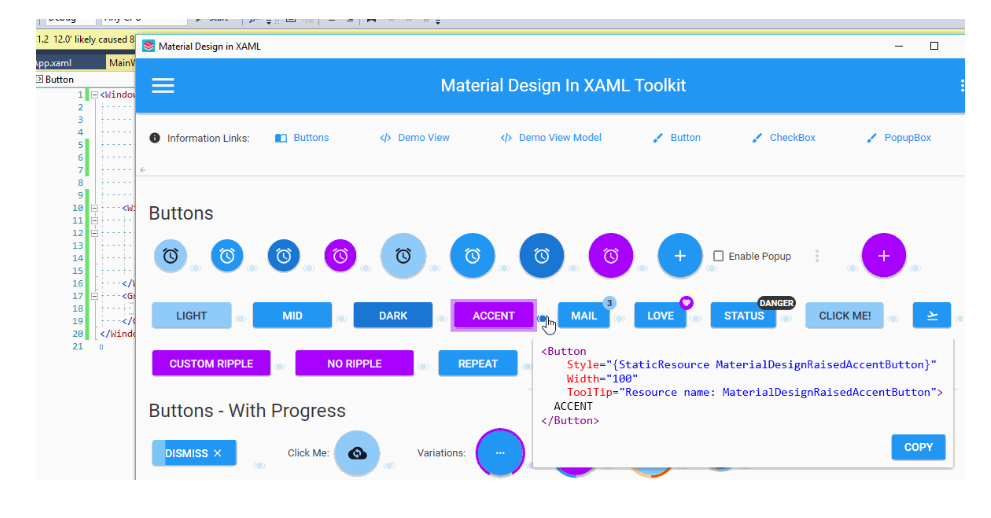
I want to know how to display the window in MaterialDesignInXaml that can select the specific tool component and copy the code, as shown below. Or an component selection tutorial. Thank you.
 ttweixiao9999
All 14 comments
It is called ShowMeTheXaml. Example use here:
https://github.com/MaterialDesignInXAML/MaterialDesignInXamlToolkit/blob/cca77f4b2e27d4a58013eece1d3ec5782501a171/MainDemo.Wpf/Buttons.xaml#L74-L79
Repo here: https://github.com/Keboo/ShowMeTheXAML/
 jespersh
on 15 Feb 2020
jespersh
on 15 Feb 2020
I'm glad to receive your reply. I'm very excited. I tried the ShowMeTheXaml tutorial on GitHub, but I couldn't find a way to call up the interface for searching component code. I don't if it's because I can't use it now or something.... I'm frustrated that I can't find a reason.
ttweixiao9999
on 19 Feb 2020
@ttweixiao9999 there are several things to know here.
First make sure you are using the latest preview release of ShowMeTheXaml. There are bug fixes in it that you will likely need.
Next, you will need to make sure you are referencing the ShowMeTheXAML.MSBuild NuGet package in your project. This NuGet adds a compile step to MSBuild that generates a C# dictionary at compile time with all of the XAML.
Next make sure you wrap the code you care to show in the XamlDisplay code as shown above.
Finally you need to make sure you call XamlDisplay.Init() at the start of your program. Like what is done here.
It is also worth mentioning that this library uses a custom control template for XamlDisplay control, which is why it looks the say that it does. You can see that style and template here
 Keboo
on 19 Feb 2020
Keboo
on 19 Feb 2020
Dear, I have followed your steps, but still failed, and there is stall a strange phenomenon that the following code appears in the display window. This code happens to be the code I wrote in the SMTX section of the xaml file.
The code shown in the running results:
<Button Style="{StaticResource MaterialDesignFloatingActionButton}" ToolTip="MaterialDesignFloatingActionLightButton">
    <materialDesign:PackIcon Kind="Alarm" Height="24" Width="24" xmlns:materialDesign="http://materialdesigninxaml.net/winfx/xaml/themes" />
</Button>
I don't know which step went wrong. I hope I can get help. Thank you.
ttweixiao9999
on 24 Feb 2020
Can you please share the code that you have written?
Keboo
on 24 Feb 2020
My pleasure.
(1) MainWindow.xaml :
<Window x:Class="ShowMeTheXAMLUSe.MainWindow"
        xmlns="http://schemas.microsoft.com/winfx/2006/xaml/presentation"
        xmlns:x="http://schemas.microsoft.com/winfx/2006/xaml"
        xmlns:d="http://schemas.microsoft.com/expression/blend/2008"
        xmlns:mc="http://schemas.openxmlformats.org/markup-compatibility/2006"
        xmlns:local="clr-namespace:ShowMeTheXAMLUSe"
        xmlns:materialDesign="http://materialdesigninxaml.net/winfx/xaml/themes"
        xmlns:smtx="clr-namespace:ShowMeTheXAML;assembly=ShowMeTheXAML"
        mc:Ignorable="d"
        Title="MainWindow" Height="350" Width="525">
    <DockPanel>
        <Grid VerticalAlignment="Top" Margin="16">
            <Grid.ColumnDefinitions>
                <ColumnDefinition Width="Auto"/>
                <ColumnDefinition Width="Auto"/>
                <ColumnDefinition Width="*"/>
                <ColumnDefinition Width="Auto"/>
            </Grid.ColumnDefinitions>
            <materialDesign:PackIcon Kind="Account" VerticalAlignment="Center"/>
            <TextBlock Grid.Column="1" Margin="8 0 0 0" VerticalAlignment="Center">Name:</TextBlock>
            <TextBox Grid.Column="2" Margin="8 0 0 0" VerticalAlignment="Center"></TextBox>
            <Button Grid.Column="3" Margin="8 0 0 0">SUBMIT</Button>
            <smtx:XamlDisplay Key="but" Margin="8 0" >
                <Button Style="{StaticResource MaterialDesignFloatingActionButton}"
                        ToolTip="MaterialDesignFloatingActionLightButton">
                    <materialDesign:PackIcon Kind="Alarm" Height="24" Width="24" />
                </Button>
            </smtx:XamlDisplay>
        </Grid>
    </DockPanel>
</Window>
(2) MainWindow.xaml.cs :
using System.Windows;
using ShowMeTheXAML;

namespace ShowMeTheXAMLUSe
{
    /// <summary>
    /// Interaction logic for MainWindow.xaml
    /// </summary>
    public partial class MainWindow : Window
    {
        public MainWindow()
        {
            InitializeComponent();
            XamlDisplay.Init();
        }
    }
}
(3) App.xaml :
 <Application x:Class="ShowMeTheXAMLUSe.App"
             xmlns="http://schemas.microsoft.com/winfx/2006/xaml/presentation"
             xmlns:x="http://schemas.microsoft.com/winfx/2006/xaml"
             xmlns:local="clr-namespace:ShowMeTheXAMLUSe"
             xmlns:materialDesign="http://materialdesigninxaml.net/winfx/xaml/themes"
             StartupUri="MainWindow.xaml">
    <Application.Resources>
        <ResourceDictionary>
            <ResourceDictionary.MergedDictionaries>
                <ResourceDictionary Source="pack://application:,,,/MaterialDesignThemes.Wpf;component/Themes/MaterialDesignTheme.Light.xaml" />
                <ResourceDictionary Source="pack://application:,,,/MaterialDesignThemes.Wpf;component/Themes/MaterialDesignTheme.Defaults.xaml" />
                <ResourceDictionary Source="pack://application:,,,/MaterialDesignColors;component/Themes/Recommended/Primary/MaterialDesignColor.DeepPurple.xaml" />
                <ResourceDictionary Source="pack://application:,,,/MaterialDesignColors;component/Themes/Recommended/Accent/MaterialDesignColor.Lime.xaml" />
                <ResourceDictionary Source="pack://application:,,,/ShowMeTheXAML.AvalonEdit;component/Themes/xamldisplayer.xaml" />
            </ResourceDictionary.MergedDictionaries>
        </ResourceDictionary>
    </Application.Resources>
</Application>
(4) Manage NuGet Packages .. :
AvalonEdit v5.0.4 v6.0.1
MaterialDesignColors v1.2.2
MaterialDesignThemes v3.0.1
ShowMeTheXAML v1.0.12
ShowMeTheXAML.AvalonEdit v1.0.12
ShowMeTheXAML.MSBuild v1.0.12
ttweixiao9999
on 25 Feb 2020
First make sure you are using the latest preview release of ShowMeTheXaml. There are bug fixes in it that you will likely need.
What @Keboo is referring to is ShowMeTheXAML 1.1.0-ci73.
And could you format your code in points 1 through 3?
jespersh
on 25 Feb 2020
I'm sorry, I don't know how to use the question system, I'll try to modify it. In my project, I use .Net Framework 4.7.2, and ShowMeTheXAML v1.0.12 is the latest version.
ttweixiao9999
on 26 Feb 2020
https://www.nuget.org/packages/ShowMeTheXAML/1.1.0-ci73
See this part for commands:

jespersh
on 26 Feb 2020
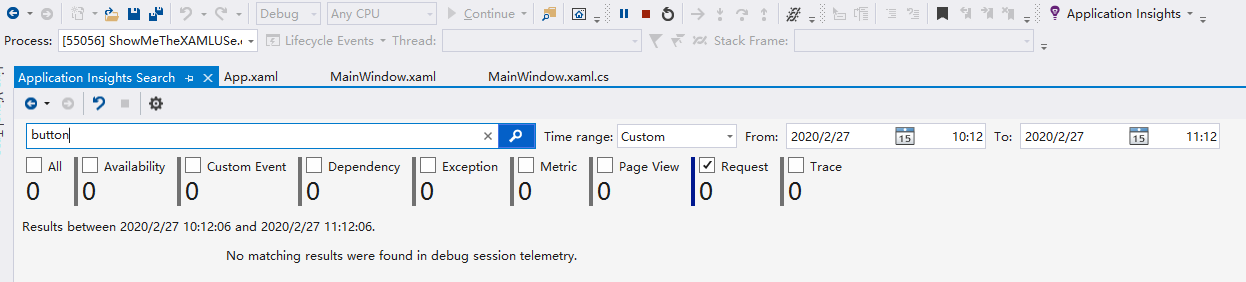
Dear, there will be no bug that the code appear on the interface after install the version 1.1.0-ci73. However, I still couldn't found a way to display the window I want. Instead, I only found a button called "Application Insights", and I clicked it, typed "button" and hit the search button, but noting came up. I feel so sorry.
ttweixiao9999
on 27 Feb 2020
@ttweixiao9999 A couple issues I see.
- In your MainWindow.xaml, the XamlDisplay control does not have a
Grid.Columnspecified which will put it in column 0. The same column as<materialDesign:PackIcon Kind="Account" VerticalAlignment="Center"/>. I assume you want<smtx:XamlDisplay Key="but" Margin="8 0" Grid.Column="3"> - You are using the Avalon style for the XamlDisplay control. If you want yours to look like the one in this library you need to put the style here into your App.xaml. This should make it look like the one inside of the demo app.
- Finally to get the Copy functionality to work, you will need to add command handlers to the Copy routed command in each of your Windows that use the XamlDisplay control. Doing this requires two changes. First in your Xaml add a CommandBinding for the Copy command; like this. Second implement the OnCopy method in the code behind for the Window, like this
Keboo
on 27 Feb 2020
Dear, I have modified the MainWindow.xaml and MainWindow.xaml.cs as you said, as shown below. But when it comes to App.xaml file, I keep trying to add the content from "", but keep getting an error about "The namespace prefix smtx is not defined." or "XamlDisplayEx is not supported in WPF project." or "The property "Value" cannot be empty." , and so on.
App.xaml
MainWindow.xaml :
<Window x:Class="ShowMeTheXAMLUSe.MainWindow"
        xmlns="http://schemas.microsoft.com/winfx/2006/xaml/presentation"
        xmlns:x="http://schemas.microsoft.com/winfx/2006/xaml"
        xmlns:d="http://schemas.microsoft.com/expression/blend/2008"
        xmlns:mc="http://schemas.openxmlformats.org/markup-compatibility/2006"
        xmlns:local="clr-namespace:ShowMeTheXAMLUSe"
        xmlns:materialDesign="http://materialdesigninxaml.net/winfx/xaml/themes"
        xmlns:smtx="clr-namespace:ShowMeTheXAML;assembly=ShowMeTheXAML"
        mc:Ignorable="d"
        Title="MainWindow" Height="350" Width="525">
    <Window.CommandBindings>
        <CommandBinding Command="Copy" Executed="OnCopy" />
    </Window.CommandBindings>
    <DockPanel>
        <Grid VerticalAlignment="Top" Margin="16">
            <Grid.ColumnDefinitions>
                <ColumnDefinition Width="Auto"/>
                <ColumnDefinition Width="Auto"/>
                <ColumnDefinition Width="*"/>
                <ColumnDefinition Width="Auto"/>
            </Grid.ColumnDefinitions>
            <materialDesign:PackIcon Kind="Account" VerticalAlignment="Center"/>
            <TextBlock Grid.Column="1" Margin="8 0 0 0" VerticalAlignment="Center">Name:</TextBlock>
            <TextBox Grid.Column="2" Margin="8 0 0 0" VerticalAlignment="Center"></TextBox>
            <Button Grid.Column="3" Margin="8 0 0 0">SUBMIT</Button>

            <smtx:XamlDisplay Key="but" Margin="8 0" Grid.Column="3">
                <Button Style="{StaticResource MaterialDesignFloatingActionButton}"
                        ToolTip="MaterialDesignFloatingActionLightButton">
                    <materialDesign:PackIcon Kind="Alarm" Height="24" Width="24" />
                </Button>
            </smtx:XamlDisplay>
        </Grid>
    </DockPanel>
</Window>
MainWindow.xaml.cs:
namespace ShowMeTheXAMLUSe
{
    /// <summary>
    /// Interaction logic for MainWindow.xaml
    /// </summary>
    public partial class MainWindow : Window
    {
        public MainWindow()
        {
            InitializeComponent();
            XamlDisplay.Init();
        }

        private void OnCopy(object sender, ExecutedRoutedEventArgs e)
        {
            if (e.Parameter is string stringValue)
            {
                try
                {
                    Clipboard.SetDataObject(stringValue);
                }
                catch (Exception ex)
                {
                    Trace.WriteLine(ex.ToString());
                }
            }
        }
    }
}
@ttweixiao9999 There is one more class you need to add to your project that provides the XamlDisplayEx. https://github.com/MaterialDesignInXAML/MaterialDesignInXamlToolkit/blob/master/MainDemo.Wpf/XamlDisplayEx.cs
Keboo
on 28 Feb 2020
I've got the answer. Thank you very much.
ttweixiao9999
on 29 Feb 2020
Related issues
 bbougot
·
13Comments
bbougot
·
13Comments
 maciz84
·
36Comments
maciz84
·
36Comments
 darturdotnetdeveloper
·
11Comments
darturdotnetdeveloper
·
11Comments
 Tyrrrz
·
12Comments
Tyrrrz
·
12Comments
 TheSylence
·
12Comments
TheSylence
·
12Comments