Materialdesigninxamltoolkit: TimePicker control disabled hours/minutes
It would be really nice if the TimePicker control (and its Clock control) made the developer choose which hours/minutes are enabled and which are not. This would make the control more flexible to the various
software needs.
For example in an appointment application it could be needed to choose just the timings every half an hour, so the only enabled minutes would be 00 and 30.
Thanks
 artoo80
All 9 comments
Would like to pick this item. I got two approaches,
- Two properties,
EnabledHours&EnabledMinutesof typestring; which can hold comma separated values. (Easy for XAML use) - Two properties,
EnabledHours&EnabledMinutesof typestring[]; holds enabled Hours and Minutes respectively. (Easy for Binding)
@Keboo Comments & Suggestions?
 dhilmathy
on 10 Sep 2018
dhilmathy
on 10 Sep 2018
@dhilmathy that would be great. As for the design I am thinking that we probably want something that resembles the DatePicker.BlackoutDates. Also to stick with the pattern I would invert the naming of the properties. So rather than a list of enabled times (where the user specifies the hours/minutes that are enabled), do something more like blackout times (where the user specifies the hours/minutes that are disabled).
As for the types of the properties. I think it would probably be best to mimic the DatePicker and do a class (TimePickerTimeRange?). Again copying the DatePicker class since we want the timePicker to feel very similar. Not 100% sure on the exact structure of this (ideas welcome), but I am anticipating something that takes in a DateTime (perhaps some overloaded constructors to make it easier) to specify a range of hours/minutes and simply ignore the date portion of the DateTime (just like how the DatePicker ignores the time portion of the DateTime).
 Keboo
on 10 Sep 2018
Keboo
on 10 Sep 2018
@Keboo Thanks for the suggestions. I can start as it's implemented in DatePicker.BlackoutDates.
One more thought,
For TimePickerTimeRange class, can we have TimeSpan to represent Start and End, instead of using DateTime and ignoring the date portion of it?
dhilmathy
on 11 Sep 2018
@dhilmathy I had considered TimeSpan and I am open to seeing what the end result looks like using the TimeSpan. My reason for using the DateTime rather than a TimeSpan is because the DateTime represents a fixed point, while the TimeSpan is intended to represent duration. However, neither class quite captures the intent of a BlackoutTimes.
Just an idea (don't take this as a spec, just a thought), we might not need either class, and simply create TimePickerTimeRange to represent what we need. Rather than having the TimePickerTimeRange wrap the DateTime/TimeSpan simply have it contain the data directly.
If we imagine that we want to limit the selection to only minutes :00 and :30, and only between the hours as 8am to 5pm. Perhaps something like this?
<TimePicker>
    <TimePicker.BlackoutTimes>
        <TimePickerTimeRange StartMinute="1" EndMinute="29" />
        <TimePickerTimeRange StartMinute="31" EndMinute="59" />
        <TimePickerTimeRange StartHour="0" EndHour="7" />
        <TimePickerTimeRange StartHour="18" EndHour="23" />
    </TimePicker.BlackoutTimes>
</TimePicker>
We could even go as far as to make TimePickerTimeRange and abstract base class with two derived classes being TimePickerMinuteRange and TimePickerHourRange. This might make working with the class a little simpler since it will keep the minute properties separate from the hour ones.
Thoughts?
Keboo
on 11 Sep 2018
Why don't separate the 2 contexts?
For example:
<TimePicker>
    <TimePicker.BlackoutTimes>
         <Hours>
                  <TimePickerTimeRange Start="0" End="7" />
                  <TimePickerTimeRange Start="18" End="23" />
        </Hours>
        <Minutes>
                  <TimePickerTimeRange Start="1" End="29" />
                  <TimePickerTimeRange Start="31" End="59" />
        </Minutes>
    </TimePicker.BlackoutTimes>
</TimePicker>
This way TimePickerTimeRange would remain one implementation that accepts just 2 numbers start and end. The context is outside and it's known by BlackoutTimes.
Also seconds could be handled this way, when the new Clock with seconds will be released...
What do you think about this?
By the way I really like the solution proposed and can't wait to use it!
artoo80
on 11 Sep 2018
@Keboo I like your final idea. This makes more simpler with just integer properties (Start and End). No need to useDateTime or TimeSpan and ignore some values from it. Final usage will be like,
<TimePicker>
    <TimePicker.BlackoutTimes>
        <TimePickerMinuteRange Start="1" End="29" />
        <TimePickerMinuteRange Start="31" End="59" />
        <TimePickerHourRange Start="0" End="7" />
        <TimePickerHourRange Start="18" End="23" />
    </TimePicker.BlackoutTimes>
</TimePicker>
I had a requirement to fix the minute picker to intervals, as opposed to blacking out time i implemented finite intervals. https://github.com/rrs/MaterialDesignInXamlToolkit/tree/feature/TimePickerIntervals
I can't really think of a real world scenario where you would want to exclude an irregular set of minutes, I can with hours.
 rrs
on 8 Oct 2018
rrs
on 8 Oct 2018
I've had a bit of a crack at this - I've set up a clock resolution - but I'm not sure if this solves the original problem - and I could use some help / guidance around this.
I recorded a quick screen cast (now converted to a GIF) to show what I've done.
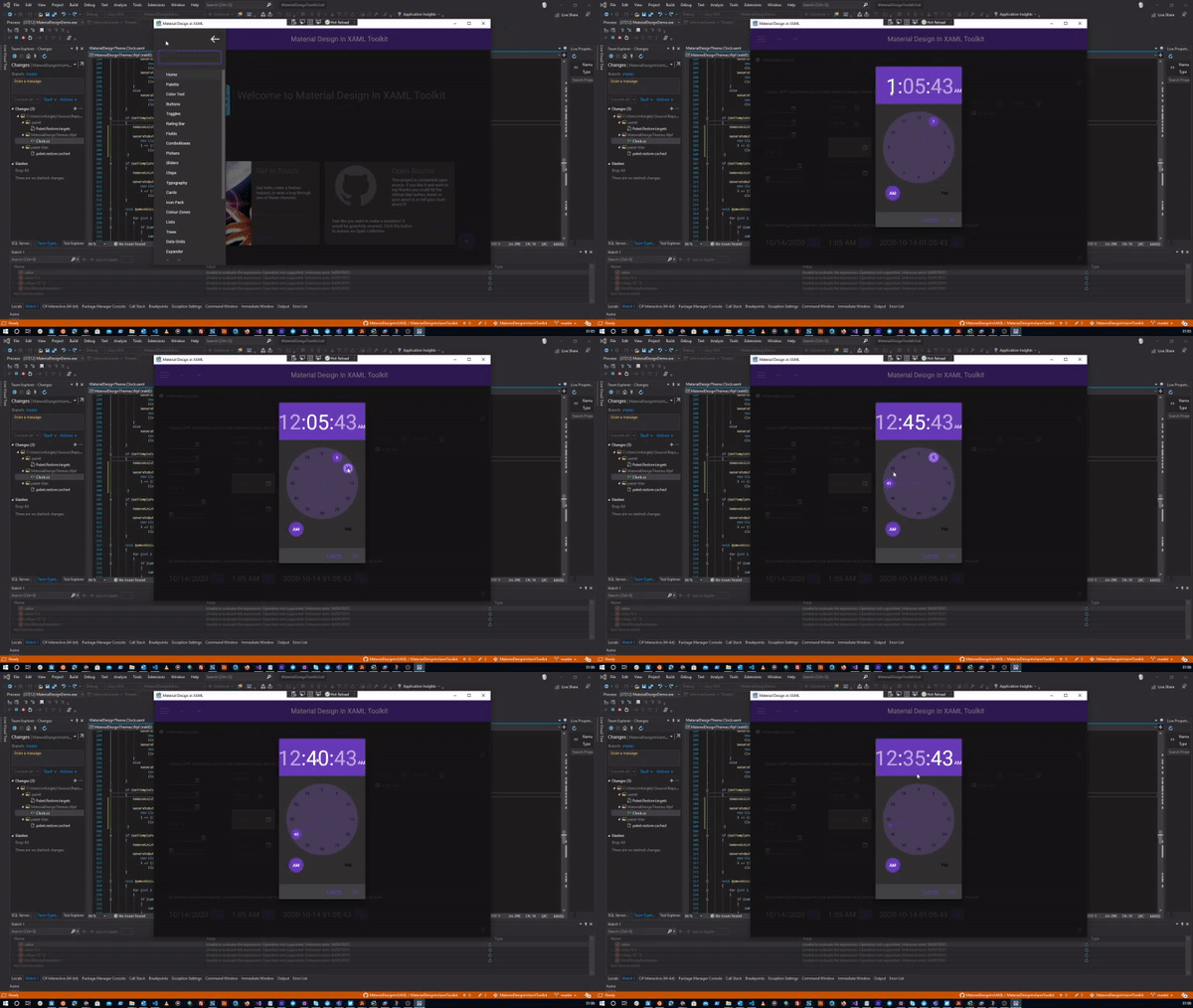
so I've set this up with a 5 minute resolution (only pick minutes in multiples of 5 - and it rounds down to the nearest 5 minute).
is this what we're looking for?
I will say that it's not 100% there yet - I could use some help/guidance with disabling minute buttons
 computamike
on 14 Oct 2020
computamike
on 14 Oct 2020
I've had a bit of a crack at this - I've set up a clock resolution - but I'm not sure if this solves the original problem - and I could use some help / guidance around this.
I recorded a quick screen cast (now converted to a GIF) to show what I've done.
so I've set this up with a 5 minute resolution (only pick minutes in multiples of 5 - and it rounds down to the nearest 5 minute).
is this what we're looking for?
I will say that it's not 100% there yet - I could use some help/guidance with disabling minute buttons
Wow, this looks great! Have you managed to make it work completely? 😄 I would like to limit 30-minute appointments in TimePicker.... Can you please explain or provide a code for doing this? Thanks in advance! 😄
 VasilijeBursac
on 7 Jan 2021
VasilijeBursac
on 7 Jan 2021
Related issues
 bbougot
·
13Comments
bbougot
·
13Comments
 oSethoum
·
10Comments
oSethoum
·
10Comments
 zirius666
·
12Comments
zirius666
·
12Comments
 ttweixiao9999
·
14Comments
rrs
·
18Comments
ttweixiao9999
·
14Comments
rrs
·
18Comments
Most helpful comment
I've had a bit of a crack at this - I've set up a clock resolution - but I'm not sure if this solves the original problem - and I could use some help / guidance around this.
I recorded a quick screen cast (now converted to a GIF) to show what I've done.

so I've set this up with a 5 minute resolution (only pick minutes in multiples of 5 - and it rounds down to the nearest 5 minute).
is this what we're looking for?
I will say that it's not 100% there yet - I could use some help/guidance with disabling minute buttons