Material-theme-jetbrains: JavaScript keywords are highlighted when used as object keys
Summary
JavaScript keywords are highlighted when used as object keys
Expected behavior

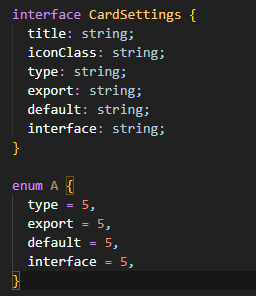
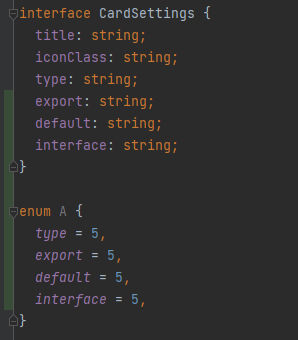

Actual behavior
No difference between these keys: type, import, name etc. They are all object's keys. But they are highlighted like keywords

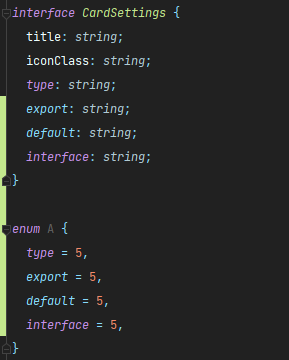
Environment
WebStorm 2021.1
Build #WS-211.6693.108, built on April 5, 2021
Licensed to WebStorm Evaluator
Expiration date: May 31, 2021
Runtime version: 11.0.10+9-b1341.35 amd64
VM: Dynamic Code Evolution 64-Bit Server VM by JetBrains s.r.o.
Windows 10 10.0
GC: G1 Young Generation, G1 Old Generation
Memory: 2042M
Cores: 12
Registry: ide.intellij.laf.enable.animation=true, editor.maximize.on.double.click=false, ide.balloon.shadow.size=0
Non-Bundled Plugins: com.mallowigi (36.0), com.chrisrm.idea.MaterialThemeUI (6.4.0)
Material Theme UI version 6.4.0
Material Theme Darker, language additions + enforce highlighting are enabled
 ddubrava
>All comments
Thanks, will take a look
 mallowigi
on 3 May 2021
mallowigi
on 3 May 2021
Related issues
 dg00GT00
·
3Comments
mallowigi
·
3Comments
dg00GT00
·
3Comments
mallowigi
·
3Comments
 Izopi4a
·
4Comments
Izopi4a
·
4Comments
 NikoGrano
·
4Comments
NikoGrano
·
4Comments
 martinaguilar
·
4Comments
martinaguilar
·
4Comments
Most helpful comment
Thanks, will take a look