Material-theme-jetbrains: Toolbar icons rendered wrong placement obsurs Mac bullets
Summary
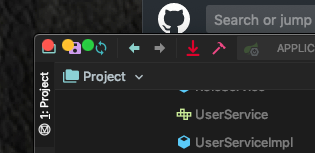
Toolbar icons rendered wrong placement obsurs Mac bullets
...
Expected behavior
not obscure
...
Actual behavior
see screendump
...
Environment
Toolbar icons rendered wrong placement obsurs Mac bullets
If possible please also give out your Material Theme/Material Custom Theme configuration file. To find your configuration file, see: https://intellij-support.jetbrains.com/hc/en-us/articles/206544519-Directories-used-by-the-IDE-to-store-settings-caches-plugins-and-logs. On Ubuntu this could be ~/.IntelliJIdea2019.1/config/options for example.
Note that not providing any of the required info will result of your issue being closed.
 hakuseki
All 7 comments
Same issue in Webstorm 2019.2
 ihachani
on 25 Jul 2019
ihachani
on 25 Jul 2019
Bit similar here. Seems like the title bar was removed or something?

 sebastiaanluca
on 25 Jul 2019
sebastiaanluca
on 25 Jul 2019
Its' the intended behavior (well not really but it is for the time being). It will return back on 2019.3 probably, in the meantime you can disable the "Themed Title Bar" in the options and restart
 mallowigi
on 25 Jul 2019
mallowigi
on 25 Jul 2019
But it's so cool having the combined title bar @mallowigi ;) - thanks for the tip!
 coleman17
on 25 Jul 2019
coleman17
on 25 Jul 2019
Its' the intended behavior
Can you explain what you mean by this? How do you know that JetBrains will make a change supporting this in 2019.3?
 ahokinson
on 25 Jul 2019
ahokinson
on 25 Jul 2019
https://youtrack.jetbrains.com/issue/JBR-1569
Please follow up this
mallowigi
on 25 Jul 2019
mallowigi
on 26 Jul 2019
Related issues
 ddnexus
·
3Comments
ddnexus
·
3Comments
 NikoGrano
·
4Comments
NikoGrano
·
4Comments
 sanderboom
·
4Comments
sanderboom
·
4Comments
 nammaianh
·
3Comments
nammaianh
·
3Comments
 vbasem
·
4Comments
vbasem
·
4Comments
Most helpful comment
Its' the intended behavior (well not really but it is for the time being). It will return back on 2019.3 probably, in the meantime you can disable the "Themed Title Bar" in the options and restart