Material-theme-jetbrains: Horizontal editor scroll isn't being themed with Intellij 19 beta
Summary
Horizontal scroll isn't being themed. Using Solarized Dark as my theme, but the horizontal scroll is white (see screenshot).
Expected behavior
Horizontal scroll should be themed the same as vertical
Actual behavior
Screenshot: https://www.dropbox.com/s/tmk78klycms9pts/Screen%20Shot%202019-03-19%20at%2006.45.04.png?dl=0
Environment
IntelliJ IDEA 2019.1 Beta (Ultimate Edition)
Build #IU-191.6183.20, built on March 13, 2019
IntelliJ IDEA EAP User
Expiration date: April 12, 2019
JRE: 1.8.0_202-release-1483-b39 x86_64
JVM: OpenJDK 64-Bit Server VM by JetBrains s.r.o
macOS 10.13.6
 rlubke
All 15 comments
Scroll bars are from the color scheme. Please reset to defaults or change the values manually in the color scheme options.
 mallowigi
on 19 Mar 2019
mallowigi
on 19 Mar 2019
The vertical scroll bar is properly themed. I've reset to the defaults and it has had no effect.
rlubke
on 19 Mar 2019
Will check.
mallowigi
on 20 Mar 2019
Cannot reproduce. Please contact me on Slack for more troubleshooting
mallowigi
on 24 Mar 2019
I am seeing the same issue on
IntelliJ IDEA 2019.1 (Ultimate Edition)
Build #IU-191.6183.87, built on March 27, 2019
Any setting I am missing?
 adanperez
on 27 Mar 2019
adanperez
on 27 Mar 2019
Look in “Settings > Editor > Color schemes > Scrollbars” if it’s themed.
mallowigi
on 28 Mar 2019
@mallowigi I have no colors being applied there. I've attached an image of what I am seeing.
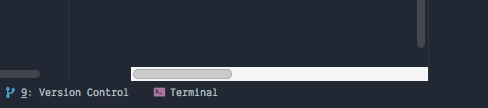
I am on OSX Mojave
The Project window has the correct horizontal scrollbar being applied which you can see on the bottom left of my image. The editor window has the odd one.
adanperez
on 28 Mar 2019
Look in “Settings > Editor > Color schemes > Scrollbars” if it’s themed.
hi, @mallowigi
i am seeing the same issue on 2019.1 (Mac Mojave 10.14.3), and i can't found "Scrollbars" setting in "Settings > Editor > Color schemes". but i reset the theme to Decular, the issue disappear.
 Bodil-X
on 1 Apr 2019
Bodil-X
on 1 Apr 2019
http://www.jetbrains.org/intellij/sdk/docs/reference_guide/ui_themes/themes_extras.html#customizing-editor-scroll-bar-colors scrollbars can now be customised from UI plugins, as of 2019.1.
I also got around this by changing the parent theme of my own custom theme to Darcula, since that already customises the scrollbars to be dark, is that something applicable here?
 anotherjames
on 11 Apr 2019
anotherjames
on 11 Apr 2019
This has been fixed in 3.9.0.3
mallowigi
on 13 Apr 2019
I found the solution:
In JetBrains go to Preferences -> Editor -> Color Scheme
Next to Scheme selection field — Click on a Gear Icon -> Export... -> IDEA color scheme ( .icls )
Then find that file and change it to .xml -> Open in any text editor and modify the very top line:
<scheme name="Custom Schema" version="142" parent_scheme="Darcula">
The fix is to make parent_scheme any default dark based like Darcula in my case.
Then it fixing scrolling bars themes.
 s-dezign
on 24 Apr 2019
s-dezign
on 24 Apr 2019
The fix is to make parent_scheme any default dark based like Darcula in my case.
This didn't work for me, still getting the default horizontal scrollbars.
PhpStorm 2019.1.2 Preview
Build #PS-191.7141.35, built on May 2, 2019
JRE: 1.8.0_202-release-1483-b49 x86_64
JVM: OpenJDK 64-Bit Server VM by JetBrains s.r.o
macOS 10.14.4
 sebastiaanluca
on 8 May 2019
sebastiaanluca
on 8 May 2019
I fixed the issue by editing my custom Color Scheme.
Export the color scheme as .icls and open it in a text editor.
I replaced all ScrollBar trackColor colors to match my background color.
In the colors block I modified the following:
    <option name="ScrollBar.Mac.Transparent.hoverThumbBorderColor" value="" />
    <option name="ScrollBar.Mac.Transparent.hoverThumbColor" value="" />
    <option name="ScrollBar.Mac.Transparent.hoverTrackColor" value="212733" />
    <option name="ScrollBar.Mac.Transparent.thumbBorderColor" value="" />
    <option name="ScrollBar.Mac.Transparent.thumbColor" value="" />
    <option name="ScrollBar.Mac.Transparent.trackColor" value="212733" />
    <option name="ScrollBar.Mac.hoverThumbBorderColor" value="" />
    <option name="ScrollBar.Mac.hoverThumbColor" value="" />
    <option name="ScrollBar.Mac.hoverTrackColor" value="212733" />
    <option name="ScrollBar.Mac.thumbBorderColor" value="" />
    <option name="ScrollBar.Mac.thumbColor" value="" />
    <option name="ScrollBar.Mac.trackColor" value="212733" />
    <option name="ScrollBar.Transparent.hoverThumbBorderColor" value="" />
    <option name="ScrollBar.Transparent.hoverThumbColor" value="" />
    <option name="ScrollBar.Transparent.hoverTrackColor" value="212733" />
    <option name="ScrollBar.Transparent.thumbBorderColor" value="" />
    <option name="ScrollBar.Transparent.thumbColor" value="" />
    <option name="ScrollBar.Transparent.trackColor" value="212733" />
    <option name="ScrollBar.hoverThumbBorderColor" value="" />
    <option name="ScrollBar.hoverThumbColor" value="" />
    <option name="ScrollBar.hoverTrackColor" value="212733" />
    <option name="ScrollBar.thumbBorderColor" value="" />
    <option name="ScrollBar.thumbColor" value="" />
    <option name="ScrollBar.trackColor" value="212733" />
After editing, save the file and import it back.
adanperez
on 8 May 2019
I see, the Scrollbars setting only changes the thumb colors, not the track color. These are set to the background color for the bundled themes, but for external themes one need to supply a value anyway.
Hope they will introduce a setting page soon enough
mallowigi
on 8 May 2019
@adanperez This fixed the scrollbars, but messed up various other code editor colors 😅
sebastiaanluca
on 8 May 2019
Related issues
 sheinfeld
·
4Comments
sheinfeld
·
4Comments
 dg00GT00
·
3Comments
dg00GT00
·
3Comments
 sanderboom
·
4Comments
sanderboom
·
4Comments
 ovr
·
3Comments
ovr
·
3Comments
 CeramicTitan
·
3Comments
CeramicTitan
·
3Comments
Most helpful comment
I found the solution:
In JetBrains go to Preferences -> Editor -> Color Scheme
Next to Scheme selection field — Click on a Gear Icon -> Export... -> IDEA color scheme ( .icls )
Then find that file and change it to .xml -> Open in any text editor and modify the very top line:
<scheme name="Custom Schema" version="142" parent_scheme="Darcula">The fix is to make
parent_schemeany default dark based like Darcula in my case.Then it fixing scrolling bars themes.