Material-theme-jetbrains: Red background on each checkboxes
Summary
Strange red background below checkboxes
Expected behavior
The checkboxes should have the same background as everything else
Actual behavior
This red background appears for every default theme I tried

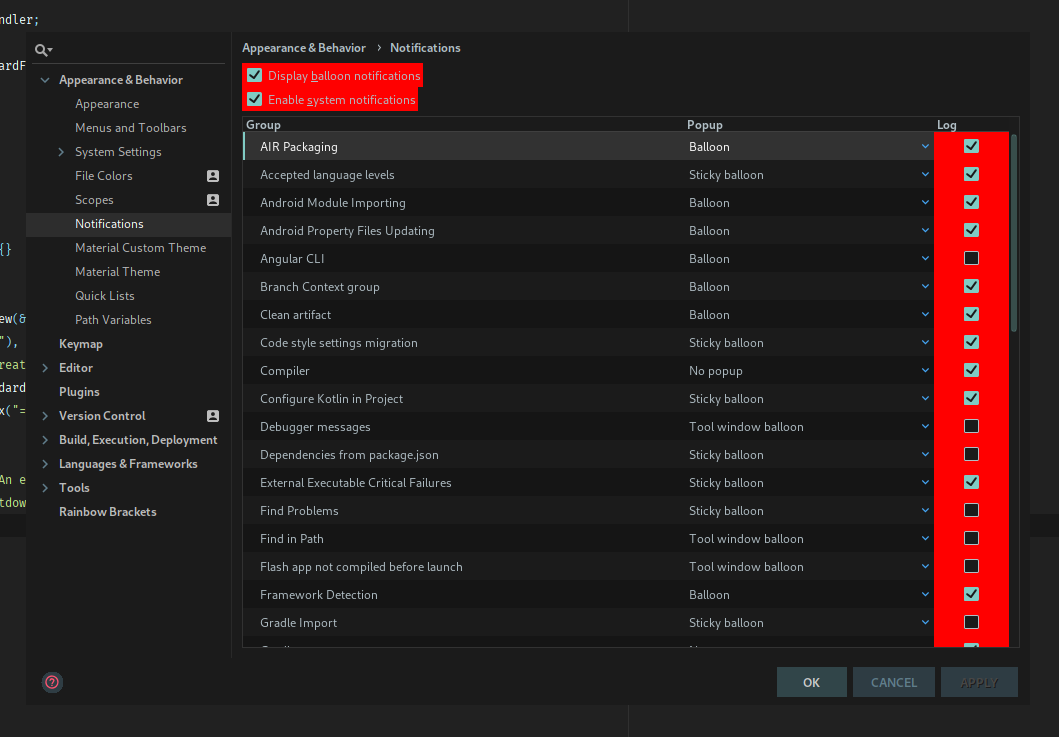
Steps to reproduce (if needed)
This is a new IntelliJ installation, no other plugin is actually installed. I even tried reinstalling everything.
Environment
IntelliJ IDEA 2018.2.4 (Ultimate Edition)
Build #IU-182.4505.22, built on September 18, 2018
JRE: 1.8.0_172-b11 amd64
JVM: OpenJDK 64-Bit Server VM by Oracle Corporation
Linux 4.17.11-arch1
Tried versions: 2.9.0-pre1, 2.8.3
material_theme.xml:
```
 lbenard
All 10 comments
I am not able to reproduce and there is nothing in the code related to this. Can you try on a clean install?
 mallowigi
on 1 Oct 2018
mallowigi
on 1 Oct 2018
I do experience the exact same behavior on my JetBrains products (WebStorm, IntelliJ IDEA, PHPStorm). If you come up with any suggestion on how to tackle this, I would be glad to provide assistance.
I am seeing this on one of my machines only. Both machines run Debian + KDE. I experience this bug on the machine running Debian testing, the other one runs stable.
 DrGlitchMX
on 18 Oct 2018
DrGlitchMX
on 18 Oct 2018
I am not able to reproduce and there is nothing in the code related to this. Can you try on a clean install?
Sorry for being late to reply, but I already mentioned it was a totally clean install
I do experience the exact same behavior on my JetBrains products (WebStorm, IntelliJ IDEA, PHPStorm). If you come up with any suggestion on how to tackle this, I would be glad to provide assistance.
I am seeing this on one of my machines only. Both machines run Debian + KDE. I experience this bug on the machine running Debian testing, the other one runs stable.
On my case, it was Arch + i3, everything up to date.
lbenard
on 19 Oct 2018
So it’s a Linux issue? Ok I’ll try to reproduce with a vm.
mallowigi
on 19 Oct 2018
It quite probably is. It seems like it has sth. to do with the "Material Components" - switching them off and falling back to the default does not show the issue.
DrGlitchMX
on 19 Oct 2018
It will take too much time and energy to install an arch vm and to configure it... Maybe if you might connect to slack one day we can try to debug live, but until then I can't do much.
mallowigi
on 19 Oct 2018
I just tried again on Anarchy Linux (which is basically Arch) with the exact same IntelliJ IDEA build, and it works perfectly.
I am seeing this on one of my machines only. Both machines run Debian + KDE. I experience this bug on the machine running Debian testing, the other one runs stable.
Maybe it has something to do with the kernel. Right now I'm using 4.14.76-1 LTS.
lbenard
on 22 Oct 2018
Good grief. I don't want to keep issues that are hard to reproduce and there is nothing in the code that could trigger that. Closing for the moment. If it happens again tell me.
mallowigi
on 22 Oct 2018
As of 2018-12-04, this is no longer an issue on my Debian/testing machine.
I am perfectly confident to deem this an issue not related to the material theme, yet more probably to some widget renderer.
I am not really familiar with the renderer-setup employed by the JetBrains IDEs and the Material-UI, but I am confident this rendering issue of does not find its root-cause within the Material-Theme.
Sorry for bothering you, @mallowigi with this - I think you are doing a great job and provide excellent response times. Please keep up the good work because I really do enjoy the results!
DrGlitchMX
on 4 Dec 2018
Same issue in Deepin 15 :(
 r0b1n1sl4m
on 6 Jul 2019
r0b1n1sl4m
on 6 Jul 2019
Related issues
 anstarovoyt
·
3Comments
anstarovoyt
·
3Comments
 martinaguilar
·
4Comments
martinaguilar
·
4Comments
 CeramicTitan
·
3Comments
CeramicTitan
·
3Comments
 jpap
·
3Comments
jpap
·
3Comments
 dg00GT00
·
3Comments
dg00GT00
·
3Comments