Material-theme-jetbrains: search box cannot display Chinese character.
PyCharm 2018.1.4
Windows 10
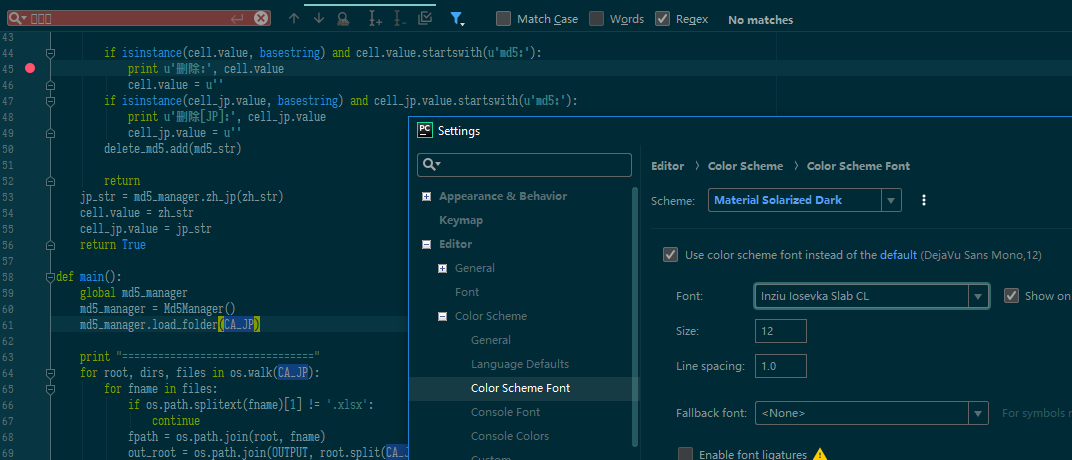
Issue: search box cannot display Chinese character.
but if I go to setting--> material theme--> panels--> check/uncheck Compact Table Cells --> Apply
the search box will become normal and can display Chinese correctly.

ctrl+shift+f --> find in path dialog --> also have the same issue.
 Jecvay
All 5 comments
You need to change the font in the color scheme settings (Editor > Color Scheme > Color Scheme Font)
 mallowigi
on 13 Jul 2018
mallowigi
on 13 Jul 2018
color scheme font only change the font of the code, but not the search box.
the font of the code can display the Chinese normally
Jecvay
on 16 Jul 2018
Ah ok my bad I thought you were talking about the search box in the “find file” dialogs.
You can try to disable the “material fonts” in the features tab and restart the ide.
mallowigi
on 16 Jul 2018
I have already tried to disable but it's not fixed.
but turn on / off will make the UI have a refresh which cause the issue temporary fixed.
Jecvay
on 16 Jul 2018
 DukeAnn
on 21 Aug 2018
DukeAnn
on 21 Aug 2018
Related issues
 wolf99
·
3Comments
wolf99
·
3Comments
 sanderboom
·
4Comments
sanderboom
·
4Comments
 ovr
·
3Comments
ovr
·
3Comments
 uar-zlatko-alomerovic
·
3Comments
uar-zlatko-alomerovic
·
3Comments
 un000
·
4Comments
un000
·
4Comments
Most helpful comment
I have already tried to disable but it's not fixed.
but turn on / off will make the UI have a refresh which cause the issue temporary fixed.