Material-theme-jetbrains: Plugin problems in Jetbrains 2018.1 Release
Summary
Material Theme UI Plugin is automatically disabled after updating to IntelliJ 2018.1 release for several IDEs (Idea, Webstorm, PyCharm).
If you search for the plugin in the repositories, it shows "installed" and enabled (check mark), but it is nowhere to be found on the "Tools" dropdown, where it usually appears.
The only way is to manually uninstall the plugin, restart the IDE, install the plugin again and restart IDE again.
Even then, the current plugin version (2.5) says "this has been pushed by mistake, there might be bugs".
Expected behavior
Plugin should persist across IDE updates.
Actual behavior
Plugin is disabled. Needs a full reinstall to activate.
Steps to reproduce (if needed)
- Update IDE to 2018.1 release.
- Search for plugin.
Environment
Please go to IntelliJ IDEA -> About IntelliJ IDEA (Mac) or Help -> About IntelliJ IDEA (Windows) and copy the infos
to the clipboard and paste it here.
It should contain:
- OS (Windows, Linux, Mac) Mac OSX High Sierra
- IntelliJ Product + version (IDEA, RubyMine...) IntelliJ Idea 2018.1, Webstorm 2018.1, PyCharm 2018.1
- Material Theme Plugin version 1.6.0.3
 Manish-Giri
All 16 comments
Are you sure you’re not using the now obsolete Eap?
 mallowigi
on 4 Apr 2018
mallowigi
on 4 Apr 2018
You wrote that you have the 1.6 installed while the latest version should be the 2.1.5
mallowigi
on 4 Apr 2018
I have version 2018.1 and the theme doesn't install. I have version 1.6.1 of Material Theme UI installed but it is disabled. It doesn't show EAP on the name, just the Material Theme UI
 zeg-io
on 4 Apr 2018
zeg-io
on 4 Apr 2018
I had had EAP a long time ago and switched to the non EAP... however, I just now uninstalled, rebooted, and reinstalled the theme... now version 2.xxx is installing... weird.
zeg-io
on 4 Apr 2018
@mallowigi
Are you sure you’re not using the now obsolete Eap?
Yes, I've always been using the main IDEs. I've only had RubyMine EAP, but I never used it.
You wrote that you have the 1.6 installed while the latest version should be the 2.1.5
Prior to the 2018.1 release, I had the 2017.3.5 version. In that whenever there was a pop-up for plugin updates, I did update. And the maximum the Material Theme UI plugin was updated to, through this process, is the 1.6 version.
So unless upgrading to the 2.1.5 version required a manual reinstall of the plugin, I don't think I missed anything.
Manish-Giri
on 5 Apr 2018
I'm experiencing the same behavior in RubyMine 2018.1. After uninstalling and restarting, I also see the warning message about the 2.1.5 release when attempting to re-install:
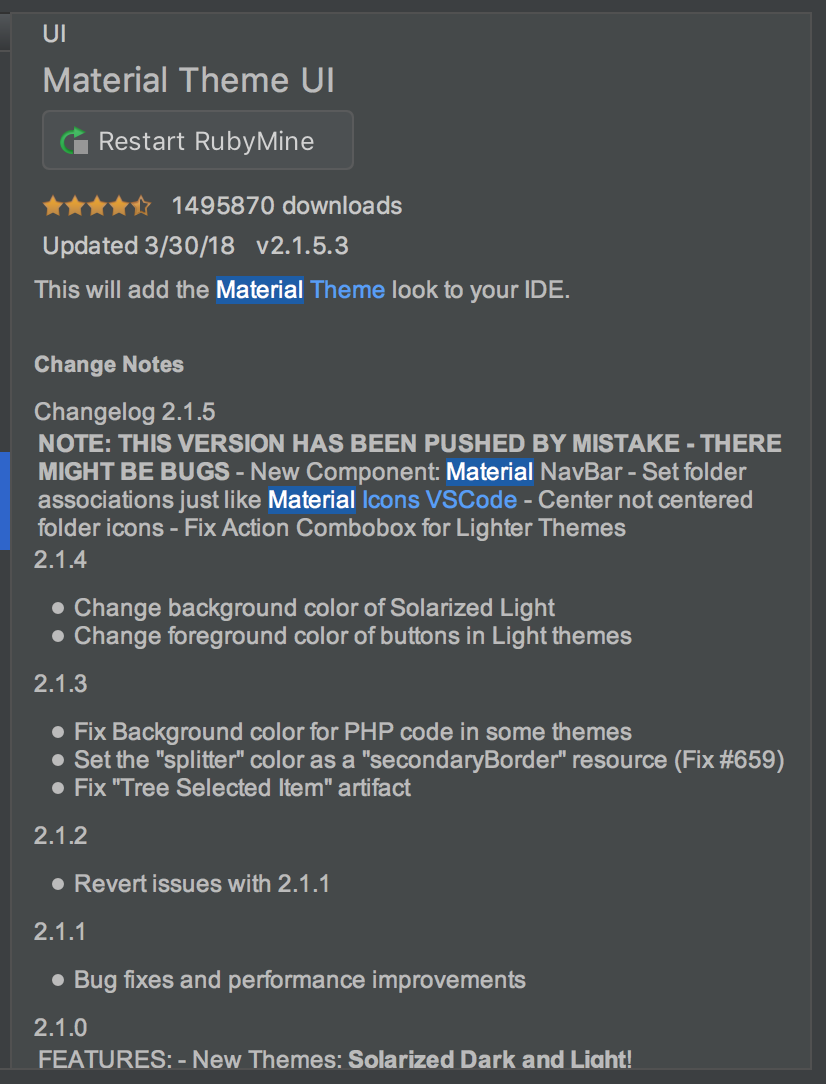
Installing the 2.1.5 release restores everything back to my previous Material Theme settings.
 techpeace
on 5 Apr 2018
techpeace
on 5 Apr 2018
This warning states that I pushed the version ahead of its time and may contain bugs - which it does. Still it’s very stable and you can use it in your day to day work.
There is an upcoming version that you can find in the plugin page inside the eap tab.
mallowigi
on 5 Apr 2018
I'm using 2018.1.1 (not EAP) and the plugin appears to be disabled and missing as well. The plugin version shows 1.6.1.
When I look in the plugins list it's there and checked, but it is red for some reason.
 octoxan
on 9 Apr 2018
octoxan
on 9 Apr 2018
Just had the same issue. Version seemed 'stuck' on 1.6, only updated once I uninstalled the plugin and restarted the IDE
 fralewsmi
on 16 Apr 2018
fralewsmi
on 16 Apr 2018
Closing for the sake of closing weird non reproducible issues:
The last version for EAPs is 2.1.5.3. A 2.1.6 is in preparation but that will work only for 2018.1 and EAPs.
2017.3 and AS 3.1 are obsolete and stayed at 1.6
mallowigi
on 16 Apr 2018
Really?
Closing for the sake of closing weird non reproducible issues:
Even with so many people confirming it's the same issue and on the regular (non-EAP) versions, it's "weird" and "non-reproducible"?
Manish-Giri
on 16 Apr 2018
What do you suggest to do? I don't know why people would need to uninstall the plugin and install it again in order to get the last update.
mallowigi
on 16 Apr 2018
So leave it open? Or better yet, attach a label like "Help Wanted" and "Bug" so that if other open-source contributors are interested can work on it and identify a fix?
Clearly, when people are required to uninstall and reinstall to get the disabled plugin working again after an update, something is wrong?
Manish-Giri
on 16 Apr 2018
I can leave it open so people would not open an issue again, yes. But still it is out of the scope of the plugin. Why would the plugin cease to update itself? It's something wrong with the plugin system, not the plugin as well.
Anyway perhaps the next update will fix this
mallowigi
on 16 Apr 2018
I had the same issue - upgraded Rider to 2018.1 and the plugin showed being incompatible with this version.
The plugin was stuck on version 1.6.1 and didn't show any updates were available.
I had to 'browse repositories' from the plugins section of settings to see an update was available. Updated and everything worked as expected (v 2.1.7.1)
 SteveByerly
on 21 Apr 2018
SteveByerly
on 21 Apr 2018
Closing. Thanks for the help
mallowigi
on 25 Apr 2018
Related issues
 CeramicTitan
·
3Comments
CeramicTitan
·
3Comments
 sanderboom
·
4Comments
sanderboom
·
4Comments
 anstarovoyt
·
3Comments
anstarovoyt
·
3Comments
 sheinfeld
·
4Comments
sheinfeld
·
4Comments
 uar-zlatko-alomerovic
·
3Comments
uar-zlatko-alomerovic
·
3Comments
Most helpful comment
@mallowigi
Yes, I've always been using the main IDEs. I've only had RubyMine EAP, but I never used it.
Prior to the 2018.1 release, I had the
2017.3.5version. In that whenever there was a pop-up for plugin updates, I did update. And the maximum the Material Theme UI plugin was updated to, through this process, is the1.6version.So unless upgrading to the
2.1.5version required a manual reinstall of the plugin, I don't think I missed anything.