Material-theme-jetbrains: Sidebar Font Color not matching your Screenshots
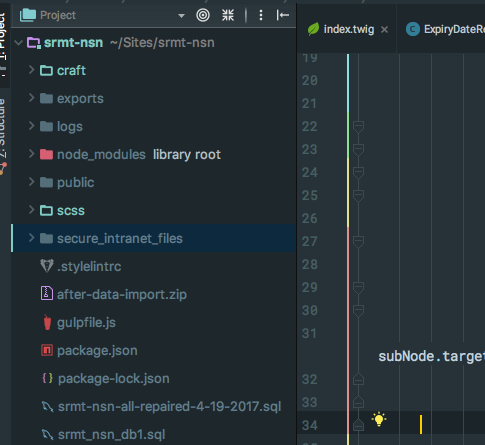
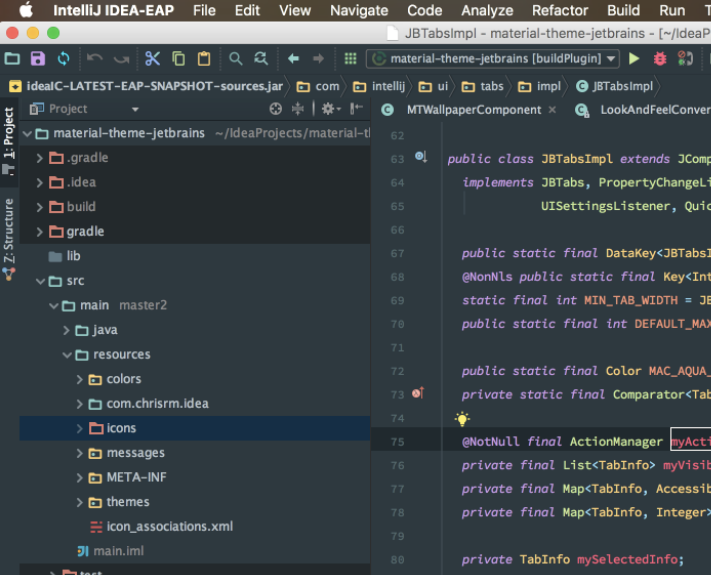
In the screenshots of Material Theme UI for PHPStorm the fonts in sidebar are white. Mine seem to be blue when using default color scheme. How can I get them to be white?
 bgarrant
All 8 comments
This is from your screenshot. I am using latest 2017.2 PHPStorm by the way.
bgarrant
on 31 Jul 2017
I know, this is something new from version 0.7.2.
This is done in order to match the sublime theme. For now this is not customizable but if enough people want it I can add an option.
 mallowigi
on 31 Jul 2017
mallowigi
on 31 Jul 2017
This is actually a big problem for me. =/
I'm using the Dark theme, and all my file colors are so gray that they're kind of hard to read.
Additionally, they're the same color as files which are ignored by .gitignore. It actually took me a few moments to realize that the .gitignore plugin wasn't marking all my files as ignored, for some reason.
I suppose "big problem" is probably a bit of an overstatement, but I much preferred the tone before the 0.7.2 update. I'd endorse and appreciate a way to modify it! <3
In the mean time, is there a way to force IntelliJ to use an older version of the plugin? I realize this probably isn't a priority, and I don't mind forgoing the few updates that I'll have to rollback.
EDIT: Just a suggestion (for organizational/comprehension reasons), perhaps we should change the title to: Optionally allow pre-0.7.2 file-tree colors
EDIT2: For those of you who don't mind rolling back until @mallowigi (perhaps) adds in this optional feature, you can download 0.7.2.1 from here and manually override the Material Theme folder in your IntelliJ (or whichever IDE you use) plugins folder.
Linux:
${user.home}/<IDE folder>/config/plugins
Windows:
%USERPROFILE%\<IDE folder>\config\plugins
Note, replace IDE folder with whatever IDE/version you're using. For IntelliJ IDEA, mine appeared as .IntelliJIdea2017.2.
Thank you for all the work you put in making our programming experience so much more relaxing on the eyes, @mallowigi <3
 FerusGrim
on 4 Aug 2017
FerusGrim
on 4 Aug 2017
I have added the option to customize file colors in version 0.8.0
Now everyone is happy (I hope)
mallowigi
on 9 Aug 2017
@mallowigi Would it be possible for you to explain how to make this switch? I'm really lost, after updating. =/
I think I found the section that controls it, but I don't know what the previous colors were. Or maybe I'm in the wrong place, entirely.
FerusGrim
on 17 Aug 2017
There is a section under Editor > Colors and Fonts > Material File Colors. There you can set different colors for the file statuses, the original default status being "Up to date".
If you set "Up to date" to #FFFFFF, you will have white colors for files. Otherwise leave it unchecked to use the blu-ish color.
mallowigi
on 19 Aug 2017
@mallowigi Thank you! :D
Is that the only file color that I have to worry about if I wanted the pre-0.7.2 scheme?
FerusGrim
on 19 Aug 2017
I may be missing something, but this doesn't seem to be working, for me.
http://i.imgur.com/QImcBx6.png
FerusGrim
on 19 Aug 2017
Related issues
 nammaianh
·
3Comments
nammaianh
·
3Comments
 un000
·
4Comments
un000
·
4Comments
 wolf99
·
3Comments
wolf99
·
3Comments
 sheinfeld
·
4Comments
sheinfeld
·
4Comments
 CeramicTitan
·
3Comments
CeramicTitan
·
3Comments
Most helpful comment
I know, this is something new from version 0.7.2.
This is done in order to match the sublime theme. For now this is not customizable but if enough people want it I can add an option.