Material-theme-jetbrains: Colors & Fonts scheme not being honored
Summary
Color & Fonts scheme not being honored after restart.
Expected behavior
Scheme to persist after a restart.
Actual behavior
After a restart, scheme reverts back to default "Darcula".
Steps to reproduce
- Install material theme ui plugin and select (Darker, Default, Palenight)
- Go to File/PhpStorm > Settings/Preferences > Editor > Colors & Fonts
- Select any item that was custom installed to the colors dir.
- Restart PHPStorm
- Setting reverts back to Darcula.
- Operating system and version:
- [X] Mac OS 10.11.6
- [X] Linux Ubuntu Gnome 17.04
- Material Theme release:
- v. 0.3.0.1
- PHPStorm/IntelliJ Version
- PHPStorm 2017.1.4 (#PS-171.4694.2)
 vpassapera
All 26 comments
Downgraded to previous version for now, since it doesn't have these problems.
vpassapera
on 2 Jun 2017
I could not reproduce your behavior. I'm on MacOS 10.12 (Sierra) with the latest PHPStorm. I tested it on a clean install and install with plugins.
Can you give me the list of plugins you use?
 mallowigi
on 2 Jun 2017
mallowigi
on 2 Jun 2017
Or maybe you have an issue with one of your color schemes, I remember Idea having this problem in the past (the problem should be long gone though)
Do you have custom color schemes?
mallowigi
on 2 Jun 2017
I do, these are custom color schemes. Same as other ticket....does upgrading mean i'm unable to use any icls files??
Steps to reproduce
- Install material theme ui plugin and select (Darker, Default, Palenight)
- Go to File/PhpStorm > Settings/Preferences > Editor > Colors & Fonts
- Select any item that was custom installed to the colors dir. <-- these are custom color schemes
- Restart PHPStorm
- Setting reverts back to Darcula.
vpassapera
on 2 Jun 2017
Where did you get those custom icls files? Did you create them manually or did you import it from some website? Care to share one that causes problems?
mallowigi
on 3 Jun 2017
https://github.com/nealio82/PhpStorm-GitHub-Theme
https://github.com/panique/phpstorm-theme-github-remixed
vpassapera
on 4 Jun 2017
I downgraded back to version 0.2.3.2 since that one seems to work fine.
Plugins include:
.ignore v1.7.6
Apache config v171.4694.2
Awesome Console v0.1337.6
BashSupport v1.6.9.171
Behat Support v171.4694.2
Bootstrap 3 v2.4
CodeGlance v1.5.2
Color Tree v1.0
Command Line Tool Support v171.4694.2
Copyright v8.1
CSS Support v171.4694.2
Database Tools and SQL v1.0
Framework MVC Structure Support v133.326
gfm v0.1.13
Gherkin v999.999
Git Flow Integration v0.5.1
Git Integration v8.1
HTML Tools v2.0
Ini4Idea v171.4694.2
IntelliLang v8.0
Javascript Debugger v1.0
JavaScript Intention Power Pack v0.9.4
JavaScript Support v1.0
Markdown Navigator v2.3.7
Material Theme UI (Had latest version, downgraded back to 0.2.3.2 because of the bugs i opened)
MoreUnit v1.0.6
PHP Advanced AutoComplete v1.0.4
PHP Annotations v5.0
PHP composer.json support v1.0.20
PHP Remote Interpreter v171.4694.2
PHPUnit code coverage v0.5.0
PHPUnit Enhancement v2.2.1
PlantUML Integration v2.8.0
QuirksMode v171.4694.2
Refactor-X v2.01
Remote Hosts Access v0.1
SensioLabsInsight v1.2
SSH Remote Run v0.1
Symfony Plugin v0.14.145
Symfony2 Clickable Views v0.1.4
Task Management v1.0
Terminal v0.1
TextMate bundles support
Twig Support v171.4694.2
UML Support v1.0
Vagrant v171.4694.2
W3C Validators v2.0
XPathView + XSLT Support v4
XSLT-Debugger v1.4
YAML v171.4694.2
I see there is something weird about these color schemes... I will check what the problem is
mallowigi
on 4 Jun 2017
I should note, that color tree is also not honored along with the color theme, but it is in previous version.
vpassapera
on 5 Jun 2017
Ok I found the cause of the bug, apparently light themes were not saved, this explains why I didn't got this bug. Hopefully it should work now in the plugin EAP.
I will release an update as soon as I finish fixing all the issues and adding all the icons. In the meanwhile you can still use the Material Theme EAP plugin.
mallowigi
on 5 Jun 2017
Please download the latest version (it's not available in the plugin repository yet, you will have to download and install it manually) and tell me if it is fixed.
mallowigi
on 10 Jun 2017
Just upgraded to 0.4.1 Good so far.
I like the new background in the editor area when no windows are open. The whole release feels very slick.
Will report back if any problems.
thanks!
vpassapera
on 11 Jun 2017

This issue happens again! After restarting , Solarized dark theme has been reverted to Darcular.
macOS 10.15.5
WebStorm 2020.2.1
Material Theme UI 5.3.4
@mallowigi
 kuige
on 11 Sep 2020
kuige
on 11 Sep 2020
Probably an issue with Sync Settings. Please make sure you're not using it.
mallowigi
on 11 Sep 2020
I'm not using any sync settings.
kuige
on 11 Sep 2020
Can you provide a video showing it happening again?
mallowigi
on 11 Sep 2020
@mallowigi the video
kuige
on 15 Sep 2020
Hmm, weird... can you provide me the list of plugins that are enabled?
Thanks
--
Elior
On 15 Sep 2020, 6:53 +0300, sange notifications@github.com, wrote:
https://youtu.be/ly68xP2yr4s
@mallowigi the video
—
You are receiving this because you were mentioned.
Reply to this email directly, view it on GitHub, or unsubscribe.
mallowigi
on 15 Sep 2020

@mallowigi These are the only two plugins I have installed, all the others are bundled with WebStorm.
kuige
on 15 Sep 2020
Then please give me them as well so I can have the whole picture
mallowigi
on 15 Sep 2020
Atom Material Icons (27.0)
Material Theme UI (5.3.4)
Docker (202.6948.73)
FTP/SFTP Connectivity (ex. Remote Hosts Access) (202.6948.73)
Vagrant (202.6948.73)
HTML Tools (202.6948.73)
Live Edit (202.6948.73)
Refactor-X (202.6948.73)
XPathView + XSLT (202.6948.73)
IDE Settings Sync (202.6948.73)
Settings Repository (202.6948.73)
Angular and AngularJS (202.6948.73)
CoffeeScript (202.6948.73)
Cordova (202.6948.73)
Cucumber.js (202.6948.73)
JavaScript Debugger (202.6948.73)
JavaScript Intention Power Pack (202.6948.73)
Karma (202.6948.73)
Meteor (202.6948.73)
Node.js (202.6948.73)
Node.js Remote Interpreter (202.6948.73)
Polymer & Web Components (202.6948.73)
Prettier (202.6948.73)
Spy-js (202.6948.73)
TSLint (202.6948.73)
Vue.js (202.6948.73)
Gherkin (202.6948.73)
Markdown (202.6948.73)
Shell Script (202.6948.73)
YAML (202.6948.73)
CSS (202.6948.73)
Less (202.6948.73)
Sass (202.6948.73)
Stylus (202.6948.73)
W3C Validators (202.6948.73)
ASP (202.6948.73)
EJS (202.6948.73)
Haml (202.6948.73)
Handlebars/Mustache (202.6948.73)
Java Server Pages (JSP) (202.6948.73)
Pug (ex-Jade) (202.6948.73)
macOS Light Theme (202.6948.73)
ChangeReminder (202.6948.73)
Git (202.6948.73)
GitHub (202.6948.73)
Mercurial (202.6948.73)
Subversion (202.6948.73)
Copyright (202.6948.73)
EditorConfig (202.6948.73)
File Watchers (202.6948.73)
Grazie (202.6948.73)
HTTP Client (202.6948.73)
IntelliLang (202.6948.73)
Machine Learning Code Completion (202.6948.73)
Performance Testing (202.6948.73)
Task Management (202.6948.73)
Terminal (202.6948.73)
TextMate Bundles (202.6948.73)
Time Tracking (202.6948.73)
UML (202.6948.73)
kuige
on 15 Sep 2020
IDE Settings Sync (202.6948.73)
so you do have sync settings. Please disable this.
mallowigi
on 15 Sep 2020
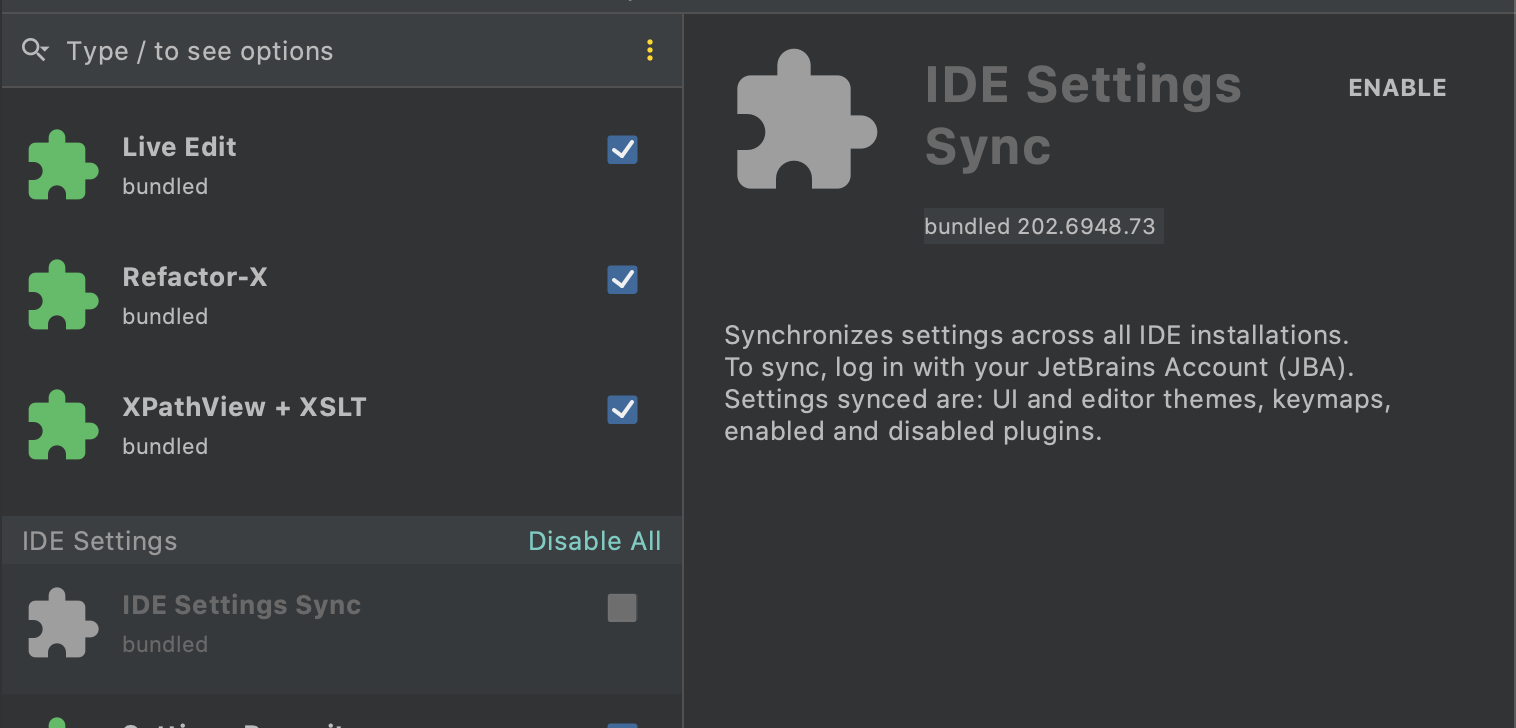
I didn't login to any account.
After performing the following steps, it's still not working, the color theme setting is still not saved.
- disable the sync plugin, and restart WebStorm
- change color theme to solarized dark theme, restart WebStorm
- color theme turn back to Darcula
kuige
on 15 Sep 2020
@mallowigi These are the only two plugins I have installed, all the others are bundled with WebStorm.
Before installing Material Theme full version, I had installed the lite version, then I removed the lite version and switch to full version.
kuige
on 15 Sep 2020
Hmmm I managed to reproduce and it looks like this only happens with Solarized Dark for what i can see.
mallowigi
on 15 Sep 2020
Yes, when I try another color theme, the setting is saved !
I have thought that if it would be the issue of Solarized Dark theme, but I think it is unlikely with a specific theme, so I didn't give it a try. 😂
kuige
on 15 Sep 2020
Related issues
 MiracleWisp
·
3Comments
MiracleWisp
·
3Comments
 vbasem
·
4Comments
vbasem
·
4Comments
 sheinfeld
·
4Comments
sheinfeld
·
4Comments
 jpap
·
3Comments
jpap
·
3Comments
 CeramicTitan
·
3Comments
CeramicTitan
·
3Comments
Most helpful comment
Please download the latest version (it's not available in the plugin repository yet, you will have to download and install it manually) and tell me if it is fixed.