Material-theme-jetbrains: Can't keep appearance font setting ?


when i set the appearance font. it is work right now. but when i restart the project. it is not work.
 agileago
All 27 comments
I've the same issue.
 IceMan81
on 4 Aug 2016
IceMan81
on 4 Aug 2016
me too , i want to change the default font to Monaco, but did not work.
 houzixiashanxiedaima
on 5 Aug 2016
houzixiashanxiedaima
on 5 Aug 2016
But, i could change the font to Dejabu for Powerline with no problems.
 SalahAdDin
on 6 Aug 2016
SalahAdDin
on 6 Aug 2016
@SalahAdDin when you reopen or restart the project. the font also keep ?
agileago
on 6 Aug 2016
I think so.
SalahAdDin
on 7 Aug 2016
it looks like your ide is so different with us
agileago
on 7 Aug 2016
@SalahAdDin my ide is Android Studio 2.1.1,OS is Windows 10 , you are the same with me ?
houzixiashanxiedaima
on 7 Aug 2016
No, my ID is WebStorm and PyCharm.
SalahAdDin
on 7 Aug 2016
Yep, have to change appearance font size every time ide starts due to hidpi
 Rukuki
on 19 Aug 2016
Rukuki
on 19 Aug 2016
got same issue, any ideas?
 victorlapshev
on 21 Aug 2016
victorlapshev
on 21 Aug 2016
Maybe @ChrisRM is so busy that have no time to see this issue.😱
agileago
on 21 Aug 2016
Same here on Linux with IntelliJ. (BTW, the plugin is just awesome, UI theme and Editor theme are both great)
 Erwyn
on 24 Aug 2016
Erwyn
on 24 Aug 2016
:O
SalahAdDin
on 24 Aug 2016
I've the same issue.
Summary
I install the theme and reset idea . the theme activate ,but the theme ui font is changed, it doesn't use my default font
the error font is activated when i change the ui and restart idea

Expected behavior
I change the theme
the Appearance > default font is Comic Sans Ms
I want the new ui font is Comic Sans Ms
Actual behavior
1 I change the theme
2 the Appearance > default font is Comic Sans Ms
3 but the new ui font actual is other font
4 I change the font is Comic Sans Ms and restart idea
5 I open the idea ,it's can't apply my Comic Sans Ms ,I have to set the default font again
Environment
ubuntu 16.04 64bit
Tools
Idea community 2016.2.4
Material Theme release: 1.4.4
sorry ,I am english is weak
 unixc3t
on 16 Sep 2016
unixc3t
on 16 Sep 2016
@ChrisRM could you point us with this issue, maybe we will be able to solve it. Do you have any clue what problem can be or how to debug it?
 andrzejsliwa
on 18 Oct 2016
andrzejsliwa
on 18 Oct 2016
This should be fixed in the latest build. Try reinstalling the plugin or download the Material Theme.zip and install it manually.
I'm hoping to release 0.2.2 during the weekend.
 ChrisRM
on 18 Oct 2016
ChrisRM
on 18 Oct 2016
@ChrisRM I reinstalled it, than again download this file and installed it manually. Still broken.
I'm using recent Intellij IDEA 2016.3.5
btw: I'm using settings repository, maybe this is source of problems.
andrzejsliwa
on 18 Oct 2016
Can you guys test to see if this still is a problem?
ChrisRM
on 21 Nov 2016
Yes, it is still a problem
 mallowigi
on 22 Nov 2016
mallowigi
on 22 Nov 2016
@ChrisRM I fixed the issue in my latest PR. plz review
mallowigi
on 9 Dec 2016
@mallowigi could you kindly build your PR and provide a zip for us? Currently i am failed to build against my environment.
 gencer
on 12 Dec 2016
gencer
on 12 Dec 2016
I haven't tested it, but there you go.
mallowigi
on 14 Dec 2016
@mallowigi, should I expect a file after that sentence? You said '...there you go' but I can't see any links.
gencer
on 14 Dec 2016
 asamuga
on 14 Dec 2016
asamuga
on 14 Dec 2016
@thebasix, oh didn't catch that. I verify that it is working.
gencer
on 14 Dec 2016
Duplicates #54
 denofevil
on 27 Mar 2017
denofevil
on 27 Mar 2017
This problem bothers me a lot,so I changed the properties file of Idea (on Mac)
~/Library/Preferences/IntelliJIdea2019.2/options/ui.lnf.xml
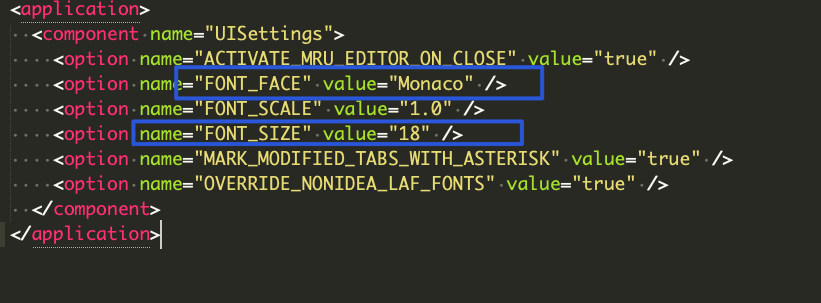
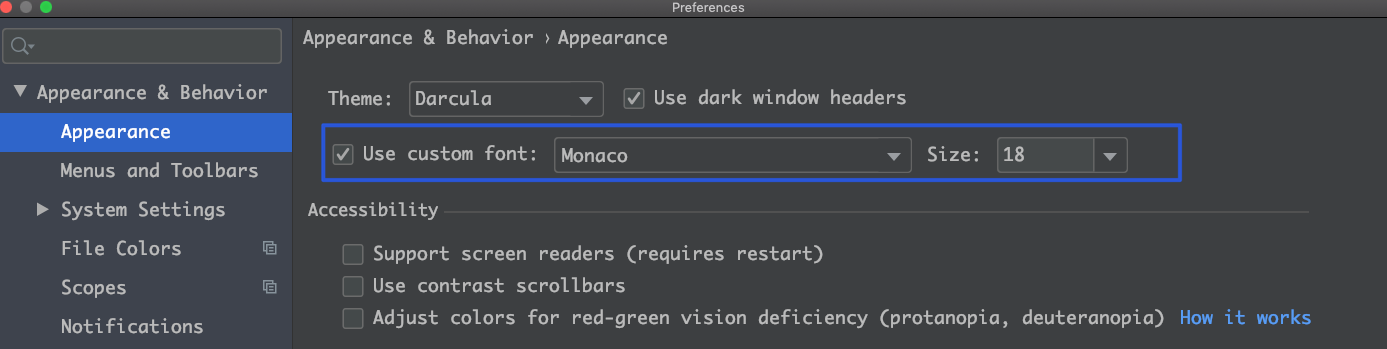
change the FONT_FACE and FONT_SIZE of this file, restart your idea, problems solved !!!
 wxweven
on 13 Mar 2020
wxweven
on 13 Mar 2020
Related issues
 sanderboom
·
4Comments
sanderboom
·
4Comments
 sheinfeld
·
4Comments
sheinfeld
·
4Comments
 nammaianh
·
3Comments
nammaianh
·
3Comments
 MiracleWisp
·
3Comments
MiracleWisp
·
3Comments
 uar-zlatko-alomerovic
·
3Comments
uar-zlatko-alomerovic
·
3Comments
Most helpful comment
Maybe @ChrisRM is so busy that have no time to see this issue.😱