Material-components-ios: [TextFields] RTL: wrong text (placeholder, helper text), position in hebrew
Overview
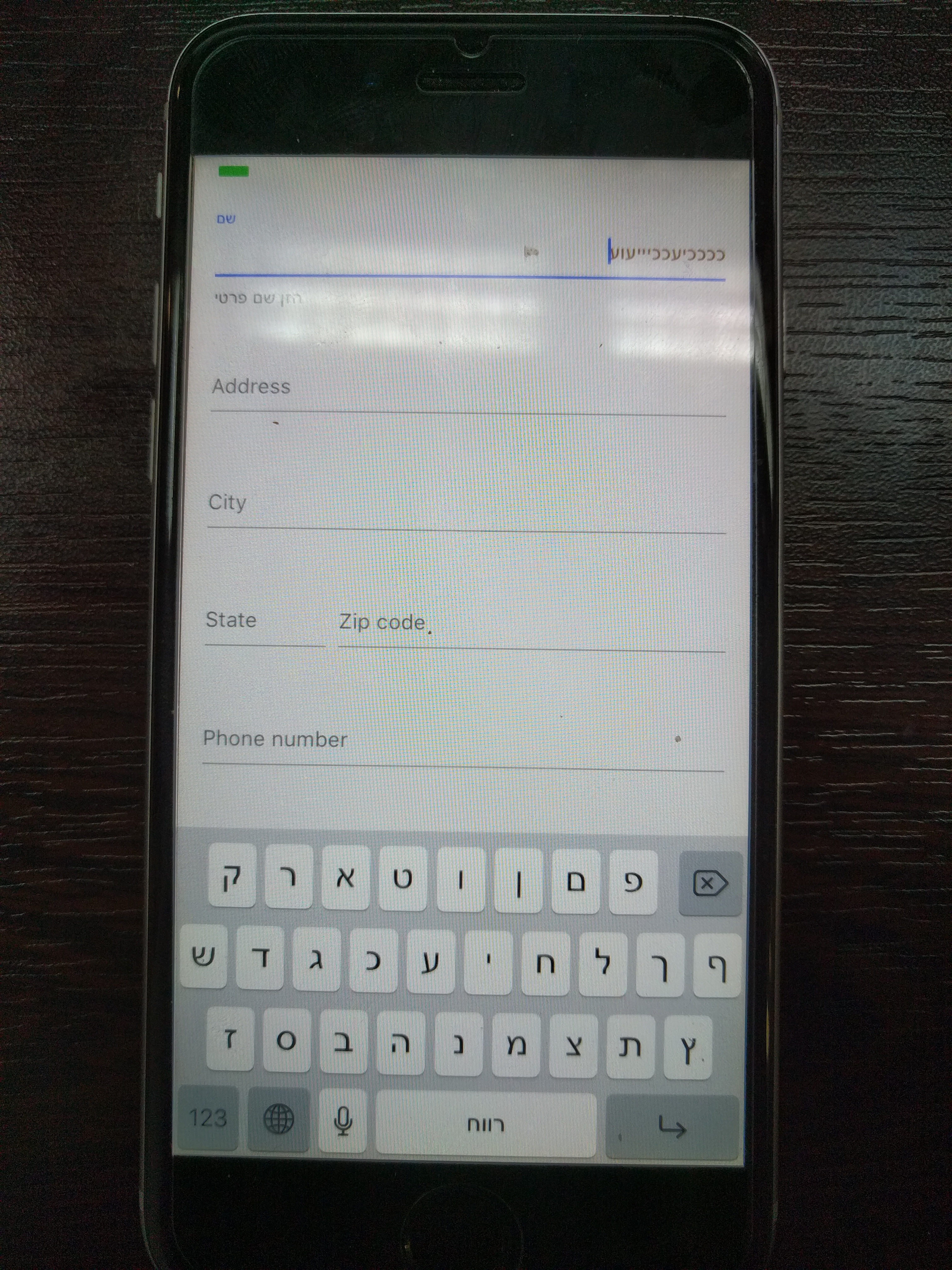
MDCTextField RTL the placeholder and the controller helper text are in the wrong position.
the device working language is Hebrew..
my code (Swift):
let nameController = MDCTextInputControllerLegacyDefault(textInput: name)
name.delegate = self
name.textColor = UIColor.brown
name.translatesAutoresizingMaskIntoConstraints = false
name.autocapitalizationType = .words
name.textAlignment = .right
name.placeholder = "שם"
//let rightView = UIImageView()
//name.rightView = rightView
//name.makeTextWritingDirectionRightToLeft(nil)
nameController.helperText = "הזן שם פרטי"
nameController.isFloatingEnabled = true
Version number
im using the latest pod - downloaded at 3.9.2017
Operating system and device
Ios 10.12.6 (16G29), xcode 8.3.3 (8E3004b)
 itzikkle
All 17 comments
Thanks for reporting the bug, @itzikkle . Sorry the text fields aren't working for your app. It would really help us if you could check your Podfile.lock and update this Issue with the version number it has for TextFields. It should look something like this:
- MaterialComponents/TextFields (= 34.0.1)
 romoore
on 3 Sep 2017
romoore
on 3 Sep 2017
Thanks for the fast response!!
MaterialComponents/TextFields (= 33.0.0)
COCOAPODS: 1.3.1
itzikkle
on 3 Sep 2017
Thanks! 👍 I was unable to reproduce this defect using the iOS Simulator in Hebrew/Israel using the MDC Catalog. Can you try the same example using MDCTextInputControllerDefault instead of the Legacy class?
romoore
on 3 Sep 2017
It did not compile.. already tried that...
On Sep 3, 2017 4:12 PM, "Robert Moore" notifications@github.com wrote:
Thanks! 👍 I was unable to reproduce this defect using the iOS Simulator in
Hebrew/Israel using the MDC Catalog
https://github.com/material-components/material-components-ios/tree/develop/catalog.
Can you try the same example using MDCTextInputControllerDefault instead of
the "Legacy" class?
—
You are receiving this because you were mentioned.
Reply to this email directly, view it on GitHub
https://github.com/material-components/material-components-ios/issues/1945#issuecomment-326804153,
or mute the thread
https://github.com/notifications/unsubscribe-auth/AIqR4KS_dyjKoNSZBtCV23_m0PNH1BWuks5seqXHgaJpZM4PLIOd
.
itzikkle
on 3 Sep 2017
Hi,
The only difference between the example and my code is that I use the
required"init" and not the nib/xib one. I don't think it should affect
anything but..
I can't get the correct behavior both on the emulator and on a device set
which local is set to Hebrew..
I checked the be objective code abet and it seems that although the system
knows it's in rtl, its still draw the placeholder in the wrong position..
On Sep 3, 2017 4:18 PM, "Itzik kleiman" itzikkle@gmail.com wrote:
It did not compile.. already tried that...
On Sep 3, 2017 4:12 PM, "Robert Moore" notifications@github.com wrote:
Thanks! 👍 I was unable to reproduce this defect using the iOS Simulator in
Hebrew/Israel using the MDC Catalog
https://github.com/material-components/material-components-ios/tree/develop/catalog.
Can you try the same example using MDCTextInputControllerDefault instead of
the "Legacy" class?
—
You are receiving this because you were mentioned.
Reply to this email directly, view it on GitHub
https://github.com/material-components/material-components-ios/issues/1945#issuecomment-326804153,
or mute the thread
https://github.com/notifications/unsubscribe-auth/AIqR4KS_dyjKoNSZBtCV23_m0PNH1BWuks5seqXHgaJpZM4PLIOd
.
itzikkle
on 3 Sep 2017
Is there any additional information I can supply that can help you in
reproducing this bug? Do I need to change some config to make it work
correctly?
On Sep 3, 2017 19:49, "Itzik kleiman" itzikkle@gmail.com wrote:
>
Hi,
The only difference between the example and my code is that I use the
required"init" and not the nib/xib one. I don't think it should affect
anything but..
I can't get the correct behavior both on the emulator and on a device set
which local is set to Hebrew..
I checked the be objective code abet and it seems that although the system
knows it's in rtl, its still draw the placeholder in the wrong position..On Sep 3, 2017 4:18 PM, "Itzik kleiman" itzikkle@gmail.com wrote:
It did not compile.. already tried that...
On Sep 3, 2017 4:12 PM, "Robert Moore" notifications@github.com wrote:
Thanks! 👍 I was unable to reproduce this defect using the iOS Simulator
in Hebrew/Israel using the MDC Catalog
https://github.com/material-components/material-components-ios/tree/develop/catalog.
Can you try the same example using MDCTextInputControllerDefault instead of
the "Legacy" class?—
You are receiving this because you were mentioned.
Reply to this email directly, view it on GitHub
https://github.com/material-components/material-components-ios/issues/1945#issuecomment-326804153,
or mute the thread
https://github.com/notifications/unsubscribe-auth/AIqR4KS_dyjKoNSZBtCV23_m0PNH1BWuks5seqXHgaJpZM4PLIOd
.
itzikkle
on 3 Sep 2017
I will ask @ianegordon to take a look Tuesday morning. Have you tried with release 34.0.1? I'm not sure what if there are many functional changes (like this) between the new TextFields and the old ones. I will try to take another look tonight or tomorrow if I get a chance.
romoore
on 3 Sep 2017
There are no changes between version that affect RTL. I’ll take a look at
this.
Are you on a simulator that is set to Hebrew via scheme or system settings?
On Sun, Sep 3, 2017 at 11:11 Robert Moore notifications@github.com wrote:
I will ask @ianegordon https://github.com/ianegordon to take a look
Tuesday morning. Have you tried with release 34.0.1? I'm not sure what if
there are many functional changes (like this) between the new TextFields
and the old ones. I will try to take another look tonight or tomorrow if I
get a chance.—
You are receiving this because you are subscribed to this thread.
Reply to this email directly, view it on GitHub
https://github.com/material-components/material-components-ios/issues/1945#issuecomment-326821340,
or mute the thread
https://github.com/notifications/unsubscribe-auth/ABNm5YNLLeuqOs4WMGnHPJt2AQ3eBvyLks5seuvagaJpZM4PLIOd
.
 willlarche
on 3 Sep 2017
willlarche
on 3 Sep 2017
Hi,
I haven't tried 34.0.1 yet (tested on what I get with the pod..) - I will
try that first thing in the morning.
I have tried the example (swift) and also by using the name property as a
bind data member (storyboard) with force alignment to the right but without
success. Later on I have understand why - you do handle the rtl case in the
objective c level but apparently the rightVIew gets wrong rect params or
so..
Thanks again for the responsivness, hope we will fix that issue fast,
Itzik
On Sep 3, 2017 9:11 PM, "Robert Moore" notifications@github.com wrote:
I will ask @ianegordon https://github.com/ianegordon to take a look
Tuesday morning. Have you tried with release 34.0.1? I'm not sure what if
there are many functional changes (like this) between the new TextFields
and the old ones. I will try to take another look tonight or tomorrow if I
get a chance.
—
You are receiving this because you were mentioned.
Reply to this email directly, view it on GitHub
https://github.com/material-components/material-components-ios/issues/1945#issuecomment-326821340,
or mute the thread
https://github.com/notifications/unsubscribe-auth/AIqR4AonyFi6aaQd-NFFyh8kjai4Hzqoks5seuvbgaJpZM4PLIOd
.
itzikkle
on 3 Sep 2017
Oh is this because of rightView? We have an existing issue for right view
messing up the placeholder in RTL. I can prioritize it and fix it Thursday
On Sun, Sep 3, 2017 at 12:38 Robert Moore notifications@github.com wrote:
Assigned #1945
https://github.com/material-components/material-components-ios/issues/1945
to @willlarche https://github.com/willlarche.—
You are receiving this because you were mentioned.
Reply to this email directly, view it on GitHub
https://github.com/material-components/material-components-ios/issues/1945#event-1232706122,
or mute the thread
https://github.com/notifications/unsubscribe-auth/ABNm5b7Ite4uF_pWWhcfRFY16YuSzGznks5sewAcgaJpZM4PLIOd
.
willlarche
on 4 Sep 2017
willarche thank you very much!!
- regarding your prev. question, in order to save time in configuring the emulator i have started debugging on a device which locale i have pre-set to Hebrew..
itzikkle
on 4 Sep 2017
@itzikkle I'm not able to reproduce this exact bug. There is a bug regarding rightView but not the layout of everything like in your screenshot.
Here's on my device:

willlarche
on 8 Sep 2017
I'm going to close this. If you still have problems @itzikkle , let me know and we can reopen.
willlarche
on 22 Sep 2017
Hi, this behaviour still exists on 62.0.0.
My iPhone's main language is English, but our app does not have English localisation - it should work rtl-like on all iPhones. Even it works properly on iPhone with Hebrew as main language, it still jumps to the left on English iPhone. There is no option to align floatingPlaceholder to right.

 kioltk
on 3 Sep 2018
kioltk
on 3 Sep 2018
@kioltk , the text fields use https://github.com/material-foundation/material-internationalization-ios/blob/f71a0901d2155b0d0f7b95f7c10969144443d3ad/Sources/UIView%2BMaterialRTL.m#L84 to understand which way to lay out. As you noticed, that's controlled by the effectiveUserInterfaceLayoutDirection and the userInterfaceLayoutDirectionForSemanticContentAttribute which both come from Apple. You'd have to adjust the layout of the text field yourself. Maybe you could override MDF's mdf_effectiveUserInterfaceLayoutDirection.
willlarche
on 4 Sep 2018
Well, this was pretty simple, semanticContentAttribute does the work:
numberField.semanticContentAttribute = .forceRightToLeft
kioltk
on 5 Sep 2018
Awesome! If you put in a PR updating the documentation to include that tip,
that would be great.
On Wed, Sep 5, 2018 at 04:50 David notifications@github.com wrote:
Well, this was pretty simple, semanticContentAttribute does the work:
numberField.semanticContentAttribute = .forceRightToLeft—
You are receiving this because you modified the open/close state.
Reply to this email directly, view it on GitHub
https://github.com/material-components/material-components-ios/issues/1945#issuecomment-418651459,
or mute the thread
https://github.com/notifications/unsubscribe-auth/ABNm5Qt6pF6emolEzJ5TAGEj23DOWR4gks5uX5BcgaJpZM4PLIOd
.
willlarche
on 5 Sep 2018
Related issues
 versoworks
·
4Comments
versoworks
·
4Comments
 ulaserdegor
·
4Comments
ulaserdegor
·
4Comments
 temkich
·
8Comments
temkich
·
8Comments
 croccio
·
3Comments
croccio
·
3Comments
 material-mirror
·
10Comments
material-mirror
·
10Comments
Most helpful comment
Well, this was pretty simple, semanticContentAttribute does the work:
numberField.semanticContentAttribute = .forceRightToLeft