Maskrcnn-benchmark: ImportError: ../maskrcnn_benchmark/_C.cpython-35m-x86_64-linux-gnu.so: undefined symbol: _ZN2at15UndefinedTensor10_singletonE
❓ Questions and Help
pytorch 1.0
CUDA 9.0
PYTHON 3.5
Ubuntu 16.04
 ypxie
ypxie
All 17 comments
This is a duplicate of https://github.com/facebookresearch/maskrcnn-benchmark/issues/119
You are probably not using PyTorch 1.0, and there is an old PyTorch version laying around in your machine that is conflicting.
Try doing in your interpreter
import torch
print(torch.__version__)
and it will probably show that you are not using 1.0
 fmassa
on 29 Nov 2018
fmassa
on 29 Nov 2018
I have the same issue too.
cuda 9.2
pytorch-nightly 1.0.0.dev20181211 py3.7_cuda9.0.176_cudnn7.4.1_0 https://mirrors.tuna.tsinghua.edu.cn/anaconda/cloud/pytorch
when I do print torch.__version__,it outpus 1.0.0 so my torch version is correct.
but I still got this issue.
 Dandi007
on 14 Dec 2018
Dandi007
on 14 Dec 2018
this is my env info
Collecting environment information...
PyTorch version: 1.0.0.dev20181211
Is debug build: No
CUDA used to build PyTorch: 9.0.176
OS: Ubuntu 17.10
GCC version: (Ubuntu 7.2.0-8ubuntu3.2) 7.2.0
CMake version: version 3.9.1
Python version: 3.7
Is CUDA available: Yes
CUDA runtime version: 9.2.88
GPU models and configuration: GPU 0: GeForce MX150
Nvidia driver version: 410.48
cuDNN version: Could not collect
Versions of relevant libraries:
[pip] Could not collect
[conda] blas 1.0 mkl https://mirrors.tuna.tsinghua.edu.cn/anaconda/pkgs/main
[conda] mkl 2018.0.3 1 https://mirrors.tuna.tsinghua.edu.cn/anaconda/pkgs/main
[conda] mkl_fft 1.0.4 py37h4414c95_1 https://mirrors.tuna.tsinghua.edu.cn/anaconda/pkgs/main
[conda] mkl_random 1.0.1 py37h4414c95_1 https://mirrors.tuna.tsinghua.edu.cn/anaconda/pkgs/main
[conda] pytorch-nightly 1.0.0.dev20181211 py3.7_cuda9.0.176_cudnn7.4.1_0 https://mirrors.tuna.tsinghua.edu.cn/anaconda/cloud/pytorch
[conda] torchvision 0.2.1
Dandi007
on 14 Dec 2018
I can run web.py successfully,
python webcam.py --min-image-size 800
but when I run nms.py,I got
ImportError: /media/disk1/PycharmProjects/maskrcnn-benchmark/maskrcnn_benchmark/_C.cpython-37m-x86_64-linux-gnu.so: undefined symbol: _ZN2at19UndefinedTensorImpl10_singletonE
Dandi007
on 14 Dec 2018
what is nms.py?
fmassa
on 14 Dec 2018
I just run it to run this line of code:
from maskrcnn_benchmark import _C
it raise error when trying to import _C
Dandi007
on 17 Dec 2018
This means that maskrcnn-benchmark was not properly installed.
Can you try rm -rf build/ from maskrcnn-benchmark folder, and try installing it again according to the instructions in INSTALL.md?
fmassa
on 17 Dec 2018
This means that
maskrcnn-benchmarkwas not properly installed.Can you try
rm -rf build/frommaskrcnn-benchmarkfolder, and try installing it again according to the instructions inINSTALL.md?
Oh... Forget to delete all the files. It works for me
 niaoyu
on 8 Jan 2019
niaoyu
on 8 Jan 2019
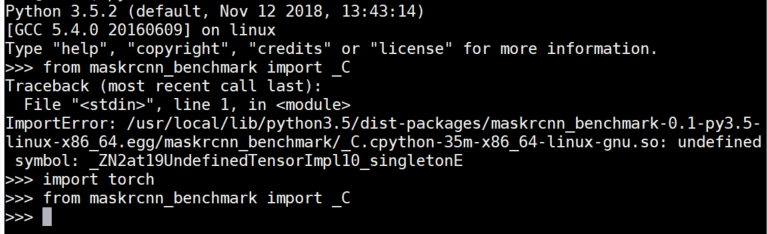
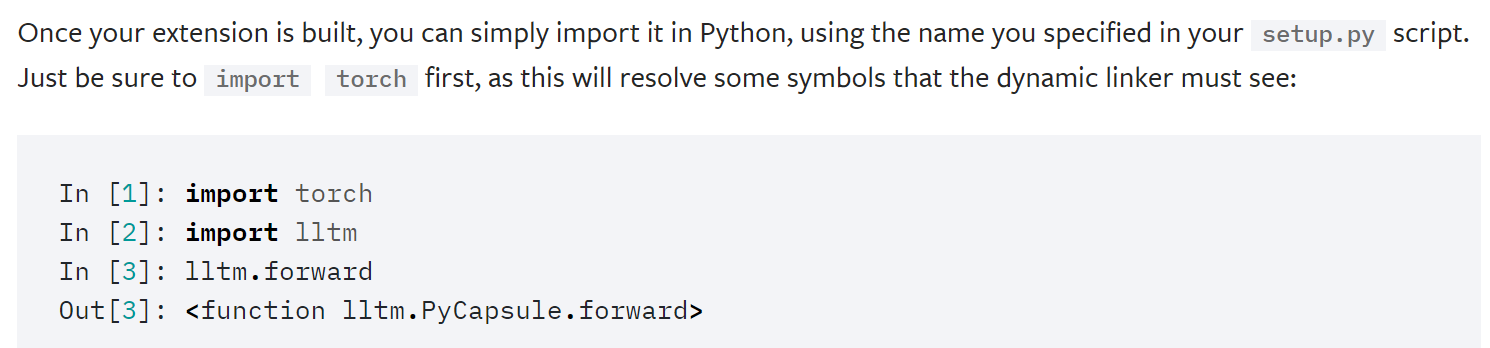
actually this maybe not some wrong with installation, as it's said in pytorch's tutorial:
https://pytorch.org/tutorials/advanced/cpp_extension.html
 qushan326
on 20 Mar 2019
qushan326
on 20 Mar 2019
Usually reinstalling packages and some important depencencies (e.g. gcc) solves most of the problems lol
 sdw95927
on 4 May 2019
sdw95927
on 4 May 2019
conda install -c pytorch pytorch-nightly torchvision cudatoolkit=10.0
issue:
from maskrcnn_benchmark import _C ImportError: maskrcnn_benchmark/_C.cpython-36m-x86_64-linux-gnu.so: undefined symbol: __cudaRegisterFatBinaryEnd
or from torchvision import _C.
this do run by:
conda uninstall pytorch
conda uninstall pytorch-nightly
conda uninstall torch
codna uninstall torchvision
then:
conda install -c pytorch pytorch-nightly torchvision cudatoolkit=10.0
pip install torchvision==0.2.2
successfully!!
 futureisatyourhand
on 2 Jun 2019
futureisatyourhand
on 2 Jun 2019
conda install -c pytorch pytorch-nightly torchvision cudatoolkit=10.0
issue:
from maskrcnn_benchmark import _C ImportError: maskrcnn_benchmark/_C.cpython-36m-x86_64-linux-gnu.so: undefined symbol: __cudaRegisterFatBinaryEnd
or from torchvision import _C.
this do run by:
conda uninstall pytorch
conda uninstall pytorch-nightly
conda uninstall torch
codna uninstall torchvision
then:
conda install -c pytorch pytorch-nightly torchvision cudatoolkit=10.0
pip install torchvision==0.2.2
successfully!!
how do you success with cuda 10.0?
I tried python webcam.py --min-image-size 800
and I got
ImportError: libcudart.so.9.0 cannot open shared object file: No such file or directory
 i-chaochen
on 4 Jun 2019
i-chaochen
on 4 Jun 2019
the version of cuda on my server is 10.0, if you use cuda9.0, I suggest you try cuda9.2, the version can run well, since I find cuda9.0 often doesn't work very well.
futureisatyourhand
on 5 Jun 2019
the version of cuda on my server is 10.0, if you use cuda9.0, I suggest you try cuda9.2, the version can run well, since I find cuda9.0 often doesn't work very well.
My machine is cuda 10.0 as well, but when I followed your steps uninstall everything and conda install again.
I met the cuda library problem. Does it mean I need to uninstall cuda10.0 and reinstall cuda9.2?
ImportError: libcudart.so.9.0 cannot open shared object file: No such file or directory
i-chaochen
on 10 Jun 2019
My machine is cuda 10.0 as well, but when I followed your steps uninstall everything and conda install again.
I met the cuda library problem. Does it mean I need to uninstall cuda10.0 and reinstall cuda9.2?
ImportError: libcudart.so.9.0 cannot open shared object file: No such file or directory
you just need to reinstall it again as the instruction, I met the the same problem and reinstall it, it worked now
 milkytipo
on 17 Jun 2019
milkytipo
on 17 Jun 2019
the version of cuda on my server is 10.0, if you use cuda9.0, I suggest you try cuda9.2, the version can run well, since I find cuda9.0 often doesn't work very well.
My machine is cuda 10.0 as well, but when I followed your steps uninstall everything and conda install again.
I met the cuda library problem. Does it mean I need to uninstall cuda10.0 and reinstall cuda9.2?
ImportError: libcudart.so.9.0 cannot open shared object file: No such file or directory
you can try to reinstall "conda install -c pytorch pytorch-nightly torchvision cudatoolkit=9.2" or reinstall by my instruction.
futureisatyourhand
on 17 Jun 2019
hi @fmassa
it seems that torch_nightly-1.2.0 is not compatible with torchvision-0.3
 zimenglan-sysu-512
on 1 Aug 2019
zimenglan-sysu-512
on 1 Aug 2019
Related issues
 SkeletonOne
·
3Comments
SkeletonOne
·
3Comments
 qijiezhao
·
3Comments
qijiezhao
·
3Comments
 Idolized22
·
3Comments
Idolized22
·
3Comments
 nanyoullm
·
3Comments
nanyoullm
·
3Comments
 BelhalK
·
4Comments
BelhalK
·
4Comments
Most helpful comment
actually this maybe not some wrong with installation, as it's said in pytorch's tutorial:

https://pytorch.org/tutorials/advanced/cpp_extension.html