Maskrcnn-benchmark: problem at last setp 'python setup.py build develop'.
❓ Questions and Help
I follow the INSTALL.md, but got a problem at last step like:
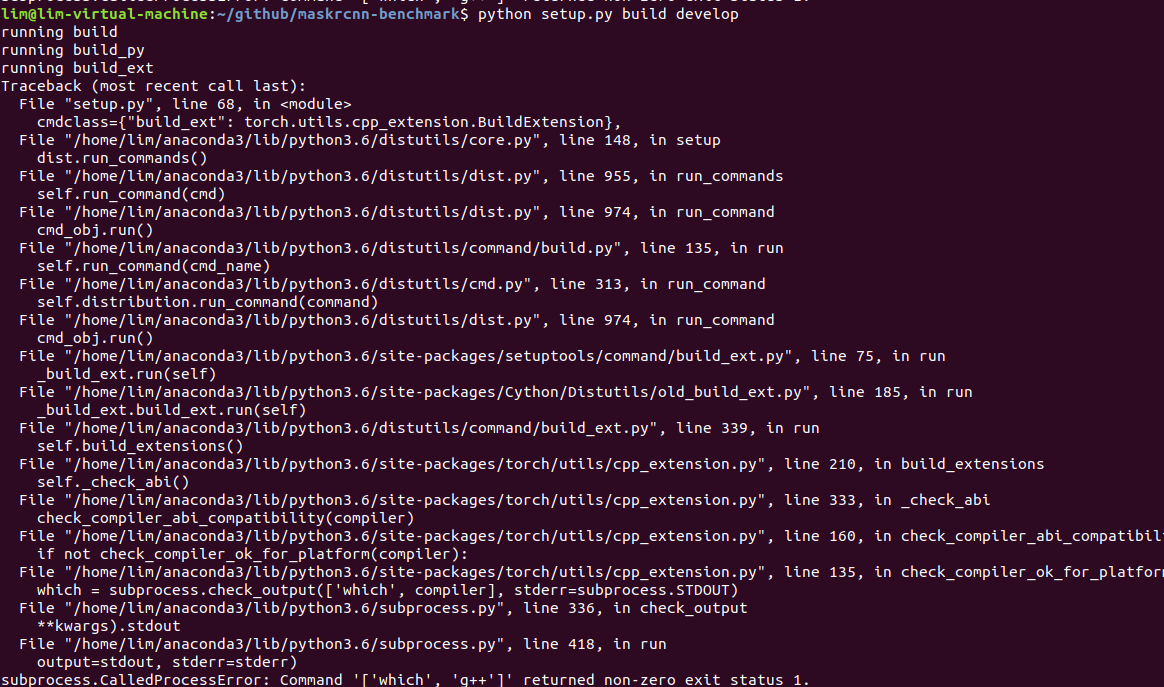
my environment is:
- ubuntu 18.04 LST, no gpu
- gcc version is 7.3.0
- pytorch-nightly-cpu installed, version: 1.0.0.dev20181113
Thank you!
 nanyoullm
All 3 comments
It seems that which g++ is failing in your machine, can you try it locally?
which g++
Also, could you please copy and paste the output from the
environment collection script from PyTorch
(or fill out the checklist below manually).
You can get the script and run it with:
wget https://raw.githubusercontent.com/pytorch/pytorch/master/torch/utils/collect_env.py
# For security purposes, please check the contents of collect_env.py before running it.
python collect_env.py
- PyTorch Version (e.g., 1.0):
- OS (e.g., Linux):
- How you installed PyTorch (
conda,pip, source): - Build command you used (if compiling from source):
- Python version:
- CUDA/cuDNN version:
- GPU models and configuration:
- Any other relevant information:
 fmassa
on 14 Nov 2018
fmassa
on 14 Nov 2018
It seems that
which g++is failing in your machine, can you try it locally?which g++Also, could you please copy and paste the output from the
environment collection script from PyTorch
(or fill out the checklist below manually).You can get the script and run it with:
wget https://raw.githubusercontent.com/pytorch/pytorch/master/torch/utils/collect_env.py # For security purposes, please check the contents of collect_env.py before running it. python collect_env.py* PyTorch Version (e.g., 1.0): * OS (e.g., Linux): * How you installed PyTorch (`conda`, `pip`, source): * Build command you used (if compiling from source): * Python version: * CUDA/cuDNN version: * GPU models and configuration: * Any other relevant information:
Hi @fmassa , I ran the script and the whole output is:
Collecting environment information...
PyTorch version: 1.0.0.dev20181114
Is debug build: No
CUDA used to build PyTorch: None

OS: Ubuntu 18.04.1 LTS
GCC version: (Ubuntu 7.3.0-27ubuntu1~18.04) 7.3.0
CMake version: Could not collect

Python version: 3.7
Is CUDA available: No
CUDA runtime version: No CUDA
GPU models and configuration: No CUDA
Nvidia driver version: No CUDA
cuDNN version: No CUDA

Versions of relevant libraries:
[pip] Could not collect
[conda] pytorch-nightly-cpu       1.0.0.dev20181114     py3.7_cpu_0    pytorch
@fmassa maybe just no g++. After I ran sudo apt-get install g++, I can ran setup.py.
Thanks for you remind.
nanyoullm
on 15 Nov 2018
Related issues
 mrteera
·
3Comments
mrteera
·
3Comments
 BelhalK
·
4Comments
BelhalK
·
4Comments
 Nacho114
·
4Comments
Nacho114
·
4Comments
 Idolized22
·
3Comments
Idolized22
·
3Comments
 CF2220160244
·
3Comments
CF2220160244
·
3Comments
Most helpful comment
It seems that
which g++is failing in your machine, can you try it locally?Also, could you please copy and paste the output from the
environment collection script from PyTorch
(or fill out the checklist below manually).
You can get the script and run it with:
conda,pip, source):