Maptool: [Feature Request] New impersonate() function
Is your feature request related to a problem? Please describe.
Proper impersonation cannot be automated right now. There are scenarios in which this would be useful. For example:
- Prepare a default token for GMs and automate impersonation during campaign load.
- Automatically impersonate player tokens if player name and ownership match.
Describe the solution you'd like
I’d like to have a macro function impersonate(), which impersonates the designated token (via token name or token ID) the same way it would if one used right click > Impersonate or the /im chat command.
Describe alternatives you've considered
I considered the /im chat command, but it cannot be used to automate in the way described above. Shortcoming are that chat commands cannot be used within a macro, unless they com at the beginning of the macro. The /im command specifically does not work if it comes from a macro on a library token.
 mrkwnzl
All 32 comments
There is also a pseudo-impersonation going on at the macro level. For example, running a macro with "Apply to Selected Tokens" will pseudo-impersonate these tokens for the duration of the macro as indicated by getImpersonatedName(), even though the actual token showing up in the Impersonate panel does not change.
Maybe the new impersonate() function should also change this sort of impersonation? Perhaps an additional parameter to differentiate which one is intended?
 Merudo
on 11 May 2020
Merudo
on 11 May 2020
How would a pseudo-impersonation with impersonate() differ from switchToken()?
mrkwnzl
on 11 May 2020
How would a pseudo-impersonation with
impersonate()differ fromswitchToken()?
The function switchToken() changes the token referred to when the id parameter is ommited.
The impersonate() function could change the token displayed at the left of the text when a macro displays text.
Merudo
on 11 May 2020
Which is to say it wouldn't be a pseudo- impersonation but would function exactly as if you right-clicked on a token and selected impersonate.
 Phergus
on 11 May 2020
Phergus
on 11 May 2020
If done in a macro, pseudo impersonation would change the token displayed when that macro displays text, but leave the token impersonated through the Impersonate panel intact.
That what I meant by pseudo-impersonation: it doesn't actually change the token impersonated in the Impersonate panel.
It would work similar to how Apply to Selected Tokens auto-impersonates tokens.
Merudo
on 11 May 2020
Seems like that is something that switchToken() should do.
If I see an impersonate() command, I would pretty much expect it to actually impersonate.
Phergus
on 11 May 2020
Seems like that is something that
switchToken()should do.If I see an
impersonate()command, I would pretty much expect it to actually impersonate.
Agreed.
mrkwnzl
on 12 May 2020
I just figured out that changing which token is speaking within a macro (what I called pseudo-impersonation) is already possible using the /im tokename : command.
Everything in a macro after the colon will be displayed as if the specified token had said it.
The colon is crucial, otherwise it will not work.
Merudo
on 12 May 2020
Seems like that is something that
switchToken()should do.
Does this mean switchToken() should have an extra parameter (0/1) to also pseudo impersonate the specified token?
Merudo
on 13 May 2020
PR #1821 implements this.
Merudo
on 13 May 2020
Interesting. I thought most if not all of the chat commands only worked on the first line but you can sprinkle /im tokename : throughout a macro.
Phergus
on 13 May 2020
Seems like that is something that
switchToken()should do.Does this mean
switchToken()should have an extra parameter(0/1)to also pseudo impersonate the specified token?
Seems like the ability to set the "pseudo-impersonation" on the fly without changing the impersonation seen on the Impersonation panel would be nice to have.
Phergus
on 13 May 2020
Seems like the ability to set the "pseudo-impersonation" on the fly without changing the impersonation seen on the Impersonation panel would be nice to have.
Agreed!
I wonder what would be the best way to call the method. I can imagine a few options:
impersonate, with an extra parameterswitchToken, with an extra parameter- new method with different name
- modified
/im tokename
Merudo
on 13 May 2020
My vote would be to add a parameter to switchToken and keep impersonate strictly for real impersonation.
Phergus
on 13 May 2020
So three possible values for the extra parameter of switchToken:
- switch current token ("current"?)
- switch "pseudo-impersonation" only ("impersonated"?)
- switch current token and pseudo-impersonation ("currentAndImpersonated"?)
Merudo
on 13 May 2020
Not sure there is a need for that level of complication.
I was thinking switchToken should always change Current Token and really only needs to add the control over whether or not it enables/disables the "pseudo-impersonation".
But thinking about what you said, I guess I can see where you might want to just output as a particular token ("pseudo-impersonate") without changing the Current Token. Hmm. So in your suggestion the default would be as it is now. Might change the 3rd option to "both".
Phergus
on 13 May 2020
Tested in develop branch using unique token name and token ID. Working as expected. Thanks a lot!
mrkwnzl
on 14 May 2020
The behavior seems off.
- Impersonate a token.
- Produce some output from the chat.
- Run this macro.
My name is [r:token.name] <br>
[h: impersonate("Wolf")]Burp! - Get this:
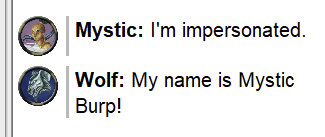
Same action but with this macro:
My name is [r: token.name]<br>
/im Wolf:
[h: switchToken("Wolf")]Burp!
Does this:
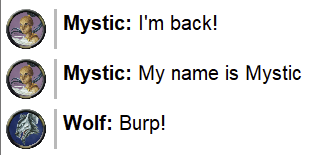
So the impersonate() command is switching the impersonation for the entire macro and not just from the point of being called. It is changing the both Chat and Impersonate windows.
Is this the desired/intended behavior?
Phergus
on 16 May 2020
I guess the impersonation should only happen after the macro is done executing? Maybe have impersonate() do its job like a delayed execLink.
Merudo
on 16 May 2020
I was expecting it to work just like doing /im tokenname does but as an actual function but maybe that isn't actually possible.
@mrkwnzl I believe you said it was working as you expected? So did you expect it to change the impersonation for all output of a macro even if it is done as the last call in a macro?
I haven't even checked yet if what impact, if any, it has on accessing token properties.
Phergus
on 16 May 2020
To be honest, I have missed to test it when there was already an impersonation before executing the macro. Good idea about checking token properties. I’ll test that and in conjunction with switchToken today.
Intuitively, I’m not sure. One could always use an execLink to call upon a different macro for impersonation. It should then work like your second example. I see an appeal for the first case, though, which goes through the whole macro before outputting. Are there other functions working like that?
mrkwnzl
on 16 May 2020
Okay, @Phergus, you are right, impersonate() should work like in your second example.
I tried two macros with two fresh tokens, Dragon and Eagle. Macro 1:
[r: switchToken("Eagle")]
[r: setProperty("Strength", 1)]
This works as expected. It sets the property for Eagle, both when Dragon is impersonated and when there is no impersonation. As a comparison:
[h: setProperty("Strength", 1)]
[h: switchToken("Eagle")]
This does not work. If there is no token impersonated, there is an error. If there is Dragon impersonated, the property of Dragon is changed. Again, as expected.
Now compare this to the following:
[h: switchToken("Eagle")]
[h: setProperty("Strength", 1)]
[h: impersonate("Dragon")]
~Regardless of any impersonation before the execution of that macro (no impersonation, Eagle impersonated, or Dragon impersonated), the property of Dragon is changed. In this example, I expect that actually expect that the property of Eagle is changed. If so, it should work that way across the board, including chat output.~
Edit: Strike that. Something went wrong here. Let me try that again.
Sidenote: [r: impersonate("Dragon")] outputs “Dragon” in the chat. Is that right?
mrkwnzl
on 16 May 2020
Okay, sorry for the confusion. I restarted MapTool and tried that again. I don’t know what I did wrong there. Here’s how it worked this time.
[h: switchToken("Eagle")]
[h: setProperty("Strength", 1)]
[h: impersonate("Dragon")]
This does change the property of Eagle and impersonates Dragon. This also works, when Dragon is already impersonated before running the macro. So far, as expected.
[h: impersonate("Dragon")]
[h: setProperty("Strength", 1)]
This does _not_ change the Property of Dragon, but it does impersonate it. I don’t know why I didn’t catch that before. I’m pretty sure I tried that...
I’d expect that to work the same as if I had Dragon impersonated and then just run [h: setProperty("Strength", 1)], which does change the property of Dragon.
[h: setProperty("Strength", 1)]
[h: impersonate("Dragon")]
For completeness, this doesn’t work either, but that should be expected. It still does impersonate Dragon.
mrkwnzl
on 16 May 2020
I played around with it some more. _Sometimes_, it seems as if the current token stays on a token that has been impersonated, but isn’t anymore, until you select or impersonate a different token or switch token in a macro. But I can’t reliably reproduce this.
mrkwnzl
on 16 May 2020
Just to clear things up, impersonate() is not supposed to change the current token. So
[h: impersonate("Dragon")]
[h: setProperty("Strength", 1)]
should not change any property of Dragon, unless Dragon was already the current token before.
Merudo
on 16 May 2020
Ah, well, that explains my confusion. Okay, then I _think_ what I tested is working correctly, except maybe that [r: impersonate("Dragon")] prints “Dragon” to the chat (but I’m not sure if this is intended).
Or let me frame it differently, if we disregard what token the current token should be (as I don’t have enough insight to give an educated opinion about that), impersonate() seems to work as I expect it to. It impersonates the correct token in all cases I tested. For everything else, I should also use switchToken(). Makes sense to me.
Regarding @Phergus’s point, I think it should work like in his second example.
mrkwnzl
on 16 May 2020
Sidenote: [r: impersonate("Dragon")] outputs “Dragon” in the chat. Is that right?
We're pretty inconsistent about this in macro functions. Sometimes functions that change or set things return the value that was set and sometimes not. Except possibly for debugging purposes when a macro is dynamically impersonating tokens I'm not sure what other use it would serve.
On the issue of the position of an impersonate() call within a macro:
If I have this macro, with no impersonation prior to calling it,
[h: impersonate("Hero")]Hi!<br>
[h: impersonate("Elf")]Hi!<br>
[h: impersonate("Mystic")]Hi!<br>
[h: impersonate("Wolf")]Burp!
Should I expect this:
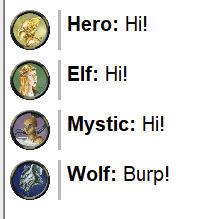
Or this:
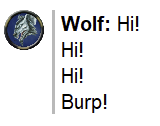
Phergus
on 16 May 2020
The function impersonate() can take token ids instead of a token name as the argument, so there is some potential value in returning the name of the token impersonated.
I'm fine with returning a blank string instead if that is what folks want.
Merudo
on 16 May 2020
I'm fine with returning a blank string instead if that is what folks want.
I’m okay either way. Using [h: impersonate()] works perfectly fine, and if there are debugging uses for [r: impersonate()], it doesn’t hurt.
I think I figured out a way to make it behave like the first picture, if that's what we want.
It might be what most people expect, so I think it’s a good idea.
mrkwnzl
on 16 May 2020
I think I figured out a way to make it behave like the first picture, if that's what we want.
It might be what most people expect, so I think it’s a good idea.
I think it's a bit confusing if you put an impersonate() call down deep in a macro but all of the output from the macro is affected by it.
Phergus
on 16 May 2020
Tested. Function is working as described with the caveats noted above. Further changes if needed will fall under a new issue.
Phergus
on 16 May 2020
Added function to wiki with example from this thread. Didn't know if there is a Map ID parameter and presumed it could only be used on a trusted macro (like switchToken()).
 melek
on 16 May 2020
melek
on 16 May 2020
Related issues
melek
·
8Comments
melek
·
3Comments
Merudo
·
7Comments
mrkwnzl
·
9Comments
Merudo
·
6Comments
Most helpful comment
I think it's a bit confusing if you put an
impersonate()call down deep in a macro but all of the output from the macro is affected by it.