Maptool: AI Movement Bug - Too restrictive when moving next to VBL masked areas.
Describe the bug
Movement next to VBL or in between two areas of VBL can cause the pathfinding algorithm to block access to an otherwise open grid cell.
To Reproduce
Steps to reproduce the behavior:
- Load attached campaign.
- With AI enabled, try to move Hero token through passage.
- Observe that Movement counter is stuck at 0.
- Turn off AI and movement works normally.
Expected behavior
Expect movement to work normally.
MapTool Info
- Version: 1.5.12
- Install: Any
Desktop:
- OS: Windows
- Version: 10
Additional context
Remove ".zip" from name.
AI Movement Bug.cmpgn.zip
Drawing the VBL for the map with snap-to-grid did not produce the error. I had to draw a section of VBL at the top of the passage that slightly overlapped the passage.
Map with similar problem.
AI Movement Bug 2.rpmap.zip
Map with interesting variation of problem. Attempt to move Hero token directly down 1 cell.
AI Movement Bug 3.rpmap.zip
 Phergus
All 15 comments
Another example map...
 JamzTheMan
on 28 Feb 2020
JamzTheMan
on 28 Feb 2020
That's the same map as AI Movement Bug 2. I took out a bunch of the extraneous tokens and such to cut the file size down.
Phergus
on 28 Feb 2020
I did some sleuthing, and my conclusion is that MapTool deals incorrectly with VBL when it takes an hollow shape, such as a hollow rectangle.
The problematic line is vblGeometry.intersects(centerRay) used in AbstractAStarWalker,
The issue is that hollow VBLs are considered solid, and so vblGeometry.intersects(centerRay) will return true and thus block movement for any move made inside the hollow shape.
The bug is bypassed by making any hole in the VBL so it is no longer hollow. For example, in AI Movement Bug making a very thin hole anywhere in the VBL of the room makes movement possible again.
This is a huge bug and can creates all kind of issues when using hollow shaped VBL. The reason the bug has not manifested itself more is the earlier check
    // If there is no vbl within the footprints, we're good!
    if (!vbl.intersects(startBounds) && !vbl.intersects(goalBounds)) {
      return false;
    }
which uses the vbl shape (instead of vblGeometry) to preemptively allow movement if no VBL exists within the bounds of the start and end cells.
If you comment out the return false; line, the bug manifests itself fully; in AI Movement Bug, it becomes impossible for the token to make any movement, for example.
 Merudo
on 26 Mar 2020
Merudo
on 26 Mar 2020
Nice sleuthing. There does seem to be something more however.
I took AI Movement Bug 2 map and cut 2 holes in the VBL so that it is broken up in multiple shapes and the issue is still present.
Phergus
on 26 Mar 2020
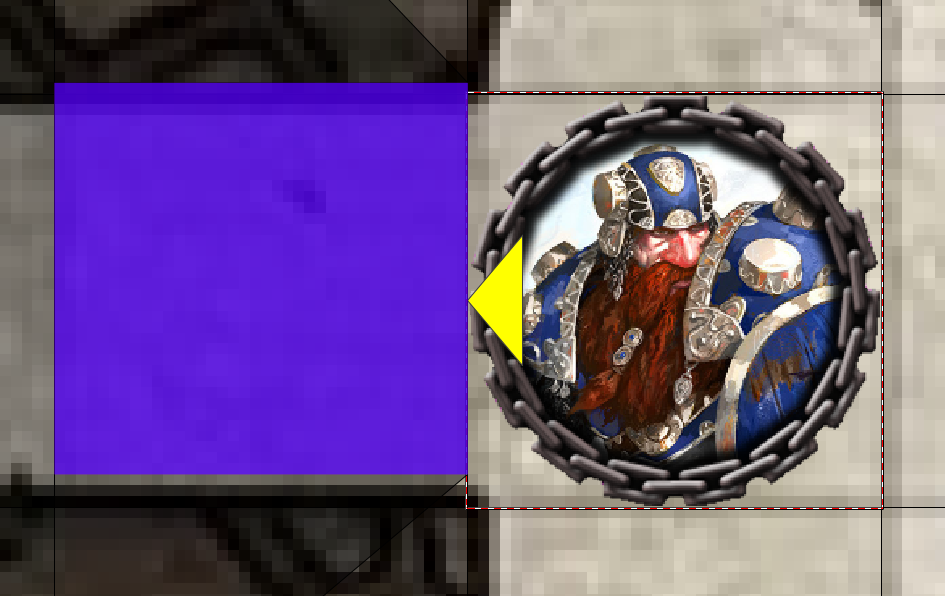
I checked the map. Interestingly, the VBL is checked from the bottom of the token instead of the center.
I reduced the VBL to a single point. The movement to the left of the Dwarf remains impossible:
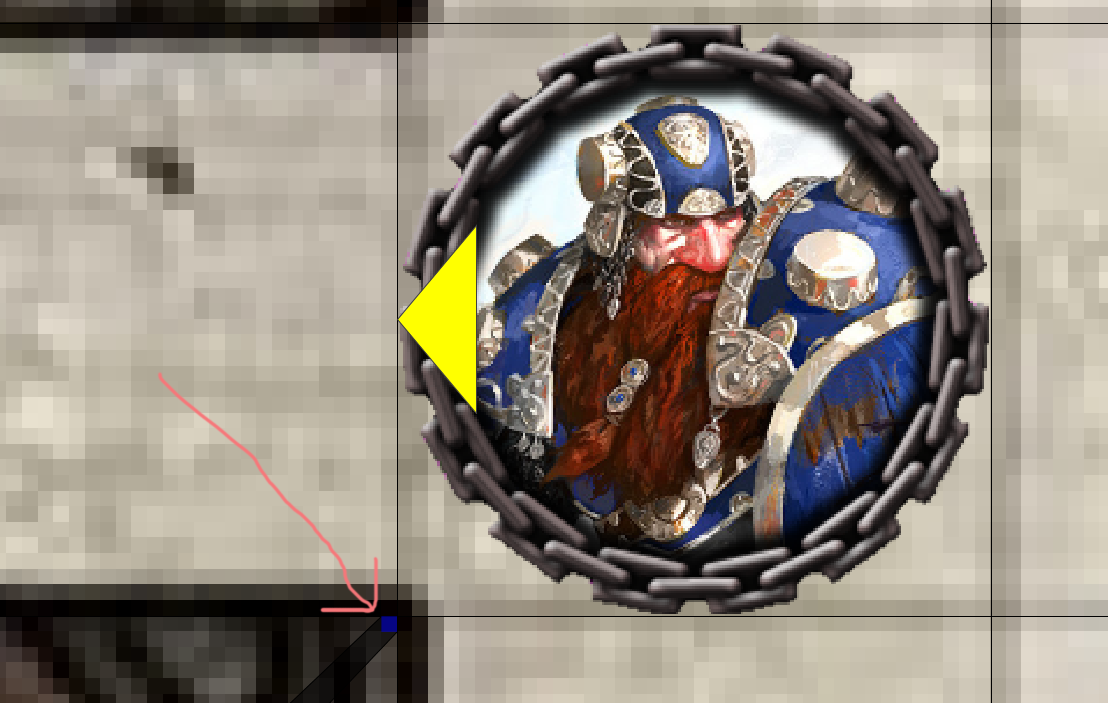
Yet, the Dwarf can move to the left even with this VBL:
Merudo
on 26 Mar 2020
Wow. That's curious.
Phergus
on 26 Mar 2020
I found out what's going on. The (-18,-18) pixel offset of the grid is not correctly taken into account.
Merudo
on 26 Mar 2020
So maps with a grid offset have the issue. Wow.
Phergus
on 26 Mar 2020
PR #1416 fixes the offset issue.
The hollow geometry issue is still not resolved.
Merudo
on 26 Mar 2020
Testing fix. Issues seen on AI Movement Bug 2 & 3 maps are resolved.
As noted, issues with hollow geometry still present.
Phergus
on 26 Mar 2020
I accidentally introduced some offsets issues for the isometric, hex and gridless grids with PR #1416. Among those, dragging a token with the mouse would move the token incorrectly.
PR #1417 fixes these problems.
EDIT: Isometric grid with offset didn't work right in 1.5.14 to begin with. With my PR, it is fixed :)
Merudo
on 26 Mar 2020
Testing with #1417. Hex movement seems to be fine on maps with offset grid and without offest. Tested AI movement within a cave map with offset grid and matching VBL with no issues. No issues seen with movement on gridless and iso maps.
Phergus
on 26 Mar 2020
Gah, grid offsets. Good work!
Makes me wonder now what happens with tokens that have anchor offsets (and what should happen really?)
@Merudo Thanks for chasing this down. Regarding the hollow point, IIRC I convert the VBL once to Geometry? There may be a setting to check for valid geometry when doing so (which may be on now) and maybe toggling that will fix it. We ran into a similar issue with holes recently in the token optimization update which was resolved by turning it off.
If I'm feeling better tomorrow I'll take a look at the code.
JamzTheMan
on 27 Mar 2020
Thank you, @JamzTheMan!
To my knowledge, the anchor offsets only affect the token's appearance and personal VBL. Moving a token around with AI movement ignores the offsets.
As for the hollow point issue, I believe our problem is the same as this one.
Merudo
on 27 Mar 2020
I have a number of maps that have hollow VBL that don't exhibit this issue.
Once we have some test cases that produce the issue we can open a ticket just for the hollow VBL issue.
Phergus
on 31 Mar 2020
Related issues
 Azhrei
·
9Comments
Merudo
·
4Comments
Azhrei
·
9Comments
Merudo
·
4Comments
 jfranciscoap
·
8Comments
jfranciscoap
·
8Comments
 melek
·
8Comments
Merudo
·
6Comments
melek
·
8Comments
Merudo
·
6Comments