Mapper: Moving by hand a georeferenced template
I need to move a georeferenced template by hand (I need this all the time - I use often 2 or 3 different templates and they are never perfectly aligned - I need to move them by 2-3 meters - very important for me to better survey).
Is this possible in Mapper?
If not, do you know any workaround better than opening the same templates with dpi info?
(I tried deleting tfw file but not working - only working if I convert an ocad file with already georefenced templates )
Thanks
[I'm new here; after 15 years of Ocad I want to support Mapper and completely switch to Mapper - and of course I have a lot to say/suggest... but I am not very familiar with programmers' world and github so please excuse me if my netiquette is not OK and direct me somewhere else if this is not the right place to ask these kind of questions - thanks a lot]
 rem-maps
All 3 comments
(Desktop version only)
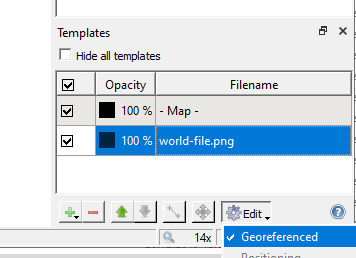
You uncheck the templates "georeferenced" property if you want to do manual adjustments:
 dg0yt
on 7 Jan 2020
dg0yt
on 7 Jan 2020
[I'm new here; after 15 years of Ocad I want to support Mapper and completely switch to Mapper - and of course I have a lot to say/suggest... but I am not very familiar with programmers' world and github so please excuse me if my netiquette is not OK and direct me somewhere else if this is not the right place to ask these kind of questions - thanks a lot]
Reading your FB post on Mapper was a pleasure for me. The more I'm happy to see you joining the Mapper group on GitHub.
Ad communication style, I'd like to point out that it's highly practical to adhere to "one suggestion per issue ticket" practice. That way the ticket can be easily marked done when the suggestion gets implemented. For questions, we do not have a dedicated place where users can ask. For a general discussion, there is "Ideas incubator" ticket.
Please make sure to check Mapper manual pages at https://www.openorienteering.org/mapper-manual/pages/, including the FAQ section which has a paragraph on differences to OCAD. Thanks!
 lpechacek
on 7 Jan 2020
lpechacek
on 7 Jan 2020
Thanks a lot @dg0yt :
so I learned a lot from this post, I should have tried current OOM version before asking and I should have included OOM version in my ticket (I was using cove 0.8.4 that hadn't the check-uncheck option in the template).
Thanks a lot @lpechacek :
your hints are a lot appreciated.
I also tried to attach the 'question' label to this ticket but I wasn't able - how can I attach a label?
I will have other questions and suggestions soon (because I map a lot and using it on a daily basis) - and I will try to check tutorial or practice OOM before asking... but you know sometimes in a new environment you feel clumsy and ask stupid things.., sorry about that
In any case guys if I do/say something not ok please help me behave here :-)
For sure I'm really very excited to be using OOM
rem-maps
on 7 Jan 2020
Related issues
 mlerjen
·
8Comments
mlerjen
·
8Comments
 IamShado
·
3Comments
IamShado
·
3Comments
 jan-gerard
·
7Comments
mlerjen
·
5Comments
jan-gerard
·
7Comments
mlerjen
·
5Comments
 MartinHore
·
4Comments
MartinHore
·
4Comments
Most helpful comment
Reading your FB post on Mapper was a pleasure for me. The more I'm happy to see you joining the Mapper group on GitHub.
Ad communication style, I'd like to point out that it's highly practical to adhere to "one suggestion per issue ticket" practice. That way the ticket can be easily marked done when the suggestion gets implemented. For questions, we do not have a dedicated place where users can ask. For a general discussion, there is "Ideas incubator" ticket.
Please make sure to check Mapper manual pages at https://www.openorienteering.org/mapper-manual/pages/, including the FAQ section which has a paragraph on differences to OCAD. Thanks!