Mapper: Android: Changed preview behaviour
Steps to reproduce
- Choose point feature to draw
- Approach screen with pen ->point feature appears as preview (so far so good and how it was with earlier versions)
3a. Move the pen away from screen proximity -> preview remains at the last preview position.
3b. Set the feature, then move the pen away from screen proxymity. -> same behaviour as 3a. but even a bit more confusing as set feature and "frozen" preview are visually indistiguable.
Expected behaviour
Is this innovation intended? -The behaviour of earlier versions seem more intuitive to me, which is to have a preview only while the pen is close to the screen.
Configuration
Mapper Version: 0.9.0
Operating System: Andoid 4.x
 mlerjen
All 5 comments
I think this might be a side effect of "hovering" which will also give you tooltips like on desktop. Unfortunately my hardware is currently incomplete, so I cannot test with a true pen.
 dg0yt
on 23 Oct 2019
dg0yt
on 23 Oct 2019
I've tried this on my Galaxy Tab 2 with S-Pen (Android P) yesterday. With v0.8.4 no point symbol preview renders on screen when hovering with S-Pen over the screen while with v0.9.0 preview appears as in the desktop version. Next to that, selecting (changing) a symbol in the symbol selector table leaves a preview trace in the ("underlying") map when the symbol selector table disappears. That is common to v0.8.4 and v0.9.0 on my device.
@mlerjen, at this point I'm unsure what you mean with "set the feature". Is that symbol selection, which leaves the ghost symbol preview in map after Symbol Selector disappears, or is that something else?
 lpechacek
on 24 Oct 2019
lpechacek
on 24 Oct 2019
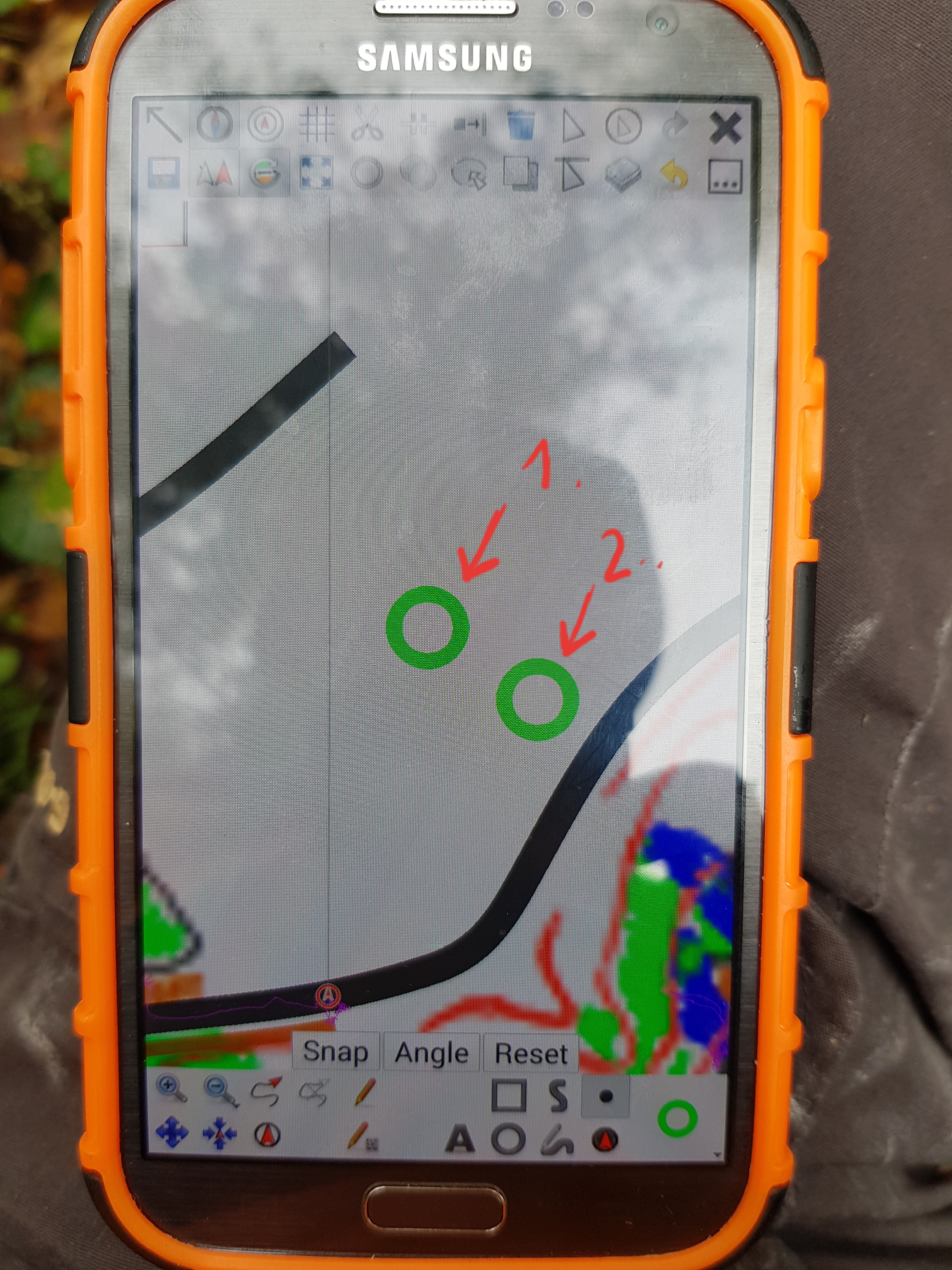
@lpechacek: 1. Is where I digitized a tree for the map.
2 is where the pen left the field of induction. 2 really remains there as long as I do not reenter this field.. Preview should disappear when hover is over IMO.
@dg0yt : I might have mixed up something. (Dektop preview and prliminary landing position mark on android phone)
mlerjen
on 24 Oct 2019
Well, to sum the status up on my side at least... I acknowledge there is behavior change, likely connected with the Qt component upgrade. In v0.9 the point symbol preview follows the S-Pen cursor. When S-Pen leaves the display induction field, the symbol preview remains displayed.
At this point it is unclear to me what Qt events S-Pen generates and if they can be leveraged for hiding the preview.
lpechacek
on 29 Oct 2019
@lpechacek Qt 5.9 also introduced a tablet tracking property in QWidget.
dg0yt
on 10 Jan 2020
Related issues
 MartinHore
·
4Comments
MartinHore
·
4Comments
 sfroyen
·
6Comments
sfroyen
·
6Comments
 SwStef
·
6Comments
SwStef
·
6Comments
 IamShado
·
3Comments
IamShado
·
3Comments
 ollesmaps
·
7Comments
ollesmaps
·
7Comments